This thread has been locked.

If you have a related question, please click the "Ask a related question" button in the top right corner. The newly created question will be automatically linked to this question.

[参考译文] AM2612:使用 CCS 12.8.1 JATG 错误和构建错误的 AM2612

Guru**** 2511985 points
Other Parts Discussed in Thread: AM2612, LP-AM261, SYSCONFIG

请注意,本文内容源自机器翻译,可能存在语法或其它翻译错误,仅供参考。如需获取准确内容,请参阅链接中的英语原文或自行翻译。

https://e2e.ti.com/support/microcontrollers/arm-based-microcontrollers-group/arm-based-microcontrollers/f/arm-based-microcontrollers-forum/1555462/am2612-am2612-using-ccs-12-8-1-jatg-error-and-build-error

器件型号:AM2612
Thread 中讨论的其他器件: LP-AM261SysConfig

工具/软件:


您好、我遇到了以下问题


CCS 12.8.1


b:\ti\ccs1281\ccs/utils/cygwin/rm -f B:/rtie/Desktop/Root/ARG8000/AM2612_Code/rti_led_blink_am261x-lp_r5fss0_nortoss_ti-arm-clang/Release/rti_ Robert_Li
引导多核 ELF 映像:am261x:r5fss0-0-0:nortos:ti-arm-clang B:/rtie/Desktop/Root/ARG8000/AM2612_Code/rti_led_blink_am261x-lp_r5fss0_nortos_ti-arm-clang/release/rti_led_b_cod_blink_am1-nors.r5fss_link_cl_top_hs.r5fss.r5fss_ Robert_Li……
python B:/ti/mcu_plus_sdk_am261x_10_02_00_15/tools/boot/multicore-elf/genimage.py --core-img=0:Release/RTI_led_blink_am261x-lp_r5fss0-0_nortos_ti-arm-clang.out --output=B Robert_Li:/XIP/Desktop/Root/ARG8000/Rtice_led_blink_am261x-lp_ti-arm-clang.out -out=-output=B
Makefile ccs_bootimage_gen:87:目标“全部“的配方失败
回溯(最近一次呼叫):
中的文件“B:\ti\mcu_plus_sdk_am261x_10_02_00_15\tools\boot\multiple-elf\genimage.py“第 40 行
从 modules.otfecc_structs 导入*
^^^^^^^^^^^^^^^^^^^^^^^^^^^^^^^^^^^^^μ s
中的文件“B:\ti\mcu_plus_sdk_am261x_10_02_00_15\tools\boot\multiple-elf\modules\otfecc_structs.py“第 35 行
从构造导入结构、int16ul、int16ub、\
ModuleNotFoundError:没有名为“struct"的“的模块
gmake[3]:***【全部】错误 1
gmake[2]:[post-build]错误 2(已忽略)
Makefile:168:目标“编译后“的配方失败
  • 请注意,本文内容源自机器翻译,可能存在语法或其它翻译错误,仅供参考。如需获取准确内容,请参阅链接中的英语原文或自行翻译。

    您好、

    发生此错误的原因是未安装相关的 pythion 模块结构。

  • 请注意,本文内容源自机器翻译,可能存在语法或其它翻译错误,仅供参考。如需获取准确内容,请参阅链接中的英语原文或自行翻译。

    请遵循以下 e2e 获取所需修复:

    解决 AM261x MCU+ SDK 的编译后错误

  • 请注意,本文内容源自机器翻译,可能存在语法或其它翻译错误,仅供参考。如需获取准确内容,请参阅链接中的英语原文或自行翻译。

    好~我已经解决了部分问题。

    C:\Windows\system32>python -m pip 安装构造

    C:\Windows\system32>python -m pip install pyelftools

    C:\Windows\system32>python -m pip 安装加密


    我阅读了中的信息
    mcu_plus_sdk_am261x_10_02_00_15/docs/api_guide_am261x/SDK_DOWNLOAD_PAGE.html
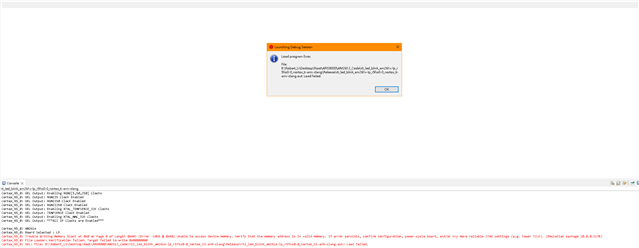
    但我仍然遇到 JTAG 错误:

    Cortex_R5_0: Trouble Writing Memory Block at 0x0 on Page 0 of Length 0x40: (Error -1065 @ 0x40) Unable to access device memory. Verify that the memory address is in valid memory. If error persists, confirm configuration, power-cycle board, and/or try more reliable JTAG settings (e.g. lower TCLK). (Emulation package 20.0.0.3178) Cortex_R5_0: File Loader: Verification failed: Target failed to write 0x00000000 Cortex_R5_0: GEL: File: B:\Robert_Li\OneDrive\Root\ARG8000\AM2612_Code\rti_led_blink_am261x-lp_r5fss0-0_nortos_ti-arm-clang\Release\rti_led_blink_am261x-lp_r5fss0-0_nortos_ti-arm-clang.out: Load failed.


  • 请注意,本文内容源自机器翻译,可能存在语法或其它翻译错误,仅供参考。如需获取准确内容,请参阅链接中的英语原文或自行翻译。

    我查看了中的文档mcu_plus_sdk_am261x_10_02_00_15/docs/api_guide_am261x/CCS_SETUP_PAGE.html、并更新了 Sitara 器件支持。 我还尝试将 TCK 更改为 1MHz、这样可以解决一些问题、但我仍然收到以下错误:

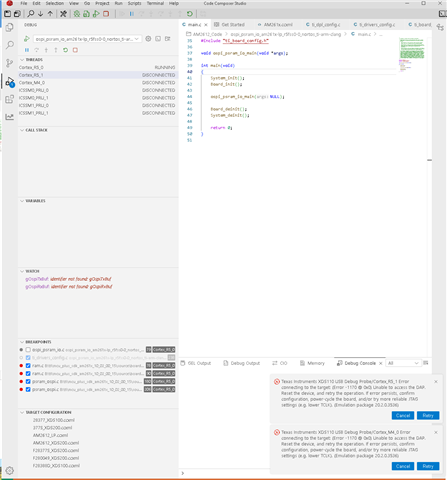
    Error connecting to the target: (Error -1170 @ 0x0) Unable to access the DAP. Reset the device, and retry the operation. If error persists, confirm configuration, power-cycle the board, and/or try more reliable JTAG settings (e.g. lower TCLK). (Emulation package 20.0.0.3178)


    非常感谢。
  • 请注意,本文内容源自机器翻译,可能存在语法或其它翻译错误,仅供参考。如需获取准确内容,请参阅链接中的英语原文或自行翻译。

    尊敬的 LI:

    您是否有其他可供您测试的 LP?

    另一种建议是使用 CCS 12.8.1 进行一次测试、但还要确保在安装 CCS 12.8.1 后完成此处提到的步骤

    e2e.ti.com/.../faq-am2612-device-cortex-r-am261x-is-not-currently-recognized-ccs-is-not-detecting-am261x

  • 请注意,本文内容源自机器翻译,可能存在语法或其它翻译错误,仅供参考。如需获取准确内容,请参阅链接中的英语原文或自行翻译。

    尊敬的 Nilabh:
    没有其他 LP 板可供测试。 这是一个新收到的电路板模型 LP-AM261 PROC193E2

    关于安装步骤、您提供的链接与 SDK 中的说明相同(甚至更详细):

    作为一个旁注,我 Sitara MCU 器件对 Windows 的支持 版本为 1.5.0

    另外,与 CCS 20 我没有遇到 JTAG 错误(Error -1170 @ 0x0) Unable to access the DAP). 但是、调试会感到迟钝、例如、当按 Ctrl 跳过变量时、有时无法选择或复制变量。 这就是我强烈希望改用 CCS 12.8.1 的原因。

    此外、SDK 文档本身也使用了 CCS 12.8.1

  • 请注意,本文内容源自机器翻译,可能存在语法或其它翻译错误,仅供参考。如需获取准确内容,请参阅链接中的英语原文或自行翻译。

    Robert、抱歉您正面临以下问题:

    1.您可以重新启动电脑一次并尝试吗? 有时、XDS 驱动程序会在重新启动后刷新?

    2.可以尝试更新此主题 e2e.ti.com/.../lp-am261-unable-to-flash-with-jtag-error-–1170 上提到的 XDS 固件吗

    请告诉我您的观察结果。

  • 请注意,本文内容源自机器翻译,可能存在语法或其它翻译错误,仅供参考。如需获取准确内容,请参阅链接中的英语原文或自行翻译。

    尊敬的 Nilabh:

    第一项: 我已经试过了。
    此时会弹出相同的错误:

    Error connecting to the target: (Error -1170 @ 0x0) Unable to access the DAP. Reset the device, and retry the operation. If error persists, confirm configuration, power-cycle the board, and/or try more reliable JTAG settings (e.g. lower TCLK). (Emulation package 20.0.0.3178)

    第二项: 我尝试更新到 3.0.0.32 和 3.0.0.38。
    ccs1281\ccs\ccs_base\common\uscif\xds110\firmware_3.0.0.32.bin

    当前版本为:

    xdsdfu.exe -e
    Device Name: XDS110 Embed with CMSIS-DAP
    Version: 3.0.0.38
    Manufacturer: Texas Instruments
    Serial Num: S26G0014
    Mode: Runtime Configuration: Standard

  • 请注意,本文内容源自机器翻译,可能存在语法或其它翻译错误,仅供参考。如需获取准确内容,请参阅链接中的英语原文或自行翻译。

    您好 Robert:

    我认为这可能与电源有关、我只是在电源不稳定时才看到这个问题、

    请重新检查电源。

  • 请注意,本文内容源自机器翻译,可能存在语法或其它翻译错误,仅供参考。如需获取准确内容,请参阅链接中的英语原文或自行翻译。

    尊敬的 Nilabh:

    我已经尝试了 20W PD 和 65W PD、但结果是相同的。

    以下是两种情况的摘要:
    使用 LP-AM261 PROC193E2。
    XDS110 版本:3.0.0.38

    用例 1:

    • CCS12.8.1.

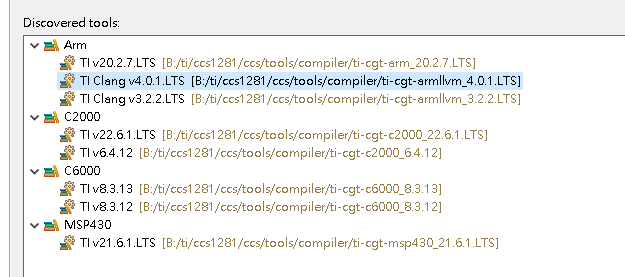
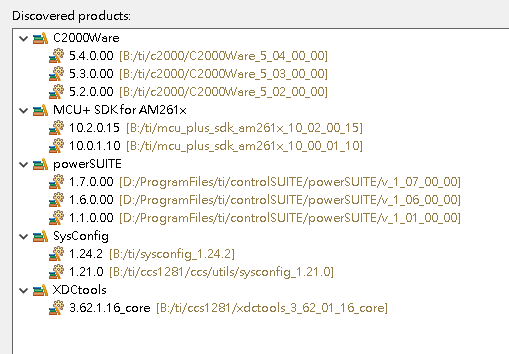
    • SysConfig 1.23.0

    • 适用于 AM261x 10.2.0.15 的 MCU+SDK

    • 编译器 TI Clang v4.0.1.LTS

    • Sitara MCU 器件支持文件 (Windows) v1.5.0

    连接到目标时出错:
    (错误–1170 @ 0x0)无法访问 DAP。 重置器件、然后重试此操作。 如果错误仍然存在、请确认配置、对电路板进行下电上电、和/或尝试更可靠的 JTAG 设置(例如下 TCLK)。 (仿真包 20.0.0.3178)

    用例 2:

    • CCS 20.2.0

    • SysConfig 1.23.0

    • 适用于 AM261x 10.2.0.15 的 MCU+SDK

    • 编译器 TI Clang v4.0.3.LTS

    • 基于 Arm (R) 的 AM2x MCU 器件支持 1.5.0

    首次创建新工程时、找不到调试配置文件。
    重新启动 CCS 后、JTAG 将正常工作、但在使用期间经常会断开连接。
    此外、使用 Ctrl +鼠标左键点击某个变量通常会导致变量变得不可选择/无法复制。

    根据 SDK 文档、建议使用 CCS12.8.1、因为它的错误更少、我也更喜欢使用 12.8.1 进行开发。
    https://software-dl.ti.com/mcu-plus-sdk/esd/AM261X/10_02_00_15/exports/docs/api_guide_am261x/CCS_SETUP_PAGE.html

  • 请注意,本文内容源自机器翻译,可能存在语法或其它翻译错误,仅供参考。如需获取准确内容,请参阅链接中的英语原文或自行翻译。
    [引述 userid=“317072" url="“ url="~“~/support/microcontrollers/arm-based-microcontrollers-group/arm-based-microcontrollers/f/arm-based-microcontrollers-forum/1555462/am2612-am2612-using-ccs-12-8-1-jatg-error-and-build-error/5996925

    用例 1:

    • CCS12.8.1.

    • SysConfig 1.23.0

    • 适用于 AM261x 10.2.0.15 的 MCU+SDK

    • 编译器 TI Clang v4.0.1.LTS

    • Sitara MCU 器件支持文件 (Windows) v1.5.0

    连接到目标时出错:
    (错误–1170 @ 0x0)无法访问 DAP。 重置器件、然后重试此操作。 如果错误仍然存在、请确认配置、对电路板进行下电上电、和/或尝试更可靠的 JTAG 设置(例如下 TCLK)。 (仿真包 20.0.0.3178)

    [/报价]

    您好 Robert:

    您是否可以尝试重新安装 CCS 12.8.1 并重新启动 PC、然后重试、

    看起来这是特定于您的 PC 或 CCS 安装、请告诉我您的观察结果。

  • 请注意,本文内容源自机器翻译,可能存在语法或其它翻译错误,仅供参考。如需获取准确内容,请参阅链接中的英语原文或自行翻译。

    尊敬的 Nilabh:
    我尝试了重新安装 CCS 12.8.1、重新启动 PC、以及更改电路板连接。
    情况仍然是一样的。

    连接到目标时出错:
    (错误–1170 @ 0x0)
    无法访问 DAP。 重置器件、然后重试此操作。 如果错误仍然存在、请确认配置、对电路板进行下电上电、和/或尝试更可靠的 JTAG 设置(例如下 TCLK)。
    (仿真包 20.0.0.3178)

  • 请注意,本文内容源自机器翻译,可能存在语法或其它翻译错误,仅供参考。如需获取准确内容,请参阅链接中的英语原文或自行翻译。

    尊敬的 Nilabh:
    今天、我尝试在另一台计算机上安装 CCS、并且发生了相同的问题。

    • 第一台计算机:Windows 10 Professional

    • 第二台计算机:Windows 11 Professional

    使用的版本:

    • CCS 12.8.1

    • SysConfig 1.23.0

    • 适用于 AM261x 10.2.0.15 的 MCU+SDK

    • 编译器 TI Clang v4.0.1.LTS

    • Sitara MCU 器件支持文件 (Windows) v1.5.0

  • 请注意,本文内容源自机器翻译,可能存在语法或其它翻译错误,仅供参考。如需获取准确内容,请参阅链接中的英语原文或自行翻译。

    尊敬的 Nilabh:
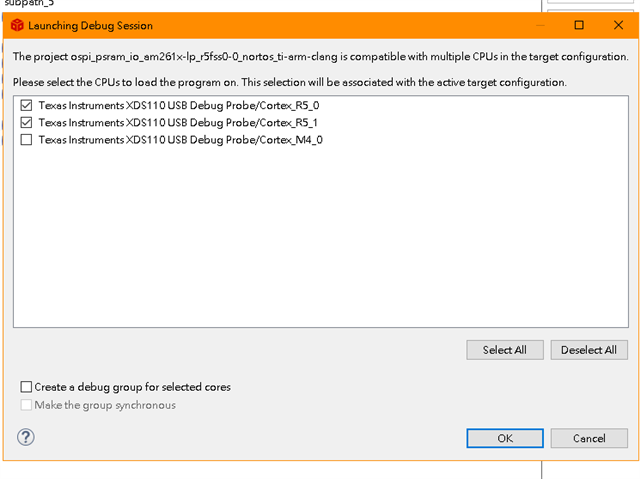
    我发现了这个问题。 DAP 错误的根本原因是无法读取内核。 我发现无法访问 M4 内核、因此、如果在开始之前取消选中此选项、则可以继续调试。 我在 CCS20 上尝试了同样的情况、无法读取 R1 内核。 谢谢你。