This thread has been locked.
If you have a related question, please click the "Ask a related question" button in the top right corner. The newly created question will be automatically linked to this question.
https://e2e.ti.com/support/microcontrollers/arm-based-microcontrollers-group/arm-based-microcontrollers/f/arm-based-microcontrollers-forum/1094017/launchxl2-tms57012-how-could-i-found-this-kits-and-board-on-code-composer-studio
我正在尝试将CCS V11连接到Launchpad和BQ7.5614万EVM
您好,Sanon:
1.将LAUNCXL2连接到PC的USB端口
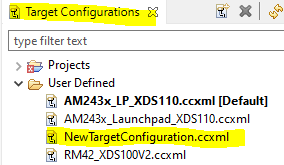
2.启动CCS视图-->目标配置
3.在Target Config (目标配置)窗口中,双击NewtargetCnfiguration.CCXML (您可以更改名称)
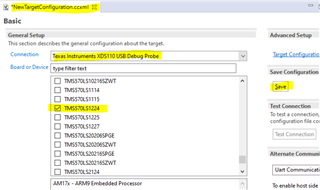
4.在NewTarget配置窗口中,选择xds110 USB调试器和TMS570LS1224,然后保存配置:
5.返回目标配置窗口,选择NewtargetConfiguration.CCXML,然后单击鼠标右键
6.启动选定的配置
7.在“调试”窗口中,将JTAG连接到目标。