请注意,本文内容源自机器翻译,可能存在语法或其它翻译错误,仅供参考。如需获取准确内容,请参阅链接中的英语原文或自行翻译。
器件型号:TM4C1294NCPDT 您好!
今天的问候!
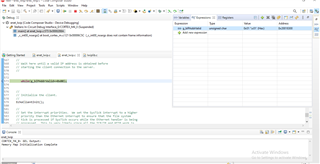
我是 Tiva C 控制器的新用户、现在正在处理 TCP/IP 回显客户端程序、我在 这里从 TI 获得了一份文档(www.ti.com/.../spna248) 我刚刚按照步骤操作、服务器程序正常工作、但问题从客户端 程序开始。 在 tcp_echo_client 代码中、程序 在此行处停止 、同时(g_bIPAddrValid = 0);
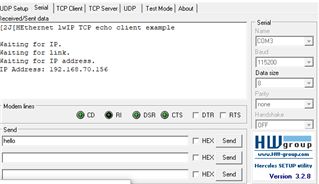
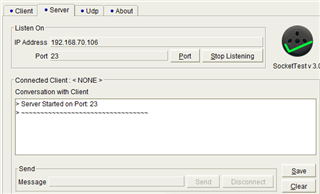
我刚刚使用办公室网络的 LAN 端口连接了主板和计算机,我提到服务器 IP 地址是我的计算机 IP (i.e) #define SERVER_IPADDR"192.168.70.106",为了便于您参考,我已附上了下面的屏幕截图和代码。
//*****************************************************************************
//
// enet_tcpecho_client_lwip.c - Sample Echo Client Application using lwIP.
//
// Copyright (c) 2019-2020 Texas Instruments Incorporated.  All rights reserved.
// Software License Agreement
//
// Texas Instruments (TI) is supplying this software for use solely and
// exclusively on TI's microcontroller products. The software is owned by
// TI and/or its suppliers, and is protected under applicable copyright
// laws. You may not combine this software with "viral" open-source
// software in order to form a larger program.
//
// THIS SOFTWARE IS PROVIDED "AS IS" AND WITH ALL FAULTS.
// NO WARRANTIES, WHETHER EXPRESS, IMPLIED OR STATUTORY, INCLUDING, BUT
// NOT LIMITED TO, IMPLIED WARRANTIES OF MERCHANTABILITY AND FITNESS FOR
// A PARTICULAR PURPOSE APPLY TO THIS SOFTWARE. TI SHALL NOT, UNDER ANY
// CIRCUMSTANCES, BE LIABLE FOR SPECIAL, INCIDENTAL, OR CONSEQUENTIAL
// DAMAGES, FOR ANY REASON WHATSOEVER.
//
//
//*****************************************************************************

#include <stdbool.h>
#include <stdint.h>
#include <string.h>
#include <stdio.h>
#include "inc/hw_ints.h"
#include "inc/hw_memmap.h"
#include "inc/hw_emac.h"
#include "driverlib/flash.h"
#include "driverlib/interrupt.h"
#include "driverlib/gpio.h"
#include "driverlib/rom_map.h"
#include "driverlib/sysctl.h"
#include "driverlib/systick.h"
#include "drivers/pinout.h"
#include "utils/locator.h"
#include "utils/lwiplib.h"
#include "utils/ustdlib.h"
#include "utils/uartstdio.h"
#include "lwip/debug.h"
#include "lwip/stats.h"
#include "lwip/tcp.h"
#include "lwip/inet.h"

//*****************************************************************************
//
//! \addtogroup example_list
//! <h1>Ethernet TCP Echo Client (enet_tcpecho_client_lwip)</h1>
//!
//! This example application demonstrates the TM4C129x Ethernet Controller
//! operating as a client on the network using the lwIP TCP/IP Stack.  The
//! processor will send a hello greeting message to the server after it
//! establishes a connection with the server. It will then echo back whatever
//! the server sends to it. The DHCP is used to obtain an Ethernet address.
//! If DHCP times out without obtaining an address, AutoIP will be used to
//! obtain a link-local address.  The address that is selected will be shown
//! on the UART.
//!
//! UART0, connected to the Virtual Serial Port and running at 115,200, 8-N-1,
//! is used to display messages from this application.
//!
//! For additional details on lwIP, refer to the lwIP web page at:
//! savannah.nongnu.org/.../
//
//*****************************************************************************

//*****************************************************************************
//
// Defines for the server IP address and PORT numbers.
//
// TODO: User must change these settings per their application.
//
//*****************************************************************************
#define SERVER_IPADDR "192.168.70.106"
#define SERVER_PORT 23

//*****************************************************************************
//
// Defines for setting up the system clock.
//
//*****************************************************************************
#define SYSTICKHZ               100
#define SYSTICKMS               (1000 / SYSTICKHZ)

//*****************************************************************************
//
// Interrupt priority definitions.  The top 3 bits of these values are
// significant with lower values indicating higher priority interrupts.
//
//*****************************************************************************
#define SYSTICK_INT_PRIORITY    0x80
#define ETHERNET_INT_PRIORITY   0xC0

//*****************************************************************************
//
// The variable g_ui32SysClock contains the system clock frequency in Hz.
//
//*****************************************************************************
uint32_t g_ui32SysClock;

//*****************************************************************************
//
// The current IP address.
//
//*****************************************************************************
uint32_t g_ui32IPAddress;

//*****************************************************************************
//
// Global counter to keep track the duration the connection has been idle.
//
//*****************************************************************************
uint32_t g_ui32tcpPollTick = 0;

//*****************************************************************************
//
// Volatile global flag to manage LED blinking, since it is used in interrupt
// and main application.  The LED blinks at the rate of SYSTICKHZ.
//
//*****************************************************************************
volatile bool g_bLED;

//*****************************************************************************
//
// Global flag indicating when the IP address is acquired
//
//*****************************************************************************
bool g_bIPAddrValid = 0;

//*****************************************************************************
//
// Global flag indicating when the client connects to the server
//
//*****************************************************************************
bool g_bconnect = 0;

//*****************************************************************************
//
// Global LwIP PCB structure and error variables.
//
//*****************************************************************************
err_t err;
static struct tcp_pcb *tpcb;

//*****************************************************************************
//
// The error routine that is called if the driver library encounters an error.
//
//*****************************************************************************
#ifdef DEBUG
void
__error__(char *pcFilename, uint32_t ui32Line)
{
}
#endif

#define UART_DEBUG_OUT 1
//*****************************************************************************
//
// Display an lwIP type IP Address.
//
//*****************************************************************************
void
DisplayIPAddress(uint32_t ui32Addr)
{
    char pcBuf[16];
    // Convert the IP Address into a string.
     usprintf(pcBuf, "%d.%d.%d.%d", ui32Addr & 0xff, (ui32Addr >> 8) & 0xff,
            (ui32Addr >> 16) & 0xff, (ui32Addr >> 24) & 0xff);
    UARTprintf(pcBuf);
}

//*****************************************************************************
//
// Required by lwIP library to support any host-related timer functions.
//
//*****************************************************************************
void
lwIPHostTimerHandler(void)
{
    uint32_t ui32NewIPAddress;

    //
    // Get the current IP address.
    //
    ui32NewIPAddress = lwIPLocalIPAddrGet();

    //
    // See if the IP address has changed.
    //
    if(ui32NewIPAddress != g_ui32IPAddress)
    {
        //
        // See if there is an IP address assigned.
        //
        if(ui32NewIPAddress == 0xffffffff)
        {
            //
            // Indicate that there is no link.
            //
            UARTprintf("Waiting for link.\n");
        }
        else if(ui32NewIPAddress == 0)
        {
            //
            // There is no IP address, so indicate that the DHCP process is
            // running.
            //
            UARTprintf("Waiting for IP address.\n");
        }
        else
        {
            g_bIPAddrValid = 1;
            //
            // Display the new IP address.
            //
            UARTprintf("IP Address: ");
            DisplayIPAddress(ui32NewIPAddress);
        }
        //
        // Save the new IP address.
        //
        g_ui32IPAddress = ui32NewIPAddress;
    }

    //
    // If there is not an IP address.
    //
    if((ui32NewIPAddress == 0) || (ui32NewIPAddress == 0xffffffff))
    {
        //
        // Do nothing and keep waiting.
        //
    }
}

//*****************************************************************************
//
// The interrupt handler for the SysTick interrupt.
//
//*****************************************************************************
void
SysTickIntHandler(void)
{
    //
    // Call the lwIP timer handler.
    //
    lwIPTimer(SYSTICKMS);

    //
    // Tell the application to change the state of the LED (in other words
    // blink).
    //
    g_bLED = true;
}


//*****************************************************************************
//
// The EchoReceive is a callback function when payload is received from the
// remote host
//
//*****************************************************************************
err_t
EchoReceive(void *arg, struct tcp_pcb *tpcb, struct pbuf *p, err_t err)
{
    int len;
    char *header = "Client: ";
    int header_len = strlen(header);
    char mydata[1024];

    //
    // Check for null pointer.
    //
    if (p == NULL)
    {
        //
        // If null pointer has been passed in, close the connection.
        //
        UARTprintf("The remote host closed the connection.\n");
        tcp_close(tpcb);
        return ERR_ABRT;
    }
    else
    {
        tcp_recved(tpcb, p->tot_len);

#if UART_DEBUG_OUT
        UARTprintf("Receive %d bytes from the remote host.\n", p->tot_len);
#endif

        //
        // Determine the size of the payload.
        //
        len = p->tot_len + header_len;

        strcpy(mydata, header);
        strcat(mydata, (char *)p->payload);

        //
        // Free the packet buffer.
        //
        pbuf_free(p);

        //
        // Check output buffer capacity.
        //
        if (len > tcp_sndbuf(tpcb))
            len= tcp_sndbuf(tpcb);

        //
        // Queue the data to transmit.
        //
        err = tcp_write(tpcb, mydata, len, 0);
        if (err == ERR_OK)
        {
#if UART_DEBUG_OUT
            UARTprintf("Echo the data out\n");
#endif
        }
        else if(err == ERR_MEM)
        {
            //
            // We are low on memory, try later, defer to poll.
            //
            UARTprintf("Low on memory.\n");

        }
        else
        {
            //
            // Other problems to take care of.
            //
            UARTprintf("Other problems.\n");
        }

        //
        // No need for a callback when transmitting.
        //
        tcp_sent(tpcb, NULL);
    }

    return ERR_OK;
}

//*****************************************************************************
//
// Function to send TCP packets to the server
//
//*****************************************************************************
uint32_t
TcpSendPacket(char *string)
{
    //
    // Queues the data pointed to by string.
    //
    err = tcp_write(tpcb, string, strlen(string), TCP_WRITE_FLAG_COPY);

    if (err)
    {
        UARTprintf("ERROR: Code: %d (TcpSendPacket :: tcp_write)\n", err);
        return 1;
    }

    //
    // Transmit the data.
    //
    err = tcp_output(tpcb);

    //
    // Report any error that occurs.
    //
    if (err)
    {
        UARTprintf("ERROR: Code: %d (TcpSendPacket :: tcp_output)\n", err);
        return 1;
    }

    return 0;
}

//*****************************************************************************
//
// Callback function when the client establishes a successful connection to
// the remote host.
//
//*****************************************************************************
err_t
ConnectCallback(void *arg, struct tcp_pcb *tpcb, err_t err)
{
    char *string = "Hello World! \n\r ";

    if (err == ERR_OK){
#if UART_DEBUG_OUT
        UARTprintf("Connection Established.\n");
#endif
        g_bconnect = true;

        //
        // Register the callback function EchoReceive when
        // receiving data
        //
        tcp_recv(tpcb, EchoReceive);
        tcp_sent(tpcb, NULL);
#if UART_DEBUG_OUT
        UARTprintf("Sending a greeting message to the Server\n");
#endif
        TcpSendPacket(string);
        return 0;
    }
    else
    {
        UARTprintf("No Connection Established.\n");
        return 1;

    }
}

//*****************************************************************************
//
// Function to create a LwIP client.
//
//*****************************************************************************
void
EchoClientInit(void)
{
    //
    // Create IP address structure.
    //
    struct ip_addr server_addr;

    //
    // Create a new TCP control block.
    //
    tpcb = tcp_new();

    if (tpcb != NULL)
    {
        //
        // Assign destination server IP address.
        //
        server_addr.addr = inet_addr(SERVER_IPADDR);

        //
        // Configure destination IP address and port.
        //
        err = tcp_connect(tpcb, &server_addr, SERVER_PORT, ConnectCallback);

        if (err)
        {
            UARTprintf("ERROR: Code: %d (tcp_connect)\n", err);
        }

        UARTprintf("\nPCB CREATED\n");

    }
    else
    {
        memp_free(MEMP_TCP_PCB, tpcb);
        UARTprintf("PCB NOT CREATED\n");
    }
}

//*****************************************************************************
//
// This example demonstrates the use of the Ethernet Controller.
//
//*****************************************************************************
int
main(void)
{
    uint32_t ui32User0, ui32User1;
    uint8_t pui8MACArray[8];

    //
    // Make sure the main oscillator is enabled because this is required by
    // the PHY.  The system must have a 25MHz crystal attached to the OSC
    // pins. The SYSCTL_MOSC_HIGHFREQ parameter is used when the crystal
    // frequency is 10MHz or higher.
    //
    SysCtlMOSCConfigSet(SYSCTL_MOSC_HIGHFREQ);

    //
    // Run from the PLL at 120 MHz.
    // Note: SYSCTL_CFG_VCO_240 is a new setting provided in TivaWare 2.2.x and
    // later to better reflect the actual VCO speed due to SYSCTL#22.
    //
    g_ui32SysClock = MAP_SysCtlClockFreqSet((SYSCTL_XTAL_25MHZ |
                                             SYSCTL_OSC_MAIN |
                                             SYSCTL_USE_PLL |
                                             SYSCTL_CFG_VCO_480), 120000000);
    //
    // Configure the device pins.
    //
    PinoutSet(true, false);

    //
    // Configure UART.
    //
    UARTStdioConfig(0, 115200, g_ui32SysClock);

    //
    // Clear the terminal and print banner.
    //
    UARTprintf("\033[2J\033[H");
    UARTprintf("Ethernet lwIP TCP echo client example\n\n");

    //
    // Configure Port N1 for as an output for the animation LED.
    //
    MAP_GPIOPinTypeGPIOOutput(GPIO_PORTN_BASE, GPIO_PIN_1);

    //
    // Initialize LED to OFF (0)
    //
    MAP_GPIOPinWrite(GPIO_PORTN_BASE, GPIO_PIN_1, ~GPIO_PIN_1);

    //
    // Configure SysTick for a periodic interrupt.
    //
    MAP_SysTickPeriodSet(g_ui32SysClock / SYSTICKHZ);
    MAP_SysTickEnable();
    MAP_SysTickIntEnable();

    //
    // Configure the hardware MAC address for Ethernet Controller filtering of
    // incoming packets.  The MAC address will be stored in the non-volatile
    // USER0 and USER1 registers.
    //
    MAP_FlashUserGet(&ui32User0, &ui32User1);
    if((ui32User0 == 0xffffffff) || (ui32User1 == 0xffffffff))
    {
        //
        // We should never get here.  This is an error if the MAC address has
        // not been programmed into the device.  Exit the program.
        // Let the user know there is no MAC address
        //
        UARTprintf("No MAC programmed!\n");
        while(1)
        {
        }
    }

    //
    // Tell the user what we are doing just now.
    //
    UARTprintf("Waiting for IP.\n");

    //
    // Convert the 24/24 split MAC address from NV ram into a 32/16 split MAC
    // address needed to program the hardware registers, then program the MAC
    // address into the Ethernet Controller registers.
    //
    pui8MACArray[0] = ((ui32User0 >>  0) & 0xff);
    pui8MACArray[1] = ((ui32User0 >>  8) & 0xff);
    pui8MACArray[2] = ((ui32User0 >> 16) & 0xff);
    pui8MACArray[3] = ((ui32User1 >>  0) & 0xff);
    pui8MACArray[4] = ((ui32User1 >>  8) & 0xff);
    pui8MACArray[5] = ((ui32User1 >> 16) & 0xff);

    //
    // Initialize the lwIP library, using DHCP.
    //
    lwIPInit(g_ui32SysClock, pui8MACArray, 0, 0, 0, IPADDR_USE_DHCP);

    //
    // Wait here until a valid IP address is obtained before
    // starting the client connection to the server.
    //
    while (g_bIPAddrValid == 0);

    //
    // Initialize the client.
    //
    EchoClientInit();

    //
    // Set the interrupt priorities.  We set the SysTick interrupt to a higher
    // priority than the Ethernet interrupt to ensure that the file system
    // tick is processed if SysTick occurs while the Ethernet handler is being
    // processed.  This is very likely since all the TCP/IP and HTTP work is
    // done in the context of the Ethernet interrupt.
    //
    MAP_IntPrioritySet(INT_EMAC0, ETHERNET_INT_PRIORITY);
    MAP_IntPrioritySet(FAULT_SYSTICK, SYSTICK_INT_PRIORITY);

    //
    // Loop forever, processing the LED blinking.  All the work is done in
    // interrupt handlers.
    while(1)
    {

        while(g_bLED == false || g_bconnect == false)
        {
        }

        //
        // Clear the flag.
        //
        g_bLED = false;

        //
        // Toggle the LED.
        //
        MAP_GPIOPinWrite(GPIO_PORTN_BASE, GPIO_PIN_1,
                         (MAP_GPIOPinRead(GPIO_PORTN_BASE, GPIO_PIN_1) ^
                          GPIO_PIN_1));
    }
}

谢谢、此致、
Aravinth K