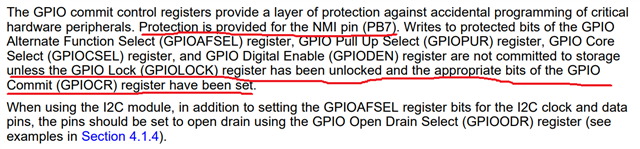
Part Number: F28M35H52C
测试过程描述:
1.使用TI的历程i2c_loopback_m3,只使用一块F28M35H52C开发板,配置寄存器I2CMCR_LPBK=1,开启loopback模式,能完成数据的收发,也在CCS上看到数据以及寄存器的变化,但是用逻辑分析仪在对应的引脚上看不到波形的变化。
2.使用两块F28M35H52C开发板,两台电脑,让其中一块开发板做master transmitter 模式,另外一块开发板做slave receiver 模式配置,将引脚相连,寄存器I2CMCR_LPBK=0,不能完成数据的收发,也在CCS上也不能看到数据以及寄存器的变化,用逻辑分析仪在对应的引脚上看不到波形的变化。
下面第一个代码是I2C做master部分的代码
//###########################################################################
// FILE:   i2c_loopback.c
// TITLE:  Example demonstrating a simple I2C message
//         transmission and reception.
//###########################################################################
// $TI Release: F28M35x Support Library v220 $
// $Release Date: Tue Sep 26 15:35:11 CDT 2017 $
// $Copyright: Copyright (C) 2011-2017 Texas Instruments Incorporated -
//             http://www.ti.com/ ALL RIGHTS RESERVED $
//###########################################################################

#include "inc/hw_memmap.h"
#include "inc/hw_types.h"
#include "inc/hw_i2c.h"
#include "inc/hw_nvic.h"
#include "inc/hw_sysctl.h"
#include "driverlib/i2c.h"
#include "driverlib/sysctl.h"
#include "driverlib/gpio.h"
#include "driverlib/flash.h"
#include "utils/uartstdio.h"
#include <string.h>

//*****************************************************************************
//! \addtogroup master_example_list
//! <h1>I2C Master Loopback (i2c_master_slave_loopback)</h1>
//!
//! This example shows how to configure the I2C0 module for loopback mode.
//! This includes setting up the master and slave module.  Loopback mode
//! internally connects the master and slave data and clock lines together.
//! The address of the slave module is set in order to read data from the
//! master.  Then the data is checked to make sure the received data matches
//! the data that was transmitted.  This example uses a polling method for
//! sending and receiving data.
//!
//! This example uses the following peripherals and I/O signals.  You must
//! review these and change as needed for your own board:
//! - I2C0 peripheral
//! - GPIO Port B peripheral (for I2C0 pins)
//! - I2C0SCL - PB2
//! - I2C0SDA - PB3
//!
//! The following UART signals are configured only for displaying console
//! messages for this example.  These are not required for operation of I2C.
//! - UART0 peripheral
//! - GPIO Port E peripheral (for UART0 pins)
//! - UART0RX - PE4
//! - UART0TX - PE5
//!
//! This example uses the following interrupt handlers.  To use this example
//! in your own application you must add these interrupt handlers to your
//! vector table.
//! - None.
//
//*****************************************************************************

#ifdef _FLASH
// These are defined by the linker (see device linker command file)
extern unsigned long RamfuncsLoadStart;
extern unsigned long RamfuncsRunStart;
extern unsigned long RamfuncsLoadSize;
#endif

//*****************************************************************************
// Number of I2C data packets to send.
//*****************************************************************************
#define NUM_I2C_DATA 3

//*****************************************************************************
// Set the address for slave module. This is a 7-bit address sent in the
// following format:
//                      [A6:A5:A4:A3:A2:A1:A0:RS]
// A zero in the "RS" position of the first byte means that the master
// transmits (sends) data to the selected slave, and a one in this position
// means that the master receives data from the slave.
//*****************************************************************************
#define SLAVE_ADDRESS 0x3C

//*****************************************************************************
// This function sets up UART0 to be used for a console to display information
// as the example is running.
//*****************************************************************************
void
InitConsole(void)
{
    // Enable GPIO port A which is used for UART0 pins.
    // TODO: change this to whichever GPIO port you are using.
    SysCtlPeripheralEnable(SYSCTL_PERIPH_GPIOE);

    // Configure the pin muxing for UART0 functions on port A0 and A1.
    // This step is not necessary if your part does not support pin muxing.
    // TODO: change this to select the port/pin you are using.
    GPIOPinConfigure(GPIO_PE4_U0RX);
    GPIOPinConfigure(GPIO_PE5_U0TX);

    // Select the alternate (UART) function for these pins.
    // TODO: change this to select the port/pin you are using.
    GPIOPinTypeUART(GPIO_PORTE_BASE, GPIO_PIN_4 | GPIO_PIN_5);

    // Initialize the UART for console I/O.
    UARTStdioInit(0);
}

//*****************************************************************************
// Configure the I2C0 master and slave and connect them using loopback mode.
//*****************************************************************************
int
main(void)
{
    unsigned long ulDataTx[NUM_I2C_DATA];
    unsigned long ulDataRx[NUM_I2C_DATA];
    unsigned long ulindex;
    unsigned long iii;
    unsigned long tmp1;
    unsigned long tmp2;

    iii = 0 ;


    // Disable Protection
    HWREG(SYSCTL_MWRALLOW) =  0xA5A5A5A5;

    // Setup main clock tree for 75MHz - M3 and 150MHz - C28x
    SysCtlClockConfigSet(SYSCTL_SYSDIV_1 | SYSCTL_M3SSDIV_2 | SYSCTL_USE_PLL |
                         (SYSCTL_SPLLIMULT_M & 0x0F));

#ifdef _FLASH
// Copy time critical code and Flash setup code to RAM
// This includes the following functions:  InitFlash();
// The  RamfuncsLoadStart, RamfuncsLoadSize, and RamfuncsRunStart
// symbols are created by the linker. Refer to the device .cmd file.
    memcpy(&RamfuncsRunStart, &RamfuncsLoadStart, (size_t)&RamfuncsLoadSize);

// Call Flash Initialization to setup flash waitstates
// This function must reside in RAM
    FlashInit();
#endif

    // The I2C0 peripheral must be enabled before use.
    SysCtlPeripheralEnable(SYSCTL_PERIPH_I2C0);

    // For this example I2C0 is used with PortB[3:2].  The actual port and
    // pins used may be different on your part, consult the data sheet for
    // more information.  GPIO port B needs to be enabled so these pins can
    // be used.
    // TODO: change this to whichever GPIO port you are using.
    SysCtlPeripheralEnable(SYSCTL_PERIPH_GPIOB);

    // Configure the pin muxing for I2C0 functions on port B2 and B3.
    // This step is not necessary if your part does not support pin muxing.
    // TODO: change this to select the port/pin you are using.
    GPIOPinConfigure(GPIO_PB7_I2C0SCL);
    GPIOPinConfigure(GPIO_PB6_I2C0SDA);
    // Select the I2C function for these pins.  This function will also
    // configure the GPIO pins pins for I2C operation, setting them to
    // open-drain operation with weak pull-ups.  Consult the data sheet
    // to see which functions are allocated per pin.
    // TODO: change this to select the port/pin you are using.
    GPIOPinTypeI2C(GPIO_PORTB_BASE, GPIO_PIN_7 | GPIO_PIN_6);
    // Enable loopback mode.  Loopback mode is a built in feature that is
    // useful for debugging I2C operations.  It internally connects the I2C
    // master and slave terminals, which effectively let's you send data as
    // a master and receive data as a slave.
    // NOTE: For external I2C operation you will need to use external pullups
    // that are stronger than the internal pullups.  Refer to the datasheet for
    // more information.
//    HWREG(I2C0_MASTER_BASE + I2C_O_MCR) |= 0x01;

    // Enable and initialize the I2C0 master module.  Use the system clock for
    // the I2C0 module.  The last parameter sets the I2C data transfer rate.
    // If false the data rate is set to 100kbps and if true the data rate will
    // be set to 400kbps.  For this example we will use a data rate of 100kbps.
    I2CMasterInitExpClk(I2C0_MASTER_BASE, SysCtlClockGet(SYSTEM_CLOCK_SPEED), false);

    // Enable the I2C0 slave module. This module is enabled only for testing
    // purposes.  It does not need to be enabled for proper operation of the
    // I2Cx master module.
    I2CSlaveEnable(I2C0_SLAVE_BASE);

    // Set the slave address to SLAVE_ADDRESS.  In loopback mode, it's an
    // arbitrary 7-bit number (set in a macro above) that is sent to the
    // I2CMasterSlaveAddrSet function.
    I2CSlaveInit(I2C0_SLAVE_BASE, SLAVE_ADDRESS);

    // Tell the master module what address it will place on the bus when
    // communicating with the slave.  Set the address to SLAVE_ADDRESS
    // (as set in the slave module).  The receive parameter is set to false
    // which indicates the I2C Master is initiating a writes to the slave.  If
    // true, that would indicate that the I2C Master is initiating reads from
    // the slave.
    I2CMasterSlaveAddrSet(I2C0_MASTER_BASE, SLAVE_ADDRESS, false);

    // Set up the serial console to use for displaying messages.  This is
    // just for this example program and is not needed for I2C operation.
//    InitConsole();
//
//    // Display the example setup on the console.
//    UARTprintf("I2C Loopback Example ->");
//    UARTprintf("\n   Module = I2C0");
//    UARTprintf("\n   Mode = Single Send/Receive");
//    UARTprintf("\n   Rate = 100kbps\n\n");

    // Initialize the data to send.
    ulDataTx[0] = '1';
    ulDataTx[1] = '2';
    ulDataTx[2] = '1';

    // Initialize the receive buffer.
    for(ulindex = 0; ulindex < NUM_I2C_DATA; ulindex++)
    {
        ulDataRx[ulindex] = 0;
    }

    // Indicate the direction of the data.
//    UARTprintf("Transferring from: Master -> Slave\n");

    // Send 3 pieces of I2C data from the master to the slave.
    for(ulindex = 0; ulindex < NUM_I2C_DATA; ulindex++)
    {
        // Display the data that the I2C0 master is transferring.
//        UARTprintf("  Sending: '%c'  . . .  ", ulDataTx[ulindex]);

        // Place the data to be sent in the data register
        I2CMasterDataPut(I2C0_MASTER_BASE, ulDataTx[ulindex]);

        // Initiate send of data from the master.  Since the loopback
        // mode is enabled, the master and slave units are connected
        // allowing us to receive the same data that we sent out.
        I2CMasterControl(I2C0_MASTER_BASE, I2C_MASTER_CMD_SINGLE_SEND);

        while(1){}

//
//        // Wait until the slave has received and acknowledged the data.
//        while(!(I2CSlaveStatus(I2C0_SLAVE_BASE) & I2C_SCSR_RREQ))
//        {
//
//        }
//
//
//        // Read the data from the slave.
//        ulDataRx[ulindex] = I2CSlaveDataGet(I2C0_SLAVE_BASE);
//
//        // Wait until master module is done transferring.
//        while(I2CMasterBusy(I2C0_MASTER_BASE))
//        {
//        }

        // Display the data that the slave has received.
//        UARTprintf("Received: '%c'\n", ulDataRx[ulindex]);
    }

    // Reset receive buffer.
//    for(ulindex = 0; ulindex < NUM_I2C_DATA; ulindex++)
//    {
//        ulDataRx[ulindex] = 0;
//    }
//
//    // Indicate the direction of the data.
//    UARTprintf("\n\nTranferring from: Slave -> Master\n");
//
//    // Modify the data direction to true, so that seeing the address will
//    // indicate that the I2C Master is initiating a read from the slave.
//    I2CMasterSlaveAddrSet(I2C0_MASTER_BASE, SLAVE_ADDRESS, true);
//
//    // Do a dummy receive to make sure you don't get junk on the first receive.
//    I2CMasterControl(I2C0_MASTER_BASE, I2C_MASTER_CMD_SINGLE_SEND);//测试一下其他的情况中看SDR是否会变化成其他的值
//
//    // Dummy acknowledge and wait for the receive request from the master.
//    // This is done to clear any flags that should not be set.
//    while(!(I2CSlaveStatus(I2C0_SLAVE_BASE) & I2C_SLAVE_ACT_TREQ))
//    {
//
//    }
//
//    for(ulindex = 0; ulindex < NUM_I2C_DATA; ulindex++)
//    {
//        // Display the data that I2C0 slave module is transferring.
//        UARTprintf("  Sending: '%c'  . . .  ", ulDataTx[ulindex]);
//
//        // Place the data to be sent in the data register
//        I2CSlaveDataPut(I2C0_SLAVE_BASE, ulDataTx[ulindex]);
//
//        // Tell the master to read data.
//        I2CMasterControl(I2C0_MASTER_BASE, I2C_MASTER_CMD_SINGLE_SEND);
//
//        // Wait until the slave is done sending data.
//        while(!(I2CSlaveStatus(I2C0_SLAVE_BASE) & I2C_SLAVE_ACT_TREQ))
//        {
//        }
//
//        // Read the data from the master.
//        ulDataRx[ulindex] = I2CMasterDataGet(I2C0_MASTER_BASE);
//
//        // Display the data that the slave has received.
//        UARTprintf("Received: '%c'\n", ulDataRx[ulindex]);
//    }

    // Tell the user that the test is done.
    UARTprintf("\nDone.\n\n");

    // Return no errors
    return(0);
}
,第二个是I2C做slave部分的代码//###########################################################################
// FILE: i2c_loopback.c
// TITLE: Example demonstrating a simple I2C message
// transmission and reception.
//###########################################################################
// $TI Release: F28M35x Support Library v220 $
// $Release Date: Tue Sep 26 15:35:11 CDT 2017 $
// $Copyright: Copyright (C) 2011-2017 Texas Instruments Incorporated -
// http://www.ti.com/ ALL RIGHTS RESERVED $
//###########################################################################
#include "inc/hw_memmap.h"
#include "inc/hw_types.h"
#include "inc/hw_i2c.h"
#include "inc/hw_nvic.h"
#include "inc/hw_sysctl.h"
#include "driverlib/i2c.h"
#include "driverlib/sysctl.h"
#include "driverlib/gpio.h"
#include "driverlib/flash.h"
#include "utils/uartstdio.h"
#include <string.h>
//*****************************************************************************
//! \addtogroup master_example_list
//! <h1>I2C Master Loopback (i2c_master_slave_loopback)</h1>
//!
//! This example shows how to configure the I2C0 module for loopback mode.
//! This includes setting up the master and slave module. Loopback mode
//! internally connects the master and slave data and clock lines together.
//! The address of the slave module is set in order to read data from the
//! master. Then the data is checked to make sure the received data matches
//! the data that was transmitted. This example uses a polling method for
//! sending and receiving data.
//!
//! This example uses the following peripherals and I/O signals. You must
//! review these and change as needed for your own board:
//! - I2C0 peripheral
//! - GPIO Port B peripheral (for I2C0 pins)
//! - I2C0SCL - PB2
//! - I2C0SDA - PB3
//!
//! The following UART signals are configured only for displaying console
//! messages for this example. These are not required for operation of I2C.
//! - UART0 peripheral
//! - GPIO Port E peripheral (for UART0 pins)
//! - UART0RX - PE4
//! - UART0TX - PE5
//!
//! This example uses the following interrupt handlers. To use this example
//! in your own application you must add these interrupt handlers to your
//! vector table.
//! - None.
//
//*****************************************************************************
#ifdef _FLASH
// These are defined by the linker (see device linker command file)
extern unsigned long RamfuncsLoadStart;
extern unsigned long RamfuncsRunStart;
extern unsigned long RamfuncsLoadSize;
#endif
//*****************************************************************************
// Number of I2C data packets to send.
//*****************************************************************************
#define NUM_I2C_DATA 3
//*****************************************************************************
// Set the address for slave module. This is a 7-bit address sent in the
// following format:
// [A6:A5:A4:A3:A2:A1:A0:RS]
// A zero in the "RS" position of the first byte means that the master
// transmits (sends) data to the selected slave, and a one in this position
// means that the master receives data from the slave.
//*****************************************************************************
#define SLAVE_ADDRESS 0x3C
//*****************************************************************************
// This function sets up UART0 to be used for a console to display information
// as the example is running.
//*****************************************************************************
void
InitConsole(void)
{
// Enable GPIO port A which is used for UART0 pins.
// TODO: change this to whichever GPIO port you are using.
SysCtlPeripheralEnable(SYSCTL_PERIPH_GPIOE);
// Configure the pin muxing for UART0 functions on port A0 and A1.
// This step is not necessary if your part does not support pin muxing.
// TODO: change this to select the port/pin you are using.
GPIOPinConfigure(GPIO_PE4_U0RX);
GPIOPinConfigure(GPIO_PE5_U0TX);
// Select the alternate (UART) function for these pins.
// TODO: change this to select the port/pin you are using.
GPIOPinTypeUART(GPIO_PORTE_BASE, GPIO_PIN_4 | GPIO_PIN_5);
// Initialize the UART for console I/O.
UARTStdioInit(0);
}
//*****************************************************************************
// Configure the I2C0 master and slave and connect them using loopback mode.
//*****************************************************************************
int
main(void)
{
unsigned long ulDataTx[NUM_I2C_DATA];
unsigned long ulDataRx[NUM_I2C_DATA];
unsigned long ulindex;
unsigned long iii;
unsigned long tmp1;
unsigned long tmp2;
iii = 0 ;
// Disable Protection
HWREG(SYSCTL_MWRALLOW) = 0xA5A5A5A5;
// Setup main clock tree for 75MHz - M3 and 150MHz - C28x
SysCtlClockConfigSet(SYSCTL_SYSDIV_1 | SYSCTL_M3SSDIV_2 | SYSCTL_USE_PLL |
(SYSCTL_SPLLIMULT_M & 0x0F));
#ifdef _FLASH
// Copy time critical code and Flash setup code to RAM
// This includes the following functions: InitFlash();
// The RamfuncsLoadStart, RamfuncsLoadSize, and RamfuncsRunStart
// symbols are created by the linker. Refer to the device .cmd file.
memcpy(&RamfuncsRunStart, &RamfuncsLoadStart, (size_t)&RamfuncsLoadSize);
// Call Flash Initialization to setup flash waitstates
// This function must reside in RAM
FlashInit();
#endif
// The I2C0 peripheral must be enabled before use.
SysCtlPeripheralEnable(SYSCTL_PERIPH_I2C0);
// For this example I2C0 is used with PortB[3:2]. The actual port and
// pins used may be different on your part, consult the data sheet for
// more information. GPIO port B needs to be enabled so these pins can
// be used.
// TODO: change this to whichever GPIO port you are using.
SysCtlPeripheralEnable(SYSCTL_PERIPH_GPIOB);
// Configure the pin muxing for I2C0 functions on port B2 and B3.
// This step is not necessary if your part does not support pin muxing.
// TODO: change this to select the port/pin you are using.
GPIOPinConfigure(GPIO_PB7_I2C0SCL);
GPIOPinConfigure(GPIO_PB6_I2C0SDA);
// Select the I2C function for these pins. This function will also
// configure the GPIO pins pins for I2C operation, setting them to
// open-drain operation with weak pull-ups. Consult the data sheet
// to see which functions are allocated per pin.
// TODO: change this to select the port/pin you are using.
GPIOPinTypeI2C(GPIO_PORTB_BASE, GPIO_PIN_7 | GPIO_PIN_6);
// Enable loopback mode. Loopback mode is a built in feature that is
// useful for debugging I2C operations. It internally connects the I2C
// master and slave terminals, which effectively let's you send data as
// a master and receive data as a slave.
// NOTE: For external I2C operation you will need to use external pullups
// that are stronger than the internal pullups. Refer to the datasheet for
// more information.
// HWREG(I2C0_MASTER_BASE + I2C_O_MCR) |= 0x00;
// Enable and initialize the I2C0 master module. Use the system clock for
// the I2C0 module. The last parameter sets the I2C data transfer rate.
// If false the data rate is set to 100kbps and if true the data rate will
// be set to 400kbps. For this example we will use a data rate of 100kbps.
I2CMasterInitExpClk(I2C0_MASTER_BASE, SysCtlClockGet(SYSTEM_CLOCK_SPEED), false);
// Enable the I2C0 slave module. This module is enabled only for testing
// purposes. It does not need to be enabled for proper operation of the
// I2Cx master module.
I2CSlaveEnable(I2C0_SLAVE_BASE);
// Set the slave address to SLAVE_ADDRESS. In loopback mode, it's an
// arbitrary 7-bit number (set in a macro above) that is sent to the
// I2CMasterSlaveAddrSet function.
I2CSlaveInit(I2C0_SLAVE_BASE, SLAVE_ADDRESS);
// Tell the master module what address it will place on the bus when
// communicating with the slave. Set the address to SLAVE_ADDRESS
// (as set in the slave module). The receive parameter is set to false
// which indicates the I2C Master is initiating a writes to the slave. If
// true, that would indicate that the I2C Master is initiating reads from
// the slave.
// I2CMasterSlaveAddrSet(I2C0_MASTER_BASE, SLAVE_ADDRESS, false);
// Set up the serial console to use for displaying messages. This is
// just for this example program and is not needed for I2C operation.
InitConsole();
// Display the example setup on the console.
UARTprintf("I2C Loopback Example ->");
UARTprintf("\n Module = I2C0");
UARTprintf("\n Mode = Single Send/Receive");
UARTprintf("\n Rate = 100kbps\n\n");
// Initialize the data to send.
ulDataTx[0] = '1';
ulDataTx[1] = '2';
ulDataTx[2] = '1';
// Initialize the receive buffer.
for(ulindex = 0; ulindex < NUM_I2C_DATA; ulindex++)
{
ulDataRx[ulindex] = 0;
}
// Indicate the direction of the data.
UARTprintf("Transferring from: Master -> Slave\n");
//
// Send 3 pieces of I2C data from the master to the slave.
for(ulindex = 0; ulindex < NUM_I2C_DATA; ulindex++)
{
// Display the data that the I2C0 master is transferring.
UARTprintf(" Sending: '%c' . . . ", ulDataTx[ulindex]);
//
// // Place the data to be sent in the data register
// I2CMasterDataPut(I2C0_MASTER_BASE, ulDataTx[ulindex]);
//
// // Initiate send of data from the master. Since the loopback
// // mode is enabled, the master and slave units are connected
// // allowing us to receive the same data that we sent out.
// I2CMasterControl(I2C0_MASTER_BASE, I2C_MASTER_CMD_SINGLE_SEND);
//
// // Wait until the slave has received and acknowledged the data.
while(!(I2CSlaveStatus(I2C0_SLAVE_BASE) & I2C_SCSR_RREQ))
{
}
//
//
// Read the data from the slave.
ulDataRx[ulindex] = I2CSlaveDataGet(I2C0_SLAVE_BASE);
//
// // Wait until master module is done transferring.
while(I2CMasterBusy(I2C0_MASTER_BASE))
{
}
//
// // Display the data that the slave has received.
UARTprintf("Received: '%c'\n", ulDataRx[ulindex]);
}
// // Reset receive buffer.
// for(ulindex = 0; ulindex < NUM_I2C_DATA; ulindex++)
// {
// ulDataRx[ulindex] = 0;
// }
// // Indicate the direction of the data.
// UARTprintf("\n\nTranferring from: Slave -> Master\n");
//
// // Modify the data direction to true, so that seeing the address will
// // indicate that the I2C Master is initiating a read from the slave.
// I2CMasterSlaveAddrSet(I2C0_MASTER_BASE, SLAVE_ADDRESS, true);
//
// // Do a dummy receive to make sure you don't get junk on the first receive.
// I2CMasterControl(I2C0_MASTER_BASE, I2C_MASTER_CMD_SINGLE_SEND);//测试一下其他的情况中看SDR是否会变化成其他的值
//
// // Dummy acknowledge and wait for the receive request from the master.
// // This is done to clear any flags that should not be set.
// while(!(I2CSlaveStatus(I2C0_SLAVE_BASE) & I2C_SLAVE_ACT_TREQ))
// {
//
// }
// for(ulindex = 0; ulindex < NUM_I2C_DATA; ulindex++)
// {
// // Display the data that I2C0 slave module is transferring.
// UARTprintf(" Sending: '%c' . . . ", ulDataTx[ulindex]);
//
// // Place the data to be sent in the data register
// I2CSlaveDataPut(I2C0_SLAVE_BASE, ulDataTx[ulindex]);
//
// // Tell the master to read data.
// I2CMasterControl(I2C0_MASTER_BASE, I2C_MASTER_CMD_SINGLE_SEND);
//
// // Wait until the slave is done sending data.
// while(!(I2CSlaveStatus(I2C0_SLAVE_BASE) & I2C_SLAVE_ACT_TREQ))
// {
// }
//
// // Read the data from the master.
// ulDataRx[ulindex] = I2CMasterDataGet(I2C0_MASTER_BASE);
//
// // Display the data that the slave has received.
// UARTprintf("Received: '%c'\n", ulDataRx[ulindex]);
// }
// Tell the user that the test is done.
UARTprintf("\nDone.\n\n");
// Return no errors
return(0);
}