This thread has been locked.

If you have a related question, please click the "Ask a related question" button in the top right corner. The newly created question will be automatically linked to this question.

DLP2000: DLP2000EVM IIC COMMUNICATION WITH STM32H750

Part Number: DLP2000
Other Parts Discussed in Thread: DLPC2607

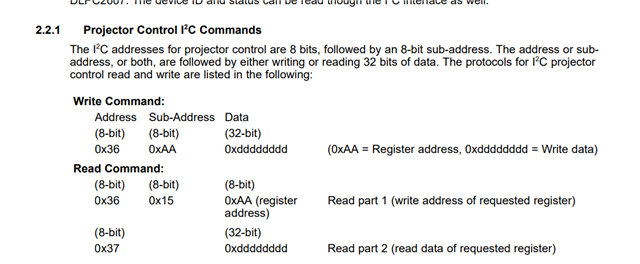
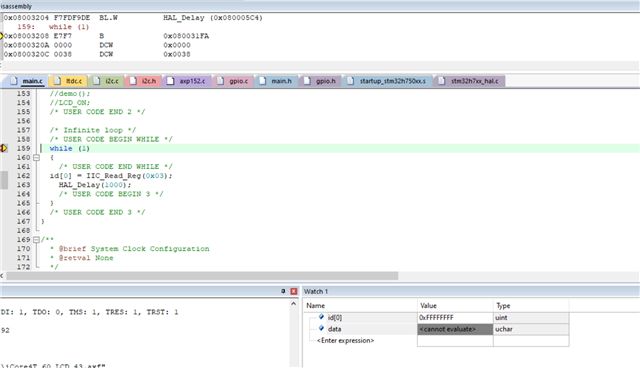
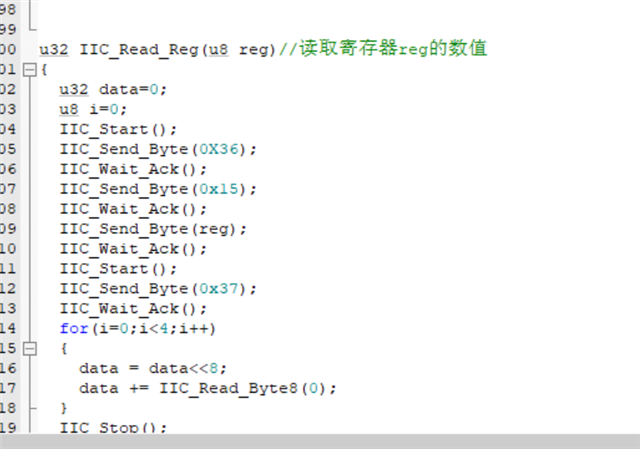
HI,I am a student studying DLP development. I use stm32h750 and dlp2000 for i2c communication, why can’t I read the register data?  IIC register (0x36 0x37).   the following pictures show the code. and the dubeg mode shows that the test register id[0]=0xFF,whatever id[0] is,the value is always 0xFF.

0
  • Please take MSP430 I2C codes as the I2C reference.

    https://www.ti.com/lit/zip/dlpc086

    It can work well with DLP I2C.

  • Thank you very much for your reply. But I still got some questions about your code. Could you please offer me a detailed reply?

    1、Since I used STM32H750, Will the different equipment we use change the usage of IIC?

    2、the "DLPC2607 Software Programmer's Guide" shows some register address and IIC commands , it seems to be different from yours.

    3、Could you please explain  in detail what each parameter in the functions is,the write_dpp3430_i2c() and read_dpp3430_i2c() [such as uint08 addr]

    4、Could you please show me the IIC address which you have used. is that 0x36 0x37 right? (I saw them from "DLPC2607 Software Programmer's Guide")

    Again, I‘'d like to express my warm thanks to you. Looking forward to your reply.

  • My purpose is to ask you to consider the I2C driver not  write_dpp3430_i2c() and read_dpp3430_i2c() API.

    I2C is the Philip interface standard. Your issue is not the I2C command, it is I2C driver.

    Please ignore the above DPP3430_I2C, which is for your timing reference.

    TI used BeagleBone Black I2C to do the test:

    https://www.ti.com/lit/pdf/dlpu049

    Page 11.

    You can see the Python script.

    To automate this process, we can employ sample scripts provided on the BeagleBone Black operating system. To find them, navigate to the directory "/opt/scripts/device/bone/capes/DLPDLCR2000/" and follow the README.txt file there to install the dlp_lightcrafter-1.0.19.tar package. Once installed, navigate back to the "DLPDLCR2000" directory and invoke python to run a script on the system. For example: 1. "cd /opt/scripts/device/bone/capes/DLPDLCR2000/" 2. "export DISPLAY=:0" 3. "python MplayerTest.py"

    Please check out the DLPC2607 MSP430 I2C driver interface for your reference. DLPC2607 is an old system released long time ago.

    void write_dpp2600_i2c(uint08 addr, uint08 subaddr, uint32 data, uint08 verify)
    {
    uint32 read_data;
    uint08 num_written;
    uint08 status;
    uint08 i2c_array[5];

    // clear fault indicator LED for this transaction
    P6OUT &= ~LED_IIC_FAULT;

    i2c_array[0] = subaddr;
    i2c_array[1] = (uint08) (data>>24);
    i2c_array[2] = (uint08) (data>>16);
    i2c_array[3] = (uint08) (data>>8);
    i2c_array[4] = (uint08) data;
    status = i2c_master_polled_write(addr, i2c_array, 5, &num_written, 30);

    // flag an error if necessary
    if ( (status != 0) || (num_written != 5) )
    P6OUT |= LED_IIC_FAULT;

    if ( verify ) {
    read_dpp2600_i2c(addr, subaddr, &read_data);

    // compare the read data to what we just sent
    if ( read_data != data ) {
    P6OUT |= LED_IIC_FAULT;
    }
    }
    }

    void read_dpp2600_i2c(uint08 addr, uint08 subaddr, uint32* data)
    {
    uint08 num_written, num_read;
    uint08 i2c_array[4];
    uint08 status;

    // clear fault indicator LED for this transaction
    P6OUT &= ~LED_IIC_FAULT;

    // setup the readback
    i2c_array[0] = (uint08) READ_REG_SELECT;
    i2c_array[1] = subaddr;
    status = i2c_master_polled_write(addr, i2c_array, 2, &num_written, 30);

    // flag an error if necessary
    if ( (status != 0) || num_written != 2 ) {
    P6OUT |= LED_IIC_FAULT;
    *data = 0;
    return;
    }

    // perform the read
    status = i2c_master_polled_read(addr, i2c_array, 4, &num_read, 30);

    // flag an error if necessary
    if ( (status != 0) || num_read != 4 ) {
    P6OUT |= LED_IIC_FAULT;
    *data = 0;
    return;
    }

    // concatenate the bytes to make a word
    *data = (uint32)i2c_array[0]<<24 |
    (uint32)i2c_array[1]<<16 |
    (uint32)i2c_array[2]<<8 |
    (uint32)i2c_array[3];
    }

    void write_i2c_1byte(uint08 addr, uint08 subaddr, uint08 data)
    {
    uint08 status;
    uint08 num_written;
    uint08 i2c_array[4];

    // clear fault indicator LED for this transaction
    P6OUT &= ~LED_IIC_FAULT;

    i2c_array[0] = subaddr;
    i2c_array[1] = data;
    status = i2c_master_polled_write(addr, i2c_array, 2, &num_written, 30);

    // flag the error if necessary
    if ( (status != 0) || (num_written != 2) )
    P6OUT |= LED_IIC_FAULT;
    }

    uint08 read_i2c_1byte(uint08 addr, uint08 subaddr, uint08* data)
    {
    /**
    * Read one byte of data on IIC bus
    *
    * @return 0 - no errors
    * 1 - IIC communication failed
    *
    */

    uint08 status, num_written, num_read;

    // clear fault indicator LED for this transaction
    P6OUT &= ~LED_IIC_FAULT;

    status = i2c_master_polled_write(addr, &subaddr, 1, &num_written, 30);

    // no sense continuing if the slave does not respond
    if ( status == I2C_NO_ACK )
    {
    P6OUT |= LED_IIC_FAULT;
    return 1;
    }

    status = i2c_master_polled_read(addr, data, 1, &num_read, 30);

    // flag the error if necessary
    if ( (status != 0) || (num_read != 1) )
    {
    P6OUT |= LED_IIC_FAULT;
    return 1;
    }

    return 0;
    }

  • Please also check 

    Page 6  for the I2C address and timing.

    https://www.ti.com/lit/ug/dlpu013a/