This thread has been locked.

If you have a related question, please click the "Ask a related question" button in the top right corner. The newly created question will be automatically linked to this question.

[参考译文] AM263P4:无法向 AM263Px MCAL 的 EB Tresos 添加插件

Guru**** 2535150 points
Other Parts Discussed in Thread: AM263P4

请注意,本文内容源自机器翻译,可能存在语法或其它翻译错误,仅供参考。如需获取准确内容,请参阅链接中的英语原文或自行翻译。

https://e2e.ti.com/support/microcontrollers/arm-based-microcontrollers-group/arm-based-microcontrollers/f/arm-based-microcontrollers-forum/1562969/am263p4-unable-to-add-plugin-to-eb-tresos-for-the-am263px-mcal

器件型号:AM263P4


工具/软件:

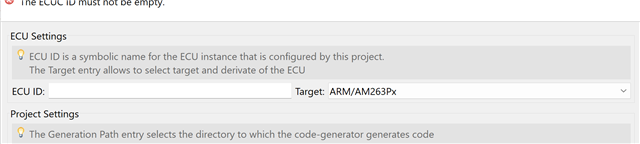
我按照说明将 MCAL 插件目录(在 MCAL AM263Px_10.02.00\mcal_config\plugins 中找到)的内容复制到我认为正确的位置 (C:\eB\tresos\plugins)。 但是、在 Tresos 中创建新的配置项目时、AM263P4 不会显示为目标器件。

  • 请注意,本文内容源自机器翻译,可能存在语法或其它翻译错误,仅供参考。如需获取准确内容,请参阅链接中的英语原文或自行翻译。

    您好、  

    很抱歉耽误响应。

    是否在更改名称的情况下进行复制?

    执行相同操作后、请重新启动 EB、您应该会在下拉列表中看到目标

    谢谢。此致、

    Nikhil Dasan

  • 请注意,本文内容源自机器翻译,可能存在语法或其它翻译错误,仅供参考。如需获取准确内容,请参阅链接中的英语原文或自行翻译。

    我们已经找出了问题。

    该文档显示“将所有插件从 MCAL 安装目录复制到*{EB_TRESOS_INSTALL_directory}\plugins 文件夹。“ 这是模糊和模棱两可的。

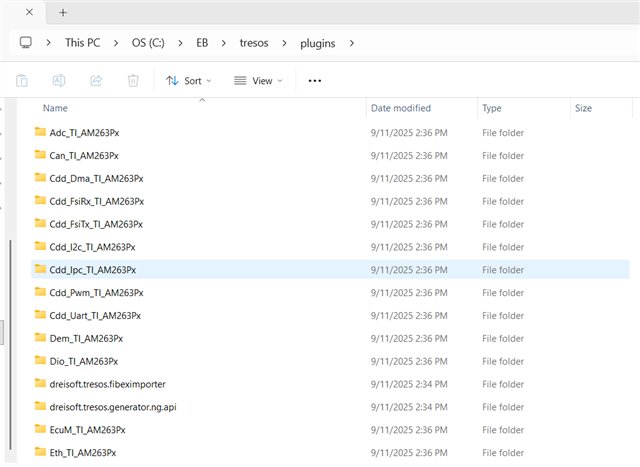
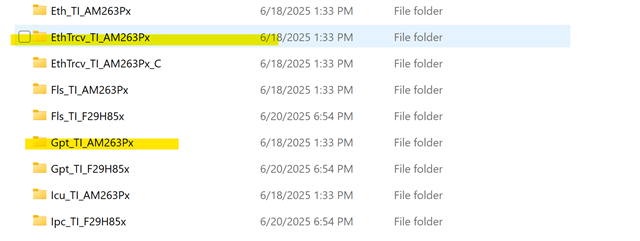
    应该说的是“将 MCAL 插件目录的全部内容、例如* MCAL AM263Px_10.02.00\mcal_config\plugins\AM263Px、复制到 *{EB_TRESOS_INSTALL_directory}\plugins 文件夹中“。 因此、Tresos 插件文件夹内容如下所示:

  • 请注意,本文内容源自机器翻译,可能存在语法或其它翻译错误,仅供参考。如需获取准确内容,请参阅链接中的英语原文或自行翻译。

    Sure Angelo、

    感谢您的反馈。 我们将在下一个 SDK 中输入此输入。