This thread has been locked.
If you have a related question, please click the "Ask a related question" button in the top right corner. The newly created question will be automatically linked to this question.
https://e2e.ti.com/support/microcontrollers/arm-based-microcontrollers-group/arm-based-microcontrollers/f/arm-based-microcontrollers-forum/1647982/faq-am2612-q1-how-to-run-am261-soc-at-200mhz-cpu-clock-frequency
尊敬的 TI 团队:
如何将 AM261 SoC 配置为以 200MHz CPU 时钟频率运行?
AM261 SoC 可在 200MHz CPU 时钟频率下运行。 这可以通过修改 PLL 配置以调整 CPU 时钟和 SYS 时钟来实现。
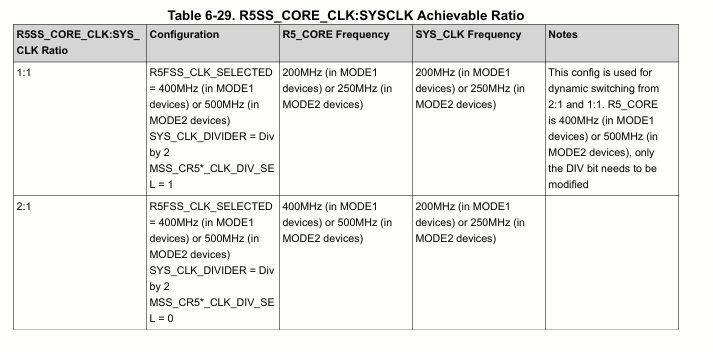
以 200MHz 运行时、AM261 TRM 中提到了所需的频率比。 需要遵循这一要求。 需要遵循 CPU 和 Sysclock 之间的时钟频率比值
以下是为运行 CPU @ 200MHz 而附加的补丁文件。 这适用于时钟发布工具简介之前的 AM261 MCU + SDK。
通过补丁文件执行修改
请按照以下步骤编译 SBL_OSPI 示例。
1.我们需要首先在 SDK 上应用路径文件。 该补丁已在 MCU_PLUS_SDK_am261x_10_00_01_10 上进行了测试。
应用补丁的命令: git Apply .\cpu_clock_fixed.patch
e2e.ti.com/.../0121.cpu_5F00_clock_5F00_fixed.patch
2、建造坟墓
构建 libs 的命令: gmake -sj32 -f .\makefile.am261x libs profile=debug
3.编译 SBL OSPI 示例。
4.构建 hello world 示例。 为了测量 CPU 速度、可以从 hello world 示例调用以下代码片段
void measureCpuSpeed(void)
{
    uint32_t startCounter = CycleCounterP_getCount32();
    uint32_t startTime = ClockP_getTimeUsec();

    ClockP_usleep(1000);

    uint32_t endCounter = CycleCounterP_getCount32();
    uint32_t endTime = ClockP_getTimeUsec();

    uint32_t elapsedCycles = endCounter - startCounter;
    uint32_t elapsedUsec = endTime - startTime;

    if (elapsedUsec > 0)
    {
        uint32_t cpuClockMHz = elapsedCycles / elapsedUsec;

        uint32_t cpuClockHz = (uint32_t)(((uint64_t)elapsedCycles * 1000000) / elapsedUsec);

        DebugP_log("CPU Freq: %u MHz (%u Hz)\r\n", cpuClockMHz, cpuClockHz);
    }
}
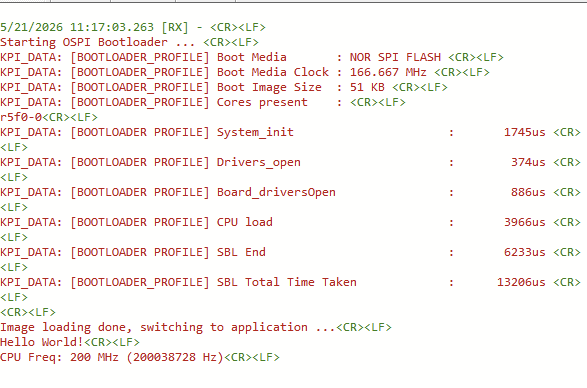
刷写图像并观察输出