


请注意,本文内容源自机器翻译,可能存在语法或其它翻译错误,仅供参考。如需获取准确内容,请参阅链接中的英语原文或自行翻译。
器件型号:MSP432E401Y 大家好、TI 社区、
我想启用它
#define FF_USE_FIND 1并使用这些功能创建 fatfs.a ffconf.h。 我可以清理、但无法构建。 这些是我采取的步骤。
1.禁用 C:\ti\simplelink_msp432e4_sdk_4_20_00_12\source\third_party/fatfs\makefile 中 CCS 编译器以外的编译器、并根据需要将 imports.mak 重命名为 imports.windows
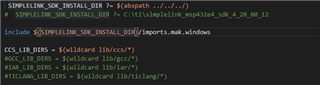
2.我然后着手进行编译。 无论我做什么、都无法找到文件。 我还尝试在 vpath 中使用 C:\ti\simplelink_msp432e4_sdk_4_20_00_12\source\third_party/fatfs 和 SIMPLELINK_SDK_INSTALL_DIR 中的 C:\ti\simplelink_msp432e4_sdk_4_4_20_00_12\等绝对路径。
SIMPLELINK_SDK_INSTALL_DIR ?= $(abspath ../../../../../../)
include $(SIMPLELINK_SDK_INSTALL_DIR)/imports.mak.windows

CC = "$(CCS_ARMCOMPILER)/bin/armcl"
AR = "$(CCS_ARMCOMPILER)/bin/armar"

OBJS = diskio.obj \
	ff.obj \
	ffcio.obj \
	ffsystem.obj \
	ffunicode.obj \
	ramdisk.obj

CFLAGS = -I../../../ -I$(SIMPLELINK_SDK_INSTALL_DIR)/source \
	"-I$(CCS_ARMCOMPILER)/include" --silicon_version=7M4 --code_state=16 \
	--little_endian --display_error_number --diag_warning=255 --diag_wrap=off \
	--gen_func_subsections=on --float_support=vfplib -O2 --symdebug:dwarf

ARFLAGS = -r

vpath %.c ../../../

%.obj: %.c
	@ $(CC) $(CFLAGS) $< --output_file=$@

all: fatfs.a

clean:
	@ $(RM) $(OBJS) fatfs.a > $(DEVNULL) 2>&1

fatfs.a: $(OBJS)
	@ echo "# Archiving $@"
	@ $(AR) $(ARFLAGS) $@ $^
我刚开始直接使用 makefile 文件、可能错过了一些重要的东西。 我找到了另一篇文章、其中指出将头文件 ff.h 和 ffconf.h 放入%.obj:%.c 但不起作用。 如果有任何见解,将不胜感激。 |
输出低于:
C:\ti\ccs1031\ccs\utils\bin>gmake -C "C:\ti\simplelink_msp432e4_sdk_4_20_00_12\source\third_party\fatfs" -f makefile clean
gmake: Entering directory 'C:/ti/simplelink_msp432e4_sdk_4_20_00_12/source/third_party/fatfs'
gmake[1]: Entering directory 'C:/ti/simplelink_msp432e4_sdk_4_20_00_12/source/third_party/fatfs/lib/ccs/m4'
gmake[1]: Leaving directory 'C:/ti/simplelink_msp432e4_sdk_4_20_00_12/source/third_party/fatfs/lib/ccs/m4'
gmake[1]: Entering directory 'C:/ti/simplelink_msp432e4_sdk_4_20_00_12/source/third_party/fatfs/lib/ccs/m4f'
gmake[1]: Leaving directory 'C:/ti/simplelink_msp432e4_sdk_4_20_00_12/source/third_party/fatfs/lib/ccs/m4f'
gmake: Leaving directory 'C:/ti/simplelink_msp432e4_sdk_4_20_00_12/source/third_party/fatfs'

C:\ti\ccs1031\ccs\utils\bin>gmake -C "C:\ti\simplelink_msp432e4_sdk_4_20_00_12\source\third_party\fatfs" -f makefile all
gmake: Entering directory 'C:/ti/simplelink_msp432e4_sdk_4_20_00_12/source/third_party/fatfs'
gmake[1]: Entering directory 'C:/ti/simplelink_msp432e4_sdk_4_20_00_12/source/third_party/fatfs/lib/ccs/m4'
process_begin: CreateProcess(NULL, c:/ti/ccs1010/ccs/tools/compiler/ti-cgt-arm_20.2.1.LTS/bin/armcl -I../../../ -IC:/ti/simplelink_msp432e4_sdk_4_20_00_12/source -Ic:/ti/ccs1010/ccs/tools/compiler/ti-cgt-arm_20.2.1.LTS/include --silicon_version=7M4 --code_state=16 --little_endian --display_error_number --diag_warning=255 --diag_wrap=off --gen_func_subsections=on --float_support=vfplib -O2 --symdebug:dwarf ../../../diskio.c --output_file=diskio.obj, ...) failed.
make (e=2): The system cannot find the file specified.
makefile:24: recipe for target 'diskio.obj' failed
gmake[1]: *** [diskio.obj] Error 2
gmake[1]: Leaving directory 'C:/ti/simplelink_msp432e4_sdk_4_20_00_12/source/third_party/fatfs/lib/ccs/m4'
makefile:36: recipe for target 'lib/ccs/m4' failed
gmake: *** [lib/ccs/m4] Error 2
gmake: Leaving directory 'C:/ti/simplelink_msp432e4_sdk_4_20_00_12/source/third_party/fatfs'

C:\ti\ccs1031\ccs\utils\bin>
谢谢、
乌特 sav
