
我需要使用 GPIO 引脚作为芯片选择来提供 SPI 器件。
我找不到任何工作示例。
现在我基于回送 SPI 示例、但看不到如何将另一个引脚配置为 CS。
Anny 已知示例? 或如何完成代码将被设置为密码。
Maccabi
This thread has been locked.
If you have a related question, please click the "Ask a related question" button in the top right corner. The newly created question will be automatically linked to this question.
我需要使用 GPIO 引脚作为芯片选择来提供 SPI 器件。
我找不到任何工作示例。
现在我基于回送 SPI 示例、但看不到如何将另一个引脚配置为 CS。
Anny 已知示例? 或如何完成代码将被设置为密码。
Maccabi
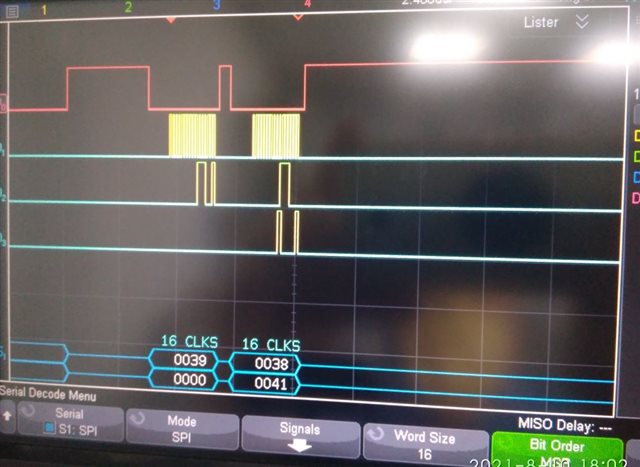
您好!
确保可以使用 GPIO 作为芯片选择。 首先参考 project0示例、了解如何使用 GPIO 引脚。 请参阅 C:\ti\TivaWare_C_Series-2.2.0.295\examples\boards\ek-tm4c1294xl\project0。 选择要用作 CS 引脚的任何 GPIO 引脚。
然后、您将执行如下步骤所示的操作。
-将 GPIO 引脚驱动为低电平。 GPIO 用作从器件的片选。
-调用 SSIDataPut()发送数据。
-将 GPIO 引脚驱动为高电平以取消选择 CS。
有关 SPI 示例、另请参阅 C:\ti\TivaWare_C_Series-2.2.0.295\examples\boards\ek-tm4c1294xl\ssi_main_slave_xfer。
谢谢
当我使用环回示例(SSI1 -从器件、SSI0 -主器件)时、我首先从从器件写入、然后从主器件写入
就像在示例中一样-在 MISO 线路上看不到任何东西、只有在 MOSI 上。
for (ui32Index = 0;ui32Index < 2;ui32Index++)
{
MAP_GPIOPinWrite (GPIO_PORTD_BASE、GPIO_PIN_4、0);
MAP_SSIDataPut (SSI1_base、pui32DataTX1[ui32Index]);
MAP_SSIDataPut (SSI0_BASE、pui32DataTx[ui32Index]);
for (jjj=0;jj<22;jjj++);//wait - needed
MAP_GPIOPinWrite (GPIO_PORTD_base、GPIO_PIN_4、GPIO_PIN_4);
}
如果我添加另 一个- MAP_SSIDataPut (SSI1_base、pui32DataTx1[0]);上面的行只能得到第二个数组值。
意思是,我从从属方发送一个字,然后从主控方发出一个字(从从属方无响应)
然后看到从器件的另一个字和第一个从器件发送的值。
如何在第一个主器件发送的值上设置从器件应答?
您好!
在将芯片选择取消为高电平之前、您需要等待传输完成。 我修改了该示例、将 GPIOA3用于芯片选择、它对我来说很有用。
for(ui32Index = 0; ui32Index < NUM_SSI_DATA; ui32Index++)
{
MAP_GPIOPinWrite(GPIO_PORTA_BASE,GPIO_PIN_3, 0);
//
// Prepare data to send from the slave.
//
MAP_SSIDataPut(SSI1_BASE, pui32DataTx1[ui32Index]);
//
// Send the data using the "blocking" put function. This function
// will wait until there is room in the send FIFO before returning.
// This allows you to assure that all the data you send makes it into
// the send FIFO.
//
MAP_SSIDataPut(SSI0_BASE, pui32DataTx[ui32Index]);
while (SSIBusy(SSI0_BASE));
MAP_GPIOPinWrite(GPIO_PORTA_BASE,GPIO_PIN_3, GPIO_PIN_3);
}
好的、我使它正常工作。 请参阅以下代码片段。 在从主器件接收时钟之前、我们需要先填充从器件 TXFIFO 中的数据。 与之前的情况一样、从器件 TXFIFO 在接收到来自主器件的 SPICLK 时还没有数据。 因此、它发送0。 我认为这与数据表说明相匹配。 在主器件发送时钟之前、只需确保从器件 TXFIFO 中已经有一些数据。
17.3.2.1发送 FIFO
通用发送 FIFO 是一个16位宽、8位置深、先入先出的存储器缓冲器。 。
CPU 通过写 SSI 数据寄存器(SSIDR)将数据写入 FIFO、数据为
存储在 FIFO 中、直到被发送逻辑读出。
当配置为主器件或从器件时、并行数据会在发送 FIFO 中写入、然后再写入
传统 SSI 串行转换和通过分别发送到连接的从机或主机
SSInDAT0/SSInTX 引脚。
在从机模式下、当主机每次发起一个传输时、传统 SSI 都会发送数据。 如果
发送 FIFO 为空、主机启动时、从机发送中的第8个最新值
发送 FIFO。 如果 SSI 模块之后写入发送 FIFO 的值少于8个
使用 RCGCSSI 寄存器中的 Rn 位或使用 SRSSI 复位 QSSI 时钟启用
那么0被发送。 应注意确保 FIFO 中的有效数据与相同
需要。 QSSI 模块可配置为在 FIFO 中产生中断或 μ μDMA 请求
为空。
//
// Initialize the data to send.
//
pui32DataTx[0] = 'T';
pui32DataTx[1] = 'I';
pui32DataTx[2] = 'V';
pui32DataTx[3] = 'A';
pui32DataTx1[0] = 'Q';
pui32DataTx1[1] = 'S';
pui32DataTx1[2] = 'S';
pui32DataTx1[3] = 'I';
//
// Display indication that the SSI0/SSI1 is transmitting data.
//
UARTprintf("SSI0 Sent:\n ");
UARTprintf("'T' 'I' 'V' 'A' \n");
UARTprintf("SSI1 Sent:\n ");
UARTprintf("'Q' 'S' 'S' 'I' \n");
//
// Send 4 bytes of data.
//
for(ui32Index = 0; ui32Index < NUM_SSI_DATA; ui32Index++)
{
//
// Fill the slave FIFO with 4 data
//
MAP_SSIDataPut(SSI1_BASE, pui32DataTx1[ui32Index]);
}
//
// Send 4 bytes of data.
//
for(ui32Index = 0; ui32Index < NUM_SSI_DATA; ui32Index++)
{
MAP_GPIOPinWrite(GPIO_PORTA_BASE,GPIO_PIN_3, 0);
//
// Prepare data to send from the slave.
//
// MAP_SSIDataPut(SSI1_BASE, pui32DataTx1[ui32Index]);
//
// Send the data using the "blocking" put function. This function
// will wait until there is room in the send FIFO before returning.
// This allows you to assure that all the data you send makes it into
// the send FIFO.
//
MAP_SSIDataPut(SSI0_BASE, pui32DataTx[ui32Index]);
while (SSIBusy(SSI0_BASE));
MAP_GPIOPinWrite(GPIO_PORTA_BASE,GPIO_PIN_3, GPIO_PIN_3);
}
