This thread has been locked.

If you have a related question, please click the "Ask a related question" button in the top right corner. The newly created question will be automatically linked to this question.

[参考译文] TMS570LC4357:HALCoGen 04.07.01 GUI 混合了重叠图形

Guru**** 2524460 points
Other Parts Discussed in Thread: HALCOGEN

请注意,本文内容源自机器翻译,可能存在语法或其它翻译错误,仅供参考。如需获取准确内容,请参阅链接中的英语原文或自行翻译。

https://e2e.ti.com/support/microcontrollers/arm-based-microcontrollers-group/arm-based-microcontrollers/f/arm-based-microcontrollers-forum/846904/tms570lc4357-halcogen-04-07-01-gui-mixed-up-and-overlapped-graphics

器件型号:TMS570LC4357
主题中讨论的其他器件:HALCOGEN

尊敬的各位成员:

我已尝试将显示器和应用程序字体设置为100%、125%、150%。

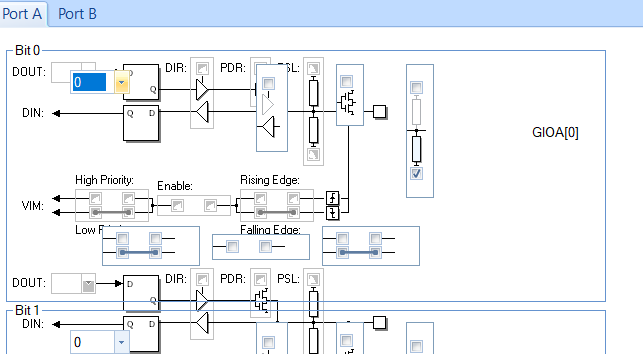
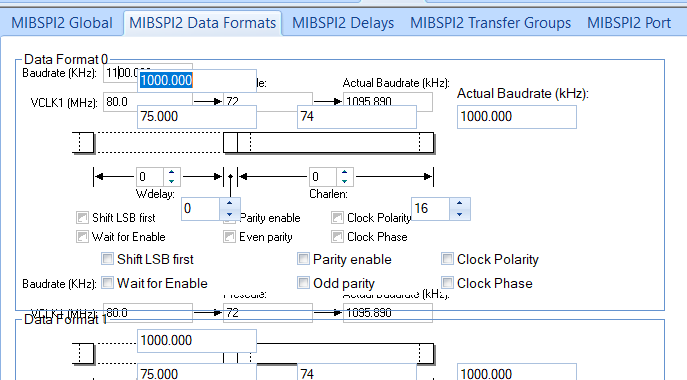
我仍然有随附的混合或重叠的 GUI 图形。

我使用的是 win10、HALCoGen 04.07.01、2个扩展监视器(我也尝试过在与扩展监视器断开连接时遇到的相同 GUI 问题)。

有人可以建议另一种尝试方式吗?  

非常感谢
  • 请注意,本文内容源自机器翻译,可能存在语法或其它翻译错误,仅供参考。如需获取准确内容,请参阅链接中的英语原文或自行翻译。

    您好!

    HALCoGen 必须仅使用默认的100%字体大小。

    您可能需要重新启动 PC 以使新设置生效。 可以试试吗?

  • 请注意,本文内容源自机器翻译,可能存在语法或其它翻译错误,仅供参考。如需获取准确内容,请参阅链接中的英语原文或自行翻译。

    你(们)好、Miro

    谢谢,我尝试了它。  

    我想我忘记同时将扩展显示器调整为100%。