
请注意,本文内容源自机器翻译,可能存在语法或其它翻译错误,仅供参考。如需获取准确内容,请参阅链接中的英语原文或自行翻译。
器件型号:MSP432E401Y 主题中讨论的其他器件:UNIFLASH、
大家好,
我生成了一个文件夹,其中包含一个 bat 文件,用于使用 Uniflash 的独立命令行将映像刷写到 msp432e401y 中。 但我的问题是,我需要一个接一个地刷新2个不同的图像,每当我运行 bat 文件一次时,任何人都能帮助我解决这个问题。
谢谢你。
This thread has been locked.
If you have a related question, please click the "Ask a related question" button in the top right corner. The newly created question will be automatically linked to this question.
大家好,
我生成了一个文件夹,其中包含一个 bat 文件,用于使用 Uniflash 的独立命令行将映像刷写到 msp432e401y 中。 但我的问题是,我需要一个接一个地刷新2个不同的图像,每当我运行 bat 文件一次时,任何人都能帮助我解决这个问题。
谢谢你。
您好!
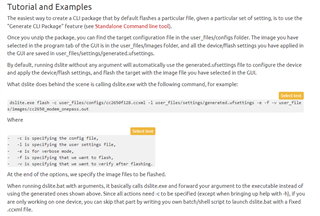
请参阅 https://software-dl.ti.com/ccs/esd/uniflash/docs/v5_0/quick_start_guide/uniflash_quick_start_guide.html 上的此 Uniflash 快速入门指南。 您应该能够将这两个文件指定为参数。 请参见下面的示例。
dslite flash --config=ccxml-file [options] [flash-file1 flash-file2...]
-c [ --config ] arg Target Configuration (ccxml) file, must be
supplied other than running --help. CCXML
file can be generated and exported using
the Uniflash GUI or Code Composer Studio.
-n [ --core ] arg (=0) Zero based index of core to operate on.
-S [ --list-settings ] arg Takes a regex and list the final values
applied to the matching settings. (ie; use
.* to list all available settings)
-p [ --list-ops ] List the available flash operations.
-I [ --list-device-cmds ] List the available device commands, if
any.
-l [ --load-settings ] arg Apply settings file generated by UniFlash
GUI.
-s [ --setting ] arg Override a specific setting by using
id=value. Can be specified multiple
times.
-b [ --before ] arg Operation(s) to perform before loading.
Can be specified multiple times, and are
performed in the order they appear on the
command line. Get a list of operations by
using --list-ops.
-f [ --flash ] Load the file(s) specified at the end of
the command line to flash. This is
assumed to be set unless verify is set.
-v [ --verify ] Verify the file(s) specified at the end of
the command line.
-a [ --after ] arg Optional operation to perform after
loading. Can be specified multiple times,
and are performed in the order they appear
on the command line. Get a list of
operations by using --list-ops.
-R [ --list-resets ] List of resets that can be done after
program load and verification.
-r [ --reset ] arg Set reset operation to be done after
program load and verification.
-O [ --post-flash-device-cmd ] arg Execute the given device command. Get a
list of device commands by using
--list-device-cmds.
-t [ --timeout ] arg Timeout in seconds, infinite if
unspecified.
-g [ --log ] arg Enable detailed logging to the specified
file.
-e [ --verbose ] Outputs progress messages to the console.
-h [ --help ] Print this message.
