This thread has been locked.

If you have a related question, please click the "Ask a related question" button in the top right corner. The newly created question will be automatically linked to this question.

[参考译文] TLV320AIC3262:在 TI Linux SDK 9.03 上移植 TLV320AIC3262 驱动程序

Guru**** 2540720 points
Other Parts Discussed in Thread: AM5728, TLV320AIC3262

请注意,本文内容源自机器翻译,可能存在语法或其它翻译错误,仅供参考。如需获取准确内容,请参阅链接中的英语原文或自行翻译。

https://e2e.ti.com/support/audio-group/audio/f/audio-forum/1554257/tlv320aic3262-porting-tlv320aic3262-driver-on-ti-linux-sdk-9-03

器件型号:TLV320AIC3262
主题中讨论的其他器件:AM5728

工具/软件:

您好、  

我有一个运行 TI 的基于 am5728 SOC 的定制板  Linux SDK 9.03  我想为 TLV320AIC3262 器件移植驱动程序。

但我在 sound/codecs/ soc 目录中没有看到此设备的任何驱动程序文件。

请指导我完成所需的步骤。

- Vishal  

  • 请注意,本文内容源自机器翻译,可能存在语法或其它翻译错误,仅供参考。如需获取准确内容,请参阅链接中的英语原文或自行翻译。

    你好、Vishal、

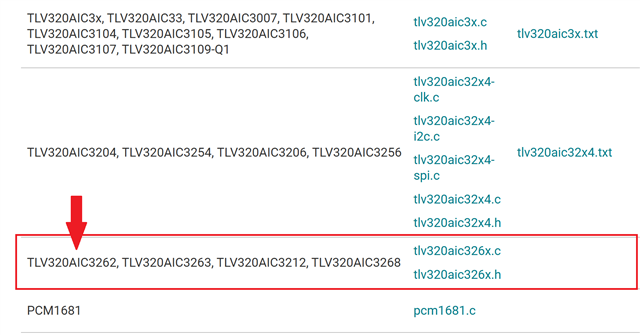
    您 可以   在此页面中找到不同器件的所有可用 Linux 驱动程序。  

     https://e2e.ti.com/support/audio-group/audio/f/audio-forum/773056/faq-linux-drivers-device-drivers-for-aic31xx-dac31xx-aic325x-aic320x-aic326x-aic321x 

    此致、

    Arash

  • 请注意,本文内容源自机器翻译,可能存在语法或其它翻译错误,仅供参考。如需获取准确内容,请参阅链接中的英语原文或自行翻译。

    你好、Vishal、我 请我们的一位软件专家 Raphael 来看看这个、因为我不是帮助 furthur 的合适人选。

    此致、

    Arash

  • 请注意,本文内容源自机器翻译,可能存在语法或其它翻译错误,仅供参考。如需获取准确内容,请参阅链接中的英语原文或自行翻译。

    您好、Arash、

    您能否尽早提供答复? 由于这个问题、我无法继续。

  • 请注意,本文内容源自机器翻译,可能存在语法或其它翻译错误,仅供参考。如需获取准确内容,请参阅链接中的英语原文或自行翻译。

    Vishal Maheshwari Josue Zamitiz-Ayala. 

    对不起,当我想要删除特定的旧修补程序时,我不小心删除了内容,以避免混淆。  

    我将再次附加该补丁和最新的解决方案。

    e2e.ti.com/.../v3_2D00_0001_2D00_Add_2D00_driver_2D00_for_2D00_tlv320aic3262.patch

    -----

    来自 Vishal Maheshwari 的最新评论 

    在 dtsi 文件中设置兼容字符串后 aic3xxx_i2c_probe   驱动程序/MFD/tlv320aic3xxx-i2c.c 文件中的函数被调用、但 仍然检测不到声卡、如下所示。

    root@am57xx-evm:~# aplay -l aplay: device_list:274: no soundcards found...

    所以我添加了相同的内容 兼容  sound/scodecs/tlv320aic326x.c soc 驱动程序文件中的字符串、如下所示。

    static const struct of_device_id aic3262_of_match[] = {
        { .compatible = "ti,aic3262", },
        { .compatible = "ti,aic3268", },
        { .compatible = "ti,tlv320aic3262", },
        { },
    };

    最后会检测到声卡。

    root@am57xx-evm:~# aplay -L
    null   Discard all samples (playback) or generate zero samples (capture) 
    default:
      CARD=BeagleBoardX15    BeagleBoard-X15, davinci-mcasp.0-aic326x-asi1 aic326x-asi1-0    Default Audio Device
    sysdefault:
      CARD=BeagleBoardX15    BeagleBoard-X15, davinci-mcasp.0-aic326x-asi1 aic326x-asi1-0    Default Audio Deviceroot@am57xx-evm:~# aplay -l**** List of PLAYBACK Hardware Devices ****card 0: BeagleBoardX15 [BeagleBoard-X15], device 0: davinci-mcasp.0-aic326x-asi1 aic326x-asi1-0 [davinci-mcasp.0-aic326x-asi1 aic326x-asi1-0]  Subdevices: 1/1  Subdevice #0: subdevice #0
    

    谢谢你们两人!

    我现在将尝试录制和播放声音。

    -----

  • 请注意,本文内容源自机器翻译,可能存在语法或其它翻译错误,仅供参考。如需获取准确内容,请参阅链接中的英语原文或自行翻译。

    你好 Niranjan Holalu Yogendra ,

    添加 {.compatible =“ti,tlv320aic3262",“,}、}、   指定  sound/scodecs/tlv320aic326x.c soc 示例。

    而不添加该功能 aplay -L / aplay -l 无法在我的定制电路板上工作。

    此外、现在音频设备正在工作、我可以分别使用录制和播放功能来捕获和播放声音。  

    - Vishal