
This thread has been locked.

If you have a related question, please click the "Ask a related question" button in the top right corner. The newly created question will be automatically linked to this question.

[参考译文] CC2745R10-Q1:请确认使用 ECDH_generatePublicKey

Guru**** 2524550 points
Other Parts Discussed in Thread: CC2745R10-Q1

请注意,本文内容源自机器翻译,可能存在语法或其它翻译错误,仅供参考。如需获取准确内容,请参阅链接中的英语原文或自行翻译。

https://e2e.ti.com/support/wireless-connectivity/bluetooth-group/bluetooth/f/bluetooth-forum/1563287/cc2745r10-q1-please-confirm-the-use-of-ecdh_generatepublickey

器件型号:CC2745R10-Q1


工具/软件:

我的环境如下:
板:CC2745R10-Q1
调试器:XDS110
SDK:SimpleLink Lowpower f3 ver.9.10.00.83
IDE:IAR Embedded Workbench for ARM 9.60.3.7274

我正尝试从 PSA 存储器中存储的私钥生成一个公钥、
但完成 ECDH_generatePublicKey() 后 S2T_STATUS 的值为–33。
如何解决此问题?
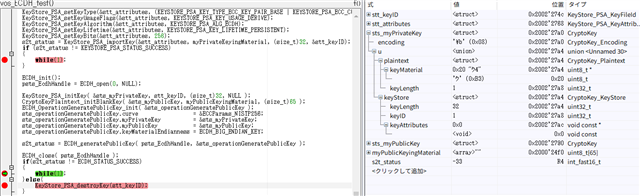
static uint8_t myPrivateKeyingMaterial[32] = {0x00, 0x00, 0x00, 0x00, 0x00, 0x00, 0x00, 0x00, \
                                              0x00, 0x00, 0x00, 0x00, 0x00, 0x00, 0x00, 0x00, \
                                              0x00, 0x00, 0x00, 0x00, 0x00, 0x00, 0x00, 0x00, \
                                              0x00, 0x00, 0x00, 0x00, 0x00, 0x00, 0x00, 0x01 };
static uint8_t myPublicKeyingMaterial[65] = { 0 };

static void vos_ECDH_test()
{
    KeyStore_PSA_KeyFileId      stt_keyID;
    KeyStore_PSA_KeyAttributes  stt_attributes = KEYSTORE_PSA_KEY_ATTRIBUTES_INIT;
    ECDH_OperationGeneratePublicKey sts_operationGeneratePublicKey;
    CryptoKey    sts_myPrivateKey;
    CryptoKey    sts_myPublicKey;
    ECDH_Handle  psts_EcdhHandle;
    int_fast16_t s2t_status;

    s2t_status = psa_crypto_init();
    if (s2t_status != PSA_SUCCESS)
    {
        while(1);
    }

    s2t_status = HSMLPF3_provisionHUK();
    if (s2t_status != HSMLPF3_STATUS_SUCCESS)
    {
        while(1);
    }

    GET_KEY_ID(stt_keyID, KEYSTORE_PSA_KEY_ID_USER_MIN);
    KeyStore_PSA_setKeyId(&stt_attributes, stt_keyID);
    KeyStore_PSA_setKeyType(&stt_attributes, (KEYSTORE_PSA_KEY_TYPE_ECC_KEY_PAIR_BASE | KEYSTORE_PSA_ECC_CURVE_SECP256R1) );
    KeyStore_PSA_setKeyUsageFlags(&stt_attributes, KEYSTORE_PSA_KEY_USAGE_DERIVE);
    KeyStore_PSA_setKeyAlgorithm(&stt_attributes, KEYSTORE_PSA_ALG_ECDH);
    KeyStore_PSA_setKeyLifetime(&stt_attributes, KEYSTORE_PSA_KEY_LIFETIME_PERSISTENT);
    KeyStore_PSA_setKeyBits(&stt_attributes, 256);
    s2t_status = KeyStore_PSA_importKey(&stt_attributes, myPrivateKeyingMaterial, (size_t)32, &stt_keyID);
    if (s2t_status != KEYSTORE_PSA_STATUS_SUCCESS)
    {
        while(1);
    }

    ECDH_init();
    psts_EcdhHandle = ECDH_open(0, NULL);

    KeyStore_PSA_initKey( &sts_myPrivateKey, stt_keyID, (size_t)32, NULL );
    CryptoKeyPlaintext_initBlankKey( &sts_myPublicKey, myPublicKeyingMaterial, (size_t)65 );
    ECDH_OperationGeneratePublicKey_init( &sts_operationGeneratePublicKey );
    sts_operationGeneratePublicKey.curve                 = &ECCParams_NISTP256;
    sts_operationGeneratePublicKey.myPrivateKey          = &sts_myPrivateKey;
    sts_operationGeneratePublicKey.myPublicKey           = &sts_myPublicKey;
    sts_operationGeneratePublicKey.keyMaterialEndianness = ECDH_BIG_ENDIAN_KEY;

    s2t_status = ECDH_generatePublicKey( psts_EcdhHandle, &sts_operationGeneratePublicKey );
    
    ECDH_close( psts_EcdhHandle );
    if(s2t_status != ECDH_STATUS_SUCCESS)
    {
        while(1);
    }else{
        KeyStore_PSA_destroyKey(stt_keyID);
    }
}

  • 请注意,本文内容源自机器翻译,可能存在语法或其它翻译错误,仅供参考。如需获取准确内容,请参阅链接中的英语原文或自行翻译。

    您好:

    您似乎正在混合各种 API。 如果您使用的是 PSA、则只能使用 PSA、而不能使用 SimpleLink API。 它们不兼容。 建议使用 PSA API。 下面是一个使用 PSA API 的示例。

    /* For usleep() */
    #include <unistd.h>
    #include <stdint.h>
    #include <stddef.h>
    
    /* Driver Header files */
    #include <ti/drivers/GPIO.h>
    #include <ti/display/Display.h>
    #include <ti/display/DisplayUart2.h>
    #include <third_party/psa_crypto/include/psa/crypto.h>
    #include <ti/drivers/cryptoutils/hsm/HSMLPF3.h>
    
    /* Driver configuration */
    #include "ti_drivers_config.h"
    
    
    Display_Handle handle;
    Display_Params d_params;
    
    /** PSA Specific defines **/
    #define KEY_BITS 256
    #define KEY_TYPE PSA_KEY_TYPE_ECC_KEY_PAIR(PSA_ECC_FAMILY_SECP_R1)
    #define KEY_ALG  PSA_ALG_ECDSA(PSA_ALG_SHA_256)
    
    const uint8_t message[6] = {0x01, 0x02, 0x03, 0x04, 0x05, 0x06};
    
    /*
     *  ======== mainThread ========
     */
    void *mainThread(void *arg0)
    {
        psa_status_t status;
        int_fast16_t ret;
    
        Display_Params_init(&d_params);
        handle = Display_open(CONFIG_Display_0, &d_params);
    
        /** Initialize PSA **/
        status = psa_crypto_init();
        if (status != PSA_SUCCESS)
        {
            /** Error Handling **/
            Display_printf(handle, 0, DisplayUart2_SCROLLING, "PSA: Init failed.");
            while(1);
        }
    
        /** Provision the hardware unique key **/
        ret = HSMLPF3_provisionHUK();
        if (ret != HSMLPF3_STATUS_SUCCESS)
        {
            Display_printf(handle, 0, DisplayUart2_SCROLLING, "PSA: HUK provisioning failed.");
            while(1);
        }
    
        /**** ECDSA Key Generation ****/
        psa_key_id_t key_id;
    
        /* To store generated public key */
        uint8_t public_key[PSA_KEY_EXPORT_ECC_PUBLIC_KEY_MAX_SIZE(KEY_BITS)];
        size_t public_key_length = 0;
    
        psa_key_attributes_t attributes = PSA_KEY_ATTRIBUTES_INIT;
    
        /* Since we want to sign messages, we need PSA_KEY_USAGE_SIGN_HASH */
        psa_set_key_usage_flags(&attributes, PSA_KEY_USAGE_SIGN_HASH);
    
        /* We are using these keys for ECDSA, and the hashing algorithm used is SHA-256 */
        psa_set_key_algorithm(&attributes, KEY_ALG);
    
        /* This is where we are setting out curve */
        psa_set_key_type(&attributes, KEY_TYPE);
    
        /* This is the bit size of the hash algorithm we are using (SHA-256) */
        psa_set_key_bits(&attributes, KEY_BITS);
    
        /* This will generate our key */
        status = psa_generate_key(&attributes, &key_id);
        if (status != PSA_SUCCESS)
        {
            Display_printf(handle, 0, DisplayUart2_SCROLLING, "PSA: Key generation failed. %d", status);
            while(1);
        }
    
        /* Now we want to export our PUBLIC key */
        status = psa_export_public_key(key_id, public_key, sizeof(public_key), &public_key_length);
        if (status != PSA_SUCCESS)
        {
            Display_printf(handle, 0, DisplayUart2_SCROLLING, "PSA: export failed. %d", status);
            while(1);
        }
    
        /**** ECDSA Key Generation Done ****/
    
        /**** ECDSA Signing ****/
        /** Our buffer to hold the signature **/
        uint8_t signature[PSA_SIGN_OUTPUT_SIZE(KEY_TYPE, KEY_BITS, KEY_ALG)];
        size_t signature_length = 0;
    
        status = psa_sign_message(key_id,
                                  KEY_ALG,
                                  message,
                                  6,
                                  signature,
                                  PSA_SIGN_OUTPUT_SIZE(KEY_TYPE, KEY_BITS, KEY_ALG),
                                  &signature_length);
    
        if (status != PSA_SUCCESS)
        {
            Display_printf(handle, 0, DisplayUart2_SCROLLING, "PSA: sign failed. %d", status);
            while(1);
        }
        /**** ECDSA Signing Done ****/
    
        /**** Import ECDSA Public Key ****/
        psa_key_id_t p_key_id = PSA_KEY_ID_USER_MIN + 1;
        psa_key_attributes_t p_attributes = PSA_KEY_ATTRIBUTES_INIT;
    
        /* the public key is used to verify */
        psa_set_key_usage_flags(&p_attributes, PSA_KEY_USAGE_VERIFY_HASH);
    
        /* We are using these keys for ECDSA, and the hashing algorithm used is SHA-256 */
        psa_set_key_algorithm(&p_attributes, KEY_ALG);
    
        /* This is where we are setting out curve */
        psa_set_key_type(&p_attributes, PSA_KEY_TYPE_ECC_PUBLIC_KEY(PSA_ECC_FAMILY_SECP_R1));
    
        /* Key bits of the curve type */
        psa_set_key_bits(&p_attributes, KEY_BITS);
    
        status = psa_import_key(&p_attributes, public_key, public_key_length, &p_key_id);
    
        if (status != PSA_SUCCESS)
        {
            Display_printf(handle, 0, DisplayUart2_SCROLLING, "PSA: import public key failed. %d", status);
            while(1);
        }
        /**** Import ECDSA Public Key Done ****/
    
        /**** Verify message ****/
        status = psa_verify_message(p_key_id,
                                  KEY_ALG,
                                  message,
                                  6,
                                  signature,
                                  signature_length);
    
        if (status != PSA_SUCCESS)
        {
            Display_printf(handle, 0, DisplayUart2_SCROLLING, "PSA: Verify failed. %d", status);
            while(1);
        }
        /**** Verify message done ****/
    
        GPIO_write(GREEN_LED, 1);
        while(1);
    }

    此致、

    Nima Behmanesh

  • 请注意,本文内容源自机器翻译,可能存在语法或其它翻译错误,仅供参考。如需获取准确内容,请参阅链接中的英语原文或自行翻译。

    您好:
    我想仅使用 SimpleLink API 来实现此功能。 这是可能的吗?
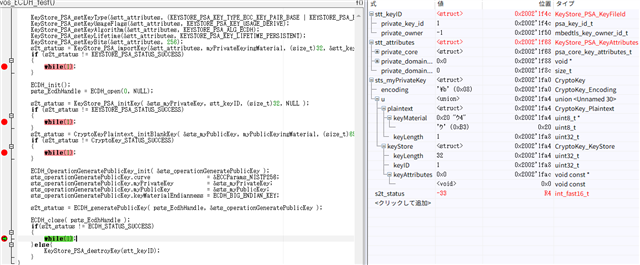
    当我使用修改后的源代码运行它时、当 ECDH_generatePublicKey () 完成时、S2T_STATUS 的值保持为–33。

    static uint8_t myPrivateKeyingMaterial[32] = {0x00, 0x00, 0x00, 0x00, 0x00, 0x00, 0x00, 0x00, \
                                                  0x00, 0x00, 0x00, 0x00, 0x00, 0x00, 0x00, 0x00, \
                                                  0x00, 0x00, 0x00, 0x00, 0x00, 0x00, 0x00, 0x00, \
                                                  0x00, 0x00, 0x00, 0x00, 0x00, 0x00, 0x00, 0x01 };
    static uint8_t myPublicKeyingMaterial[65] = { 0 };
    
    static void vos_ECDH_test()
    {
        KeyStore_PSA_KeyFileId      stt_keyID;
        KeyStore_PSA_KeyAttributes  stt_attributes = KEYSTORE_PSA_KEY_ATTRIBUTES_INIT;
        ECDH_OperationGeneratePublicKey sts_operationGeneratePublicKey;
        CryptoKey    sts_myPrivateKey;
        CryptoKey    sts_myPublicKey;
        ECDH_Handle  psts_EcdhHandle;
        int_fast16_t s2t_status;
    
        s2t_status = KeyStore_PSA_init();
        if (s2t_status != KEYSTORE_PSA_STATUS_SUCCESS)
        {
            while(1);
        }
    
        s2t_status = HSMLPF3_provisionHUK();
        if (s2t_status != HSMLPF3_STATUS_SUCCESS)
        {
            while(1);
        }
    
        GET_KEY_ID(stt_keyID, KEYSTORE_PSA_KEY_ID_USER_MIN);
        KeyStore_PSA_setKeyId(&stt_attributes, stt_keyID);
        KeyStore_PSA_setKeyType(&stt_attributes, (KEYSTORE_PSA_KEY_TYPE_ECC_KEY_PAIR_BASE | KEYSTORE_PSA_ECC_CURVE_SECP256R1) );
        KeyStore_PSA_setKeyUsageFlags(&stt_attributes, KEYSTORE_PSA_KEY_USAGE_DERIVE);
        KeyStore_PSA_setKeyAlgorithm(&stt_attributes, KEYSTORE_PSA_ALG_ECDH);
        KeyStore_PSA_setKeyLifetime(&stt_attributes, KEYSTORE_PSA_KEY_LIFETIME_PERSISTENT);
        KeyStore_PSA_setKeyBits(&stt_attributes, 256);
        s2t_status = KeyStore_PSA_importKey(&stt_attributes, myPrivateKeyingMaterial, (size_t)32, &stt_keyID);
        if (s2t_status != KEYSTORE_PSA_STATUS_SUCCESS)
        {
            while(1);
        }
    
        ECDH_init();
        psts_EcdhHandle = ECDH_open(0, NULL);
    
        s2t_status = KeyStore_PSA_initKey( &sts_myPrivateKey, stt_keyID, (size_t)32, NULL );
        if (s2t_status != KEYSTORE_PSA_STATUS_SUCCESS)
        {
            while(1);
        }
        s2t_status = CryptoKeyPlaintext_initBlankKey( &sts_myPublicKey, myPublicKeyingMaterial, (size_t)65 );
        if (s2t_status != CryptoKey_STATUS_SUCCESS)
        {
            while(1);
        }
    
        ECDH_OperationGeneratePublicKey_init( &sts_operationGeneratePublicKey );
        sts_operationGeneratePublicKey.curve                 = &ECCParams_NISTP256;
        sts_operationGeneratePublicKey.myPrivateKey          = &sts_myPrivateKey;
        sts_operationGeneratePublicKey.myPublicKey           = &sts_myPublicKey;
        sts_operationGeneratePublicKey.keyMaterialEndianness = ECDH_BIG_ENDIAN_KEY;
    
        s2t_status = ECDH_generatePublicKey( psts_EcdhHandle, &sts_operationGeneratePublicKey );
        
        ECDH_close( psts_EcdhHandle );
        if(s2t_status != ECDH_STATUS_SUCCESS)
        {
            while(1);
        }else{
            KeyStore_PSA_destroyKey(stt_keyID);
        }
    }
    

  • 请注意,本文内容源自机器翻译,可能存在语法或其它翻译错误,仅供参考。如需获取准确内容,请参阅链接中的英语原文或自行翻译。

    您好、

    如果要使用 SimpleLink API、则不能使用 PSA 或 Keystore。 由于 PSA 驱动程序是 SimpleLink 驱动程序周围的包装器、因此我建议改用 PSA。 此外、SimpleLink 加密驱动程序未来将被弃用。

    此致、

    Nima Behmanesh