This thread has been locked.

If you have a related question, please click the "Ask a related question" button in the top right corner. The newly created question will be automatically linked to this question.

[参考译文] CC2340R5:高驱动 IO 配置

Guru**** 2943400 points

Other Parts Discussed in Thread: SYSCONFIG

请注意,本文内容源自机器翻译,可能存在语法或其它翻译错误,仅供参考。如需获取准确内容,请参阅链接中的英语原文或自行翻译。

https://e2e.ti.com/support/wireless-connectivity/bluetooth-group/bluetooth/f/bluetooth-forum/1656361/cc2340r5-high-drive-io-configuration

器件型号: CC2340R5
主题: SysConfig 中讨论的其他器件

您好:

使用 8mA 驱动电流设置时、建议的驱动强度 (IOSTR) 设置是多少?

是否建议使用最大驱动强度? 还是应该将其保留为 Auto?

Munan

  • 请注意,本文内容源自机器翻译,可能存在语法或其它翻译错误,仅供参考。如需获取准确内容,请参阅链接中的英语原文或自行翻译。

    您好 Munan Xu:

    我们应该能够在 SysConfig 的“GPIO“部分中的“Output Strength“下设置此项。  

    谢谢、
    Alex F

  • 请注意,本文内容源自机器翻译,可能存在语法或其它翻译错误,仅供参考。如需获取准确内容,请参阅链接中的英语原文或自行翻译。

    您好 Alex、

    是的、这可以  使用 SysConfig 来配置具有驱动强度的引脚、但同样重要的是要实际写出针对此功能的建议设置、因为并非每个客户都在使用 SysConfig、然后每位查看本文的用户都需要进入 SysConfig 并配置 GPIO 以查看其内容。

    值得注意的是、SysConfig 似乎将 IOSTR 保留为默认值“auto“、除非您让它降低压摆率:

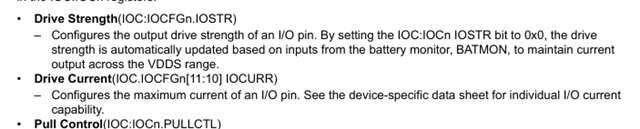
    如果您查看此功能的 TRM 说明、也会看到:

    实际上并不清楚哪个最终控制引脚的拉电流或灌电流能力。 SysConfig 似乎意味着 IOSTR 仅控制压摆率、但 TRM 似乎意味着、要在任何电源电压情况下实际从高驱动引脚中获得 8 个–10mA(无论是否建议由用户决定)、您需要覆盖 IOSTR 的自动设置并将其设置为最大值。 还是 TRM 说自动设置会为您自动实现?

    想法?

    Munan

  • 请注意,本文内容源自机器翻译,可能存在语法或其它翻译错误,仅供参考。如需获取准确内容,请参阅链接中的英语原文或自行翻译。

    此外、我刚刚在列表中进一步意识到还有另一个压摆控制领域、因此我认为 SysConfig 工具从未接触过驱动强度、只有驱动电流。 因此、问题实际上就是两个位字段 IOSTR 和 IOCURR 之间的区别是什么

    Munan

  • 请注意,本文内容源自机器翻译,可能存在语法或其它翻译错误,仅供参考。如需获取准确内容,请参阅链接中的英语原文或自行翻译。

    您好:

    具有与 SysConfig 相关定义的实际文件为 GPIOLPF3.h、位于以下位置:
    #define GPIO_CFG_DRVSTR_LOW_INTERNAL (IOC_CONFIG_DRIVE_strength_2mA)
    #define GPIO_CFG_DRVSTR_MED_INTERNAL (IOC_CONFIG_DRIVE_strength_4mA)
    #define GPIO_CFG_DRVSTR_HIGH_INTERNAL (IOC_CONFIG_DRIVE_STR_8mA)

    SysConfig 会将其提取:

    将 SysConfig GPIO 设置为中等强度会将 ti_drivers_config.c GPIO 设置为 GPIO_CFG_OUT_STR_MED

    然后将其抽象到  

    #define GPIO_CFG_OUT_STR_LOW GPIO_CFG_DRVSTR_LOW_INTERNAL  
    然后、您可以在 ioc.h 文件中找到以下内容:
    //! \hidealizer 手动模式、8mA 驱动强度
    #define IOC_CONFIG_DRIVE_strength_8mA (IOC_IOC12_IOCURR_CUR_8mA)
    //! \hidealizer 手动模式、4mA 驱动强度
    #define IOC_CONFIG_DRIVE_strength_4mA (IOC_IOC12_IOCURR_CUR_4mA)
    //! \hidealizer 手动模式、2mA 驱动强度
    #define IOC_CONFIG_DRIVE_strength_2mA (IOC_IOC12_IOCURR_CUR_2mA)
    //此设备不支持自动模式
    #undef IOC_CONFIG_DRIVE_strength_Auto
     
    上面显示了我们的四种模式(包括自动模式)、这意味着这应该是 IOSTR、它也会设置电流 (IOCURR)、因此是的、SysConfig 确实设置了驱动强度。  

    您可能还可以使用直接设置寄存器:

    //*****************************************************************************
    //
    // API Functions and prototypes
    //
    //*****************************************************************************
    
    //*****************************************************************************
    //
    //! \brief Set the configuration and mux option for a specific DIO.
    //!
    //! \param dioNumber specifies the DIO to configure (0-25).
    //!
    //! \param config The configuration to apply. This is a bitwise OR of
    //!  - One of the \ref ioc_config_drive_strength_options
    //!    "IOC Config drive strength options"
    //!  - One of the \ref ioc_config_slew_rate_options
    //!    "IOC Config slew rate options"
    //!  - One of the \ref ioc_config_pull_control_options
    //!    "IOC Config pull control options"
    //!  - One of the \ref ioc_config_edge_detection_options
    //!    "IOC Config edge detection options"
    //!  - One of the \ref ioc_config_standby_wakeup_options
    //!    "IOC Config standby wakeup options"
    //!  - One of the \ref ioc_config_shutdown_wakeup_options
    //!    "IOC Config shutdown wakeup options"
    //!  - One of the \ref ioc_config_io_invert_options
    //!    "IOC Config IO invert options"
    //!  - One of the \ref ioc_config_io_mode_options "IOC Config IO mode options"
    //!  - One of the \ref ioc_config_input_buffer_options
    //!    "IOC Config input buffer options"
    //!  - And one of the \ref ioc_config_hysteresis_options
    //!    "IOC Config hysteresis options"
    //!
    //! \param mux Selects the function of the DIO. It must be one of the following:
    //!  - \ref IOC_MUX_GPIO
    //!  - \ref IOC_MUX_DTB
    //!  - \ref IOC_MUX_ANALOG
    //!  - \ref IOC_MUX_PERIPH_FUNC1
    //!  - \ref IOC_MUX_PERIPH_FUNC2
    //!  - \ref IOC_MUX_PERIPH_FUNC3
    //!  - \ref IOC_MUX_PERIPH_FUNC4
    //!  - \ref IOC_MUX_PERIPH_FUNC5
    //
    //*****************************************************************************
    __STATIC_INLINE void IOCSetConfigAndMux(uint32_t dioNumber, uint32_t config, uint32_t mux)
    {
        // Check the arguments.
        ASSERT(dioNumberLegal(dioNumber));
        ASSERT((config & IOC_CONFIG_ALL_M) == config);
        ASSERT((mux & IOC_IOC0_PORTCFG_M) == mux);
    
        // Set the config and mux option for the specified DIO.
        HWREG(IOC_BASE + IOC_O_IOC0 + dioNumber * IOC_REG_SPACING) = config | mux;
    }

    此致、
    Alex F