


请注意,本文内容源自机器翻译,可能存在语法或其它翻译错误,仅供参考。如需获取准确内容,请参阅链接中的英语原文或自行翻译。
器件型号:LAUNCHXL-CC2650 您好!
现在、我尝试从 simpleEddystone 示例更改广播间隔。 我还安装了 TI 的 Paket Sniffer、以检查 LaunchPad 何时进行广播以及间隔时间。 标准值应为100ms:
//可发现设备时的广播间隔(625us、160=100ms 的单位)
#define DEFAULT_advertising_interval 160
我检查了 Paketsniffer、结果如下所示:
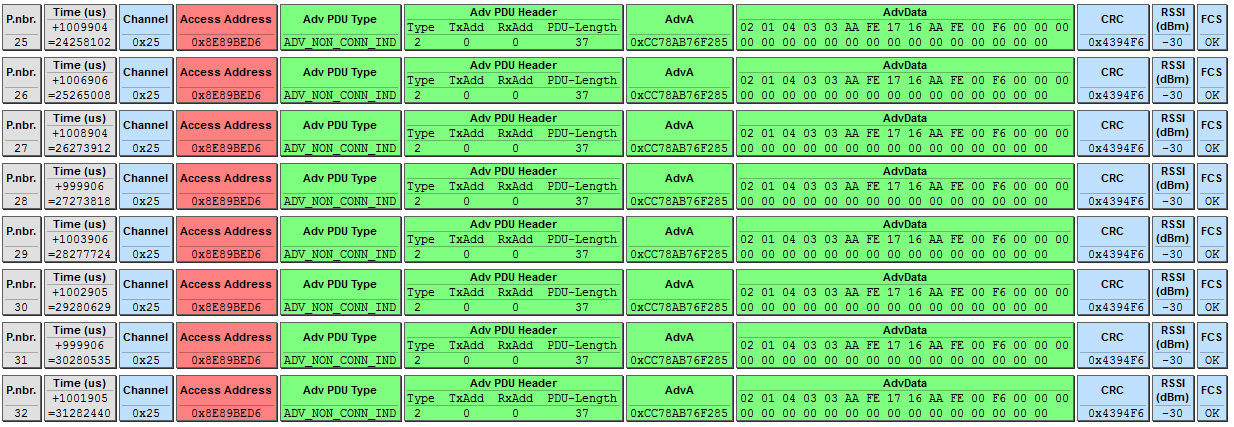
您可以清楚地看到、器件每秒广播一次、而不是每100ms 广播一次。 我还将间隔更改为10ms、但似乎没有效果。 我还检查了设置间隔的代码:
uint16 advInt = default_advertising_interval;
GAP_SetParamValue (TGAP_LIM_DISC_ADV_INT_MIN、advInt);
GAP_SetParamValue (TGAP_LIM_DISC_ADV_INT_MAX、advInt);
GAP_SetParamValue (TGAP_GEN_DISC_ADV_INT_MIN、advInt);
GAP_SetParamValue (TGAP_GEN_DISC_ADV_INT_MAX、advInt);
我在这里缺少什么吗? 感谢您的建议
谢谢
Christian
PS:我正在使用 ble_examples 中的 simpleeddystone 示例应用
