工具与软件:
我正在尝试通过 SPI 在 Raspberry Pi 4和 LaunchXL-CC2640R2之间进行通信。 我已经看了 cc2640r2 SDK 驱动程序部分中的 spiMaster 和 spiSlave 示例、这些示例正常运行。 然后、我使用 Raspberry Pi 上的 WiringPi 编写了一个 c 程序、并将其编码成与 spiMaster.c 中的 masterThread 函数完全相同 我打印了值、两个电路板正在通信、但我只是从 cc2640r2收到垃圾、并且运行从程序的 cc2640r2报告未收到充当主系统的 RaspberryPi 提供的任何数据。
因此、我连接了一个逻辑分析仪并验证了是否存在 Raspberry Pi 上 MOSI 引脚上的字符串"Hello from master、msg#:"。 因此、我不清楚 cc2640r2为何不会报告任何内容。 然后、我看到、Raspberry PI 的 MISO 线路上也有数据返回。 当我转换 ASCII 字母时、虽然它只是垃圾。 我认为这可能是同步问题或位速问题。 或者、可能是电压问题吗? Pi 上的程序是用于指令 spiMaster.c 中的 masterThread 函数中编码的内容的指令 我正在使用信标以及同样的 SPI_MASTER_READY 和 SPI_SLAVE_READY 引脚。 所有的沟通似乎都很好。 只是数据混乱。 我们非常感谢您提出任何想法并帮助我摆脱困境。
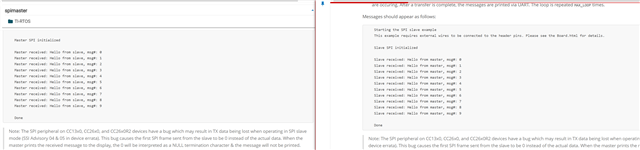
以下是 spiMaster 示例供参考:
这里是 spiSlave 示例:
以下是我的代码
#include <unistd.h>
#include <pthread.h>
#include <time.h>
#include <stdio.h>
#include <stdlib.h>
#include <string.h>
#include <errno.h>
#include "lvgl/lvgl.h"
#include "wiringPi.h"
#include "wiringPiSPI.h"
#include <semaphore.h>

#define	SPI_CHAN		0
// #define SPI_SPEED       500000
#define SPI_SPEED   4000000
#define SPI_MASTER_READY 2
#define SPI_SLAVE_READY 3
#define MASTER_MESSAGE ("Hello from master, msg#: ")
// #define MASTER_MESSAGE 0x48
#define SPI_MSG_LENGTH 30
#define MAX_LOOP 10

/* Global Variables */
int fd;
int readValue;
bool transferComplete;
// unsigned char masterTxBuffer[SPI_MSG_LENGTH];
unsigned char* masterTxBuffer;
sem_t masterSem;

/* Functions */
void lv_linux_run_loop(void);
void search_handler(lv_event_t *event);
void setUpSPI(void);

int main(void) {
    lv_init();
    const char *device = getenv("LV_LINUX_FBDEV_DEVICE") ? : "/dev/fb0";
    lv_display_t * display = lv_linux_fbdev_create();

    lv_linux_fbdev_set_file(display, device);

    lv_obj_set_style_bg_color(lv_screen_active(), lv_color_hex(0x000000), LV_PART_MAIN);

    /* Touchpad Monitor
       Need to add code to search /proc/bus/input/devices for name of event Name="10-0038 generic ft5x06 (79)"
       for(int i =0; i < )
    */
    lv_indev_t *touch = lv_evdev_create(LV_INDEV_TYPE_POINTER, "/dev/input/event0");
    lv_indev_set_display(touch, display);


    /* LAYOUT */

    lv_obj_t* label;
    lv_obj_t *searchButton = lv_button_create(lv_screen_active());
    lv_obj_align(searchButton, LV_ALIGN_CENTER, 0, 0);
    lv_obj_set_size(searchButton, lv_pct(20), lv_pct(10));
    lv_obj_add_event_cb(searchButton, search_handler, LV_EVENT_ALL, NULL);
    lv_obj_remove_flag(searchButton, LV_OBJ_FLAG_PRESS_LOCK);
    lv_obj_add_flag(searchButton, LV_OBJ_FLAG_CLICKABLE);
    label = lv_label_create(searchButton);
    lv_label_set_text(label, "Search");
    lv_obj_center(label);

    /* STYLE */

    static lv_style_t style;
    lv_style_init(&style);

    /*Set a background color and a radius*/
    lv_style_set_bg_color(&style, lv_color_hex(0x0040DD));
    lv_style_set_radius(&style, 25);

    /*Add a shadow*/
    lv_style_set_shadow_width(&style, 25);
    lv_style_set_shadow_spread(&style, 1);
    lv_style_set_shadow_color(&style, lv_color_white());
    lv_style_set_shadow_offset_x(&style, 0);
    lv_style_set_shadow_offset_y(&style, 0);

    lv_obj_add_style(searchButton, &style, 0);

    // SPI setup
    setUpSPI();

    lv_linux_run_loop();

    return 0;
}

void lv_linux_run_loop(void)
{
    uint32_t idle_time;

    /*Handle LVGL tasks*/
    while(1) {
        idle_time = lv_timer_handler(); /*Returns the time to the next timer execution*/
        usleep(idle_time * 1000);
    }
}

void slaveReadyFxn(void) {
    sem_post(&masterSem);
}

void sendMessage(void) {;
    for(int i = 0; i < MAX_LOOP; i++) {

        sem_wait(&masterSem);
        // masterTxBuffer[sizeof(MASTER_MESSAGE) - 1] = (i % 10) + '0';
        // memset((void*) masterTxBuffer, 0, SPI_MSG_LENGTH);
        printf("Sending %s\n", masterTxBuffer);
        transferComplete = wiringPiSPIDataRW(SPI_CHAN, masterTxBuffer, SPI_MSG_LENGTH);
        if(transferComplete) {
            printf("Master received: %s\n", masterTxBuffer);
        } else {
            printf("Unsuccessful master SPI transfer\n");
        }

        usleep(3000000);
    }

    printf("Done\n");
    wiringPiSPIClose(SPI_CHAN);
}

void setUpSPI(void) {
    wiringPiSetup();

    /* Set SPI_MASTER_READY To OUPUT
       Set SPI_MASETR_READY To LOW
    */
    pinMode(SPI_MASTER_READY, OUTPUT);
    digitalWrite(SPI_MASTER_READY, LOW);

    /* Set SPI_SLAVE_READY To INPUT
       Set SPI_MASETR_READY To LOW
    */
    pinMode(SPI_SLAVE_READY, INPUT);

    /*
     * Handshake - Set SPI_MASTER_READY HIGH to indicate master is ready
     * to run.  Wait SPI_SLAVE_READY to be HIGH.
     */
    digitalWrite(SPI_MASTER_READY, HIGH);
    printf("MASTER Ready\nWaiting for SLAVE\n");
    while(digitalRead(SPI_SLAVE_READY) == LOW) {}
    /*
        Handshake complete; now configure interrupt on Board_SPI_SLAVE_READY
     */
    pullUpDnControl(SPI_SLAVE_READY, PUD_UP);
    wiringPiISR(SPI_SLAVE_READY, INT_EDGE_FALLING, &slaveReadyFxn);

    /*
       Create synchronization semaphore; the master will wait on this semaphore
       until the slave is ready.
    */
    int status = sem_init(&masterSem, 0, 0);
    if(status != 0) {
        printf("Failed to create semphore\n");
        while(1);
    }

    fd = wiringPiSPISetup(SPI_CHAN, SPI_SPEED);
    if(fd < 0) {
        printf("Unable to init SPI\n");
    } else {
        printf("Master SPI initialized\n");
    }

    digitalWrite(SPI_MASTER_READY, LOW);
    // strncpy((char*)masterTxBuffer, MASTER_MESSAGE, SPI_MSG_LENGTH);
    masterTxBuffer = MASTER_MESSAGE;
    sendMessage();
}
运行 SPI 代码的函数是
这是逻辑分析仪上的数据。 
这是 MOSI 信息转换,也是我看到打印到我的 Raspberry PI 程序的控制台 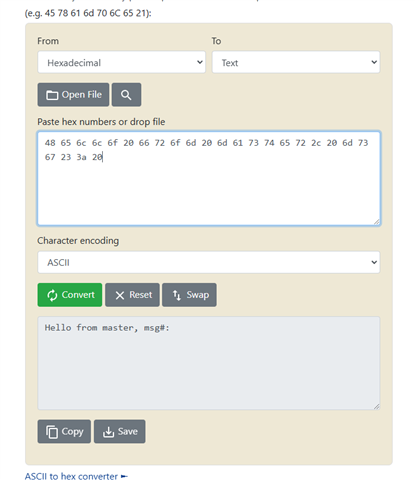
这是 MISO 转换以及我在 code composer cc2640r2 程序的 putty 控制台上看到的内容 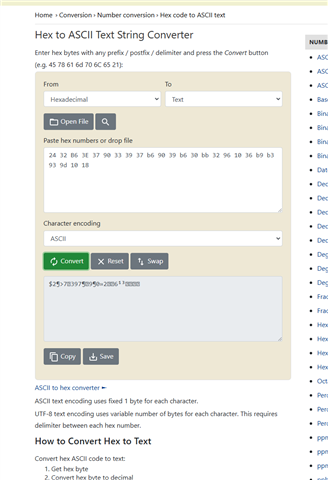
这是打印出来时控制台的样子 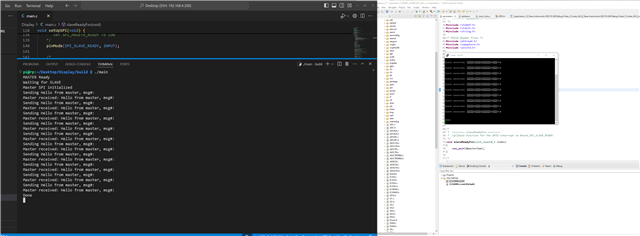
这就是我在两个 cc2640R2板之间获得的示例打印结果