
This thread has been locked.

If you have a related question, please click the "Ask a related question" button in the top right corner. The newly created question will be automatically linked to this question.

[参考译文] TMS320F28379D:如何将器件选择从 TMS320F28377D 更改为 TMS320F28379D

Guru**** 2663045 points

Other Parts Discussed in Thread: C2000WARE, TMS320F28379D, TMS320F28377D

请注意,本文内容源自机器翻译,可能存在语法或其它翻译错误,仅供参考。如需获取准确内容,请参阅链接中的英语原文或自行翻译。

https://e2e.ti.com/support/microcontrollers/c2000-microcontrollers-group/c2000/f/c2000-microcontrollers-forum/1590663/tms320f28379d-how-to-change-device-selection-from-tms320f28377d-to-tms320f28379d

部件号: TMS320F28379D
线程中讨论的其他器件: C2000WARETMS320F28377D

尊敬的先生/女士:

我已从 C:\ti\c2000\C2000Ware_6_00_01_00\driverlib\f2837xs\examples\cpu1\adc 导入工程

但此工程已开发为在 TMS320F28377D 上运行。 但我们选择了 TMS320F28379D。

如何将器件选择从 TMS320F28377D 更改为 TMS320F28379D。 屏幕截图附在下面、
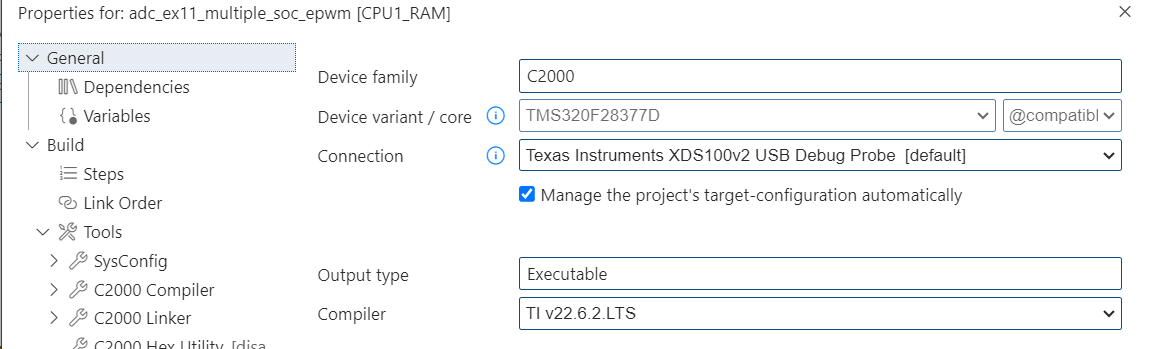
 

image.png

  • 请注意,本文内容源自机器翻译,可能存在语法或其它翻译错误,仅供参考。如需获取准确内容,请参阅链接中的英语原文或自行翻译。

    您好、  

    为此、您可以编辑位于 以下文件夹中的工程规范文件:C:\ti\c2000\C2000Ware_6_00_01_00\driverlib\f2837xs\examples\cpu1\ccs。  

    您必须更新此文件以指定  enableSysConfigTool=“false"并“并更改“device="TMS320F28379"。“。</s>“  

    您必须将项目重新导入 CCS。

    此致

    Siddharth

  • 请注意,本文内容源自机器翻译,可能存在语法或其它翻译错误,仅供参考。如需获取准确内容,请参阅链接中的英语原文或自行翻译。

    感谢 Siddharth 的回复。 我将进行必要的更改并再次导入。