This thread has been locked.

If you have a related question, please click the "Ask a related question" button in the top right corner. The newly created question will be automatically linked to this question.

[参考译文] TMDSCNCD28388D:打开一个示例.syscfg 文件不起作用

Guru**** 2999690 points

Other Parts Discussed in Thread: SYSCONFIG, TMDSCNCD28388D, C2000WARE

请注意,本文内容源自机器翻译,可能存在语法或其它翻译错误,仅供参考。如需获取准确内容,请参阅链接中的英语原文或自行翻译。

https://e2e.ti.com/support/tools/code-composer-studio-group/ccs/f/code-composer-studio-forum/1655948/tmdscncd28388d-opening-an-example-syscfg-file-does-not-work

器件型号: TMDSCNCD28388D
Thread 中讨论的其他器件: SysConfig、 C2000WARE

我在 Windows 10 和 macOS 上均安装了新的 Code Composer Studio 21.0.0.1035。 在这两种情况下、我在尝试 .syscfg 从示例工程中打开文件时遇到以下错误:

Would you like to re-try in compatibility mode?

Error: Exception occurred calling scripting.addModule()

    at Object.addModule (localhost:49853/.../scriptingGuard.ts:52:10)
    at scriptFunc (/Users/philippglaubitz/workspace_ccstheia/led_ex1_blinky_2/led_ex1_blinky.syscfg:12:34)
    at cb (localhost:49853/.../runScript.ts:127:13)
    at t.withDeprecatedAccessAsync (localhost:49853/.../deprecatedAccessGuard.ts:24:16)
    at t.runAsUserScriptAsync (localhost:49853/.../scriptingGuard.ts:93:41)
    at runScripts (localhost:49853/.../runScript.ts:125:31)
    at t.createFromScripts (localhost:49853/.../runScript.ts:87:8)
    at c (localhost:49853/.../invalidAssignment.ts:39:12)
    at Z.createSysConfig (localhost:49853/.../LoadConfigPage.tsx:495:22)
    at Z.createConfigStore (localhost:49853/.../LoadConfigPage.tsx:399:21)
Caused by: Error: No such resource: /driverlib/device_driverlib_peripherals/common/sysctl_common.js
Paths searched: 
/Users/philippglaubitz/ti/C2000Ware_26_01_00_00/driverlib/device_driverlib_peripherals/common/.meta/sysctl_common.js
/Users/philippglaubitz/ti/C2000Ware_26_01_00_00/driverlib/device_driverlib_peripherals/.meta/common/sysctl_common.js
/Users/philippglaubitz/ti/C2000Ware_26_01_00_00/driverlib/.meta/device_driverlib_peripherals/common/sysctl_common.js
/Users/philippglaubitz/ti/C2000Ware_26_01_00_00/.meta/driverlib/device_driverlib_peripherals/common/sysctl_common.js
/Users/philippglaubitz/ti/C2000Ware_26_01_00_00/driverlib/device_driverlib_peripherals/common/sysctl_common.js
/Users/philippglaubitz/workspace_ccstheia/led_ex1_blinky_2/driverlib/device_driverlib_peripherals/common/.meta/sysctl_common.js
/Users/philippglaubitz/workspace_ccstheia/led_ex1_blinky_2/driverlib/device_driverlib_peripherals/.meta/common/sysctl_common.js
/Users/philippglaubitz/workspace_ccstheia/led_ex1_blinky_2/driverlib/.meta/device_driverlib_peripherals/common/sysctl_common.js
/Users/philippglaubitz/workspace_ccstheia/led_ex1_blinky_2/.meta/driverlib/device_driverlib_peripherals/common/sysctl_common.js
/Users/philippglaubitz/workspace_ccstheia/led_ex1_blinky_2/driverlib/device_driverlib_peripherals/common/sysctl_common.js:
while processing modules() of /driverlib/device_support.js$static:
    at t.ResourceLoader.findPathAndLoader (localhost:49853/.../resourceLoader.ts:311:11)
    at t.ResourceLoader.loadResource (localhost:49853/.../resourceLoader.ts:253:43)
    at t.ResourceLoader.getResource (localhost:49853/.../resourceLoader.ts:363:15)
    at Object.freeze.getScript (localhost:49853/.../runtimeContext.ts:1373:25)
    at loaderFunc (/Users/philippglaubitz/ti/C2000Ware_26_01_00_00/driverlib/.meta/sysctl.js:12:28)
    at func (localhost:49853/.../resourceLoader.ts:261:45)
    at t.internalBoundary (localhost:49853/.../niceExceptions.ts:64:10)
    at t.ResourceLoader.loadResource (localhost:49853/.../resourceLoader.ts:261:38)
    at t.ResourceLoader.getResource (localhost:49853/.../resourceLoader.ts:363:15)
    at W.loadModule (localhost:49853/.../runtimeContext.ts:592:27)

希望您提供及时的帮助。 非常感谢。

  • 请注意,本文内容源自机器翻译,可能存在语法或其它翻译错误,仅供参考。如需获取准确内容,请参阅链接中的英语原文或自行翻译。

    打开该 .syscfg 文件时、会出现以下提示:

    “SysConfig 已更新、以使用标准 TI 器件型号。 该电路板 /boards/TMDSCNCD28388D 使用非标准器件名称进行定义。 请在下面选择它应该使用的特定器件或更新到更新的 SDK:“

    然后我选择我的器件、但随后会出现上述错误。 我已经尝试过几件事,但没有一个解决了这个问题。

  • 请注意,本文内容源自机器翻译,可能存在语法或其它翻译错误,仅供参考。如需获取准确内容,请参阅链接中的英语原文或自行翻译。

    尊敬的 Philipp:

    您能否在文本编辑器中打开.syscfg 文件并将其粘贴到此处? 错误表明第 34 行有问题。

    您还在使用哪种版本的 c2000ware?

    您可以导航至 C2000Ware_VERSION_\driverlib\.meta\device_driverlib_peripherals

    您在那里看到一个“公用“文件夹吗?

    如果不存在、则可能已在/ti 文件夹中创建了一个名为/c2000 的文件夹、这是您正确的 c2000ware 所在的位置。 您的系统上可能有多个版本的 c2000ware、您的项目可能会拾取错误的版本(/ti 中的版本、而/ti/c2000 中的版本)

    您能否证实这一点?

    谢谢、

    IRA

  • 请注意,本文内容源自机器翻译,可能存在语法或其它翻译错误,仅供参考。如需获取准确内容,请参阅链接中的英语原文或自行翻译。

    您好、Ira、感谢您的快速答复。

    /**
     * These arguments were used when this file was generated. They will be automatically applied on subsequent loads
     * via the GUI or CLI. Run CLI with '--help' for additional information on how to override these arguments.
     * @cliArgs --board "/boards/TMDSCNCD28388D" --device "F2838x" --package "337bga" --part "F2838x_337bga" --context "CPU1" --product "C2000WARE@5.02.00.00"
     * @versions {"tool":"1.0.0+dev"}
     */
    /**
     * Import the modules used in this configuration.
     */
    const led            = scripting.addModule("/driverlib/board_components/led", {}, false);
    const led1           = led.addInstance();
    const device_support = scripting.addModule("/driverlib/device_support.js");
    const sysctl         = scripting.addModule("/driverlib/sysctl.js");
    const CMD            = scripting.addModule("/utilities/cmd_tool/cmd_syscfg/source/CMD");
    const CMD1           = CMD.addInstance();
    const CMD2           = CMD.addInstance();
    /**
     * Write custom configuration values to the imported modules.
     */
    CMD1.$name                    = "generic_ram_lnk";
    CMD2.$name                    = "generic_flash_lnk";
    
    CMD1.sectionMemory_text       = ["RAMLS0","RAMLS1","RAMLS2","RAMLS3","RAMLS4"];
    CMD1.sectionMemory_ramfunc    = ["RAMM0"];
    CMD1.sectionMemory_cinit      = ["RAMM0"];
    CMD1.sectionMemory_stack      = ["RAMM1"];
    CMD1.sectionMemory_init_array = ["RAMM0"];
    CMD1.sectionMemory_bss        = ["RAMLS5"];
    CMD1.sectionMemory_const      = ["RAMLS5"];
    CMD1.sectionMemory_data       = ["RAMGS0", "RAMGS1"];
    CMD1.sectionMemory_switch     = ["RAMM0"];
    CMD1.sectionMemory_sysmem     = ["RAMLS5"];
    
    CMD2.sectionAlignEnable_ramfunc    = true;
    CMD2.sectionAlignEnable_text       = true;
    CMD2.sectionAlignEnable_binit      = true;
    CMD2.sectionAlignEnable_cinit      = true;
    CMD2.sectionAlignEnable_switch     = true;
    CMD2.sectionAlignEnable_init_array = true;
    CMD2.sectionAlignEnable_const      = true;
    CMD2.sectionAlignEnable_ovly       = true;
    CMD2.sectionMemory_codestart       = "0x080000";
    CMD2.sectionMemory_stack           = ["RAMM1"];
    CMD2.sectionMemory_bss             = ["RAMLS5"];
    CMD2.sectionMemory_data            = ["RAMLS6", "RAMLS7"];
    CMD2.sectionMemory_sysmem          = ["RAMLS5"];
    CMD2.sectionMemory_ramfunc         = ["FLASH3"];
    CMD2.sectionMemory_text            = ["FLASH1","FLASH2","FLASH3","FLASH4"];
    CMD2.sectionMemory_binit           = ["FLASH4"];
    CMD2.sectionMemory_cinit           = ["FLASH4"];
    CMD2.sectionMemory_switch          = ["FLASH1"];
    CMD2.sectionMemory_init_array      = ["FLASH1"];
    CMD2.sectionMemory_const           = ["FLASH5"];
    CMD2.sectionMemory_ovly            = ["FLASH6"];
    CMD2.sectionRunFromDifferentAddr_ramfunc = true;
    CMD2.sectionRun_ramfunc                  = ["RAMLS0"];
    CMD2.sectionBinit_ramfunc                = false;
    
    led1.$name                = "myBoardLED0";
    led1.$hardware            = system.deviceData.board.components.D1;
    led1.gpio.gpioPin.$assign = "hsecDigital.82";

    .syscfg 文件来自闪烁示例。

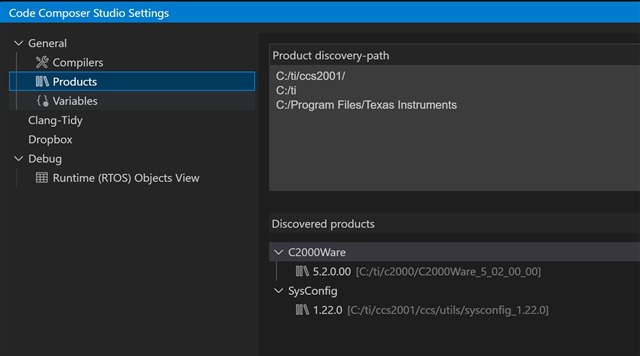
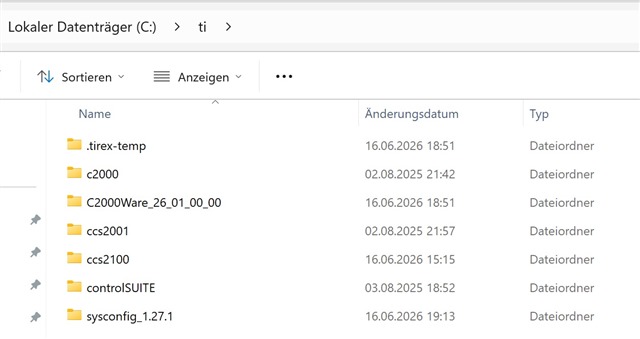
    是的、我安装了两个版本的 C2000Ware。 一个是直接位于 TI 文件夹中的版本 26.01、另一个是位于 C2000 文件夹中的版本 5.02。 但它们都没有一个“公共“文件夹。

    我还将它安装在全新的 Windows 计算机上,但它也不能在那里工作。

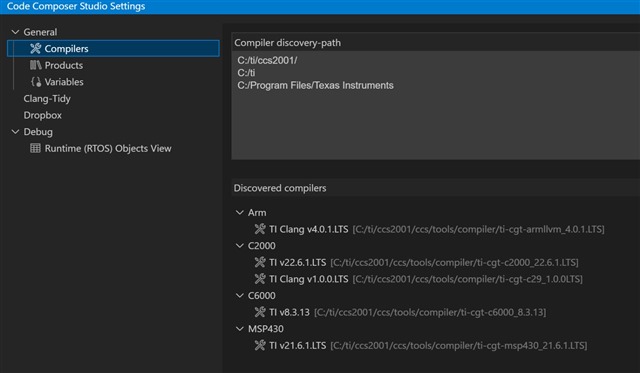
    这里还有 3 个屏幕截图:

  • 请注意,本文内容源自机器翻译,可能存在语法或其它翻译错误,仅供参考。如需获取准确内容,请参阅链接中的英语原文或自行翻译。

    您拥有哪个版本的 C2000ware 和 Code Composer Studio?

  • 请注意,本文内容源自机器翻译,可能存在语法或其它翻译错误,仅供参考。如需获取准确内容,请参阅链接中的英语原文或自行翻译。

    尊敬的 Philipp:

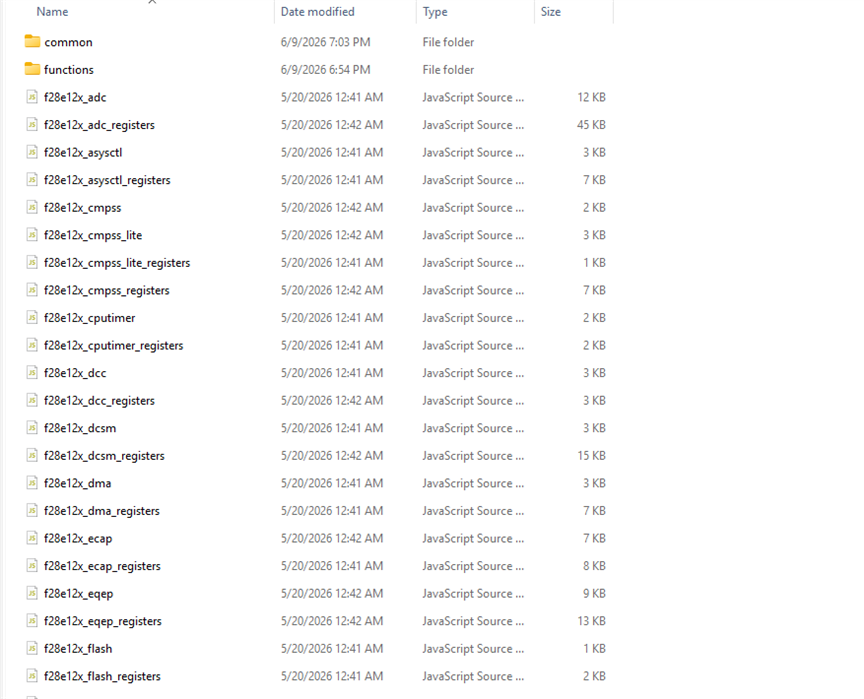
    请使用 c2000ware 26.01、因为它是最新版本。 我建议使用 CCS 20.5 或更高版本。 正确安装 c2000ware 时还应包含“common folder“(公用文件夹)。 例如、这是在我安装的 c2000ware 中

    我认为 c2000ware 未正确安装在您的系统上。 是否可以尝试再次从 TI.com 安装它并删除旧的现有安装?

    谢谢、

    IRA

  • 请注意,本文内容源自机器翻译,可能存在语法或其它翻译错误,仅供参考。如需获取准确内容,请参阅链接中的英语原文或自行翻译。

    尊敬的 Philipp:

    您是否从 TI.com 下载了 c2000ware 26.1? 还是从 TI Resource Explorer 下载的? 我们已经注意到、从 TI Resource Explorer 安装时遇到了这个问题、因此跳过了“common “文件夹。 我们正在与 TI Resource Explorer 和 c2000ware 团队合作、很快就解决了该问题。

    谢谢、

    IRA

  • 请注意,本文内容源自机器翻译,可能存在语法或其它翻译错误,仅供参考。如需获取准确内容,请参阅链接中的英语原文或自行翻译。

    是的、问题出在哪里—我是从 TI Resource Explorer 中下载的。 现在我已经从 TI 网站下载了该工具、该工具已经开始工作。 非常感谢您的帮助!