This thread has been locked.
If you have a related question, please click the "Ask a related question" button in the top right corner. The newly created question will be automatically linked to this question.
https://e2e.ti.com/support/tools/code-composer-studio-group/ccs/f/code-composer-studio-forum/572382/ccs-uniflash-failure-in-silent-installation-of-uniflash
工具/软件:Code Composer Studio
当我尝试安装1.0.0012万 模式为3.4 的Uniflash (uniflifliflif_setup_win32. win32)时(安装时需要用户干预),安装工作正常。 但是,如果我尝试使用与无人值守模式相同的安装(没有用户干预 ),安装将失败。 为什么会发生这种情况? 提前感谢
Girish Ramaiah 说:但是,如果我尝试与无人值守模式相同的安装(没有用户干预 ),安装将失败。[/QUOT]
您能否提供有关安装如何失败的详细信息,以及用于调用安装的确切命令行? 您使用的是哪种操作系统?
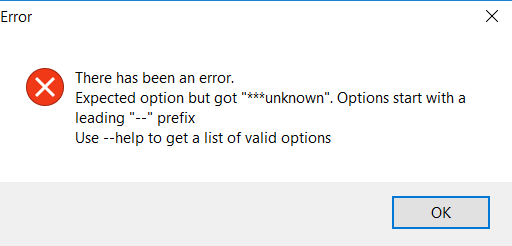
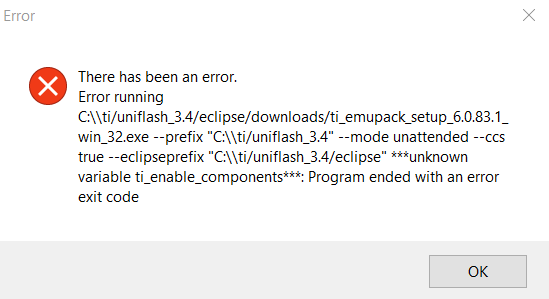
我使用Windows 10操作系统。 安装会在一段时间后失败,第一个错误会弹出,然后在一段时间后,第二个错误消息会出现。 我在查看安装目录时看到了uniflash文件夹已创建,当出现此错误时,该文件夹已被删除。
安装命令:
unifliflash设置_BH 3.4 .1.0.0012万 .exe --disable-components connectivity,simplelink_cc1xxx_cc2xxx,simplelink_wifi,c2000_JTAG,c2000_串行,MSP430,msp432,Stellaris,Stellaris_alt,处理器,Sitara,调试服务器,ucd_digital,ucd31xx_device_support --enable-components-无人值守模式-安装
能否在%TEMP%中查找从无人值守安装生成的bitrock.log文件并将其附加到此处?
谢谢!
丹麦语
请查找文件attached.e2e.ti.com/.../2821.bitrock_5F00_installer.log
您好,Girish,
很抱歉,"无人值守模式"中似乎有一个错误,似乎没有解决方法。 在下一版本中应修复此问题。