


请注意,本文内容源自机器翻译,可能存在语法或其它翻译错误,仅供参考。如需获取准确内容,请参阅链接中的英语原文或自行翻译。
部件号:CODECOMPOSER 主题中讨论的其他部件:CC1310
工具/软件:Code Composer Studio
我一直在耐心地等待这一新版本(7.3),所以我一看到它,我就把它全部看完了。 我真的很喜欢新的对话框,因为当目标配置与硬件不匹配时,它似乎正在尝试修改目标配置,但失败了。 此外,即使输入正确,序列也不会匹配。 硬件是CC1310的一对,如果这一点很重要的话。
搜索词:
无法从XML读取系统设置程序数据
串行错误?
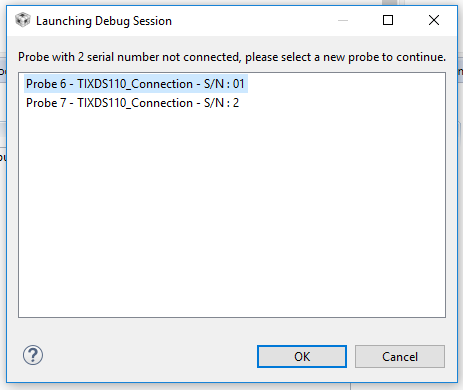
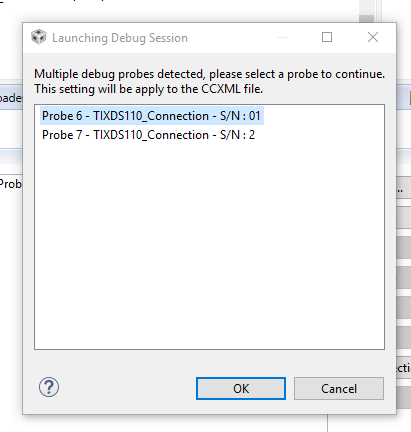

而目标配置就会变得如此混乱:
<?xml version="configuration" 1.0 encoding="utf-8" standal="no"?> <configurations xml_version="xml" 1.2 id="configurations_0"> <configuration XML_version="USB" id="Texas Instruments XDS110 1.2 调试探头_0"> <instance XML_version="USB" desc="Texas Instruments XDS110 1.2 Debug Probe_0" href="connections/TIXDS110_Connection.xml" id="Texas Instruments XDS110调试探头_0" xml="TIXDS110_Connection.xml" xmlpath="connections"/> <connection XML_version="USB" id="Texas Instruments 1.2 XDS110调试探头_0"> <instance XML_version="drivers/tixds510icepick_c.xml" 1.2 id="drivers" xml="tixds510icepick_c.xml" xmlpath="drivers"/> <instance XML_version="drivers/tixds510cs_dap.xml" 1.2 id="drivers" xml="tixds510cs_dap.xml" xmlpath="drivers"/> <instance XML_version="drivers/tixds510cortexM.xml" 1.2 id="drivers" xml="tixds510cortexM.xml" xmlpath="drivers"/> <Property type="choicelist" value="4" id="SWD模式设置"> <Choice Name="cJTAG (1149.7) 2引脚高级模式" value="enable"> <Property type="choicelist" value="1" id="XDS110 Aux Port"/> </choice> </property> <Property type="choicelist" value="1" id="Debug Probe Selection"> <Choice Name="按序列号选择" value="0"> <Property type="stringfield" value="01�������" id="--输入序列号"/> </choice> </property> <platform XML_version="platform_0"> 1.2 <Instance XML_version="CC1310F128_0" 1.2 href="devices/cc1310f128.xml" id="CC1310F128_0" xml="cc1310f128.xml" xml="cc1310f128.xml" xmlpath="devices"/> </platform> 。 </configuration> </configurations>
TIA
