
This thread has been locked.

If you have a related question, please click the "Ask a related question" button in the top right corner. The newly created question will be automatically linked to this question.

[参考译文] CCS/LAUNCHXL-CC1352R1:我无法关注 CCS 中"Expressions"选项卡中的变量

Guru**** 3001220 points
请注意,本文内容源自机器翻译,可能存在语法或其它翻译错误,仅供参考。如需获取准确内容,请参阅链接中的英语原文或自行翻译。

https://e2e.ti.com/support/tools/code-composer-studio-group/ccs/f/code-composer-studio-forum/926927/ccs-launchxl-cc1352r1-i-can-not-follow-the-variables-in-the-expressions-tab-in-ccs

器件型号:LAUNCHXL-CC1352R1

工具/软件:Code Composer Studio

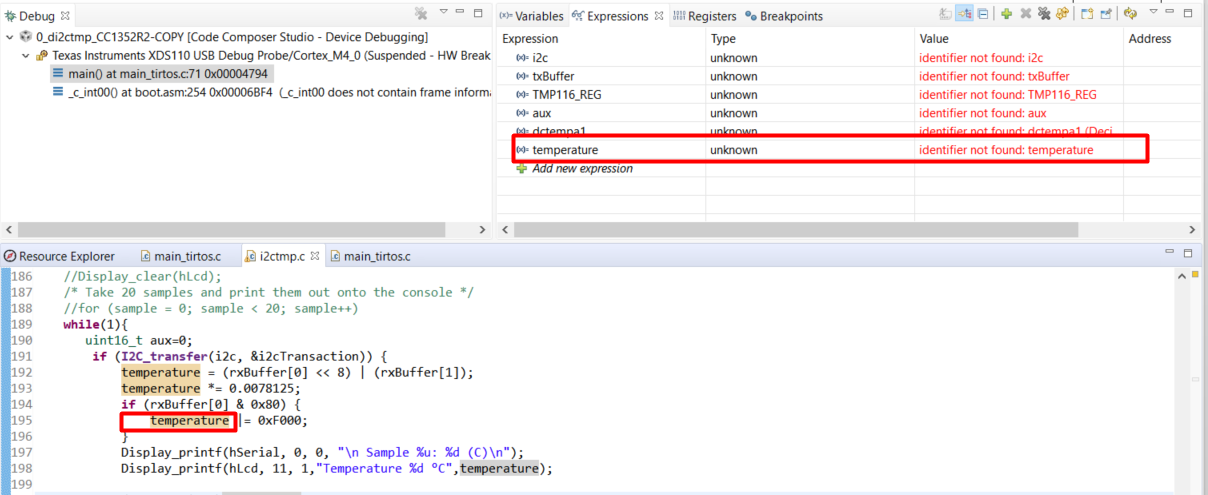
我尝试绘制变量温度、但在"Expressions"选项卡中看不到它。 我收到消息"未知"和"未找到标识符"。 一些见解?
  • 请注意,本文内容源自机器翻译,可能存在语法或其它翻译错误,仅供参考。如需获取准确内容,请参阅链接中的英语原文或自行翻译。

    您好!

    [引用 user="Darwin Caina">我尝试绘制可变温度、但在"Expressions"选项卡中看不到它。 我收到消息"未知"和"未找到标识符"。 一些见解?[/引述]

    在调试会话期间、变量需要在作用域内。 "Debug"视图指示您在"main"函数的开头暂停。 此时温度变量是否在示波器中? 很难根据您的屏幕截图来表达。

    谢谢

    Ki