
This thread has been locked.

If you have a related question, please click the "Ask a related question" button in the top right corner. The newly created question will be automatically linked to this question.

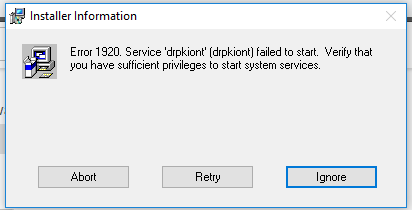
[参考译文] CCS:错误1920 service 'drpkiont'无法启动验证您是否有足够的权限启动系统服务

Guru**** 2538930 points


请注意,本文内容源自机器翻译,可能存在语法或其它翻译错误,仅供参考。如需获取准确内容,请参阅链接中的英语原文或自行翻译。

https://e2e.ti.com/support/tools/code-composer-studio-group/ccs/f/code-composer-studio-forum/760362/ccs-error-1920-service-drpkiont-failed-to-start-verify-that-you-have-sufficient-privileges-to-start-system-services

工具/软件:Code Composer Studio

在 Windows 10 64位 PC 的末尾安装 Code Composer Studio V3.3时出现此错误。

请帮助我解决此问题。
                       

  • 请注意,本文内容源自机器翻译,可能存在语法或其它翻译错误,仅供参考。如需获取准确内容,请参阅链接中的英语原文或自行翻译。
    您好!
    请参阅:
    processors.wiki.ti.com/.../Using_CCS_with_Windows_Vista_and_7

    同样适用于 Windows 10。

    请注意、CCSv3支持的 Windows 的最后一个版本是 Windows XP-32。 我无法保证 CCSv3.x 能够在 Windows 10上正常工作。 有些人能够使其正常工作、有些人则未能成功。 在任何情况下、此环境都不受支持、如果您遇到问题、我们将根本无法为您提供帮助。 我建议您将 CCS 版本更新为最新版本、或在 Windows XP 计算机(VM 或其他)上运行 CCSv3.3。

    谢谢
    Ki