
主题中讨论的其他器件:CC1350
工具/软件:Code Composer Studio
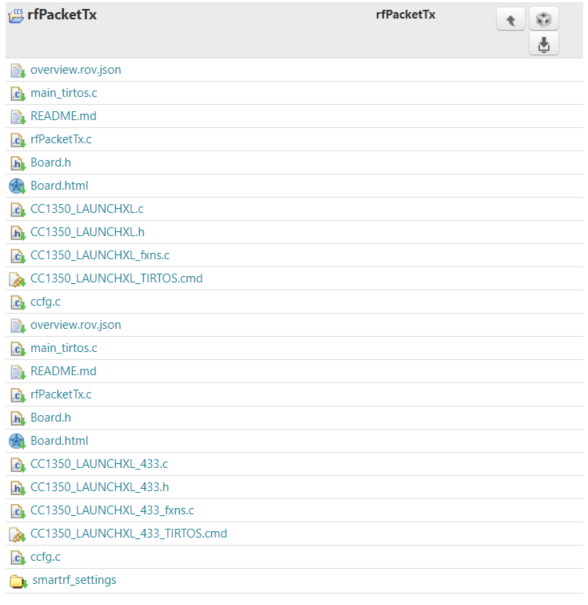
我想导入 launchxl_433的文件。 但是、如果单击"import"、则只能导入 launchxl 文件的文件。
如何导入 launchxl_433文件?
This thread has been locked.
If you have a related question, please click the "Ask a related question" button in the top right corner. The newly created question will be automatically linked to this question.
工具/软件:Code Composer Studio
我想导入 launchxl_433的文件。 但是、如果单击"import"、则只能导入 launchxl 文件的文件。
如何导入 launchxl_433文件?
Jihong、
我可以看到同样的东西。 这些文件在 Resource Explorer 中列出、但导入工程后、_433文件不是工程的一部分。 如果您想手动将这些文件复制到项目中并排除非_433文件、则该文件会出现在 SDK 中。
这些文件位于: /examples/rtos/CC1350_LAUNCHXL_433/drivers/rfPacketTx
我将在 SDK 团队中循环、以评论如何从 Resource Explorer 导入_433示例。
此致、
John
如果您在线使用 Resource Explorer: http://dev.ti.com/tirex/explore/node?node=ALXtuj8L3tsFnDQBBG6djw__eCfARaV__LATEST 、您应该能够导入正确的项目、因为在这里、项目的868MHz 和433MHz 版本是分离的。
此外、如果 您安装 SDK 并转至示例文件夹、则会找到 一个单独的 CC1350_LAUNCHXL_433文件夹。 要在 CCS 的桌面版本中使用此功能、
转到"File"->"Import"->"Code Composer Studio"->CCS Projects"、然后浏览到正确的 SDK 并选择要使用的示例。