


工具/软件:Code Composer Studio
你好吗?
我已经多次尝试更改网络环境以在我的笔记本电脑上安装 CCS 8.3.0.000009。
每次我尝试下载 JRE_ROOT_1.8.0.122失败时,它都会停止,如下所示。
正在开始安装
安装实用程序和其他程序
正在下载 software-dl.ti.com/.../com.ti.ccstudio.installer.msvc.2017.win32_root_14.11.25325
正在下载 software-dl.ti.com/.../com.ti.ccstudio.installer.msvc.2017.win32_root_14.11.25325
正在下载 software-dl.ti.com/.../jre_root_1.8.0.122
正在下载 http://software-dl.ti.com/ccs/esd/CCSv8/CCS8.3.0.00009_win32/featurerepo/binary/jre_root_1.8.0.122
如果我已经在 Chrome Web 浏览器中尝试过 abobe URL、它可以成功下载组件、但安装程序无法下载。
我还在 Ubuntu 16.04 LTS 上试用了 Linux x64版本、它成功解决了问题。
安装程序弹出以下对话框、向 TI 报告问题、但由于某些内部错误、无法成功记录。
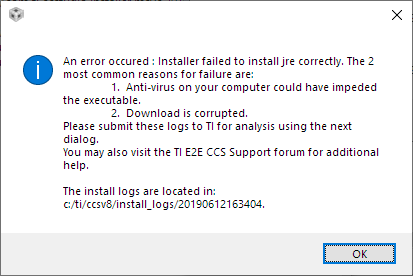

在安装 CCS 之前、我还尝试在 JRE 中单独安装、但它始终尝试下载 JRE_ROOT_1.0.0.122。
在这种情况下、如何在 Windows 10中继续安装 CCS?
请注意、在运行 CCS 安装程序之前、已禁用运行时病毒检查。
我已附加所有安装日志。
/cfs-file/__key/communityserver-discussions-components-files/81/3010.install_5F00_logs.7z
此致、
SeongHan Kim
