This thread has been locked.

If you have a related question, please click the "Ask a related question" button in the top right corner. The newly created question will be automatically linked to this question.

[参考译文] CODECOMPOSER:CC1352内置服务器在升级到 CCS12和新 SDK 后失败

Guru**** 2564565 points
Other Parts Discussed in Thread: CCSTUDIO

请注意,本文内容源自机器翻译,可能存在语法或其它翻译错误,仅供参考。如需获取准确内容,请参阅链接中的英语原文或自行翻译。

https://e2e.ti.com/support/tools/code-composer-studio-group/ccs/f/code-composer-studio-forum/1184796/codecomposer-cc1352-buildserver-fails-after-upgrading-to-ccs12-and-new-sdk

器件型号:CODECOMPOSER
Thread 中讨论的其他器件:CCStudio

对于我们的 CI 环境、我们使用 Docker 映像来构建我们的项目。

现在、在我升级到 CCS12和 CC13XX SDK6.30后 、我会遇到有关编译器的构建错误。

Buildfile generation error occurred..
This project was created using a version of compiler that is not currently installed - TICLANG_2.1.2.LTS [Arm]:
- See 'Help > Install New Software' and select 'Code Generation Tools Updates' to check if this compiler is available through a CCS update.
- Visit CCS App Center to get the latest compiler support.
- Or download and install the compiler [http://software-dl.ti.com/codegen/non-esd/downloads], then register it with CCS through 'Preferences > CCS > Build > Compilers'.
Build stopped..

现在 、升级此 SDK 后、工程将使用似乎未安装的 TI clang 编译器。

我更改了 Docker 映像以从 https://www.ti.com/tool/ARM-CGT#downloads 安装编译器

我还运行了命令、让 eclipse 通过以下命令发现编译器:

eclipse -nosplash -data /workspace -application com.ti.common.core.initialize -ccs.toolDiscoveryPath "/opt/ti/ti-cgt-armllvm_2.1.2.LTS/"

但我仍然不断得到该误差。

有人对如何解决此问题有任何想法吗?

  • 请注意,本文内容源自机器翻译,可能存在语法或其它翻译错误,仅供参考。如需获取准确内容,请参阅链接中的英语原文或自行翻译。

    您好!

    如果您运行:

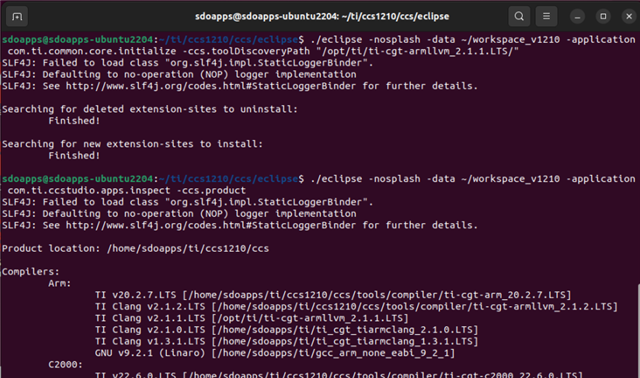
    > eclipse -nosplash -data /workspace -application com.ti.ccstudio.apps.inspect -ccs.product

    它应输出 CCS 发现的所有编译器。 您是否在 Arm 编译器列表下看到 clang 2.1.2?

    谢谢

    Ki

  • 请注意,本文内容源自机器翻译,可能存在语法或其它翻译错误,仅供参考。如需获取准确内容,请参阅链接中的英语原文或自行翻译。

    您好 Ki、

    否。如果我很遗憾地执行此命令、我将看不到编译器列表。 (请参阅下面的)

    root@41f703a51156:/workspace# eclipse -nosplash -data /workspace -application com.ti.common.core.initialize -ccs.toolDiscoveryPath "/opt/ti/ti-cgt-armllvm_2.1.2.LTS"
    SLF4J: Failed to load class "org.slf4j.impl.StaticLoggerBinder".
    SLF4J: Defaulting to no-operation (NOP) logger implementation
    SLF4J: See www.slf4j.org/codes.html for further details.
    
    Searching for deleted extension-sites to uninstall:
    	Finished!
    
    Searching for new extension-sites to install:
    	Finished!
    
    root@41f703a51156:/workspace# eclipse -nosplash -data /workspace -application com.ti.ccstudio.apps.inspect -ccs.product
    SLF4J: Failed to load class "org.slf4j.impl.StaticLoggerBinder".
    SLF4J: Defaulting to no-operation (NOP) logger implementation
    SLF4J: See www.slf4j.org/codes.html for further details.
    
    Product location: /opt/ti/ccs
    
    Compilers:
    	Arm:
    		TI v20.2.7.LTS [/opt/ti/ccs/tools/compiler/ti-cgt-arm_20.2.7.LTS]
    	C7000:
    		<none>					
    
    Products:
    	com.ti.SIMPLELINK_CC13XX_CC26XX_SDK [SimpleLink CC13xx CC26xx SDK]:
    		6.30.1.03 [/opt/ti/simplelink_cc13xx_cc26xx_sdk_6_30_01_03]
    
    	sysconfig [SysConfig]:
    		1.14.0 [/opt/ti/sysconfig_1.14.0]
    
    	com.ti.rtsc.XDCtools [XDCtools]:
    		3.62.1.16_core [/opt/ti/xdctools_3_62_01_16_core]
    		3.62.1.15_core [/opt/ti/xdctools_3_62_01_15_core]


    root@41f703a51156:/workspace# ll /opt/ti/
    total 48
    drwxr-xr-x  1 root root 4096 Jan  5 13:41  ./
    drwxr-xr-x  1 root root 4096 Dec 16 10:26  ../
    -rwxr-xr-x  1 root root  200 Dec 16 10:30 'Code Composer Studio 12.1.0.desktop'*
    drwxr-xr-x  1 root root 4096 Dec 16 10:31  ccs/
    drwxr-xr-x  8 root root 4096 Dec 16 10:34  simplelink_cc13xx_cc26xx_sdk_6_30_01_03/
    drwxr-xr-x  1 root root 4096 Dec 16 10:35  sysconfig_1.14.0/
    drwxr-xr-x  5 root root 4096 Jan  5 13:41  ti-cgt-armllvm_2.1.2.LTS/
    drwxr-xr-x 10 root root 4096 Dec 16 10:34  xdctools_3_62_01_15_core/
    drwxr-xr-x 10 root root 4096 Dec 16 10:29  xdctools_3_62_01_16_core/
    root@41f703a51156:/workspace# 


    因此、发现调用似乎不起作用或未正确引用。

  • 请注意,本文内容源自机器翻译,可能存在语法或其它翻译错误,仅供参考。如需获取准确内容,请参阅链接中的英语原文或自行翻译。

    这很奇怪。 在我的方案中、我 manall 下载并将 clang 2.1.1安装到/opt/ti 中(默认情况下、我已经有 CCS 12.1附带的2.1.2)、然后运行命令以发现它。 它发挥了作用。 我使用的命令几乎相同:

  • 请注意,本文内容源自机器翻译,可能存在语法或其它翻译错误,仅供参考。如需获取准确内容,请参阅链接中的英语原文或自行翻译。

    由于 CCS 已安装在/opt/ti 中、我希望 CCS 默认情况下应在/opt/ti 中查找任何其他产品安装。  

    正在使用哪种 Linux 发行版? 我假设您使用的是安装 CCS 的同一用户帐户?

  • 请注意,本文内容源自机器翻译,可能存在语法或其它翻译错误,仅供参考。如需获取准确内容,请参阅链接中的英语原文或自行翻译。

    为此、我使用 Docker 容器、将 Ubuntu 20.04作为发行版。

    CCS 确实安装在/opt/ti 中、当我在工具/编译器中查看 CCS 文件夹时、也会安装2.1.2 clang 编译器。

    CCS 通过 Docker 编写文件安装、通常作为 root 用户。

  • 请注意,本文内容源自机器翻译,可能存在语法或其它翻译错误,仅供参考。如需获取准确内容,请参阅链接中的英语原文或自行翻译。

    确切的 CCS 版本是什么? 我认为它不是12.1。

  • 请注意,本文内容源自机器翻译,可能存在语法或其它翻译错误,仅供参考。如需获取准确内容,请参阅链接中的英语原文或自行翻译。

    CCS12.1.0.00007_Linux-x64

  • 请注意,本文内容源自机器翻译,可能存在语法或其它翻译错误,仅供参考。如需获取准确内容,请参阅链接中的英语原文或自行翻译。
    [引用 userid="2210" URL"~/support/tools/code-composer-studio-group/ccs/f/code-composer-studio-forum/1184796/codecomposer-cc1352-buildserver-fails-after-upgrading-to-ccs12-and-new-sdk/4462541 #4462541"]我假设它不是12.1。

    哦、等一下。 我可以看到您使用的是12.1。 12.1应附带 clang 2.1.2 (位于/ccs/tools/compiler 中)。 CCS 应该已经发现了它...

  • 请注意,本文内容源自机器翻译,可能存在语法或其它翻译错误,仅供参考。如需获取准确内容,请参阅链接中的英语原文或自行翻译。

    是的、正确答案应该已经包含在内。 对于 clang 之前的早期版本、我永远不需要单独安装编译器。

    现在、由于我在编译时遇到此错误、我开始 手动安装编译器。

  • 请注意,本文内容源自机器翻译,可能存在语法或其它翻译错误,仅供参考。如需获取准确内容,请参阅链接中的英语原文或自行翻译。

    您是否在/ccs/tools/compiler?中看到 clang 2.1.2

  • 请注意,本文内容源自机器翻译,可能存在语法或其它翻译错误,仅供参考。如需获取准确内容,请参阅链接中的英语原文或自行翻译。

    是的

    root@41f703a51156:/opt/ti/ccs/tools/compiler# ll
    total 20
    drwxr-xr-x 5 root root 4096 Dec 16 10:29 ./
    drwxr-xr-x 4 root root 4096 Dec 16 10:27 ../
    drwxr-xr-x 3 root root 4096 Dec 16 10:29 dmed/
    drwxr-xr-x 6 root root 4096 Dec 16 10:27 ti-cgt-arm_20.2.7.LTS/
    drwxr-xr-x 5 root root 4096 Dec 16 10:27 ti-cgt-armllvm_2.1.2.LTS/
    root@41f703a51156:/opt/ti/ccs/tools/compiler# 
    

  • 请注意,本文内容源自机器翻译,可能存在语法或其它翻译错误,仅供参考。如需获取准确内容,请参阅链接中的英语原文或自行翻译。

    我想知道您的问题是否与中提到的问题有关:

    https://e2e.ti.com/support/processors-group/processors/f/processors-forum/1168839/ccstudio-ccs12-linux-not-showing-ti-cgt-armllvm_2-1-0-lts-in-compilers-list/4410474#4410474

  • 请注意,本文内容源自机器翻译,可能存在语法或其它翻译错误,仅供参考。如需获取准确内容,请参阅链接中的英语原文或自行翻译。

    您好 Ki、

    是的、这似乎是问题所在。

    我在 Docker 容器中安装了 libtinfo5、现在 CCS 会自动识别编译器。

    因此也无需单独安装编译器、因为 CCS 会识别编译器版本2.1.2LTS

    感谢您的帮助!