This thread has been locked.

If you have a related question, please click the "Ask a related question" button in the top right corner. The newly created question will be automatically linked to this question.

[参考译文] DS90UB941AS-Q1:DS90UB941AS-Q1:分离模式支持

Guru**** 2578865 points
Other Parts Discussed in Thread: DS90UB941AS-Q1, ALP, USB2ANY

请注意,本文内容源自机器翻译,可能存在语法或其它翻译错误,仅供参考。如需获取准确内容,请参阅链接中的英语原文或自行翻译。

https://e2e.ti.com/support/interface-group/interface/f/interface-forum/1271755/ds90ub941as-q1-ds90ub941as-q1-split-mode-support

器件型号:DS90UB941AS-Q1
主题中讨论的其他器件: ALPUSB2ANY

大家好、

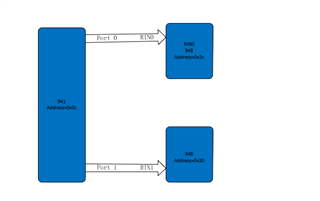
下面显示了一个简化的连接图 :

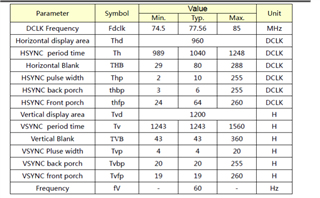
面板定时:

2.

我使用了941AS 分离器模式、但无法输出图片。  

我的脚本配置如下所示、请检查配置是否正确

{0x0c、0x01、0x02}、
{0x0c、0x01、0x08}、
{0x0c、0x1E、0x01}、//port0
{0x0c、0x5b、0x07}、//分离模式
{0x0c、0x4f、0x8c}、//4lane contiune clk
{0x0c、0x02、0x06}、//data clk PN 交换

{0x0c、0x40、0x04}、//DSI/DPHY 端口0
{0x0c、0x41、0x05}、
{0x0c、0x42、0x2e}、//DSI 时钟438、
{0x0c、0x41、0x20}、
{0x0c、0x42、0x6F}、

{0x0c、0x56、0x80}、//left/right 拆分
{0x0c、0x32、0x80}、
{0x0c、0x33、0x07}、//h 1920

{0x0c、0x1E、0x01}、//port0
{0x0c、0x36、0x00}、
{0x0c、0x37、0x80}、
{0x0c、0x38、0x7f}、//stop 1919
{0x0c、0x39、0x07}、
{0x0c、0x3a、0x00}、
{0x0c、0x3b、0x00}、
{0x0c、0x3c、0xAF}、//stop 1199
{0x0c、0x3D、0x04}、

{0x0c、0x1E、0x02}、//port1
{0x0c、0x36、0x00}、
{0x0c、0x37、0x80}、
{0x0c、0x38、0x7f}、//stop 1919
{0x0c、0x39、0x07}、
{0x0c、0x3a、0x00}、
{0x0c、0x3b、0x00}、
{0x0c、0x3c、0xAF}、//stop 1199
{0x0c、0x3D、0x04}、

{0x0c、0x40、0x10}、//DSI/DPHY 端口1
{0x0c、0x41、0x86}、
{0x0c、0x42、0x0a}、
{0x0c、0x41、0x94}、
{0x0c、0x42、0x0a}、

{0x0c、0x1E、0x01}、//port0
{0x0c、0x03、0x9a}、//pass_through
{0x0c、0x1E、0x02}、//port1
{0x0c、0x03、0x9a}、//pass_through
{0x2C、0x1E、0x09}、//port0面板背光

{0x30、0x34、0x19}、 //强制模式:单链路、辅助输入
{0x30、0x1E、0x09}、//port0面板背光
{0x0c、0x01、0x00}、//启用 DSI

  • 请注意,本文内容源自机器翻译,可能存在语法或其它翻译错误,仅供参考。如需获取准确内容,请参阅链接中的英语原文或自行翻译。

    soc (QCM6125)输出3840*1200@30fps 尺寸图像

  • 请注意,本文内容源自机器翻译,可能存在语法或其它翻译错误,仅供参考。如需获取准确内容,请参阅链接中的英语原文或自行翻译。

    您好!

    我会在1-2个工作日内检查并回复您。

    此致、
    Fadi A.

  • 请注意,本文内容源自机器翻译,可能存在语法或其它翻译错误,仅供参考。如需获取准确内容,请参阅链接中的英语原文或自行翻译。

    嘿、Hong、

    这里的问题是什么、您是否 在两个显示屏上都看到黑屏? 您是否尝试过以 Patgen 为首的方式进行测试?

    {0x0c、0x40、0x04}、//DSI/DPHY port0
    {0x0c、0x41、0x05}、
    {0x0c、0x42、0x2e}、//DSI 时钟438、[/报价]

    您的超级帧 PCLK 频率是多少?

    {0x0c、0x41、0x20}、
    {0x0c、0x42、0x6f}、

    您是否打算 在此处禁用"DSI_SYNC_PULSES "? 这会通知 DS90UB941AS-Q1接收器:它应仅期待水平/
    垂直同步启动数据包、并为 HSYNC 和 VSYNC 信号生成启用覆盖控制

    [报价 userid="534118" url="~/support/interface-group/interface/f/interface-forum/1271755/ds90ub941as-q1-ds90ub941as-q1-split-mode-support "]{0x0c、0x1E、0x01}、//port0
    {0x0c、0x03、0x9a}、//pass_through
    {0x0c、0x1E、0x02}、//port1
    {0x0c、0x03、0x9a}、//pass_through
    {0x2C、0x1E、0x09}、//port0面板背光[/报价]

    以下是您如何配置 I2C  

    board.WriteI2C (ser_addr、0x1E、0x01)#选择 FPD-Link III 端口0
    board.WriteI2C (ser_addr、0x07、0x2C)#0x07、0x2C Des0 IDX (7位地址)
    board.WriteI2C (Ser_addr、0x08、0x5C)#0x08、0x5c DES0别名
    board.WriteI2C (ser_addr、0x03、0x9A)#0x03、0x9A 启用 I2C_passthrough、FPD-Link III 端口0


    board.WriteI2C (Ser_addr、0x1E、0x02)#Select FPD-Link III 端口1 0x1E、0x02、
    board.WriteI2C (ser_addr、0x07、0x30)#0x07、0x30 DES1 IDX (7位地址)
    board.WriteI2C (Ser_addr、0x08、0x5E)#0x08、0x5E Des1别名
    board.WriteI2C (ser_addr、0x03、0x9A)#0x03、0x9A 启用 I2C_passthrough、FPD-Link III 端口1
    board.WriteI2C (ser_addr、0x1E、0x04)#0x1E、0x04

    {0x30、0x34、0x19}、 //强制模式:单链路、辅助输入
    {0x30、0x1E、0x09}、//port0面板背光
    {0x0c、0x01、0x00}、//启用 DSI[/报价]

    为什么在 DES 侧使用次级输入? 941AS 的 Dout1是否物理连接到 DES 的 RIN1?

    此致、
    Fadi A.

    [/quote]
  • 请注意,本文内容源自机器翻译,可能存在语法或其它翻译错误,仅供参考。如需获取准确内容,请参阅链接中的英语原文或自行翻译。

    这里的问题是什么、您是否 在两个显示屏上都能看到黑屏? 您是否尝试过以 Patgen 为首的方式进行测试?

    是的,所有屏幕是黑色的。我尝试 使用 Patgen 测试 ,但  屏幕仍然是黑色的。

    我的脚本模式配置如下所示。我尝试让从端口0到 display.please 的屏幕检查它。

    adb shell i2cset -fy 1 0x0c 0x01 0x08 b
    adb shell i2cset -fy 1 0x0c 0x01 0x02 b
    
    adb shell i2cset -fy 1 0x0c 0x5b 0x01 b
    adb shell i2cset -fy 1 0x0c 0x1e 0x01 b
    adb shell i2cset -fy 1 0x0c 0x03 0x9a b
    adb shell i2cset -fy 1 0x2c 0x1e 0x09 b
    
    adb shell i2cset -fy 1 0x0c 0x01 0x00 b
    adb shell i2cset -fy 1 0x0c 0x06 0x01 b
    adb shell i2cset -fy 1 0x0c 0x56 0x02 b    
    
    
    adb shell i2cset -fy 1 0x0c 0x40 0x04 b
    adb shell i2cset -fy 1 0x0c 0x41 0x21 b
    adb shell i2cset -fy 1 0x0c 0x42 0x60 b
    adb shell i2cset -fy 1 0x0c 0x40 0x04 b
    adb shell i2cset -fy 1 0x0c 0x41 0x05 b
    adb shell i2cset -fy 1 0x0c 0x42 0x32 b
    
    
    adb shell i2cset -fy 1 0x0c 0x66 0x03 b
    adb shell i2cset -fy 1 0x0c 0x67 0x1F b   //set N=31
    
    adb shell i2cset -fy 1 0x0c 0x66 0x04 b
    adb shell i2cset -fy 1 0x0c 0x67 0x20 b
    
    adb shell i2cset -fy 1 0x0c 0x66 0x05 b
    adb shell i2cset -fy 1 0x0c 0x67 0xB8 b
    
    adb shell i2cset -fy 1 0x0c 0x66 0x06 b
    adb shell i2cset -fy 1 0x0c 0x67 0x4D b
    
    adb shell i2cset -fy 1 0x0c 0x66 0x07 b
    adb shell i2cset -fy 1 0x0c 0x67 0x80 b
    
    adb shell i2cset -fy 1 0x0c 0x66 0x08 b
    adb shell i2cset -fy 1 0x0c 0x67 0x07 b
    
    adb shell i2cset -fy 1 0x0c 0x66 0x09 b
    adb shell i2cset -fy 1 0x0c 0x67 0x4b b
    
    
    adb shell i2cset -fy 1 0x0c 0x66 0x0a b
    adb shell i2cset -fy 1 0x0c 0x67 0x14 b
    
    adb shell i2cset -fy 1 0x0c 0x66 0x0b b
    adb shell i2cset -fy 1 0x0c 0x67 0x04 b
    
    adb shell i2cset -fy 1 0x0c 0x66 0x0c b
    adb shell i2cset -fy 1 0x0c 0x67 0x0C b
    
    adb shell i2cset -fy 1 0x0c 0x66 0x0d b
    adb shell i2cset -fy 1 0x0c 0x67 0x14 b
    
    adb shell i2cset -fy 1 0x0c 0x66 0x0e b
    adb shell i2cset -fy 1 0x0c 0x67 0x0F b
    
    adb shell i2cset -fy 1 0x0c 0x66 0x1a b
    adb shell i2cset -fy 1 0x0c 0x67 0x06 b  //set M=6
    
    adb shell i2cset -fy 1 0x0c 0x65 0x05 b
    adb shell i2cset -fy 1 0x0c 0x64 0x53 b

    您的超级帧 PCLK 频率是多少?

    4000*1243*30=149,160,000

    您是否打算 在此处禁用"DSI_SYNC_PULSES "? 这会通知 DS90UB941AS-Q1接收器:它应仅期待水平/
    垂直同步启动数据包、并为 HSYNC 和 VSYNC 信号生成启用覆盖控制

    该寄存器是否保留其默认值?

    4.为何在 DES 侧使用次级输入? 941AS 的 Dout1是否物理连接到 DES 的 RIN1?

     941AS 的 Dout1物理连接到 DES 的 RIN1。使用单独的 i2c 进行控制。

  • 请注意,本文内容源自机器翻译,可能存在语法或其它翻译错误,仅供参考。如需获取准确内容,请参阅链接中的英语原文或自行翻译。

    嘿、Hong、

    这是一个脚本与 patgen 使用你的计时... pclk 很难匹配你的,因为我们的内部时钟是基于一个200MHz 的时钟,所以我可以得到最接近的是66.6Mhz ... 它在我的设置中正常工作您可以在您的设置上试用吗?

    e2e.ti.com/.../splitter_5F00_mode_5F00_Script.py

    Unknown 说:
    4000*1243*30=149,160,000

    如果您的 PCLK 为149.16 MHz、那么您的 DSI CLK 以447.48 MHz 的频率运行、并且假设您使用4个 DSI 通道、您的 TSKIP 应为0x30。

    board.WriteI2C (UB941AS、0x40、0x04)# TSKIP_CNT
    board.WriteI2C (UB941AS、0x41、0x05)# TSKIP_CNT
    board.WriteI2C (UB941AS、0x42、0x30)# TSKIP_CNT

    寄存器是否保留其默认值?

    这取决于您的 SoC 如何发送数据-请查看 DSI 启动指南。  

    e2e.ti.com/.../DSI-Bringup-Guide.pdf

     941AS 的端1物理连接到 DES 的 RIN1。使用单独的 i2c 进行控制。

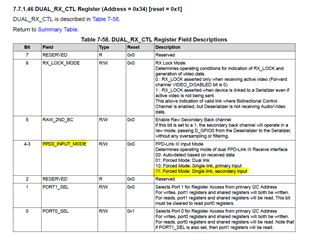
    您不使用主 输入 RIN0是不是有原因的?

    如果您使用的是 RIN1、则需要在948侧局部强制在寄存器0x34中启用该值、否则将不起作用。

    基本上、您需要将0x19写入寄存器0x34以启用 RIN1。 您需要通过与948侧的本地 I2C 连接来执行此操作、否则无法正常工作。

    此致、
    Fadi A.

  • 请注意,本文内容源自机器翻译,可能存在语法或其它翻译错误,仅供参考。如需获取准确内容,请参阅链接中的英语原文或自行翻译。

    1.这是一个脚本与 patgen 使用你的计时... pclk 很难匹配你的,因为我们的内部时钟是基于一个200MHz 的时钟,所以我可以得到最接近的是66.6Mhz ... 它在我的设置中正常工作您可以在您的设置上试用吗?

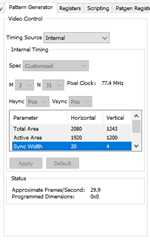
    我发现配置中的计时是1200*960,你应该反转宽度和高度,这个屏幕是双链路 LVDS,所以你需要把宽度乘以2。

    下面是我根据您修改面板计时(1920*1200)后的脚本,但仍然是黑色的 screen.please 检查。

    adb shell i2cset -fy 1 0x0c 0x01 0x08 b
    adb shell i2cset -fy 1 0x0c 0x01 0x02 b
    
    adb shell i2cset -fy 1 0x0c 0x5b 0x07 b
    adb shell i2cset -fy 1 0x0c 0x1e 0x01 b
    
    adb shell i2cset -fy 1 0x0c 0x66 0x1A b
    adb shell i2cset -fy 1 0x0c 0x67 0x01 b
    adb shell i2cset -fy 1 0x0c 0x66 0x03 b
    adb shell i2cset -fy 1 0x0c 0x67 0x03 b
    
    adb shell i2cset -fy 1 0x0c 0x66 0x04 b
    adb shell i2cset -fy 1 0x0c 0x67 0x20 b
    
    adb shell i2cset -fy 1 0x0c 0x66 0x05 b
    adb shell i2cset -fy 1 0x0c 0x67 0xB8 b
    
    adb shell i2cset -fy 1 0x0c 0x66 0x06 b
    adb shell i2cset -fy 1 0x0c 0x67 0x4D b
    
    adb shell i2cset -fy 1 0x0c 0x66 0x07 b
    adb shell i2cset -fy 1 0x0c 0x67 0x80 b
    
    adb shell i2cset -fy 1 0x0c 0x66 0x08 b
    adb shell i2cset -fy 1 0x0c 0x67 0x07 b
    
    adb shell i2cset -fy 1 0x0c 0x66 0x09 b
    adb shell i2cset -fy 1 0x0c 0x67 0x4b b
    
    
    adb shell i2cset -fy 1 0x0c 0x66 0x0a b
    adb shell i2cset -fy 1 0x0c 0x67 0x14 b
    
    adb shell i2cset -fy 1 0x0c 0x66 0x0b b
    adb shell i2cset -fy 1 0x0c 0x67 0x04 b
    
    adb shell i2cset -fy 1 0x0c 0x66 0x0c b
    adb shell i2cset -fy 1 0x0c 0x67 0x0C b
    
    adb shell i2cset -fy 1 0x0c 0x66 0x0d b
    adb shell i2cset -fy 1 0x0c 0x67 0x14 b
    
    adb shell i2cset -fy 1 0x0c 0x65 0x04 b
    adb shell i2cset -fy 1 0x0c 0x64 0x15 b
    
    adb shell i2cset -fy 1 0x0c 0x1e 0x02 b
    
    adb shell i2cset -fy 1 0x0c 0x66 0x1A b
    adb shell i2cset -fy 1 0x0c 0x67 0x01 b
    adb shell i2cset -fy 1 0x0c 0x66 0x03 b
    adb shell i2cset -fy 1 0x0c 0x67 0x03 b
    
    adb shell i2cset -fy 1 0x0c 0x66 0x04 b
    adb shell i2cset -fy 1 0x0c 0x67 0x20 b
    
    adb shell i2cset -fy 1 0x0c 0x66 0x05 b
    adb shell i2cset -fy 1 0x0c 0x67 0xB8 b
    
    adb shell i2cset -fy 1 0x0c 0x66 0x06 b
    adb shell i2cset -fy 1 0x0c 0x67 0x4D b
    
    adb shell i2cset -fy 1 0x0c 0x66 0x07 b
    adb shell i2cset -fy 1 0x0c 0x67 0x80 b
    
    adb shell i2cset -fy 1 0x0c 0x66 0x08 b
    adb shell i2cset -fy 1 0x0c 0x67 0x07 b
    
    adb shell i2cset -fy 1 0x0c 0x66 0x09 b
    adb shell i2cset -fy 1 0x0c 0x67 0x4b b
    
    
    adb shell i2cset -fy 1 0x0c 0x66 0x0a b
    adb shell i2cset -fy 1 0x0c 0x67 0x14 b
    
    adb shell i2cset -fy 1 0x0c 0x66 0x0b b
    adb shell i2cset -fy 1 0x0c 0x67 0x04 b
    
    adb shell i2cset -fy 1 0x0c 0x66 0x0c b
    adb shell i2cset -fy 1 0x0c 0x67 0x0C b
    
    adb shell i2cset -fy 1 0x0c 0x66 0x0d b
    adb shell i2cset -fy 1 0x0c 0x67 0x14 b
    
    adb shell i2cset -fy 1 0x0c 0x65 0x04 b
    adb shell i2cset -fy 1 0x0c 0x64 0x15 b
    
    adb shell i2cset -fy 1 0x0c 0x1e 0x01 b
    adb shell i2cset -fy 1 0x0c 0x07 0x58 b
    adb shell i2cset -fy 1 0x0c 0x08 0x5c b
    adb shell i2cset -fy 1 0x0c 0x03 0x9a b
    adb shell i2cset -fy 1 0x2c 0x1e 0x09 b
    
    adb shell i2cset -fy 1 0x0c 0x1e 0x02 b
    adb shell i2cset -fy 1 0x0c 0x07 0x58 b
    adb shell i2cset -fy 1 0x0c 0x08 0x5e b
    adb shell i2cset -fy 1 0x0c 0x03 0x9a b
    adb shell i2cset -fy 2 0x30 0x34 0x19 b
    adb shell i2cset -fy 2 0x30 0x1e 0x09 b
    
    adb shell i2cset -fy 1 0x0c 0x01 0x00 b


  • 请注意,本文内容源自机器翻译,可能存在语法或其它翻译错误,仅供参考。如需获取准确内容,请参阅链接中的英语原文或自行翻译。

    嘿、Hong、

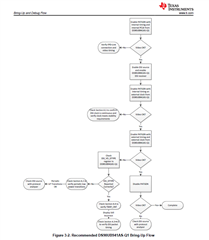
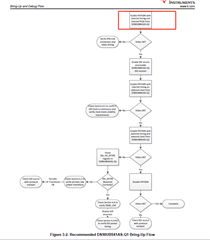
    您能否查看我上面发送的 DSI 调试指南、并记下流程中的哪一步是通过/失败的、这样我们可以退一步、以便对此调试进行更好的评估。

    此致、
    Fadi A.

  • 请注意,本文内容源自机器翻译,可能存在语法或其它翻译错误,仅供参考。如需获取准确内容,请参阅链接中的英语原文或自行翻译。

    您能否查看我上面发送的 DSI 调试指南、并记下流程中的哪一步是通过/失败的、这样我们可以退一步、以便对此调试进行更好的评估。

    第一步

  • 请注意,本文内容源自机器翻译,可能存在语法或其它翻译错误,仅供参考。如需获取准确内容,请参阅链接中的英语原文或自行翻译。

    您好、  

    948 PG 是否已成功编程并已输出? 这将确保一切都能正常工作、使用目标时序并且不会出现系统级问题(背光关闭等)。  

    您是否能够将 USB2ANY 连接到系统以使用 ALP 中的"PatGen"选项卡? 如果不正确、这将使拨入 PG 时序变得容易得多。

    此致、  

    洛根

  • 请注意,本文内容源自机器翻译,可能存在语法或其它翻译错误,仅供参考。如需获取准确内容,请参阅链接中的英语原文或自行翻译。

    948 PG 是否已成功编程并已输出? 这将确保一切都能正常工作、使用目标时序并且不会出现系统级问题(背光关闭等)。  

    还没有试过948 PG。941 PG,背光灯亮了。你能给我948 PG 脚本吗?

    您是否能够将 USB2ANY 连接到系统以使用 ALP 中的"PatGen"选项卡? 如果不正确、这将使拨入 PG 时序变得容易得多。

    我没有 USB2ANY。

  • 请注意,本文内容源自机器翻译,可能存在语法或其它翻译错误,仅供参考。如需获取准确内容,请参阅链接中的英语原文或自行翻译。

    您好、弘武

    我注意到上面的 PG 脚本有几个问题。  

    首先、您的 PG 脚本将仅从端口1输出当前写入的内容。 目前这是可以的、我建议我们首先使用正确的 PG 验证端口0显示、然后我们可以从那里继续。

    adb 外壳 i2cset - FY 1 0x0c 0x66 0x1a b
    adb 外壳 i2cset -fy 1 0x0c 0x67 0x06 b //set M=6

    脚本设置的 PCLK 为154.8MHz、但对于单个端口来说、这个值太高了。 而必须使用30Hz (如上所述)、因此此 PCLK 需要除以2。 如果 PCLK 为77、我建议使用 M=3。

    adb 外壳 i2cset - FY 1 0x0c 0x66 0x0E b
    adb 外壳 i2cset - FY 1 0x0c 0x67 0x0F b

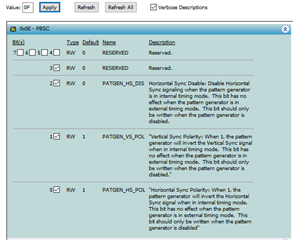
    0x0E=0xF 正在关闭水平同步。 相反、我建议使用0x0E=0x3 (如果 HS/VS 需要反相)、否则为0x00。

    这是 PG 的 ALP 选项卡工具输出、可用于生成寄存器值列表。

    寄存器数据名称
    0x0000 0x00 PGRS
    0x0001 0x00 PGGS
    0x0002 0x00 PGBS
    0x0003 0x1F PGCDC1
    0x0004 0x20 PGTFS1
    0x0005 0xB8 PGTFS2
    0x0006 0x4D PCTFS3
    0x0007 0x80 PGAFS1
    0x0008 0x07 PGAFS2
    0x0009 0x4B PGAFS3
    0x000A 0x14 PGHSW
    0x000B 0x04 PGVSW
    0x000C 0x0C PGHBP
    0x000D 0x14 PGVBP
    0x000E 0x00 PBSC ->根据极性进行更新
    0x001A 0x03 PGCDC2

    此致、  

    洛根

  • 请注意,本文内容源自机器翻译,可能存在语法或其它翻译错误,仅供参考。如需获取准确内容,请参阅链接中的英语原文或自行翻译。
    •  我像你一样调整了脚本,但仍然黑屏。

    adb shell i2cset -fy 1 0x0c 0x01 0x08 b
    adb shell i2cset -fy 1 0x0c 0x01 0x02 b
    
    adb shell i2cset -fy 1 0x0c 0x5b 0x01 b //set port0
    adb shell i2cset -fy 1 0x0c 0x1e 0x01 b
    adb shell i2cset -fy 1 0x0c 0x03 0x9a b
    adb shell i2cset -fy 1 0x2c 0x1e 0x09 b
    
    adb shell i2cset -fy 1 0x0c 0x01 0x00 b
    adb shell i2cset -fy 1 0x0c 0x06 0x01 b
    adb shell i2cset -fy 1 0x0c 0x56 0x02 b    
    
    
    adb shell i2cset -fy 1 0x0c 0x40 0x04 b
    adb shell i2cset -fy 1 0x0c 0x41 0x21 b
    adb shell i2cset -fy 1 0x0c 0x42 0x60 b
    adb shell i2cset -fy 1 0x0c 0x40 0x04 b
    adb shell i2cset -fy 1 0x0c 0x41 0x05 b
    adb shell i2cset -fy 1 0x0c 0x42 0x32 b
    
    
    adb shell i2cset -fy 1 0x0c 0x66 0x03 b
    adb shell i2cset -fy 1 0x0c 0x67 0x1F b  //set N=31
    
    adb shell i2cset -fy 1 0x0c 0x66 0x04 b
    adb shell i2cset -fy 1 0x0c 0x67 0x20 b
    
    adb shell i2cset -fy 1 0x0c 0x66 0x05 b
    adb shell i2cset -fy 1 0x0c 0x67 0xB8 b
    
    adb shell i2cset -fy 1 0x0c 0x66 0x06 b
    adb shell i2cset -fy 1 0x0c 0x67 0x4D b
    
    adb shell i2cset -fy 1 0x0c 0x66 0x07 b
    adb shell i2cset -fy 1 0x0c 0x67 0x80 b
    
    adb shell i2cset -fy 1 0x0c 0x66 0x08 b
    adb shell i2cset -fy 1 0x0c 0x67 0x07 b
    
    adb shell i2cset -fy 1 0x0c 0x66 0x09 b
    adb shell i2cset -fy 1 0x0c 0x67 0x4b b
    
    
    adb shell i2cset -fy 1 0x0c 0x66 0x0a b
    adb shell i2cset -fy 1 0x0c 0x67 0x14 b
    
    adb shell i2cset -fy 1 0x0c 0x66 0x0b b
    adb shell i2cset -fy 1 0x0c 0x67 0x04 b
    
    adb shell i2cset -fy 1 0x0c 0x66 0x0c b
    adb shell i2cset -fy 1 0x0c 0x67 0x0C b
    
    adb shell i2cset -fy 1 0x0c 0x66 0x0d b
    adb shell i2cset -fy 1 0x0c 0x67 0x14 b
    
    adb shell i2cset -fy 1 0x0c 0x66 0x0e b
    adb shell i2cset -fy 1 0x0c 0x67 0x00 b
    
    adb shell i2cset -fy 1 0x0c 0x66 0x1a b
    adb shell i2cset -fy 1 0x0c 0x67 0x03 b  //set M=3
    
    adb shell i2cset -fy 1 0x0c 0x65 0x05 b
    adb shell i2cset -fy 1 0x0c 0x64 0x53 b

  • 请注意,本文内容源自机器翻译,可能存在语法或其它翻译错误,仅供参考。如需获取准确内容,请参阅链接中的英语原文或自行翻译。

    您好、  

    是否根据原始脚本激活了背光命令?

    {0x2C、0x1E、0x09}、//port0面板背光

    以下脚本可用于确保 DES 具有正确的活动分辨率。  

    e2e.ti.com/.../0564.947_2D00_948-Res-Check.py

    此致、  

    洛根

  • 请注意,本文内容源自机器翻译,可能存在语法或其它翻译错误,仅供参考。如需获取准确内容,请参阅链接中的英语原文或自行翻译。

    是否根据原始脚本激活了背光命令?

    {0x2C、0x1E、0x09}、//port0面板背光

    我没忘记设置它

    以下脚本可用于确保 DES 具有正确的活动分辨率。  

    board.WriteI2C(UB948,0x68,0x19)# H 高电平有效监视器
    Time.Sleep (0.1)#严重延迟! 正常运行需要!
    对于 x in 范围(0100):
    board.WriteI2C(UB948、0x68、0x19)#在延迟之后需要再次写入该寄存器
    Hhigh = board.ReadI2C (UB948、0x69、1) ->0x9E
    board.WriteI2C(UB948,0x68,0x09)# H 低电平有效监视器
    Hlow = board.ReadI2C (UB948、0x69、1) ->0x80
    board.WriteI2C (UB948、0x68、0x39)# V active High monitor
    Vhigh = board.ReadI2C (UB948、0x69、1) ->0x92
    board.WriteI2C (UB948、0x68、0x29)# V 低电平有效监控器
    Vlow = board.ReadI2C (UB948、0x69、1) ->0xb0
    掩码= int ('001111'、2)
    Hlowmask = Hlow 和 mask
    hhighmask = hhigh 和 mask
    Vlowmask = Vlow 和 mask
    Vhighmask = Vhigh 和 mask
    hhighmask = hhighmask << 6
    vhighmask = vhighmask << 6
    Hactive = hhighmask | hlowmask
    主动= vhighmask | vlowmask
    打印"检测到的分辨率="、Hactive、"x"、Vactive

    board.WriteI2C (UB948、0x68、0x00)#禁用 PGENBIST

    • 我计算的分辨率是1920*1200,是正确的。但黑屏,只有背光。

  • 请注意,本文内容源自机器翻译,可能存在语法或其它翻译错误,仅供参考。如需获取准确内容,请参阅链接中的英语原文或自行翻译。

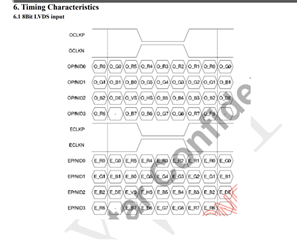
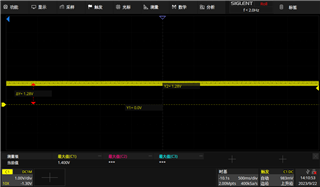
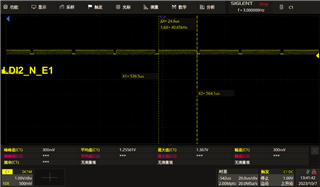
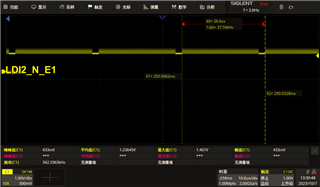
    我们测量并比较该器件与其他项目器件之间的 FPD Link III 波形。 它们看起来大致相同。 我们如何判断 FPD Link III 信号是否有效? 是否有任何示例或标准波形? 我们可以看到的不同之处是、UB948输出的 LVDS 信号的时序存在差异。 这是导致器件屏幕上不显示内容的根本原因吗?

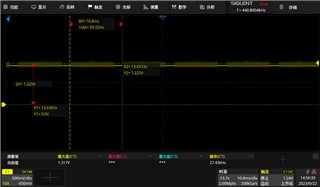
    下面是可以在其他项目上正常显示的 LVDS 数据通道波形。

    下面是目前正在调试的 LVDS 数据通道波形、

  • 请注意,本文内容源自机器翻译,可能存在语法或其它翻译错误,仅供参考。如需获取准确内容,请参阅链接中的英语原文或自行翻译。

    您好、  

    如果分辨率检查恢复正确、则确认 FPD-Link 不是问题所在。

    分辨率检查可验证941是否正确地将视频时序发送到 DES、并且 DES 已成功接收。 这似乎是底层时序或显示侧的其他方面的问题。  

    您需要验证显示端、以便更好地了解是否存在视频时序参数问题或其他系统级问题(面板电源、面板启用等)。 最后、如果存在视频参数问题(消隐、刷新率等)、则需要在 PG 脚本中识别并进行相应调整。  

    如果您通过此面板成功启动了其他显示、或许可以利用这些设置实现正确的显示/视频设置。

    此致、  

    洛根

  • 请注意,本文内容源自机器翻译,可能存在语法或其它翻译错误,仅供参考。如需获取准确内容,请参阅链接中的英语原文或自行翻译。

    分辨率检查可验证941是否正确地将视频时序发送到 DES、并且 DES 已成功接收。

    是否仍需要试用948 PG?

  • 请注意,本文内容源自机器翻译,可能存在语法或其它翻译错误,仅供参考。如需获取准确内容,请参阅链接中的英语原文或自行翻译。
    • 屏幕背光好,电源好,我能想到的就是面板定时,但 hactive 和 vactive 是正确的。 如何检查面板是否为空?这是我唯一的怀疑。

  • 请注意,本文内容源自机器翻译,可能存在语法或其它翻译错误,仅供参考。如需获取准确内容,请参阅链接中的英语原文或自行翻译。

    您好、

    由于对提供给设计人员的信息的怀疑已消除、我认为可能不需要此步骤。

    此显示屏是否在任何其他系统/程序中显示? 这是不是第一次使用 FPD-Link 来显示显示屏?

    将需要向显示模块供应商或显示系统供应商核实面板消隐。 上述消隐参数中可能有一个被误解(HFP 中包含 HS 等)。

    此致、

    洛根

  • 请注意,本文内容源自机器翻译,可能存在语法或其它翻译错误,仅供参考。如需获取准确内容,请参阅链接中的英语原文或自行翻译。

    我稍后将抓取941PG LVDS 波形。

  • 请注意,本文内容源自机器翻译,可能存在语法或其它翻译错误,仅供参考。如需获取准确内容,请参阅链接中的英语原文或自行翻译。

    尊敬的 Logan:

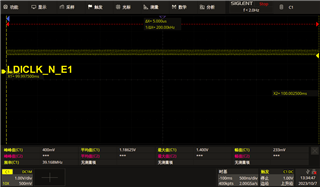
    下面是我捕获的948输出的 LVDS 波形图。请帮助检查它是否正确。

  • 请注意,本文内容源自机器翻译,可能存在语法或其它翻译错误,仅供参考。如需获取准确内容,请参阅链接中的英语原文或自行翻译。

    您好、  

    OLDI CLK 和输出看起来有效。 如前面所示、这看起来可能是视频时序问题(视频消隐、极性等)。 当前编程到 PG 941的值时、可能会违反 PCLK、Htotal、Vtotal、极性或其他视频时序参数。 探测的 OLDI 信号和分辨率检测读回证明948似乎正常运行。

    您确定显示面板可以接受30fps 吗?  在数据表表中直接指定60Hz。  

    2.

    [/报价]

    您能评论以下内容吗:

    需要向显示模块供应商或显示系统供应商检查面板消隐。 上述消隐参数之一可能被误解(HFP 中包括 HS 等)。
    是否在任何其他系统/程序中显示此显示? 这是否是第一次使用 FPD-Link 显示显示屏?

    此致、  

    洛根

    [/quote]
  • 请注意,本文内容源自机器翻译,可能存在语法或其它翻译错误,仅供参考。如需获取准确内容,请参阅链接中的英语原文或自行翻译。

    请勿使用941PG、使用 SOC 源、可以显示948 0x64集0x53 (只能显示设置0x53或0x13)、但无法显示941 0x64集0x53、这是什么问题?

  • 请注意,本文内容源自机器翻译,可能存在语法或其它翻译错误,仅供参考。如需获取准确内容,请参阅链接中的英语原文或自行翻译。

    端口1上的948现在可以显示 soc 输出数据源。但是、端口0上的948仍然不显示。请勿使用941PG、使用 SOC 源、可以显示端口0 0x64上的948设置0x53 (只能显示设置0x53或0x13)但9410x64设置0x53不能显示。 问题是什么?

  • 请注意,本文内容源自机器翻译,可能存在语法或其它翻译错误,仅供参考。如需获取准确内容,请参阅链接中的英语原文或自行翻译。

    您好、  

    [报价用户识别="534118" URL="~/support/interface-group/interface/f/interface-forum/1271755/ds90ub941as-q1-ds90ub941as-q1-split-mode-support/4847393 #4847393"]可显示948 0x64集0x53 (仅可显示设置0x53或0x13)

    如果您在948端将寄存器0x64设置为0x53、这意味着您启用948的内部专利。 这意味着连接至显示器的948 LVDS (OLDI) 没有问题。

    Unknown 说:
    941 0x64集0x53无法显示,问题是什么?

    这意味着从941运行的 Patgen 不起作用。 我们需要对此进行进一步调查。  

    端口1上的948现在可以显示 soc 输出数据源。但是,端口0上的948仍不显示。请勿使用941PG,使用 SOC 源,端口0上的948可显示0x64集0x53 (只能显示设置0x53或0x13) 但941 0x64 set 0x53无法显示,问题是什么?

    我不是完全理解这个问题在这里。 如果您从948启用 Patgen、则意味着您将忽略 SoC 视频流。  

    我会给您发送一封电子邮件、我们应该打电话来解决这个问题。  

    此致、
    Fadi A.

  • 请注意,本文内容源自机器翻译,可能存在语法或其它翻译错误,仅供参考。如需获取准确内容,请参阅链接中的英语原文或自行翻译。

    我不是完全理解这个问题在这里。 如果您从948启用 Patgen、则意味着您将忽略 SoC 视频流。  

    941配置为拆分模式。现在端口1上的948可以显示 SOC 视频链路,但端口0上的948无法显示。

  • 请注意,本文内容源自机器翻译,可能存在语法或其它翻译错误,仅供参考。如需获取准确内容,请参阅链接中的英语原文或自行翻译。

    设置 PORT0 PATGEN_ASCRL = 1、仅可在面板0上显示纯蓝色和白色。

    设置 PORT1  PATGEN_ASCRL = 1、所有颜色均可显示在面板1上。

  • 请注意,本文内容源自机器翻译,可能存在语法或其它翻译错误,仅供参考。如需获取准确内容,请参阅链接中的英语原文或自行翻译。

    e2e.ti.com/.../c358be25622693307fa563db3bfe8531.mp4

  • 请注意,本文内容源自机器翻译,可能存在语法或其它翻译错误,仅供参考。如需获取准确内容,请参阅链接中的英语原文或自行翻译。

    您好、  

    这是非常奇怪的。 通常使用我们的设备,您要么让 Patgen 为所有模式工作,要么根本不工作。 我们从未见过它对某些模式起作用、而对其他模式不起作用。 第一个和第二个显示屏之间的区别是它们是相同的,相同的 TCON ,等等。 ?

    您是否尝试过从948端测试本地 patgen,这是否也显示出端口0的问题,而端口1没有问题?

    此致、
    Fadi A.

  • 请注意,本文内容源自机器翻译,可能存在语法或其它翻译错误,仅供参考。如需获取准确内容,请参阅链接中的英语原文或自行翻译。

    这是非常奇怪的。 通常使用我们的设备,您要么让 Patgen 为所有模式工作,要么根本不工作。 我们从未见过它对某些模式起作用、而对其他模式不起作用。 第一个和第二个显示屏之间的区别是它们是相同的,相同的 TCON ,等等。 ?

    两个面板是相同的。

    您是否尝试过从948端测试本地 patgen,这是否也显示出端口0的问题,而端口1没有问题?

    是的,来自948端的 patgen,也显示端口0存在问题,端口1没有问题。

  • 请注意,本文内容源自机器翻译,可能存在语法或其它翻译错误,仅供参考。如需获取准确内容,请参阅链接中的英语原文或自行翻译。

    您好、  

    是,来自948端的 patgen 也显示出端口0存在问题,端口1无问题。

    好的、问题在于数据路径的输出侧、它介于948 LVDS OUTPUT -> TCON ->面板之间。 此显示屏可能有一些问题、您是否有其他显示屏可在 port0上尝试?

    如果将 port0显示与 port1显示交换,是否仍会看到相同的问题? 我尝试在将端口0连接线插入端口1电缆时、看看该问题是否在端口0显示后出现。  

    此致、
    Fadi A.

  • 请注意,本文内容源自机器翻译,可能存在语法或其它翻译错误,仅供参考。如需获取准确内容,请参阅链接中的英语原文或自行翻译。

    因为数据通道是反向连接的。问题已经解决了现在,非常感谢您的支持。