This thread has been locked.

If you have a related question, please click the "Ask a related question" button in the top right corner. The newly created question will be automatically linked to this question.

[参考译文] TUSB8041:无法枚举 Linux ARM 上的 USB 设备

Guru**** 2924050 points

Other Parts Discussed in Thread: TUSB8041

请注意,本文内容源自机器翻译,可能存在语法或其它翻译错误,仅供参考。如需获取准确内容,请参阅链接中的英语原文或自行翻译。

https://e2e.ti.com/support/interface-group/interface/f/interface-forum/1350533/tusb8041-unable-to-enumerate-usb-device-on-linux-arm

器件型号:TUSB8041

尊敬的 TI 支持:

我们设计了一个将  TUSB8041芯片作为 USB 集线器的电路板、我们在 Linux ARM 器件64位上运行 Ubuntu 18.04。 似乎在检测集线器时有一些问题、当我将 GRSTz 引脚设置为1时、我从内核获得以下输出:

[53.748162]  USB 1-1:使用 xhci-hcd 的新型低速 USB 设备2

[53.868423]  USB 1-1:设备描述符读/ 64,错误-71

[54.092343]  USB 1-1:设备描述符读/ 64,错误-71

[54.316535]  USB 2-1:使用 xhci-hcd 的新的 SuperSpeed 第1代 USB 设备编号2

[54.333466]  USB 2-1:发现新的 USB 设备,idVendor=0451,idProduct=8140,bcdDevice= 2.00

[  54.333481] USB 2-1:新 USB 设备字符串:MFR=0、Product=0、SerialNumber=0

[54.452210]  USB 1-1:使用 xhci-hcd 的新型低速 USB 设备3

[54.572309]  USB 1-1:器件描述符读取/ 64、错误-71

[54.670114]  集线器2-1:1.0:找到 USB 集线器

[54.694422]  集线器2-1:1.0:检测到4个端口

[54.796304]  USB 1-1:设备描述符读/ 64,错误-71

[  54.900693] USB USB1-port1:尝试下电上电

[55.532133]  USB 1-1:使用 xhci-hcd 的新款低速 USB 设备4

[55.532585]  USB 1-1:设备未响应设置地址。

[55.736663]  USB 1-1:设备不响应设置地址。

[55.940230]  USB 1-1:设备不接受地址4,错误-71

[56.060301]  USB 1-1:使用 xhci-hcd 的新低速 USB 设备5

[56.060731]  USB 1-1:设备没有响应设置地址。

[  56.264663] USB 1-1:设备未响应设置地址。

[56.468170]  USB 1-1:设备不接受地址5,错误-71

[56.468370]  USB USB1-port1:无法枚举 USB 设备

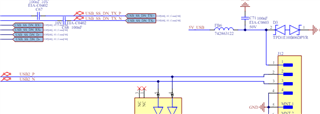
我附上此 PCB 部分的原理图。 我知道 R17和 C66将 USB_VBUS 设置为0.5V 时存在接地缺失的问题、因此我们将其接线固定为接地。  USB_VBUS 的输入电压恰好为0.5。

VDD 和 VDD33均清洁干净。  
有提示吗?

e2e.ti.com/.../TC100600.PDF.pdf

  • 请注意,本文内容源自机器翻译,可能存在语法或其它翻译错误,仅供参考。如需获取准确内容,请参阅链接中的英语原文或自行翻译。

    5V_USB 由外部电路板供电、并且正常、 如果 我尝试将任何器件插入 USB 3.0和2.0、则检测不到任何器件、而且根本不会收到来自 Linux 内核的消息。

    下面是"lsusb -v"的结果:

    Bus 002 Device 002: ID 0451:8140 Texas Instruments, Inc. 
    Device Descriptor:
      bLength                18
      bDescriptorType         1
      bcdUSB               3.10
      bDeviceClass            9 Hub
      bDeviceSubClass         0 Unused
      bDeviceProtocol         3 
      bMaxPacketSize0         9
      idVendor           0x0451 Texas Instruments, Inc.
      idProduct          0x8140 
      bcdDevice            2.00
      iManufacturer           0 
      iProduct                0 
      iSerial                 0 
      bNumConfigurations      1
      Configuration Descriptor:
        bLength                 9
        bDescriptorType         2
        wTotalLength           31
        bNumInterfaces          1
        bConfigurationValue     1
        iConfiguration          0 
        bmAttributes         0xe0
          Self Powered
          Remote Wakeup
        MaxPower                0mA
        Interface Descriptor:
          bLength                 9
          bDescriptorType         4
          bInterfaceNumber        0
          bAlternateSetting       0
          bNumEndpoints           1
          bInterfaceClass         9 Hub
          bInterfaceSubClass      0 Unused
          bInterfaceProtocol      0 Full speed (or root) hub
          iInterface              0 
          Endpoint Descriptor:
            bLength                 7
            bDescriptorType         5
            bEndpointAddress     0x81  EP 1 IN
            bmAttributes           19
              Transfer Type            Interrupt
              Synch Type               None
              Usage Type               Feedback
            wMaxPacketSize     0x0002  1x 2 bytes
            bInterval               8
            bMaxBurst               0
    Hub Descriptor:
      bLength               1
      bDescriptorType       4
      nNbrPorts            16
      wHubCharacteristic 0x0140
        Ganged power switching
        Ganged overcurrent protection
      bPwrOn2PwrGood        4 * 2 milli seconds
      bHubContrCurrent     64 milli Ampere
      bHubDecLat          0.64 micro seconds
      wHubDelay            96 nano seconds
      DeviceRemovable    0x00 0x00 0x00
     Hub Port Status:
       Port 1: 0000.06a0 highspeed lowspeed
       Port 2: 0000.06a0 highspeed lowspeed
       Port 3: 0000.06a0 highspeed lowspeed
       Port 4: 0000.06a0 highspeed lowspeed
       Port 5: 0000.06a0 highspeed lowspeed
       Port 6: 0000.06a0 highspeed lowspeed
       Port 7: 0000.06a0 highspeed lowspeed
       Port 8: 0000.06a0 highspeed lowspeed
       Port 9: 0000.06a0 highspeed lowspeed
       Port 10: 0000.06a0 highspeed lowspeed
       Port 11: 0000.06a0 highspeed lowspeed
       Port 12: 0000.06a0 highspeed lowspeed
       Port 13: 0000.06a0 highspeed lowspeed
       Port 14: 0000.06a0 highspeed lowspeed
       Port 15: 0000.06a0 highspeed lowspeed
       Port 16: 0000.06a0 highspeed lowspeed
    Binary Object Store Descriptor:
      bLength                 5
      bDescriptorType        15
      wTotalLength           42
      bNumDeviceCaps          3
      USB 2.0 Extension Device Capability:
        bLength                 7
        bDescriptorType        16
        bDevCapabilityType      2
        bmAttributes   0x00000006
          Link Power Management (LPM) Supported
      SuperSpeed USB Device Capability:
        bLength                10
        bDescriptorType        16
        bDevCapabilityType      3
        bmAttributes         0x00
        wSpeedsSupported   0x000e
          Device can operate at Full Speed (12Mbps)
          Device can operate at High Speed (480Mbps)
          Device can operate at SuperSpeed (5Gbps)
        bFunctionalitySupport   1
          Lowest fully-functional device speed is Full Speed (12Mbps)
        bU1DevExitLat          10 micro seconds
        bU2DevExitLat        2047 micro seconds
      Container ID Device Capability:
        bLength                20
        bDescriptorType        16
        bDevCapabilityType      4
        bReserved               0
        ContainerID             {008014d5-854c-b9c1-0319-8fc2b6c9d000}
    Device Status:     0x000d
      Self Powered
      U1 Enabled
      U2 Enabled


  • 请注意,本文内容源自机器翻译,可能存在语法或其它翻译错误,仅供参考。如需获取准确内容,请参阅链接中的英语原文或自行翻译。

    您好、Riccardo:

      我会查看原理图 、同时、您可以根据以下过程调试问题吗?

    https://e2e.ti.com/support/interface-group/interface/f/interface-forum/1343233/faq-tusb8041a-debug-procedure-if-ti-tusb80xx-or-tusb40xx-hub-can-not-be-detected-by-usb-host

    此致

    布赖恩

  • 请注意,本文内容源自机器翻译,可能存在语法或其它翻译错误,仅供参考。如需获取准确内容,请参阅链接中的英语原文或自行翻译。

    您好、Brian、您有机会了解一下原理图了吗? 关于电源序列、即使我们在10秒后切换 GRSTz 引脚、在 Vdd 之前为 VDD33供电是否重要?

    此致

  • 请注意,本文内容源自机器翻译,可能存在语法或其它翻译错误,仅供参考。如需获取准确内容,请参阅链接中的英语原文或自行翻译。

    您好、Riccardo:

         即使我们在 10秒后切换 GRSTz 引脚、也可以在 Vdd 之前为 VDD33供电、但 GRSTz 脉冲应大于3ms。

       已检查原理图,应该可以检测到上游。

     对于下游,连接 DP/DM 是否正确? 通常引脚2是 D-  

     在测试日志中, [54.333466]  USB 2-1:找到新的 USB 设备,idVendor=0451,idProduct=8140,bcdDevice= 2.00  

     看起来检测到 USB3集线器、您在下行端口上连接了什么器件?

    此致

    布赖恩

  • 请注意,本文内容源自机器翻译,可能存在语法或其它翻译错误,仅供参考。如需获取准确内容,请参阅链接中的英语原文或自行翻译。

    您好、Brian、

    关于 DP/DM 是的我们知道它不是一个标准的引脚分配,我们相应地进行了连接。 我们测试了插入 USB 闪存驱动器、USB WIFI 加密狗和 USB 调制解调器、根本没有来自下行端口的信号。

    检测到设备、但"无法枚举 USB 设备"是最后一个日志、并且未检测到从 Linux 连接的设备。

    我检查了发送的链接、似乎晶体没有振荡、我们检查了组件、它安装良好。  

    实际上、VDD 在 VDD33之前是稳定的、但此时 GRSTz 为低电平。  电路板上电大约10秒后、我们将 GRSTz 设置为高电平。

  • 请注意,本文内容源自机器翻译,可能存在语法或其它翻译错误,仅供参考。如需获取准确内容,请参阅链接中的英语原文或自行翻译。

     1.1V 和3.3V 稳定后,保持 GRSTz 低电平>3ms 应该足够好。

    如果 晶体未振荡、似乎有些问题、接地焊盘如何焊接?

    此致

    布赖恩

  • 请注意,本文内容源自机器翻译,可能存在语法或其它翻译错误,仅供参考。如需获取准确内容,请参阅链接中的英语原文或自行翻译。

    您好、Riccardo:

      有更新吗?

    此致

    布赖恩

  • 请注意,本文内容源自机器翻译,可能存在语法或其它翻译错误,仅供参考。如需获取准确内容,请参阅链接中的英语原文或自行翻译。

    您好、 Brian、

    原理图中存在连接器侧错误。 交换了 TX 和 RX。

    感谢您的支持。 此致