This thread has been locked.

If you have a related question, please click the "Ask a related question" button in the top right corner. The newly created question will be automatically linked to this question.

[参考译文] AM62A7:tiovxmultiscaler ROI dign't work

Guru**** 2553420 points
Other Parts Discussed in Thread: AM67A, SYSCONFIG

请注意,本文内容源自机器翻译,可能存在语法或其它翻译错误,仅供参考。如需获取准确内容,请参阅链接中的英语原文或自行翻译。

https://e2e.ti.com/support/processors-group/processors/f/processors-forum/1531570/am62a7-tiovxmultiscaler-roi-didn-t-work

器件型号:AM62A7
Thread 中讨论的其他器件:AM67ASysConfig

工具/软件:

版本 10_00_00_08

我之前在 下面更新了 gsttiovxmultiscaler 插件  

AM62A7:GStreamer kmssink 延迟问题 — 处理器论坛-处理器 — TI E2E 支持论坛

我运行此命令

gst-launch-1.0 videotestsrc is-live=true num-buffers=10000 ! \
"video/x-raw,format=NV12,width=1280,height=720" ! \
tiovxmultiscaler name=multi src_0::roi-startx=0 src_0::roi-starty=0 src_0::roi-width=640 src_0::roi-height=480   \
multi. ! "video/x-raw,format=NV12,width=320,height=240" ! queue ! \
kmssink driver-name=tidss sync=false skip-vsync=true

这个

gst-launch-1.0 videotestsrc is-live=true num-buffers=10000 ! \
"video/x-raw,format=NV12,width=1280,height=720" ! \
tiovxmultiscaler name=multi src_0::roi-startx=100 src_0::roi-starty=100 src_0::roi-width=640 src_0::roi-height=480   \
multi. ! "video/x-raw,format=NV12,width=320,height=240" ! queue ! \
kmssink driver-name=tidss sync=false skip-vsync=true

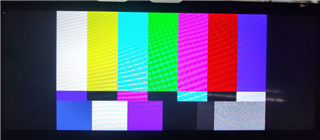
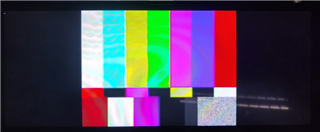
屏幕显示相同的图片

请尽快帮助解决此问题、因为我们的项目现已进入关键阶段。

  • 请注意,本文内容源自机器翻译,可能存在语法或其它翻译错误,仅供参考。如需获取准确内容,请参阅链接中的英语原文或自行翻译。

    尊敬的 Jason:

    我看到了 ROI 对我的影响。 您的屏幕尺寸是多少?

    此致、

    建中

  • 请注意,本文内容源自机器翻译,可能存在语法或其它翻译错误,仅供参考。如需获取准确内容,请参阅链接中的英语原文或自行翻译。

    你好、建中

    屏幕是 1920x720

    BR、

    Jason

  • 请注意,本文内容源自机器翻译,可能存在语法或其它翻译错误,仅供参考。如需获取准确内容,请参阅链接中的英语原文或自行翻译。

    Jason、

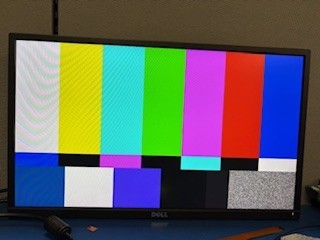
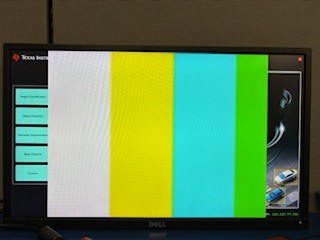
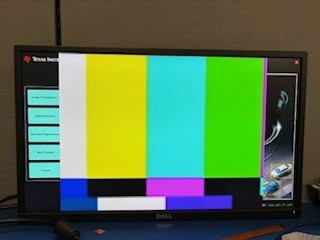
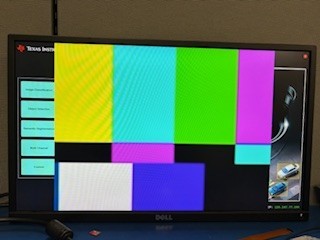
    一切都按我的预期运行。 请参阅以下日志和图片。  您可以更改屏幕并重试吗?

    1.无裁剪:

    gst-launch-1.0 videotestsrc is-live=true num-buffers=10000 ! \
    > "video/x-raw,format=NV12,width=1280,height=720" ! \
    > kmssink driver-name=tidss sync=false skip-vsync=true

    2.裁剪 640x480 自 (0、0):

    gst-launch-1.0 videotestsrc is-live=true num-buffers=10000 ! \
    "video/x-raw,format=NV12,width=1280,height=720" ! \
    tiovxmultiscaler name=multi src_0::roi-startx=0 src_0::roi-starty=0 src_0::roi-width=640 src_0::roi-height=480   \
    multi. ! "video/x-raw,format=NV12,width=320,height=240" ! queue ! \
    kmssink driver-name=tidss sync=false skip-vsync=true

    3. 裁剪 640x480 从 (100,100):

    gst-launch-1.0 videotestsrc is-live=true num-buffers=10000 ! \
    "video/x-raw,format=NV12,width=1280,height=720" ! \
    tiovxmultiscaler name=multi src_0::roi-startx=100 src_0::roi-starty=100 src_0::roi-width=640 src_0::roi-height=480   \
    multi. ! "video/x-raw,format=NV12,width=320,height=240" ! queue ! \
    kmssink driver-name=tidss sync=false skip-vsync=true

    4.裁剪 640x480 从 (200,200):

    gst-launch-1.0 videotestsrc is-live=true num-buffers=10000 ! \
    "video/x-raw,format=NV12,width=1280,height=720" ! \
    tiovxmultiscaler name=multi src_0::roi-startx=200 src_0::roi-starty=200 src_0::roi-width=640 src_0::roi-height=480   \
    multi. ! "video/x-raw,format=NV12,width=320,height=240" ! queue ! \
    kmssink driver-name=tidss sync=false skip-vsync=true

    此致、

    建中

  • 请注意,本文内容源自机器翻译,可能存在语法或其它翻译错误,仅供参考。如需获取准确内容,请参阅链接中的英语原文或自行翻译。

    你好、建中

    我一步一步地遵循了您的说明、这里是我的结果。

    1.无裁剪:

    gst-launch-1.0 videotestsrc is-live=true num-buffers=10000 ! \
    "video/x-raw,format=NV12,width=1280,height=720" ! \
    kmssink driver-name=tidss sync=false skip-vsync=true

    2.裁剪 640x480 自 (0、0):

    gst-launch-1.0 videotestsrc is-live=true num-buffers=10000 ! \
    "video/x-raw,format=NV12,width=1280,height=720" ! \
    tiovxmultiscaler name=multi src_0::roi-startx=0 src_0::roi-starty=0 src_0::roi-width=640 src_0::roi-height=480   \
    multi. ! "video/x-raw,format=NV12,width=320,height=240" ! queue ! \
    kmssink driver-name=tidss sync=false skip-vsync=true

    另外两个命令也无法正确裁剪。所以我怀疑我的多标量插件可能有问题。

    我之前在论坛上发布了修复问题、并按照说明进行了更新 /opt/edgeai-tiovx-modules /tiovx/multi_scaler_module.c src 及其头文件。 我在中还修改了此函数  /opt/edgeai-gst-plugins/ext/tiovx/gsttiovxmultiscaler.c

    static gboolean
    gst_tiovx_multi_scaler_configure_module (GstTIOVXSimo * simo)
    {
      GstTIOVXMultiScaler *self = NULL;
      vx_status status = VX_FAILURE;
      gboolean ret = TRUE;
    
      g_return_val_if_fail (simo, FALSE);
    
      self = GST_TIOVX_MULTI_SCALER (simo);
    
      GST_DEBUG_OBJECT (self, "Update filter coeffs");
      status = tiovx_multi_scaler_module_update_filter_coeffs (&self->obj);
      if (VX_SUCCESS != status) {
        GST_ERROR_OBJECT (self,
            "Module configure filter coefficients failed with error: %d", status);
        ret = FALSE;
        goto out;
      }
    
      GST_DEBUG_OBJECT (self, "Update crop params");
      status = tiovx_multi_scaler_module_update_crop_params (&self->obj);
      if (VX_SUCCESS != status) {
        GST_ERROR_OBJECT (self,
            "Module update crop params failed with error: %d", status);
        ret = FALSE;
        goto out;
      }
    
    // ==================== 增加该段代码
      GST_DEBUG_OBJECT (self, "Update input params");
      status = tiovx_multi_scaler_module_update_input_params (&self->obj);
      if (VX_SUCCESS != status) {
        GST_ERROR_OBJECT (self,
            "Module update input params failed with error: %d", status);
        ret = FALSE;
        goto out;
      }
    
      GST_DEBUG_OBJECT (self, "Release buffer scaler");
      status = tiovx_multi_scaler_module_release_buffers (&self->obj);
      if (VX_SUCCESS != status) {
        GST_ERROR_OBJECT (self,
            "Module configure release buffer failed with error: %d", status);
        ret = FALSE;
        goto out;
      }
    
    out:
      return ret;
    }

    e2e.ti.com/.../4442.tiovx_5F00_multi_5F00_scaler_5F00_module.c

    e2e.ti.com/.../4442.tiovx_5F00_multi_5F00_scaler_5F00_module.h

    BR、

    Jason

  • 请注意,本文内容源自机器翻译,可能存在语法或其它翻译错误,仅供参考。如需获取准确内容,请参阅链接中的英语原文或自行翻译。

    Jason、

    我在没有更改多标量的情况下使用干净的 SDK 10.1 进行了实验。 您还可以试用 SDK 10.1 吗?

    谢谢、

    建中

  • 请注意,本文内容源自机器翻译,可能存在语法或其它翻译错误,仅供参考。如需获取准确内容,请参阅链接中的英语原文或自行翻译。

    尊敬的 Jason:

    我想确认我还发现 AM67A 和 SDK10.1 上 tiovxmultiscaler 存在不良行为。

  • 请注意,本文内容源自机器翻译,可能存在语法或其它翻译错误,仅供参考。如需获取准确内容,请参阅链接中的英语原文或自行翻译。

    你好、建中

    我们的项目团队基于版本 10_00_00_08.我目前没有时间进行验证。 我稍后再回来。

    BR、

    Jason

  • 请注意,本文内容源自机器翻译,可能存在语法或其它翻译错误,仅供参考。如需获取准确内容,请参阅链接中的英语原文或自行翻译。

    Jason、

    没问题。 别着急、慢慢来。

    Evan、

    您能否在 AM67A 上提供有关问题的更多详细信息?

    谢谢你。

    建中

  • 请注意,本文内容源自机器翻译,可能存在语法或其它翻译错误,仅供参考。如需获取准确内容,请参阅链接中的英语原文或自行翻译。

    你好、建中

    我仍在 SDK 10_00_08 上验证此问题。 通过删除之前添加的 tiovx_multi_scaler_module_update_input_params 调用来修改 edgeai-gst-plugins/ext/tiovx/中的 gsttiovxmultiscaler.c 后、裁剪功能正常工作。 然而、这导致 前面提到的延迟和帧速率问题、使其无法满足我们的 60fps 要求。

    问题链接: AM62A7:GStreamer kmssink 延迟问题 — 处理器论坛-处理器 — TI E2E 支持论坛

    static gboolean
    gst_tiovx_multi_scaler_configure_module (GstTIOVXSimo * simo)
    {
      GstTIOVXMultiScaler *self = NULL;
      vx_status status = VX_FAILURE;
      gboolean ret = TRUE;
    
      g_return_val_if_fail (simo, FALSE);
    
      self = GST_TIOVX_MULTI_SCALER (simo);
    
      GST_DEBUG_OBJECT (self, "Update filter coeffs");
      status = tiovx_multi_scaler_module_update_filter_coeffs (&self->obj);
      if (VX_SUCCESS != status) {
        GST_ERROR_OBJECT (self,
            "Module configure filter coefficients failed with error: %d", status);
        ret = FALSE;
        goto out;
      }
    
      GST_DEBUG_OBJECT (self, "Update crop params");
      status = tiovx_multi_scaler_module_update_crop_params (&self->obj);
      if (VX_SUCCESS != status) {
        GST_ERROR_OBJECT (self,
            "Module update crop params failed with error: %d", status);
        ret = FALSE;
        goto out;
      }
    // If I add this part, it will cause the crop functionality to fail.
    // Flork 20250707
    #if 0
      GST_DEBUG_OBJECT (self, "Update input params");
      status = tiovx_multi_scaler_module_update_input_params (&self->obj);
      if (VX_SUCCESS != status) {
        GST_ERROR_OBJECT (self,
            "Module update input params failed with error: %d", status);
        ret = FALSE;
        goto out;
      }
    #endif
      GST_DEBUG_OBJECT (self, "Release buffer scaler");
      status = tiovx_multi_scaler_module_release_buffers (&self->obj);
      if (VX_SUCCESS != status) {
        GST_ERROR_OBJECT (self,
            "Module configure release buffer failed with error: %d", status);
        ret = FALSE;
        goto out;
      }
    
    out:
      return ret;
    }
    

    请帮助我们尽快解决此问题。

    BR

    Jason

  • 请注意,本文内容源自机器翻译,可能存在语法或其它翻译错误,仅供参考。如需获取准确内容,请参阅链接中的英语原文或自行翻译。

    尊敬的 Jason:

    感谢您的更新。 让我调查一下这个问题,并尽快回复你。

    此致、

    建中

  • 请注意,本文内容源自机器翻译,可能存在语法或其它翻译错误,仅供参考。如需获取准确内容,请参阅链接中的英语原文或自行翻译。

    尊敬的 Jason:

    我们刚刚修改了滤波电容器、能够实现 60fps。 请在您的端点测试以下管道

    gst-launch-1.0 -vvv videotestsrc is-live=true pattern=0 ! \
    "video/x-raw,width=1280,height=720,format=NV12,framerate=60/1" ! \
    tiovxmultiscaler name=multi src_0::roi-startx=100 src_0::roi-starty=100 src_0::roi-width=640 src_0::roi-height=480   \
    ! "video/x-raw,format=NV12,width=320,height=240,framerate=60/1" ! queue ! \
    fpsdisplaysink text-overlay=true video-sink="kmssink driver-name=tidss sync=false skip-vsync=true"

    此致、

    Dilna K

  • 请注意,本文内容源自机器翻译,可能存在语法或其它翻译错误,仅供参考。如需获取准确内容,请参阅链接中的英语原文或自行翻译。

    你好 Dilna K

    结果是、帧率仍然是不可接受的

    /GstPipeline:pipeline0/GstFPSDisplaySink:fpsdisplaysink0/GstTextOverlay:fps-display-text-overlay: text = rendered: 30, dropped: 0, current: 59.04, average: 59.04
    /GstPipeline:pipeline0/GstFPSDisplaySink:fpsdisplaysink0: last-message = rendered: 30, dropped: 0, current: 59.04, average: 59.04
    /GstPipeline:pipeline0/GstFPSDisplaySink:fpsdisplaysink0/GstTextOverlay:fps-display-text-overlay: text = rendered: 55, dropped: 4, fps: 49.34, drop rate: 7.89
    /GstPipeline:pipeline0/GstFPSDisplaySink:fpsdisplaysink0: last-message = rendered: 55, dropped: 4, fps: 49.34, drop rate: 7.89
    /GstPipeline:pipeline0/GstFPSDisplaySink:fpsdisplaysink0/GstTextOverlay:fps-display-text-overlay: text = rendered: 71, dropped: 19, fps: 31.60, drop rate: 29.63
    /GstPipeline:pipeline0/GstFPSDisplaySink:fpsdisplaysink0: last-message = rendered: 71, dropped: 19, fps: 31.60, drop rate: 29.63
    /GstPipeline:pipeline0/GstFPSDisplaySink:fpsdisplaysink0/GstTextOverlay:fps-display-text-overlay: text = rendered: 101, dropped: 19, current: 59.25, average: 49.82
    /GstPipeline:pipeline0/GstFPSDisplaySink:fpsdisplaysink0: last-message = rendered: 101, dropped: 19, current: 59.25, average: 49.82
    /GstPipeline:pipeline0/GstFPSDisplaySink:fpsdisplaysink0/GstTextOverlay:fps-display-text-overlay: text = rendered: 125, dropped: 25, fps: 47.40, drop rate: 11.85
    /GstPipeline:pipeline0/GstFPSDisplaySink:fpsdisplaysink0: last-message = rendered: 125, dropped: 25, fps: 47.40, drop rate: 11.85
    /GstPipeline:pipeline0/GstFPSDisplaySink:fpsdisplaysink0/GstTextOverlay:fps-display-text-overlay: text = rendered: 147, dropped: 34, fps: 43.45, drop rate: 17.77
    /GstPipeline:pipeline0/GstFPSDisplaySink:fpsdisplaysink0: last-message = rendered: 147, dropped: 34, fps: 43.45, drop rate: 17.77
    /GstPipeline:pipeline0/GstFPSDisplaySink:fpsdisplaysink0/GstTextOverlay:fps-display-text-overlay: text = rendered: 177, dropped: 34, current: 59.25, average: 49.91
    /GstPipeline:pipeline0/GstFPSDisplaySink:fpsdisplaysink0: last-message = rendered: 177, dropped: 34, current: 59.25, average: 49.91
    /GstPipeline:pipeline0/GstFPSDisplaySink:fpsdisplaysink0/GstTextOverlay:fps-display-text-overlay: text = rendered: 193, dropped: 48, fps: 31.60, drop rate: 27.65
    /GstPipeline:pipeline0/GstFPSDisplaySink:fpsdisplaysink0: last-message = rendered: 193, dropped: 48, fps: 31.60, drop rate: 27.65
    /GstPipeline:pipeline0/GstFPSDisplaySink:fpsdisplaysink0/GstTextOverlay:fps-display-text-overlay: text = rendered: 221, dropped: 51, fps: 55.30, drop rate: 5.92
    /GstPipeline:pipeline0/GstFPSDisplaySink:fpsdisplaysink0: last-message = rendered: 221, dropped: 51, fps: 55.30, drop rate: 5.92
    /GstPipeline:pipeline0/GstFPSDisplaySink:fpsdisplaysink0/GstTextOverlay:fps-display-text-overlay: text = rendered: 249, dropped: 53, fps: 55.30, drop rate: 3.95
    /GstPipeline:pipeline0/GstFPSDisplaySink:fpsdisplaysink0: last-message = rendered: 249, dropped: 53, fps: 55.30, drop rate: 3.95
    /GstPipeline:pipeline0/GstFPSDisplaySink:fpsdisplaysink0/GstTextOverlay:fps-display-text-overlay: text = rendered: 265, dropped: 68, fps: 31.60, drop rate: 29.63
    /GstPipeline:pipeline0/GstFPSDisplaySink:fpsdisplaysink0: last-message = rendered: 265, dropped: 68, fps: 31.60, drop rate: 29.63
    /GstPipeline:pipeline0/GstFPSDisplaySink:fpsdisplaysink0/GstTextOverlay:fps-display-text-overlay: text = rendered: 295, dropped: 68, current: 59.25, average: 48.54
    /GstPipeline:pipeline0/GstFPSDisplaySink:fpsdisplaysink0: last-message = rendered: 295, dropped: 68, current: 59.25, average: 48.54
    /GstPipeline:pipeline0/GstFPSDisplaySink:fpsdisplaysink0/GstTextOverlay:fps-display-text-overlay: text = rendered: 317, dropped: 76, fps: 43.45, drop rate: 15.80
    /GstPipeline:pipeline0/GstFPSDisplaySink:fpsdisplaysink0: last-message = rendered: 317, dropped: 76, fps: 43.45, drop rate: 15.80
    /GstPipeline:pipeline0/GstFPSDisplaySink:fpsdisplaysink0/GstTextOverlay:fps-display-text-overlay: text = rendered: 341, dropped: 83, fps: 47.40, drop rate: 13.83
    /GstPipeline:pipeline0/GstFPSDisplaySink:fpsdisplaysink0: last-message = rendered: 341, dropped: 83, fps: 47.40, drop rate: 13.83
    /GstPipeline:pipeline0/GstFPSDisplaySink:fpsdisplaysink0/GstTextOverlay:fps-display-text-overlay: text = rendered: 371, dropped: 83, current: 59.25, average: 48.83
    /GstPipeline:pipeline0/GstFPSDisplaySink:fpsdisplaysink0: last-message = rendered: 371, dropped: 83, current: 59.25, average: 48.83
    /GstPipeline:pipeline0/GstFPSDisplaySink:fpsdisplaysink0/GstTextOverlay:fps-display-text-overlay: text = rendered: 385, dropped: 100, fps: 27.23, drop rate: 33.07
    /GstPipeline:pipeline0/GstFPSDisplaySink:fpsdisplaysink0: last-message = rendered: 385, dropped: 100, fps: 27.23, drop rate: 33.07
    /GstPipeline:pipeline0/GstFPSDisplaySink:fpsdisplaysink0/GstTextOverlay:fps-display-text-overlay: text = rendered: 415, dropped: 101, fps: 58.20, drop rate: 1.94
    /GstPipeline:pipeline0/GstFPSDisplaySink:fpsdisplaysink0: last-message = rendered: 415, dropped: 101, fps: 58.20, drop rate: 1.94
    /GstPipeline:pipeline0/GstFPSDisplaySink:fpsdisplaysink0/GstTextOverlay:fps-display-text-overlay: text = rendered: 440, dropped: 106, fps: 49.60, drop rate: 9.92
    /GstPipeline:pipeline0/GstFPSDisplaySink:fpsdisplaysink0: last-message = rendered: 440, dropped: 106, fps: 49.60, drop rate: 9.92
    /GstPipeline:pipeline0/GstFPSDisplaySink:fpsdisplaysink0/GstTextOverlay:fps-display-text-overlay: text = rendered: 459, dropped: 118, fps: 37.36, drop rate: 23.59
    /GstPipeline:pipeline0/GstFPSDisplaySink:fpsdisplaysink0: last-message = rendered: 459, dropped: 118, fps: 37.36, drop rate: 23.59
    /GstPipeline:pipeline0/GstFPSDisplaySink:fpsdisplaysink0/GstTextOverlay:fps-display-text-overlay: text = rendered: 489, dropped: 118, current: 59.25, average: 48.20
    /GstPipeline:pipeline0/GstFPSDisplaySink:fpsdisplaysink0: last-message = rendered: 489, dropped: 118, current: 59.25, average: 48.20
    /GstPipeline:pipeline0/GstFPSDisplaySink:fpsdisplaysink0/GstTextOverlay:fps-display-text-overlay: text = rendered: 508, dropped: 129, fps: 37.69, drop rate: 21.82
    /GstPipeline:pipeline0/GstFPSDisplaySink:fpsdisplaysink0: last-message = rendered: 508, dropped: 129, fps: 37.69, drop rate: 21.82
    /GstPipeline:pipeline0/GstFPSDisplaySink:fpsdisplaysink0/GstTextOverlay:fps-display-text-overlay: text = rendered: 537, dropped: 131, fps: 57.02, drop rate: 3.93
    /GstPipeline:pipeline0/GstFPSDisplaySink:fpsdisplaysink0: last-message = rendered: 537, dropped: 131, fps: 57.02, drop rate: 3.93
    /GstPipeline:pipeline0/GstFPSDisplaySink:fpsdisplaysink0/GstTextOverlay:fps-display-text-overlay: text = rendered: 566, dropped: 132, fps: 57.28, drop rate: 1.98
    /GstPipeline:pipeline0/GstFPSDisplaySink:fpsdisplaysink0: last-message = rendered: 566, dropped: 132, fps: 57.28, drop rate: 1.98
    /GstPipeline:pipeline0/GstFPSDisplaySink:fpsdisplaysink0/GstTextOverlay:fps-display-text-overlay: text = rendered: 581, dropped: 148, fps: 29.62, drop rate: 31.60
    /GstPipeline:pipeline0/GstFPSDisplaySink:fpsdisplaysink0: last-message = rendered: 581, dropped: 148, fps: 29.62, drop rate: 31.60
    /GstPipeline:pipeline0/GstFPSDisplaySink:fpsdisplaysink0/GstTextOverlay:fps-display-text-overlay: text = rendered: 611, dropped: 148, current: 59.25, average: 48.20
    /GstPipeline:pipeline0/GstFPSDisplaySink:fpsdisplaysink0: last-message = rendered: 611, dropped: 148, current: 59.25, average: 48.20
    /GstPipeline:pipeline0/GstFPSDisplaySink:fpsdisplaysink0/GstTextOverlay:fps-display-text-overlay: text = rendered: 635, dropped: 154, fps: 47.61, drop rate: 11.90
    /GstPipeline:pipeline0/GstFPSDisplaySink:fpsdisplaysink0: last-message = rendered: 635, dropped: 154, fps: 47.61, drop rate: 11.90
    

    BR

    Jason

  • 请注意,本文内容源自机器翻译,可能存在语法或其它翻译错误,仅供参考。如需获取准确内容,请参阅链接中的英语原文或自行翻译。

    尊敬的建中:

    是否有任何关于 ROI 失败的更新?

    BR

    Jason

  • 请注意,本文内容源自机器翻译,可能存在语法或其它翻译错误,仅供参考。如需获取准确内容,请参阅链接中的英语原文或自行翻译。

    尊敬的 Jason:

    不幸的是、我没有。 我们的软件开发团队尚未对此进行调查。

    此致、

    建中

  • 请注意,本文内容源自机器翻译,可能存在语法或其它翻译错误,仅供参考。如需获取准确内容,请参阅链接中的英语原文或自行翻译。

    你好、建中

    我想知道您是否再现了这个问题。

    BR

    Jason

  • 请注意,本文内容源自机器翻译,可能存在语法或其它翻译错误,仅供参考。如需获取准确内容,请参阅链接中的英语原文或自行翻译。

    Jason、

    是的、我重现了这个问题。 使用我之前与您分享的多标量补丁、ROI 裁剪不能正常工作。

    此致、

    建中

  • 请注意,本文内容源自机器翻译,可能存在语法或其它翻译错误,仅供参考。如需获取准确内容,请参阅链接中的英语原文或自行翻译。

    你好、建中

    您能否敦促开发团队尽快解决此问题? 我相信这会显著影响产品的可用性。

    BR

    Jason

  • 请注意,本文内容源自机器翻译,可能存在语法或其它翻译错误,仅供参考。如需获取准确内容,请参阅链接中的英语原文或自行翻译。

    尊敬的 Jason:

    是的。  开发团队将在下周之后的一周内研究这个问题。

    此致、

    建中

  • 请注意,本文内容源自机器翻译,可能存在语法或其它翻译错误,仅供参考。如需获取准确内容,请参阅链接中的英语原文或自行翻译。

    尊敬的 Jason:

    我们的软件团队是导致 ROI 问题的根本原因、并且有一个补丁可供您尝试。 您是否有重建映像固件所需的固件构建器? 如果没有、请从 SDK 页面申请:  

    https://www.ti.com/tool/PROCESSOR-SDK-AM62A。

    如果您拥有它、是 10.0 吗?

    谢谢你。

    建中

  • 请注意,本文内容源自机器翻译,可能存在语法或其它翻译错误,仅供参考。如需获取准确内容,请参阅链接中的英语原文或自行翻译。

    你好、建中

    这是一个令人兴奋的消息。 我们工程中当前正在开发的 SDK 版本是 SDK 10_00_00_08、使用进行安装 ​ti-processor-sdk-linux-edgeai-am62a-evm-10_00_00_08-Linux-x86-Install.bin 。  但是、我们还没有固件构建器。 ​我们应该使用哪个版本的固件构建器? ​

    BR

    Jason

  • 请注意,本文内容源自机器翻译,可能存在语法或其它翻译错误,仅供参考。如需获取准确内容,请参阅链接中的英语原文或自行翻译。

    尊敬的 Jason:

    请从 SDK 下载页面申请固件构建器: https://www.ti.com/tool/PROCESSOR-SDK-AM62A#downloads

    然后、 可以访问固件构建器后、应使用版本 10.00.00.05(2024 年 8 月 20 日)。

    此致、

    建中

  • 请注意,本文内容源自机器翻译,可能存在语法或其它翻译错误,仅供参考。如需获取准确内容,请参阅链接中的英语原文或自行翻译。

    你好、建中

    已经被拉低了 TI-firmware-builder-am62axx-evm-10_00_00_05 。 您能否告知如何集成该补丁? 是否有任何手册可用于指导固件编译?

    BR

    Jason

  • 请注意,本文内容源自机器翻译,可能存在语法或其它翻译错误,仅供参考。如需获取准确内容,请参阅链接中的英语原文或自行翻译。

    尊敬的 Jason:

    我在测试补丁时发现了一些问题。 让我与 SW 团队一起解决这个问题。 我会尽快回复您。

    是否有任何手册可用于指导固件编译?

    是的、用户手册包含在 ti-firmware-builder-am62axx-evm-10_00_00_05-docs_only.tar.gz 中。


    此致、

    建中

  • 请注意,本文内容源自机器翻译,可能存在语法或其它翻译错误,仅供参考。如需获取准确内容,请参阅链接中的英语原文或自行翻译。

    你好、建中

    是否有关于此修补程序的任何更新?

    我也有一个关于 firmbuilder 的问题。 当我运行 ./sdk_builder/scripts/setup_psdk_rtos.sh 时、我遇到下载失败问题、而所有其他工具都正常下载。下载 sysconfig-1.20.0_3426-setup.run 时、我收到 404 Not Found 错误。

    日志如下所示

    ~/sdk/firmware/ti-firmware-builder-am62axx-evm-10_00_00_05 > ./sdk_builder/scripts/setup_psdk_rtos.sh                                                                                       flork@ti 17:23:53
    Hit:1 mirrors.aliyun.com/ubuntu jammy InRelease
    Hit:2 mirrors.aliyun.com/ubuntu jammy-security InRelease
    Hit:3 mirrors.aliyun.com/ubuntu jammy-updates InRelease
    Hit:4 mirrors.aliyun.com/ubuntu jammy-proposed InRelease
    Hit:5 mirrors.aliyun.com/ubuntu jammy-backports InRelease
    Reading package lists... Done
    am62a: [glbce] Creating/Updating system link to libApicalSIM.so.1 ...
    Installing Opencv for Imaging host emualtion mode
    Reading package lists... Done
    Building dependency tree... Done
    Reading state information... Done
    Note, selecting 'libgraphviz-dev' instead of 'graphviz-dev'
    bison is already the newest version (2:3.8.2+dfsg-1build1).
    build-essential is already the newest version (12.9ubuntu3).
    flex is already the newest version (2.6.4-8build2).
    libpng-dev is already the newest version (1.6.37-3build5).
    python3-pyelftools is already the newest version (0.27-1).
    libopencv-dev is already the newest version (4.5.4+dfsg-9ubuntu4).
    libopenexr-dev is already the newest version (2.5.7-1).
    mono-runtime is already the newest version (6.8.0.105+dfsg-3.2).
    ninja-build is already the newest version (1.10.1-1).
    pkgconf is already the newest version (1.8.0-1).
    swig is already the newest version (4.0.2-1ubuntu1).
    curl is already the newest version (7.81.0-1ubuntu1.20).
    git is already the newest version (1:2.34.1-1ubuntu1.15).
    libprotobuf-dev is already the newest version (3.12.4-1ubuntu7.22.04.4).
    libprotoc-dev is already the newest version (3.12.4-1ubuntu7.22.04.4).
    python3-distutils is already the newest version (3.10.8-1~22.04).
    python3-setuptools is already the newest version (59.6.0-1.2ubuntu0.22.04.3).
    libc6:i386 is already the newest version (2.35-0ubuntu3.10).
    libncurses5 is already the newest version (6.3-2ubuntu0.1).
    libtinfo5 is already the newest version (6.3-2ubuntu0.1).
    protobuf-compiler is already the newest version (3.12.4-1ubuntu7.22.04.4).
    python3-pip is already the newest version (22.0.2+dfsg-1ubuntu0.6).
    cmake is already the newest version (3.22.1-1ubuntu1.22.04.2).
    libgbm-dev is already the newest version (23.2.1-1ubuntu3.1~22.04.3).
    libgles2-mesa-dev is already the newest version (23.2.1-1ubuntu3.1~22.04.3).
    u-boot-tools is already the newest version (2022.01+dfsg-2ubuntu2.6).
    unzip is already the newest version (6.0-26ubuntu3.2).
    graphviz is already the newest version (2.42.2-6ubuntu0.1).
    libgraphviz-dev is already the newest version (2.42.2-6ubuntu0.1).
    The following packages were automatically installed and are no longer required:
      fcitx-bin fcitx-config-common fcitx-config-gtk fcitx-data fcitx-frontend-all fcitx-frontend-gtk2 fcitx-frontend-gtk3 fcitx-frontend-qt5 fcitx-module-dbus fcitx-module-kimpanel fcitx-module-lua
      fcitx-module-quickphrase-editor5 fcitx-module-x11 fcitx-modules fcitx-ui-classic libfcitx-config4 libfcitx-core0 libfcitx-gclient1 libfcitx-qt5-1 libfcitx-qt5-data libfcitx-utils0 libgettextpo0
      liblua5.2-0 libpresage-data libpresage1v5 libtinyxml2.6.2v5 presage
    Use 'sudo apt autoremove' to remove them.
    0 upgraded, 0 newly installed, 0 to remove and 120 not upgraded.
    [psdk linux tisdk-edgeai-image-am62a-evm.tar.xz] Checking ...
    [psdk linux tisdk-edgeai-image-am62a-evm.tar.xz] Done
    [psdk linux boot-edgeai-am62a-evm.tar.gz] Checking ...
    [psdk linux boot-edgeai-am62a-evm.tar.gz] Done
    export BIOS_VERSION=
    export XDC_VERSION=
    export GCC_ARCH64_VERSION=9.2-2019.12
    export CGT_C6X_VERSION=
    export CGT_C7X_VERSION=4.1.0.LTS
    export CGT_ARM_VERSION=
    export CGT_ARMLLVM_VERSION=3.2.2.LTS
    export NDK_VERSION=
    export NS_VERSION=
    export SYSCONFIG_VERSION=1.20.0
    export SYSCONFIG_BUILD=3426
    /home/flork/sdk/firmware/ti-firmware-builder-am62axx-evm-10_00_00_05
    [ti-cgt-armllvm_3.2.2.LTS] Checking ...
    [ti-cgt-armllvm_3.2.2.LTS] Done
    [ti-cgt-c7000_4.1.0.LTS] Checking ...
    [ti-cgt-c7000_4.1.0.LTS] Done
    [sysconfig_1.20.0] Checking ...
    --2025-08-21 17:23:56--  dr-download.ti.com/.../sysconfig-1.20.0_3426-setup.run
    Resolving dr-download.ti.com (dr-download.ti.com)... 184.24.133.209, 2600:1419:3200:186::358e, 2600:1419:3200:180::358e
    Connecting to dr-download.ti.com (dr-download.ti.com)|184.24.133.209|:443... connected.
    HTTP request sent, awaiting response... 404 Not Found
    2025-08-21 17:24:00 ERROR 404: Not Found.
    
    chmod: cannot access '/home/flork/ti/sysconfig-1.20.0_3426-setup.run': No such file or directory
    ./sdk_builder/scripts/setup_psdk_rtos.sh: line 320: /home/flork/ti/sysconfig-1.20.0_3426-setup.run: No such file or directory
    rm: cannot remove '/home/flork/ti/sysconfig-1.20.0_3426-setup.run': No such file or directory
    [sysconfig_1.20.0] Done
    [gcc-arm-9.2-2019.12-x86_64-aarch64-none-elf] Checking ...
    [gcc-arm-9.2-2019.12-x86_64-aarch64-none-elf] Done
    [arm-gnu-toolchain-13.2.Rel1-x86_64-aarch64-none-linux-gnu] Checking ...
    [arm-gnu-toolchain-13.2.Rel1-x86_64-aarch64-none-linux-gnu] Done
    [gcc-arm-9.2-2019.12-x86_64-arm-none-linux-gnueabihf] Checking ...
    [gcc-arm-9.2-2019.12-x86_64-arm-none-linux-gnueabihf] Done
    [protobuf-3.20.2] Checking ...
    [protobuf-3.20.2] Done
    [core secdev] Checking ...
    [core secdev] Checking ... Done
    [ATF] Checking ...
    HEAD is now at 00f1ec6b8 Merge changes from topic "revert-ti-dm-workaround" into integration
    v2.10.0-367-g00f1ec6b8
    [ATF] Checking ... Done
    [OPTEE] Checking ...
    HEAD is now at 12d7c4ee4 Update CHANGELOG for 4.2.0
    4.2.0
    [OPTEE] Checking ... Done
    [opkg-utils] Checking ...
    [opkg-utils] Done
    [glm] Checking ...
    [glm] Done
    [pip] Checking ...
    Defaulting to user installation because normal site-packages is not writeable
    Requirement already satisfied: pip in /home/flork/.local/lib/python3.10/site-packages (25.2)
    [pip] Checking ... Done
    [pip] Installing dependant python packages ...
    Requirement already satisfied: pycryptodomex in /home/flork/.local/lib/python3.10/site-packages (3.23.0)
    Requirement already satisfied: meson in /home/flork/.local/lib/python3.10/site-packages (1.8.4)
    Requirement already satisfied: jsonschema in /usr/lib/python3/dist-packages (3.2.0)
    Requirement already satisfied: yamllint in /usr/lib/python3/dist-packages (1.26.3)
    [pip] Installing dependant python packages ... Done
    Packages installed successfully
    

    BR、

    Jason

  • 请注意,本文内容源自机器翻译,可能存在语法或其它翻译错误,仅供参考。如需获取准确内容,请参阅链接中的英语原文或自行翻译。

    您好 Jason、

    请从以下位置下载并安装 SysConfig:www.ti.com/.../1.20.0.3587。  

    您是否可以测试以下内容:

    1.在不应用我之前提供的补丁的情况下,创建一个全新的 SDK 10.0 SD 卡,以实现 UV MSC 的并行 Y&MSC 处理

    2.在 firmware-builder 中、将文件 ti-firmware-builder-am62axx-evm-10_00_00_05/imaging/kernels/hwa/vpac_msc/vx_vpac_msc_multi_scale_output_target.c 替换为附加的文件。

    3.按照固件构建器文档中的说明重建固件。

    4. copy <10.0 linux SDK>/board-support/ /am62a-arm64-linux/tispl.bin。

    5.重新启动 EVM
    e2e.ti.com/.../vx_5F00_vpac_5F00_msc_5F00_multi_5F00_scale_5F00_output_5F00_target.c

    请告诉我测试是如何进行的。 我没有和您一样的确切设置、因此我自己没有测试过。  

    谢谢你。

    此致、

    建中

  • 请注意,本文内容源自机器翻译,可能存在语法或其它翻译错误,仅供参考。如需获取准确内容,请参阅链接中的英语原文或自行翻译。

    你好、建中

    请从以下位置下载并安装 SysConfig:www.ti.com/.../1.20.0.3587。 

    我无法访问此网站。您是否未完全复制链接?

    BR

    Jason

  • 请注意,本文内容源自机器翻译,可能存在语法或其它翻译错误,仅供参考。如需获取准确内容,请参阅链接中的英语原文或自行翻译。

    你好、建中

    我已成功获得 sysconf 并在集成补丁后进行了以下测试:

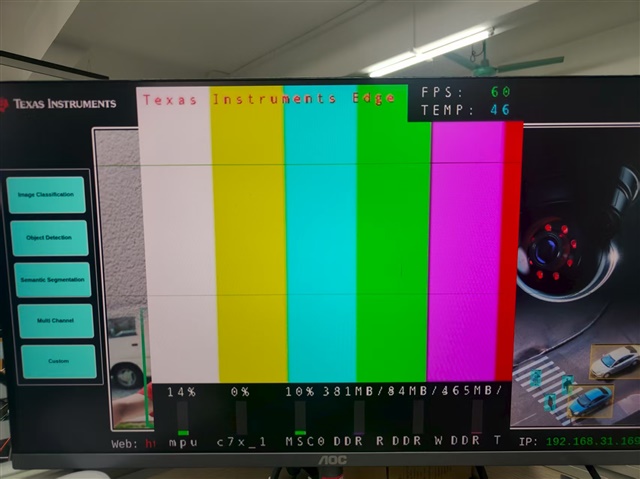
    首先、此命令可以正常工作、具有正常的 ROI 性能、并且帧速率已达到 60fps。

    gst-launch-1.0 videotestsrc is-live=true pattern=0 ! \
    video/x-raw, width=800,height=800,format=NV12,framerate=60/1 ! \
    tiovxmultiscaler name=multi \
    src_0::roi-startx=0 src_0::roi-starty=0 src_0::roi-width=600 src_0::roi-height=600 \
    multi.src_0 ! video/x-raw, width=400,height=400,format=NV12,framerate=60/1 ! queue ! \
    tiperfoverlay ! \
    kmssink driver-name=tidss sync=false skip-vsync=true

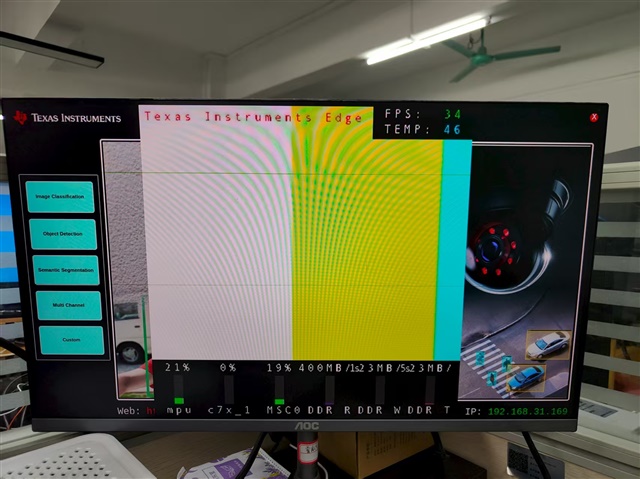
    但是、当我更改图像大小和参数时、ROI 保持正常、但帧速率下降。

    gst-launch-1.0 videotestsrc is-live=true pattern=0 ! \
    video/x-raw, width=1920,height=1080,format=NV12,framerate=60/1 ! \
    tiovxmultiscaler name=multi \
    src_0::roi-startx=0 src_0::roi-starty=0 src_0::roi-width=1000 src_0::roi-height=1000 \
    multi.src_0 ! video/x-raw, width=800,height=800,format=NV12,framerate=60/1 ! queue ! \
    tiperfoverlay ! \
    kmssink driver-name=tidss sync=false skip-vsync=true

    BR、

    Jason

  • 请注意,本文内容源自机器翻译,可能存在语法或其它翻译错误,仅供参考。如需获取准确内容,请参阅链接中的英语原文或自行翻译。

    尊敬的 Jason:

    我认为 1920x1080 的较低 fps 是一个显示问题。 您可以尝试不使用 MSC:

    gst-launch-1.0 videotestsrc is-live=true pattern=0! video/x-raw、width=1920、height=1080、format=NV12、帧速率=60/1! 排队! tiperfoverlay! kmssink driver-name=tidss sync=false skip-vsync=true

    这可能也会给你 45fps。

    此致、

    建中

  • 请注意,本文内容源自机器翻译,可能存在语法或其它翻译错误,仅供参考。如需获取准确内容,请参阅链接中的英语原文或自行翻译。

    你好、建中

    gst-launch-1.0 videotestsrc is-live=true pattern=0! video/x-raw、width=1920、height=1080、format=NV12、帧速率=60/1! 排队! tiperfoverlay! kmssink 驱动程序-name=tidss sync=false skip-vsync=true

    我尝试运行此命令、速度确实是 45fps。

    BR、

    Jason

  • 请注意,本文内容源自机器翻译,可能存在语法或其它翻译错误,仅供参考。如需获取准确内容,请参阅链接中的英语原文或自行翻译。

    Jason、

    这确认这是显示问题、而不是多标量问题。 我也做了一些测试,并确认多标量问题是由我在 8 月 21 日提供的补丁修复的。  

    我将关闭此工单。 您可以使用 videotestsrc 打开一个关于 45fps 的新视频吗?

    谢谢你。

    建中

  • 请注意,本文内容源自机器翻译,可能存在语法或其它翻译错误,仅供参考。如需获取准确内容,请参阅链接中的英语原文或自行翻译。

    你好、建中

    感谢您和 SW 团队的努力。 我们将继续在我们的定制电路板上测试此贴片的性能。 如果出现任何问题、我将打开一个新主题供反馈。

    关于此显示问题、我还使用以下链接打开了一个主题。

    AM62A7:EVM videotestsrc 仅实现 45fps — 处理器论坛-处理器 — TI E2E 支持论坛


    BR、

    Jason

  • 请注意,本文内容源自机器翻译,可能存在语法或其它翻译错误,仅供参考。如需获取准确内容,请参阅链接中的英语原文或自行翻译。

    你好、建中

    根据您之前的建议、我最终使用了tispl.bin。 但是、我们的定制板打算采用 ​SBL  加快启动速度的方法。 我们如何将此补丁应用于该配置?

    BR、

    Jason

  • 请注意,本文内容源自机器翻译,可能存在语法或其它翻译错误,仅供参考。如需获取准确内容,请参阅链接中的英语原文或自行翻译。

    Jason、

    您能否打开有关如何使用 SBL 的新工单?  

    谢谢、

    建中

  • 请注意,本文内容源自机器翻译,可能存在语法或其它翻译错误,仅供参考。如需获取准确内容,请参阅链接中的英语原文或自行翻译。

    你好、建中

    下面是新主题:AM62A7:固件构建器在 SBL 引导模式下如何利用? -处理器论坛 — 处理器- TI E2E 支持论坛

    BR、

    Jason

  • 请注意,本文内容源自机器翻译,可能存在语法或其它翻译错误,仅供参考。如需获取准确内容,请参阅链接中的英语原文或自行翻译。

    尊敬的 Jason:

    感谢您的注释。 我们的 SBL 专家会对此做出回应。

    此致、

    建中