请注意,本文内容源自机器翻译,可能存在语法或其它翻译错误,仅供参考。如需获取准确内容,请参阅链接中的英语原文或自行翻译。
器件型号:PROCESSOR-SDK-AM64X主题中讨论的其他器件:test2.
工具/软件:
您好 TI、
我目前正在使用发行版进行测试: 11.00.09.04
我发现有两个 IRQ 来自 eth1 和 eth2 的队列、用于 HSR 数据包。 但是、PRU 固件应删除重复的数据包、我期望只有一个 IRQ。
以下是操作步骤:
在 u-boot 上:
=> setenv name_overlays “ti/k3-am642-evm-icssg1-dualemac.dtbo"=>
 printenv“ printenv name_overlays
 => saveenv
禁用网络管理器:
systemctl disable dhcpcd.service
systemctl disable NetworkManager.service
systemctl
 disable systemd-resolved.service systemctl disable systemd-networkd.service
sync
reboot


将链路速度设置为
ethtool -s eth1 速度 100 双工全速 ethtool -s eth2 速度 100 双工全速
使用在 ti doc + up eth1 和 eth2 上建议的脚本启用 HSR
更多详情:root@am64xx-evm:~# cat hsr_script_ti.sh #!/bin/sh #For non offload - sh hsr_setup.sh hsr_sw <INTF_A> <INTF_B> <HSR_INTF_IP_ADDR> #For offload - sh hsr_setup.sh hsr_hw <INTF_A> <INTF_B> <HSR_INTF_IP_ADDR> if [ "$#" != "4" ] then echo "$0 <hsr_sw/hsr_hw> <intf1> <intf2> <ip addr>" exit fi if [ "$1" != "hsr_sw" ] && [ "$1" != "hsr_hw" ] then echo "$0 <hsr_sw|hsr_hw>" exit fi if=hsr0 ifa=$2 ifb=$3 ip=$4 mac=$(ifconfig "$ifa" | grep ether | cut -d " " -f 10) echo "ip=$ip" echo "if=$if" echo "mac=$mac" echo "slave-a=$ifa" echo "slave-b=$ifb" ip link set hsr0 down ip link delete hsr0 2> /dev/null if [ "$1" = "hsr_hw" ] then ethtool -k "$ifa" | grep hsr ethtool -K "$ifa" hsr-fwd-offload on ethtool -K "$ifa" hsr-dup-offload on ethtool -K "$ifa" hsr-tag-ins-offload on ethtool -K "$ifa" hsr-tag-rm-offload on ethtool -k "$ifa" | grep hsr ethtool -k "$ifb" | grep hsr ethtool -K "$ifb" hsr-fwd-offload on ethtool -K "$ifb" hsr-dup-offload on ethtool -K "$ifb" hsr-tag-ins-offload on ethtool -K "$ifb" hsr-tag-rm-offload on ethtool -k "$ifb" | grep hsr fi ip link set dev "$ifa" address "$mac" ip link set dev "$ifb" address "$mac" ip link add name $if type hsr slave1 "$ifa" slave2 "$ifb" supervision 45 version 1 sleep 3 ip addr add "$ip"/24 dev $if ip link set $if up ip link set $ifa up sleep 1 ip link set $ifb up sleep 1
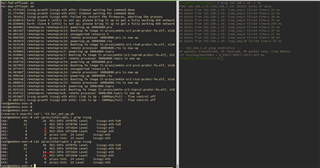
以下是我所观察到的:*************************************************************** *************************************************************** root@am64xx-evm:~# ethtool -s eth1 speed 100 duplex full ed 100 duplex fullroot@am64xx-evm:~# ethtool -s eth2 speed 100 duplex full root@am64xx-evm:~# root@am64xx-evm:~# root@am64xx-evm:~# root@am64xx-evm:~# ./hsr_script_ti.sh hsr_hw eth1 eth2 192.168.1.19 ip=192.168.1.19 if=hsr0 mac=70:ff:76:1f:41:11 slave-a=eth1 slave-b=eth2 Cannot find device "hsr0" hsr-tag-ins-offload: off hsr-tag-rm-offload: off hsr-fwd-offload: off hsr-dup-offload: off Actual changes: hsr-tag-ins-offload: on [not requested] hsr-dup-offload: on hsr-tag-ins-offload: on hsr-tag-rm-offload: on hsr-fwd-offload: on hsr-dup-offload: on hsr-tag-ins-offload: off hsr-tag-rm-offload: off hsr-fwd-offload: off hsr-dup-offload: off Actual changes: hsr-tag-ins-offload: on [not requested] hsr-dup-offload: on hsr-tag-ins-offload: on hsr-tag-rm-offload: on hsr-fwd-offload: on hsr-dup-offload: on [ 31.757554] icssg-prueth icssg1-eth eth1: timeout waiting for command done [ 31.774708] icssg-prueth icssg1-eth eth2: timeout waiting for command done [ 31.781651] icssg-prueth icssg1-eth: Failed to restart the firmwares, aborting the process [ 34.830876] hsr0: Slave A (eth1) is not up; please bring it up to get a fully working HSR network [ 34.839846] hsr0: Slave B (eth2) is not up; please bring it up to get a fully working HSR network [ 34.869401] remoteproc remoteproc13: powering up 300b4000.pru [ 34.881567] remoteproc remoteproc13: Booting fw image ti-pruss/am65x-sr2-pru0-pruhsr-fw.elf, siz8 [ 34.891101] remoteproc remoteproc13: unsupported resource 5 [ 34.896760] remoteproc remoteproc13: remote processor 300b4000.pru is now up [ 34.903924] remoteproc remoteproc16: powering up 30084000.rtu [ 34.913148] remoteproc remoteproc16: Booting fw image ti-pruss/am65x-sr2-rtu0-pruhsr-fw.elf, siz0 [ 34.922672] remoteproc remoteproc16: remote processor 30084000.rtu is now up [ 34.929805] remoteproc remoteproc7: powering up 3008a000.txpru [ 34.939081] remoteproc remoteproc7: Booting fw image ti-pruss/am65x-sr2-txpru0-pruhsr-fw.elf, si2 [ 34.948748] remoteproc remoteproc7: remote processor 3008a000.txpru is now up [ 34.958728] remoteproc remoteproc14: powering up 300b8000.pru [ 34.967992] remoteproc remoteproc14: Booting fw image ti-pruss/am65x-sr2-pru1-pruhsr-fw.elf, siz8 [ 34.977474] remoteproc remoteproc14: unsupported resource 5 [ 34.983087] remoteproc remoteproc14: remote processor 300b8000.pru is now up [ 34.990236] remoteproc remoteproc15: powering up 30086000.rtu [ 34.999348] remoteproc remoteproc15: Booting fw image ti-pruss/am65x-sr2-rtu1-pruhsr-fw.elf, siz6 [ 35.008831] remoteproc remoteproc15: remote processor 30086000.rtu is now up [ 35.015949] remoteproc remoteproc8: powering up 3008c000.txpru [ 35.025142] remoteproc remoteproc8: Booting fw image ti-pruss/am65x-sr2-txpru1-pruhsr-fw.elf, si0 [ 35.034722] remoteproc remoteproc8: remote processor 3008c000.txpru is now up [ 35.053607] icssg-prueth icssg1-eth eth1: Link is Up - 100Mbps/Full - flow control off [ 36.089765] icssg-prueth icssg1-eth eth2: Link is Up - 100Mbps/Full - flow control off root@am64xx-evm:~#
ping 后、我们可以看到 eth1 和 eth2 的 IRQ 数量正在增加。
当使用脚本启用 HSR 卸载时,我也有这些不需要的日志:[ 31.757554] icssg-prueth icssg1-eth eth1: timeout waiting for command done [ 31.774708] icssg-prueth icssg1-eth eth2: timeout waiting for command done [ 31.781651] icssg-prueth icssg1-eth: Failed to restart the firmwares, aborting the process
是否可以在您这边重现此内容?
-天一