This thread has been locked.
If you have a related question, please click the "Ask a related question" button in the top right corner. The newly created question will be automatically linked to this question.
https://e2e.ti.com/support/processors-group/processors/f/processors-forum/1563280/faq-tda4vh-q1-steps-to-duplicate-and-register-a-new-c7x-kernel
工具/软件:
在 Vision 应用程序中复制和注册新的 c7x 内核的步骤是什么?
1.复制内核文件夹
2.更新生成输出路径
修改以下.mak 文件中的输出路径以匹配您的新内核名称:
3.添加输出库路径
根据构建目标、更新以下文件:
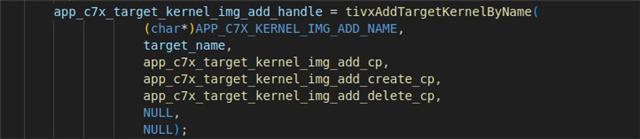
4、注册并注销内核
更新主机和目标代码中的函数名称和定义:
使用新的内核名称更新以下函数:
适当地重命名所有实例(例如,如果内核为 img_sub、则更改为 app_c7x_kernel_img_sub_register 等)。
更新内核名称:/vision_apps/apps/basic_demos/app_c7x_kernel_cp/app_c7x_kernel.h
更改 app_c7x_target_kernel_中内核函数的名称 register 及其函数定义中。
5.将内核挂钩到应用程序初始化
在以下文件中:vision_apps/platform/j784s4/rtos/common/app_init.c
找到以下函数并将调用添加到您的新注册/取消注册函数:
添加 app_c7x_target_kernel_kernel_register()<your_kernel>
app_c7x_target_kernel_kernel_unregister()<your_kernel>;
将<your_kernel>替换为新的内核标识符。
注意: