
This thread has been locked.

If you have a related question, please click the "Ask a related question" button in the top right corner. The newly created question will be automatically linked to this question.

[参考译文] CCSTUDIO:MSPM0L2228:<time.h>运行时支持库

Guru**** 2943030 points
请注意,本文内容源自机器翻译,可能存在语法或其它翻译错误,仅供参考。如需获取准确内容,请参阅链接中的英语原文或自行翻译。

https://e2e.ti.com/support/processors-group/processors/f/processors-forum/1654692/ccstudio-mspm0l2228-time-h-run-time-support-library

部件号: CCSTUDIO

根据 支持库、我正在使用 CIO 并测试所支持的 time() 函数 、并且我的时间会延迟 2 小时。  

如何解决?  
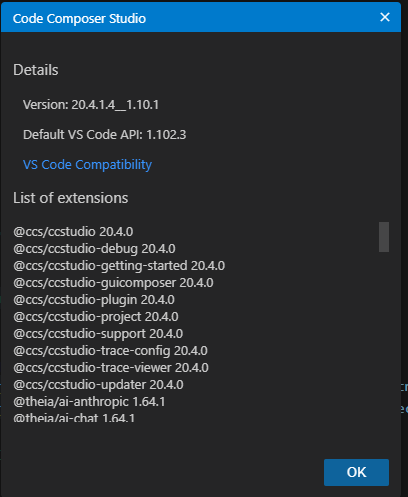
image.png

    // 1. Fetch Unix timestamp from host PC over JTAG CIO
    time(&raw_time);

    // 2. Convert to human-readable local time format structure
    pc_time = localtime(&raw_time);
if (pc_time != NULL) {
        printf("Host PC Time successfully captured!\n");
        printf("Date: %02d/%02d/%04d\n", pc_time->tm_mon + 1, pc_time->tm_mday, pc_time->tm_year + 1900);
        printf("Time: %02d:%02d:%02d\n", pc_time->tm_hour, pc_time->tm_min, pc_time->tm_sec);

    } else {
        printf("Failed to get time from host PC.\n");
    }
CORTEX_M0P: Host PC Time successfully captured!
CORTEX_M0P: Date: 06/11/2026
CORTEX_M0P: Time: 13:15:16

 

  • 请注意,本文内容源自机器翻译,可能存在语法或其它翻译错误,仅供参考。如需获取准确内容,请参阅链接中的英语原文或自行翻译。

    您好、

    使用 gmtime() 是否返回正确的值?

    此致、
    Brian

  • 请注意,本文内容源自机器翻译,可能存在语法或其它翻译错误,仅供参考。如需获取准确内容,请参阅链接中的英语原文或自行翻译。

    嘿 Brian Lee ,  

    我只是累了 gmtime (),两个例程都得到了相同的响应。

  • 请注意,本文内容源自机器翻译,可能存在语法或其它翻译错误,仅供参考。如需获取准确内容,请参阅链接中的英语原文或自行翻译。

    您好、

    您看到的行为是预期行为。 TI 的 CIO time() 通过 JTAG 将主机 PC 的时间作为 UTC Unix 时间戳检索 — 它不会捕获您的本地时区。 在裸机 NoRTOS 目标上、 localtime() 其行为与相同 gmtime() 、因为该器件没有时区数据库、因此这两个函数都不会应用任何偏移。

    要显示本地时间、请在 time() 呼叫后手动应用 UTC 偏移:

    #define UTC_OFFSET_HOURS (2)   /* Set to your UTC offset, e.g. +2 for CEST */
    
    time(&raw_time);
    raw_time += UTC_OFFSET_HOURS * 3600;
    pc_time = gmtime(&raw_time);
    

    设置 UTC_OFFSET_HOURS 为与您的时区匹配(例如,CEST 和 CET) 2 1 。 请注意、必须手动管理夏令时切换—设备不支持自动 DST、因此当您的区域在标准时间和夏季时间之间变化时、您需要更新此值。

    此致、
    Brian

  • 请注意,本文内容源自机器翻译,可能存在语法或其它翻译错误,仅供参考。如需获取准确内容,请参阅链接中的英语原文或自行翻译。

    Brian Lee ,明白了。 明白了。
    您提到的内容是否记录在任何地方? 我想确保参考任何相关文档来处理其他有用的事项。

  • 请注意,本文内容源自机器翻译,可能存在语法或其它翻译错误,仅供参考。如需获取准确内容,请参阅链接中的英语原文或自行翻译。

    您好、

    有关这些运行时函数的其他文档、请参阅第 7.1.6 节: ARM 优化 C/C++编译器 v20.2.0.LTS 用户指南(修订版 W)

    要更正我之前的回复: Time () 从午夜 CST (UTC-6) 返回秒数,默认情况下 1900年1月1日—不是
    UTC Unix 时间戳。 要使用 UNIX 1970 UTC epoch、请在包括前定义__TI_TIME_USES_64 。

    此致、
    Brian

  • 请注意,本文内容源自机器翻译,可能存在语法或其它翻译错误,仅供参考。如需获取准确内容,请参阅链接中的英语原文或自行翻译。

    Brian Lee ,我想确保我更了解这一点并正确实施。 如果没有 #define _TI_TIME_USES_64、我是否应该将结构大小设置为 32 位、而在激活#define 时、结构大小应该是 64 位?

    #include <stdio.h>
    
    #ifndef __TI_TIME_USES_64
    #define __TI_TIME_USES_64 1
    #endif
    
    #include <time.h>
    
    .
    .
    .
    
    void verify_time_configuration(void)
    {
        printf("=== TI Time Configuration Test ===\n");
    
        // 1. Check size of time_t (Should be 8 bytes for 64-bit)
        printf("Size of time_t: %d bytes\n", (int)sizeof(time_t));
    
        if (sizeof(time_t) == 8)
        {
            printf("[SUCCESS] time_t is a 64-bit integer.\n");
        }
        else
        {
            printf("[WARNING] time_t is 32-bit. __TI_TIME_USES_64 is not active.\n");
        }
    
        // 2. Check the Epoch (Should result in 1970 standard)
        // 0 seconds from the 1970 epoch is Jan 1, 1970.
        // If it is using the legacy 1900 epoch, 0 seconds would print Jan 1, 1900.
        time_t test_epoch = 0;
        struct tm *epoch_time = gmtime(&test_epoch);
    
        if (epoch_time != NULL)
        {
            printf("Epoch baseline year: %d\n", epoch_time->tm_year + 1900);
    
            if (epoch_time->tm_year + 1900 == 1970)
            {
                printf("[SUCCESS] Using correct POSIX 1970 Epoch.\n");
            }
            else
            {
                printf("[WARNING] Using legacy %d Epoch.\n",
                       epoch_time->tm_year + 1900);
            }
        }
        else
        {
            printf("[ERROR] gmtime failed to process timestamp.\n");
        }
    
        printf("==================================\n");
    }

    当我使用上述代码并在没有#define 和#define 激活的情况下运行时、我似乎可以获得相同的结果。 我是否遗漏了一些基本的东西?

    CORTEX_M0P: [SUCCESS] time_t is a 64-bit integer.
    
    CORTEX_M0P: Epoch baseline year: 1970
    
    CORTEX_M0P: [SUCCESS] Using correct POSIX 1970 Epoch.
    
    CORTEX_M0P: ==================================

  • 请注意,本文内容源自机器翻译,可能存在语法或其它翻译错误,仅供参考。如需获取准确内容,请参阅链接中的英语原文或自行翻译。

    无论是否有、行为都是相同 #define 的、因为 __TI_TIME_USES_64 1 在处理代码之前已由编译器自己的 RTS 标头定义。

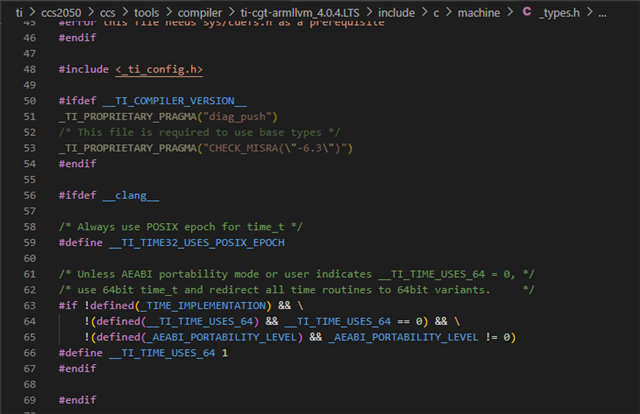
    machine/_types.h (TI Clang RTS 的一部分) __TI_TIME_USES_64 1 为 ARM EABI 目标定义。 当任何内容包括时、此标头将直接拉入 <time.h>。 因此、对于任何使用 TI Clang 构建的 ARM Cortex-M 目标、 time_t 默认使用 1970 POSIX epoch 的 64 位 #define 器件、不需要显式表达式。

    time_t 如果不主动选择退出、则无法在此目标上获得 32 位数据。 如果您需要旧的行为 (32 位、CST 1900 epoch)、则必须 -D__TI_TIME_USES_64=0 作为编译器标志传递。

    此致、
    Brian