


请注意,本文内容源自机器翻译,可能存在语法或其它翻译错误,仅供参考。如需获取准确内容,请参阅链接中的英语原文或自行翻译。
器件型号:TDA4VM 尊敬的 TI 团队:
我尝试使用 OSPI 来缩短启动时间,
我使用了 TI 的演示("SBL_cust_img"和"CAN_BOOT_APP_MCU_RTOS "),并尝试修改了演示(CAN_BOOT_APP_MCU_RTOS),以便它可以跳转到我的应用程序并启动 QNX。
启动过程为:(SBL_cust_img -> CAN_BOOT_APP_MCU_RTOS ->启动我的应用和 QNX)
a. SBL_CUST_IMG:启动 MCU1_0/MCU1_1
b. CAN_BOOT_APP_MCU_RTOS:我修改了它,添加了" status = OSPIBootImageRate (&k3xx_evmEntry、OSPI_OFFSET_APP);"以读取我的应用文件;
static int32_t OSPIBootStageImage(sblEntryPoint_t *pEntry, uint32_t address)
{
    int32_t status = E_FAIL;

    if ((NULL != address) && (NULL != pEntry))
    {
        if (address != MAIN_DOMAIN_HLOS)
        {
#    if !defined(MPU1_HLOS_BOOT_ONLY_ENABLED)
            /* non-HLOS image */
        //    status = OSPIBootImageLate(&k3xx_evmEntry, address);
        status = E_PASS;
#    else
            status = E_PASS;
#    endif
        }
#    if defined(MPU1_HLOS_BOOT_ENABLED) || defined(MPU1_HLOS_BOOT_ONLY_ENABLED)
        else
        {
              //   status = OSPIBootImageLate(&k3xx_evmEntry, OSPI_OFFSET_APP);
		//		AppUtils_Printf(MSG_NORMAL,
               //                     "START H97 APP \n");

            /* Load the HLOS appimages */
            status = OSPIBootImageLate(&k3xx_evmEntry, OSPI_OFFSET_A72IMG1);
            if (status != E_PASS)
            {
                AppUtils_Printf(MSG_NORMAL,
                                "Error parsing A72 appimage #1 for HLOS boot\n");
            }
            else
            {
                status = OSPIBootImageLate(&k3xx_evmEntry, OSPI_OFFSET_A72IMG2);
                if (status != E_PASS)
                {
                    AppUtils_Printf(MSG_NORMAL,
                                    "Error parsing A72 appimage #2 for HLOS boot\n");
                }
		else
		{
		#if 1
                status = OSPIBootImageLate(&k3xx_evmEntry, OSPI_OFFSET_APP);
		  if(status == E_PASS)
		  {
				//AppUtils_Printf(MSG_NORMAL,"START H97 APP \n");
				//AppUtils_Printf(MSG_NORMAL,"Entry point = %x\n",k3xx_evmEntry.CpuEntryPoint[4]);
				 Start_App = 1;
		  }
		  else
		 {
				AppUtils_Printf(MSG_NORMAL,"START H97 APP FAILED\n");
		  }
		#endif

		}
#        if defined(LINUX_OS)
                else
                {
                    status = OSPIBootImageLate(&k3xx_evmEntry, OSPI_OFFSET_A72IMG3);
                    if (status != E_PASS)
                        AppUtils_Printf(MSG_NORMAL,
                                        "Error parsing A72 appimage #3 for HLOS boot\n");
                }
#        endif
            }

            if (status == E_PASS)
            {
                /* Set the A72 entry point at the ATF address */
                pEntry->CpuEntryPoint[MPU1_CPU0_ID] = ATF_START_RAM_ADDR;
            }
        } /* if (address == MAIN_DOMAIN_HLOS) */
#    endif /* #if defined(MPU1_HLOS_BOOT_ENABLED)*/
    } /* if ((NULL != address) && (NULL != pEntry)) */

    return status;
}
然后调用 SBL_SlaveCoreBoot (MCU1_CPU0_ID、0、&k3xx_evmEntry、SBL_Request_CORE)以跳转到我的应用。
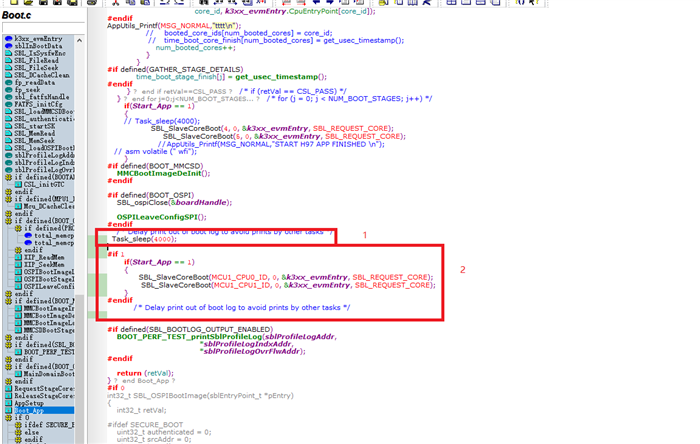
它可以正确跳转到我的应用程序并启动 QNX;但是当我删除"Task_sleep(4000)"时、它将导致 QNX 启动失败、错误为:ti_sci_recv_message、无法接收消息
NOTICE:  BL31: v2.4(release):07.03.00.005-dirty
NOTICE:  BL31: Built : 00:15:40, Apr 10 2021
ERROR:   GTC_CNTFID0 is 0! Assuming 200000000 Hz. Fix Bootloader
MMU: 16-bit ASID 44-bit PA TCR_EL1=b5183519
cpu0: MPIDR=80000000
cpu0: MIDR=411fd080 Cortex-A72 r1p0
cpu0: CWG=4 ERG=4 Dminline=4 Iminline=4 PIPT
cpu0: CLIDR=a200023 LoUU=1 LoC=2 LoUIS=1
cpu0: L1 Icache 48K linesz=64 set/way=256/3
cpu0: L1 Dcache 32K linesz=64 set/way=256/2
cpu0: L2 Unified 1024K linesz=64 set/way=1024/16
ti_sci_recv_message, unable to receive message
init_gpu: Set GPU0 device state failed!
ti_sci_recv_message, unable to receive message
init_gpu: Set GPU1 device state failed!
Display set to R5
ti_sci_recv_message, unable to receive message
init_ospi: Set OSPI0 RCLK clock parent failed!
ti_sci_recv_message, unable to receive message
init_usb_host: HOST 0, failed! 69
ti_sci_recv_message, unable to receive message
init_usb_host: HOST 1, failed! 69
Loading IFS...decompressing...done
ERROR:   Timeout waiting for thread SP_RESPONSE to fill
ERROR:   Thread SP_RESPONSE verification failed (-60)
ERROR:   Message receive failed (-60)
ERROR:   Failed to get response (-60)
ERROR:   Transfer send failed (-60)
ERROR:   Request to start core failed: -60
我的问题是:
1.删除"Task_sleep (4000)"时为什么它启动 QNX 失败? 这是因为 MCU 跳转到另一个应用程序而导致 sci 服务器关闭了吗?
2.是否有其他方法可以帮助我们解决这个问题? 我们希望引导加载程序可以跳转到我的应用程序并启动 QNX
