
This thread has been locked.

If you have a related question, please click the "Ask a related question" button in the top right corner. The newly created question will be automatically linked to this question.

[参考译文] AM623:以太网引导(以太网 RGMII)

Guru**** 2546020 points
Other Parts Discussed in Thread: AM623

请注意,本文内容源自机器翻译,可能存在语法或其它翻译错误,仅供参考。如需获取准确内容,请参阅链接中的英语原文或自行翻译。

https://e2e.ti.com/support/processors-group/processors/f/processors-forum/1309189/am623-booting-over-ethernet-ethernet-rgmii

器件型号:AM623

尊敬的 TI 团队

     尝试启动以太网时、我发现无法加载 tiboot3。 bin 文件到 tftp。 您能帮我分析一下原因吗?  

    谢谢!

这是 dhcpd.conf 文件的配置:

option domain-name "example.org";
option domain-name-servers ns1.example.org, ns2.example.org;


default-lease-time 600;
max-lease-time 7200;

subnet 192.168.1.0 netmask 255.255.255.0
{
  range dynamic-bootp 192.168.1.10 192.168.1.168;
  if substring (option vendor-class-identifier, 0, 16) = "TI K3 Bootp Boot"
  {
    filename "tiboot3.bin";
  } elsif substring (option vendor-class-identifier, 0, 20) = "AM62X U-Boot R5 SPL"
  {
    filename "tispl.bin";
  } elsif substring (option vendor-class-identifier, 0, 21) = "AM62X U-Boot A53 SPL"
  {
    filename "u-boot.img";
  }

  range 192.168.1.169 192.168.1.200;
  default-lease-time 60000;
  max-lease-time 720000;
  next-server 192.168.1.1;

  # the destination directory contains tiboot3.bin, tispl.bin, u-boot.img, ...
}

这是创建的 tftpboot 目录:

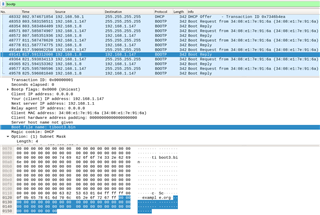
这是通过 Wireshark 捕获的日志:
 

  • 请注意,本文内容源自机器翻译,可能存在语法或其它翻译错误,仅供参考。如需获取准确内容,请参阅链接中的英语原文或自行翻译。

    您好!  

    根据 Wireshark 捕获、似乎您正在从 DHCP 服务器接收回复、好像已经建立了 IP 地址;但是、您没有看到 tiboot3.bin 文件被传输。 您以前是否见过此 e2e 主题 :SK-AM64:以太网引导不适用于 AM64x -处理器论坛-处理器- TI E2E 支持论坛 、这可能是您遇到的类似问题。  这表明问题可能是由于服务器的权限问题或安装程序没有指向正确的目录造成的。 它还建议了验证/测试 tftp 连接的步骤。

    此致、

    道林

  • 请注意,本文内容源自机器翻译,可能存在语法或其它翻译错误,仅供参考。如需获取准确内容,请参阅链接中的英语原文或自行翻译。

    大家好、Daolin

       我现在可以通过以太网引导。 主机的 IP 地址需要设置为静态192.168.1.1,并且同一网络中不得有其它 DHCP 服务器。

       如何烧录文件 tiboot3。 容器、tispl. bin、u boot。 img 和 rootfs 到 emmc 是否通过以太网?

       谢谢!

    这是串行终端打印的日志:

    U-Boot SPL 2021.01-00001-g45cb7e44ae-dirty (Jan 05 2024 - 14:27:06 +0800)
    SYSFW ABI: 3.1 (firmware rev 0x0008 '8.6.4--v08.06.04 (Chill Capybar')
    SPL initial stack usage: 13424 bytes
    Trying to boot from eth device
    Loading Environment from MMC... *** Warning - No MMC card found, using default environment
    
    eth0: ethernet@8000000port@1
    ethernet@8000000port@1 Waiting for PHY auto negotiation to complete.... done
    link up on port 1, speed 100, full duplex
    BOOTP broadcast 1
    BOOTP broadcast 2
    BOOTP broadcast 3
    DHCP client bound to address 192.168.1.155 (1004 ms)
    Using ethernet@8000000port@1 device
    TFTP from server 192.168.1.1; our IP address is 192.168.1.155
    Filename 'tispl.bin'.
    Load address: 0x82000000
    Loading: #################################################################
             #################################################################
             #########################################################
             1.1 MiB/s
    done
    Bytes transferred = 956972 (e9a2c hex)
    udma_stop_mem2dev: peer not stopped TIMEOUT !
    Warning: Detected image signing certificate on GP device. Skipping certificate to prevent boot failure. This will fail if the image was also encrypted
    Warning: Detected image signing certificate on GP device. Skipping certificate to prevent boot failure. This will fail if the image was also encrypted
    Warning: Detected image signing certificate on GP device. Skipping certificate to prevent boot failure. This will fail if the image was also encrypted
    Loading Environment from MMC... *** Warning - No MMC card found, using default environment
    
    init_env from device 4 not supported!
    Starting ATF on ARM64 core...
    
    
    U-Boot SPL 2021.01-00001-g45cb7e44ae-dirty (Jan 05 2024 - 14:27:03 +0800)
    SYSFW ABI: 3.1 (firmware rev 0x0008 '8.6.4--v08.06.04 (Chill Capybar')
    Trying to boot from eth device
    Loading Environment from MMC... *** Warning - No MMC card found, using default environment
    
    eth0: ethernet@8000000port@1
    ethernet@8000000port@1 Waiting for PHY auto negotiation to complete.... done
    link up on port 1, speed 100, full duplex
    BOOTP broadcast 1
    BOOTP broadcast 2
    BOOTP broadcast 3
    DHCP client bound to address 192.168.1.155 (760 ms)
    Using ethernet@8000000port@1 device
    TFTP from server 192.168.1.1; our IP address is 192.168.1.155
    Filename 'u-boot.img'.
    Load address: 0x82000000
    Loading: ########T #########################################################
             #################################################################
             ############################################
             135.7 KiB/s
    done
    Bytes transferred = 889008 (d90b0 hex)
    
    
    U-Boot 2021.01-00001-g45cb7e44ae-dirty (Jan 05 2024 - 14:27:03 +0800)
    
    SoC:   AM62X SR1.0 GP
    Model: Texas Instruments AM623 SK
    Board: Ranger-Daughter rev 0.0
    DRAM:  4 GiB
    MMC:   mmc@fa10000: 0, mmc@fa00000: 1, mmc@fa20000: 2
    Loading Environment from MMC... OK
    In:    serial@2820000
    Out:   serial@2820000
    Err:   serial@2820000
    Net:   eth0: ethernet@8000000port@1
    Hit any key to stop autoboot:  0
    =>


  • 请注意,本文内容源自机器翻译,可能存在语法或其它翻译错误,仅供参考。如需获取准确内容,请参阅链接中的英语原文或自行翻译。

    您好!

    感谢您的更新。

    有关如何通过以太网直接刷写到 eMMC 的文档、请参阅此处的文档: 3.5.4。 通过以太网闪存—Processor SDK AM62x 文档 然而、似乎缺少到示例 uEnv 文件的链接、该文件用于在 U-boot 中设置用于刷写的环境变量。 介绍此文档的一个重要提示是修改 am62x_EVM_A52_defconfig 文件并重新编译 U-boot 二进制文件以覆盖 bootcmd、从而发送 uEnv.txt (如果您计划使用 uEnv.txt 而不是直接发出 U-boot 命令)。

    由于缺少直接闪存示例 uEnv.txt 的链接、因此另一种方法是从 Linux 对闪存执行以下操作(相对于 U-boot)。

    1.通过以太网引导到 U-boot (正如您已完成的那样)、然后使用 U-boot 命令行通过 Ethernet tftp 加载 Kernel、DTS 和 rootfs。  

    如果尚未通过 tftp 加载 Kernel、DTS 和 rootfs、则以下是示例 UEnv.txt。 您可以根据以上提示修改解配置文件、然后重新生成 U-boot 二进制文件以直接发送并运行 uEnv.txt 文件。  

    您也可以仅将此 UEnv.txt 中的内容转换为 U-boot 命令(即 setenv...、tftp...)。 有关设置 U-boot 环境变量的更多信息、请访问 https://docs.u-boot.org/en/latest/usage/environment.html 

    svrip=10.0.0.110                    #change to your server ip address
    ipaddr=10.0.0.162                   #change to your client ip address
    imgdir='k3-am62x/'                  #change to your kernel image name
    rootpath=/home/lb/opt/filesys.am62x #rootfs is configured as nfs in uboot "bootargs" parameter
    fdtfile=k3-am625-sk.dtb             #change to your device tree binary file
    netargs=setenv bootargs console=${console} ${optargs} root=/dev/nfs nfsroot=${serverip}:${rootpath},nolock,v3 rw ip=${ipaddr}:::::eth0
    loadoverlay=fdt address ${fdtaddr}; fdt resize 0x100000;
    netboot=tftp ${loadaddr} ${bootfile}; tftp ${fdtaddr} ${imgdir}${fdtfile}; run loadoverlay; run netargs; booti ${loadaddr} - ${fdtaddr}
    uenvcmd=setenv serverip ${svrip}; setenv ipaddr ${ipaddr}; setenv bootfile ${imgdir}image; run netboot 

    2.将 U-boot 二进制文件、内核、DTS 和 rootfs 从 Linux 刷写到 eMMC。

    一旦您能够 完全引导至 Linux、您可能会发现以下页面对于将 Linux 刷写到 eMMC 很有用。 本页包含有关刷写 U-boot 二进制文件(tiboot3.bin、tispl.bin、u-boot.img)、Linux 内核、器件树 和根文件系统加载到 eMMC。 您还需要对引导模式和 U-boot Env 进行一些更改、以确保 Linux 引导时将从 eMMC 引导。

    将 Linux 刷写到 eMMC (TI.com)

    请注意、本文档是 在使用 TI EVM 时编写的;因此、如果您使用的是定制电路板、记录的 EVM 引导开关可能并不完全适用。 有关将引导模式更改为从 eMMC 引导的详细信息、请参阅 AM623数据表和 TRM。

    如果您有任何其他问题、请尝试解答、并告诉我们。

    此致、

    道林

  • 请注意,本文内容源自机器翻译,可能存在语法或其它翻译错误,仅供参考。如需获取准确内容,请参阅链接中的英语原文或自行翻译。

    你好、Daolin

    感谢您的回答。

    我们目前的要求是通过以太网将固件直接烧录到 EMMC、因为据我所知、TI 没有将 AM62x 系统映像烧录到生产线上 EMMC 的工具。 在当前调试阶段、我们使用 USB DFU 模式进行烧写。 操作过程很复杂、需要连接 USB 和调试串行端口才能完成刻录。 如果可以通过以太网将 uboot 和 rootfs 等所有文件直接下载到 EMMC、这将简化工厂烧录过程。

  • 请注意,本文内容源自机器翻译,可能存在语法或其它翻译错误,仅供参考。如需获取准确内容,请参阅链接中的英语原文或自行翻译。

    您好!

    感谢您提供有关您的要求和用例的详细信息。

    我发现我指向以太网闪存的 SDK 文档的链接(到 eMMC)在我之前的文章中已损坏。 我已在上一篇文章中更新了该链接并在此处提供:  3.5.4.通过以太网闪存–Processor SDK AM62x 文档

    我已经就本 SDK 文档中缺失的示例 uEnv.txt 文件问题向内部团队进行了跟进。 您可以在中找到这些示例 uEnv.txt 文件 /bin/Ethernet_flash. 使用 uEnv.txt 文件并重新构建 U-boot 二进制文件以支持直接发送和运行 uEnv.txt 文件、因此不需要手动输入 U-boot 命令来 加载 内核、DTB、 和 rootfs、然后手动进入 Linux、在我前面回答中的两步过程中运行命令以刷写到 eMMC。  

    具体思路是、在您通过以太网引导之后、将读取 uEnv.txt 文件并将 U-boot 二进制文件以及加载的内核、dtb 和 rootfs 文件刷写到 eMMC。  

    您是否能够尝试按照上述文档通过以太网刷写到 eMMC? 如果您遇到问题/有其他问题、敬请告知。

    此致、

    道林

  • 请注意,本文内容源自机器翻译,可能存在语法或其它翻译错误,仅供参考。如需获取准确内容,请参阅链接中的英语原文或自行翻译。

    你好、Daolin

    现在可以通过以太网将映像下载到 EMMC。

    谢谢!


    这是串行终端打印的日志

    U-Boot SPL 2021.01-00001-g45cb7e44ae-dirty (Jan 09 2024 - 10:32:36 +0800)
    SYSFW ABI: 3.1 (firmware rev 0x0008 '8.6.4--v08.06.04 (Chill Capybar')
    SPL initial stack usage: 13424 bytes
    Trying to boot from eth device
    Loading Environment from MMC... *** Warning - No MMC card found, using default environment
    
    eth0: ethernet@8000000port@1
    ethernet@8000000port@1 Waiting for PHY auto negotiation to complete.... done
    link up on port 1, speed 100, full duplex
    BOOTP broadcast 1
    BOOTP broadcast 2
    BOOTP broadcast 3
    DHCP client bound to address 192.168.1.194 (1004 ms)
    Using ethernet@8000000port@1 device
    TFTP from server 192.168.1.1; our IP address is 192.168.1.194
    Filename 'tispl_eth.bin'.
    Load address: 0x82000000
    Loading: #################################################################
             #################################################################
             #########################################################
             1.2 MiB/s
    done
    Bytes transferred = 957020 (e9a5c hex)
    udma_stop_mem2dev: peer not stopped TIMEOUT !
    Warning: Detected image signing certificate on GP device. Skipping certificate to prevent boot failure. This will fail if the image was also encrypted
    Warning: Detected image signing certificate on GP device. Skipping certificate to prevent boot failure. This will fail if the image was also encrypted
    Warning: Detected image signing certificate on GP device. Skipping certificate to prevent boot failure. This will fail if the image was also encrypted
    Loading Environment from MMC... *** Warning - No MMC card found, using default environment
    
    init_env from device 4 not supported!
    Starting ATF on ARM64 core...
    
    
    U-Boot SPL 2021.01-00001-g45cb7e44ae-dirty (Jan 09 2024 - 10:32:24 +0800)
    SYSFW ABI: 3.1 (firmware rev 0x0008 '8.6.4--v08.06.04 (Chill Capybar')
    Trying to boot from eth device
    Loading Environment from MMC... *** Warning - No MMC card found, using default environment
    
    eth0: ethernet@8000000port@1
    ethernet@8000000port@1 Waiting for PHY auto negotiation to complete... done
    link up on port 1, speed 100, full duplex
    BOOTP broadcast 1
    BOOTP broadcast 2
    BOOTP broadcast 3
    DHCP client bound to address 192.168.1.194 (760 ms)
    Using ethernet@8000000port@1 device
    TFTP from server 192.168.1.1; our IP address is 192.168.1.194
    Filename 'u-boot_eth.img'.
    Load address: 0x82000000
    Loading: #######T ##########################################################
             #################################################################
             ############################################
             135.7 KiB/s
    done
    Bytes transferred = 889064 (d90e8 hex)
    
    
    U-Boot 2021.01-00001-g45cb7e44ae-dirty (Jan 09 2024 - 10:32:24 +0800)
    
    SoC:   AM62X SR1.0 GP
    Model: Texas Instruments AM623 SK
    Board: Ranger-Daughter rev 0.0
    DRAM:  4 GiB
    MMC:   mmc@fa10000: 0, mmc@fa00000: 1, mmc@fa20000: 2
    Loading Environment from MMC... OK
    In:    serial@2820000
    Out:   serial@2820000
    Err:   serial@2820000
    Net:   eth0: ethernet@8000000port@1
    Hit any key to stop autoboot:  0
    link up on port 1, speed 100, full duplex
    BOOTP broadcast 1
    DHCP client bound to address 192.168.1.194 (3 ms)
    Using ethernet@8000000port@1 device
    TFTP from server 192.168.1.1; our IP address is 192.168.1.194
    Filename 'uEnv.txt'.
    Load address: 0x82000000
    Loading: #
             847.7 KiB/s
    done
    Bytes transferred = 2605 (a2d hex)
    Flashing_on_emmc
    switch to partitions #1, OK
    mmc0(part 1) is current device
    
    MMC erase: dev # 0, block # 0, count 1024 ... 1024 blocks erased: OK
    link up on port 1, speed 100, full duplex
    BOOTP broadcast 1
    DHCP client bound to address 192.168.1.194 (3 ms)
    Using ethernet@8000000port@1 device
    TFTP from server 192.168.1.1; our IP address is 192.168.1.194
    Filename 'tiboot3.bin'.
    Load address: 0x82000000
    Loading: ######################
             1.8 MiB/s
    done
    Bytes transferred = 309070 (4b74e hex)
    
    MMC write: dev # 0, block # 0, count 1024 ... 1024 blocks written: OK
    
    MMC erase: dev # 0, block # 1024, count 4096 ... 4096 blocks erased: OK
    link up on port 1, speed 100, full duplex
    BOOTP broadcast 1
    DHCP client bound to address 192.168.1.194 (2 ms)
    Using ethernet@8000000port@1 device
    TFTP from server 192.168.1.1; our IP address is 192.168.1.194
    Filename 'tispl.bin'.
    Load address: 0x82000000
    Loading: #################################################################
             #
             2 MiB/s
    done
    Bytes transferred = 956948 (e9a14 hex)
    
    MMC write: dev # 0, block # 1024, count 4096 ... 4096 blocks written: OK
    
    MMC erase: dev # 0, block # 5120, count 3072 ... 3072 blocks erased: OK
    link up on port 1, speed 100, full duplex
    BOOTP broadcast 1
    DHCP client bound to address 192.168.1.194 (3 ms)
    Using ethernet@8000000port@1 device
    TFTP from server 192.168.1.1; our IP address is 192.168.1.194
    Filename 'u-boot.img'.
    Load address: 0x82000000
    Loading: #############################################################
             2 MiB/s
    done
    Bytes transferred = 888912 (d9050 hex)
    
    MMC write: dev # 0, block # 5120, count 3072 ... 3072 blocks written: OK
    switch to partitions #0, OK
    mmc0(part 0) is current device
    
    MMC erase: dev # 0, block # 0, count 675840 ... 675840 blocks erased: OK
    Writing GPT: success!
    link up on port 1, speed 100, full duplex
    BOOTP broadcast 1
    DHCP client bound to address 192.168.1.194 (4 ms)
    Using ethernet@8000000port@1 device
    TFTP from server 192.168.1.1; our IP address is 192.168.1.194
    Filename 'rootfs.ext4'.
    Load address: 0x82000000
    Loading: #################################################################
             #################################################################
             #################################################################
             #################################################################
             #################################################################
             #################################################################
             #################################################################
             #################################################################
             #################################################################
             #################################################################
             #################################################################
             #################################################################
             #################################################################
             #################################################################
             #################################################################
             #################################################################
             #################################################################
             #################################################################
    		 #################################################################
             #################################################################
             #################################################################
             #################################################################
             #################################################################
             #################################################################
             #################################################################
             #################################################################
             #################################################################
             #################################################################
             ##########################################
             1.9 MiB/s
    done
    Bytes transferred = 346030080 (14a00000 hex)
    
    MMC write: dev # 0, block # 34, count 675840 ... 675840 blocks written: OK
    Flashing_Done
    Saving Environment to MMC... Writing to MMC(0)... OK


  • 请注意,本文内容源自机器翻译,可能存在语法或其它翻译错误,仅供参考。如需获取准确内容,请参阅链接中的英语原文或自行翻译。

    您好!

    好消息! 只是为了确认一下、您是否使用了我提供的软件文档中的说明、或者您是否自行进行了一些修改? 我提出这项要求的原因是获取反馈、了解我们的文档是否能提供实际帮助、或者是否有其他需要改进的地方。  

    此致、

    道林

  • 请注意,本文内容源自机器翻译,可能存在语法或其它翻译错误,仅供参考。如需获取准确内容,请参阅链接中的英语原文或自行翻译。

    你好、Daolin

    是的、我参考了上面提供的软件参考文档来实施它。