This thread has been locked.

If you have a related question, please click the "Ask a related question" button in the top right corner. The newly created question will be automatically linked to this question.

[参考译文] PROCESSOR-SDK-J721E:J721E run v4l2

Guru**** 2538950 points


请注意,本文内容源自机器翻译,可能存在语法或其它翻译错误,仅供参考。如需获取准确内容,请参阅链接中的英语原文或自行翻译。

https://e2e.ti.com/support/processors-group/processors/f/processors-forum/1340468/processor-sdk-j721e-j721e-run-v4l2

器件型号:PROCESSOR-SDK-J721E

Hello 支持、

我遇到问题、我当前的环境是 J721EVM
和子板 Fusion Application Board 的编译环境是 ti-processor-sdk-rtos-j721e-evm-08_05_00_11、我发现当前的默认驱动程序是 ti-processor-sdk-rtos-j721e-evm-08_05_00_11/image/sensor_drv。 我想在此硬件环境中、在 Linux 中使用 ub960和 ub953驱动程序。 使用 v4l2架构时、是否支持当前的电路板资源以及如何操作?

  • 请注意,本文内容源自机器翻译,可能存在语法或其它翻译错误,仅供参考。如需获取准确内容,请参阅链接中的英语原文或自行翻译。

    您好!

    使用 V4l2框架时,您也必须使用 Linux 中的 csirx 驱动程序。

    有关本主题的同一个常见问题解答、  

    (+)[常见问题解答] TDA4VM:在 SDK 上执行 Linux CSI 的步骤-处理器论坛-处理器- TI E2E 支持论坛

    此致、

    尼基尔

  • 请注意,本文内容源自机器翻译,可能存在语法或其它翻译错误,仅供参考。如需获取准确内容,请参阅链接中的英语原文或自行翻译。

    Hello 支持

    我根据流程进行了以下更改,但我发现 v4l2架构未启用, 仍在 fros 中运行。

    在以下文件中记录和 uEnv.txt。

    按如下所示修改配置、按照其他操作的步骤操作、

    e2e.ti.com/.../2117.uEnv.txt

    /*
     *
     * Copyright (c) 2018 Texas Instruments Incorporated
     *
     * All rights reserved not granted herein.
     *
     * Limited License.
     *
     * Texas Instruments Incorporated grants a world-wide, royalty-free, non-exclusive
     * license under copyrights and patents it now or hereafter owns or controls to make,
     * have made, use, import, offer to sell and sell ("Utilize") this software subject to the
     * terms herein.  With respect to the foregoing patent license, such license is granted
     * solely to the extent that any such patent is necessary to Utilize the software alone.
     * The patent license shall not apply to any combinations which include this software,
     * other than combinations with devices manufactured by or for TI ("TI Devices").
     * No hardware patent is licensed hereunder.
     *
     * Redistributions must preserve existing copyright notices and reproduce this license
     * (including the above copyright notice and the disclaimer and (if applicable) source
     * code license limitations below) in the documentation and/or other materials provided
     * with the distribution
     *
     * Redistribution and use in binary form, without modification, are permitted provided
     * that the following conditions are met:
     *
     * *       No reverse engineering, decompilation, or disassembly of this software is
     * permitted with respect to any software provided in binary form.
     *
     * *       any redistribution and use are licensed by TI for use only with TI Devices.
     *
     * *       Nothing shall obligate TI to provide you with source code for the software
     * licensed and provided to you in object code.
     *
     * If software source code is provided to you, modification and redistribution of the
     * source code are permitted provided that the following conditions are met:
     *
     * *       any redistribution and use of the source code, including any resulting derivative
     * works, are licensed by TI for use only with TI Devices.
     *
     * *       any redistribution and use of any object code compiled from the source code
     * and any resulting derivative works, are licensed by TI for use only with TI Devices.
     *
     * Neither the name of Texas Instruments Incorporated nor the names of its suppliers
     *
     * may be used to endorse or promote products derived from this software without
     * specific prior written permission.
     *
     * DISCLAIMER.
     *
     * THIS SOFTWARE IS PROVIDED BY TI AND TI'S LICENSORS "AS IS" AND ANY EXPRESS
     * OR IMPLIED WARRANTIES, INCLUDING, BUT NOT LIMITED TO, THE IMPLIED WARRANTIES
     * OF MERCHANTABILITY AND FITNESS FOR A PARTICULAR PURPOSE ARE DISCLAIMED.
     * IN NO EVENT SHALL TI AND TI'S LICENSORS BE LIABLE FOR ANY DIRECT, INDIRECT,
     * INCIDENTAL, SPECIAL, EXEMPLARY, OR CONSEQUENTIAL DAMAGES (INCLUDING,
     * BUT NOT LIMITED TO, PROCUREMENT OF SUBSTITUTE GOODS OR SERVICES; LOSS OF USE,
     * DATA, OR PROFITS; OR BUSINESS INTERRUPTION) HOWEVER CAUSED AND ON ANY THEORY
     * OF LIABILITY, WHETHER IN CONTRACT, STRICT LIABILITY, OR TORT (INCLUDING NEGLIGENCE
     * OR OTHERWISE) ARISING IN ANY WAY OUT OF THE USE OF THIS SOFTWARE, EVEN IF ADVISED
     * OF THE POSSIBILITY OF SUCH DAMAGE.
     *
     */
    
    #ifndef APP_CFG_MCU2_0_H_
    #define APP_CFG_MCU2_0_H_
    
    #include <app_cfg.h>
    
    #define L3_MEM_SIZE (MAIN_OCRAM_MCU2_0_SIZE)
    
    #define DDR_HEAP_MEM_SIZE               (DDR_MCU2_0_LOCAL_HEAP_SIZE)
    
    /* There are several external board interfaces to the SoC that can either be controlled by the MCU RTOS core
     * or the MPU HLOS core.  The top level build option BUILD_MCU_BOARD_DEPENDENCIES can be used to optionally enable
     * these interfaces (user can override specific flags in this file), or disable them.
     */
    #ifdef BUILD_MCU_BOARD_DEPENDENCIES
    
        
          #define ENABLE_CSI2RX 0
          #define ENABLE_CSI2TX 0
      
        /* IMPORANT NOTE:
         * - Only one of ENABLE_DSS_SINGLE or ENABLE_DSS_DUAL should be defined
         * - When ENABLE_DSS_SINGLE is defined, only one of ENABLE_DSS_HDMI or ENABLE_DSS_EDP should be defined
         * - When ENABLE_DSS_DUAL is defined, ENABLE_DSS_HDMI and ENABLE_DSS_EDP are not used, both EDP and HDMI are enabled unconditionally
         */
        #define ENABLE_DSS_SINGLE
        #undef  ENABLE_DSS_DUAL
    
        /* define below to enable eDP display,
           make sure to undef ENABLE_DSS_HDMI & ENABLE_DSS_DSI as well */
        #define ENABLE_DSS_EDP
        /* define below to enable HDMI display,
           make sure to undef ENABLE_DSS_EDP & ENABLE_DSS_DSI as well */
        #undef ENABLE_DSS_HDMI
        /* define below to enable DSI display, make sure to undef ENABLE_DSS_HDMI
           & ENABLE_DSS_EDP as well */
        #undef ENABLE_DSS_DSI
    
        #define ENABLE_I2C
        #define ENABLE_BOARD
    
    #else
    
    
        #undef ENABLE_CSI2RX 0
        #undef ENABLE_CSI2TX 0
       
        #undef ENABLE_DSS_SINGLE
        #undef ENABLE_DSS_DUAL
        #undef ENABLE_DSS_EDP
        #undef ENABLE_DSS_HDMI
        #undef ENABLE_DSS_DSI
        #undef ENABLE_I2C
        #undef ENABLE_BOARD
    
    #endif
    
    
    #define ENABLE_FVID2
    #define ENABLE_VHWA_VPAC
    #undef ENABLE_VHWA_DMPAC
    
    #if defined (ENABLE_DSS_DSI) && !defined(ENABLE_I2C)
    #error "DSI output depends on I2C, Include ENABLE_I2C"
    #endif
    #if defined (ENABLE_DSS_HDMI) && !defined(ENABLE_I2C)
    #error "HDMI output depends on I2C, Include ENABLE_I2C"
    #endif
    
    #if defined (ENABLE_DSS_DSI) && defined (ENABLE_CSI2TX)
    #error "CSI2TX and DSI cannot be active at the same time"
    #endif
    
    #endif /* APP_CFG_MCU2_0_H_ */
    

    e2e.ti.com/.../_5B00_com-COM8_5D00_--_2800_2024_2D00_03_2D00_27_5F00_142715_2900_--COM8--_2800_USB-Serial-Port-_2800_COM8_29002900_.log

  • 请注意,本文内容源自机器翻译,可能存在语法或其它翻译错误,仅供参考。如需获取准确内容,请参阅链接中的英语原文或自行翻译。

    root@J7-EVM:~# medial-ctl -p
    枚举/dev/media0失败(-2)

  • 请注意,本文内容源自机器翻译,可能存在语法或其它翻译错误,仅供参考。如需获取准确内容,请参阅链接中的英语原文或自行翻译。

    您好!

    请 从 Name_overlays 中删除 k3-j721e-vision-apps.dtbo、

    在此叠加中、我们在 Linux 上禁用 csirx 和 DSS。 因此、如果您在 Linux 上使用 csirx、则不应包含相同的内容

    此致、

    尼基尔

  • 请注意,本文内容源自机器翻译,可能存在语法或其它翻译错误,仅供参考。如需获取准确内容,请参阅链接中的英语原文或自行翻译。

    现在正常的可以运行 v4l2体系结构,感谢您的及时帮助

  • 请注意,本文内容源自机器翻译,可能存在语法或其它翻译错误,仅供参考。如需获取准确内容,请参阅链接中的英语原文或自行翻译。

    非常感谢您的帮助。 我发现在当前环境中无法识别 IIC 设备。 您能帮我检查一下吗?

  • 请注意,本文内容源自机器翻译,可能存在语法或其它翻译错误,仅供参考。如需获取准确内容,请参阅链接中的英语原文或自行翻译。

    非常感谢您的帮助。 我发现在当前环境中无法识别 ub960的 IIC 设备。 您能帮我看看吗?

  • 请注意,本文内容源自机器翻译,可能存在语法或其它翻译错误,仅供参考。如需获取准确内容,请参阅链接中的英语原文或自行翻译。

    您好!

    k3-j721e-fpdlink-cpb-fusion.dtbo 覆盖层应该检测到解串器的 i2c。 我相信您正在将 J721e EVM 与 FUSION 1板和 IMX390 RCM 摄像头配合使用吗?

    您能否检查硬件连接是否正确完成、以及保险丝1板和 EVM 之间没有松动的接头?

    现在正常的可以运行 v4l2体系结构

    此外、上述条件意味着摄像头能够进行流式传输? 因此应检测到 DES。

    此致、

    尼基尔

  • 请注意,本文内容源自机器翻译,可能存在语法或其它翻译错误,仅供参考。如需获取准确内容,请参阅链接中的英语原文或自行翻译。

    root@j7-evm:~#  dmesg | grep i2c
    [    0.786662] i2c /dev entries driver
    [    0.963344] omap_i2c 40b00000.i2c: bus 0 rev0.12 at 100 kHz
    [    0.969470] omap_i2c 40b10000.i2c: bus 1 rev0.12 at 100 kHz
    [    0.975941] omap_i2c 42120000.i2c: bus 2 rev0.12 at 100 kHz
    [    1.045808] omap_i2c 2000000.i2c: bus 3 rev0.12 at 400 kHz
    [    1.052303] omap_i2c 2010000.i2c: bus 4 rev0.12 at 400 kHz
    [    1.062558] omap_i2c 2020000.i2c: bus 5 rev0.12 at 400 kHz
    [    1.103829] omap_i2c 2030000.i2c: bus 6 rev0.12 at 400 kHz
    [    1.109931] omap_i2c 2040000.i2c: bus 7 rev0.12 at 100 kHz
    [    1.115926] omap_i2c 2050000.i2c: bus 8 rev0.12 at 100 kHz
    [    1.155976] omap_i2c 2060000.i2c: bus 9 rev0.12 at 100 kHz
    [    9.634127] Modules linked in: pruss(+) pci_endpoint_test ti_k3_dsp_remoteproc(+) sa2ul pvrsrvkm(O) virtio_rpmsg_bus sha512_generic authenc cdns_dphy j721e_csi2rx vxd_dec vxe_enc videobuf2_dma_sg videobuf2_dma_contig v4l2_mem2mem videobuf2_memops videobuf2_v4l2 videobuf2_common cdns3_ti m_can_platform m_can can_dev ds90ub960 i2c_atr snd_soc_pcm3168a_i2c snd_soc_pcm3168a ina2xx rti_wdt optee_rng rng_core sch_fq_codel rpmsg_kdrv_switch cryptodev(O) ipv6
    root@j7-evm:~#
    root@j7-evm:~#
    root@j7-evm:~#
    root@j7-evm:~# i2cdetect -y 6
    Warning: Can't use SMBus Quick Write command, will skip some addresses
         0  1  2  3  4  5  6  7  8  9  a  b  c  d  e  f
    00:
    10:
    20:
    30: -- -- -- -- -- -- -- --
    40:
    50: -- -- -- -- -- -- -- -- -- -- -- -- -- -- -- --
    60:
    70:
    root@j7-evm:~#
    

    在 RTOS 下、imx390已被 sonsor 替换为 x3c、并且在 RTOS 中已点亮、但应用程序使用 v4l2、因此底层也已调整。 现在我正在做的是、在 Linux 下照明 x3c、我使用 i2cdetect-y6。 但是、未选中器件 ub960地址,

    您是否有关于此主题的更详细的教程、

    登录如下:e2e.ti.com/.../_5B00_com-COM8_5D00_--_2800_2024_2D00_03_2D00_28_5F00_133514_2900_--COM8--_2800_USB-Serial-Port-_2800_COM8_29002900_.log

  • 请注意,本文内容源自机器翻译,可能存在语法或其它翻译错误,仅供参考。如需获取准确内容,请参阅链接中的英语原文或自行翻译。

    您好!

    您能阅读吗?  i2cdetect -y 9  并检查是否看到 0x36和 0x3D。 如果看到此情况、则会探测 UB960。

    此外、从日志中、我可以看到它已成功探测。

    [    8.979488] ds90ub960 9-0036: Successfully probed (rev/mask 40)
    [    9.031776] ina2xx 5-0040: power monitor ina226 (Rshunt = 10000 uOhm)
    [    9.040052] ina2xx 5-0041: power monitor ina226 (Rshunt = 10000 uOhm)
    [    9.050968] ina2xx 5-0042: power monitor ina226 (Rshunt = 10000 uOhm)
    [    9.063727] ina2xx 5-0043: power monitor ina226 (Rshunt = 10000 uOhm)
    [    9.076302] ina2xx 5-0044: power monitor ina226 (Rshunt = 10000 uOhm)
    [    9.088710] ina2xx 5-0045: power monitor ina226 (Rshunt = 5000 uOhm)
    [    9.100460] CAN device driver interface
    [    9.105022] ina2xx 5-0046: power monitor ina226 (Rshunt = 10000 uOhm)
    [    9.114587] ina2xx 5-0047: power monitor ina226 (Rshunt = 10000 uOhm)
    [    9.125770] ina2xx 5-0048: power monitor ina226 (Rshunt = 10000 uOhm)
    [    9.136751] ina2xx 5-0049: power monitor ina226 (Rshunt = 10000 uOhm)
    [    9.149474] ina2xx 5-004a: power monitor ina226 (Rshunt = 10000 uOhm)
    [    9.158379] ina2xx 5-004b: power monitor ina226 (Rshunt = 10000 uOhm)
    [    9.163329] ds90ub960 9-003d: Successfully probed (rev/mask 40)
    [    9.167071] ina2xx 5-004c: power monitor ina226 (Rshunt = 10000 uOhm)
    [    9.195685] ina2xx 5-004d: power monitor ina226 (Rshunt = 10000 uOhm)
    [    9.209335] ina2xx 5-004e: power monitor ina226 (Rshunt = 10000 uOhm)
    [    9.235435] ina2xx 5-004f: power monitor ina226 (Rshunt = 10000 uOhm)

    此致、

    尼基尔

  • 请注意,本文内容源自机器翻译,可能存在语法或其它翻译错误,仅供参考。如需获取准确内容,请参阅链接中的英语原文或自行翻译。

    我刚尝试过、发现仍然无法检测到。 有可能吗?

    警告:无法使用 SMBus 快速写入命令、将跳过一些地址

    root@J7-EVM:~# i2cdetect -y 9
    警告:无法使用 SMBus 快速写入命令、将跳过一些地址
    0 1 2 3 4 5 6 7 8 9 a b c d e f
    00:
    10:
    20:
    30:------- UU
    40:
    50: 50 ------- ------- -------
    60:
    70:

  • 请注意,本文内容源自机器翻译,可能存在语法或其它翻译错误,仅供参考。如需获取准确内容,请参阅链接中的英语原文或自行翻译。

    您好!

    让我与 EdgeAI 团队核实这一点并回复您

    此致、

    尼基尔

  • 请注意,本文内容源自机器翻译,可能存在语法或其它翻译错误,仅供参考。如需获取准确内容,请参阅链接中的英语原文或自行翻译。

    非常感谢

  • 请注意,本文内容源自机器翻译,可能存在语法或其它翻译错误,仅供参考。如需获取准确内容,请参阅链接中的英语原文或自行翻译。

    我发现在此环境中、我尝试修改了 ds960的驱动程序、添加打印日志、重复执行 make Linux 命令、Generate Image、然后在电路板 rootfs 目录下的引导中将生成的映像替换为 Image、但未生效。 日志没有立即打印的日志,这是什么原因????

  • 请注意,本文内容源自机器翻译,可能存在语法或其它翻译错误,仅供参考。如需获取准确内容,请参阅链接中的英语原文或自行翻译。

    您好!

    您是否可以尝试运行: i2cdetect -r -y 9

    谢谢!

    法比亚纳

  • 请注意,本文内容源自机器翻译,可能存在语法或其它翻译错误,仅供参考。如需获取准确内容,请参阅链接中的英语原文或自行翻译。

    您好:

    i2cdetect-r-y 9运行如下、这是否意味着 unstring 的地址已被识别、但不算作 IIC 中的第六条总线?

    main_i2c6 {
            #address-cells = <1>;
            #size-cells = <0>;
    
            deser@3d {
                    compatible = "ti,ds90ub960-q1";
    
                    reg-names = "main", "ser0", "ser1", "ser2", "ser3";
                    reg       = <0x3d>, <0x44>, <0x45>, <0x46>, <0x47>;
    
                    clocks = <&clk_fusion_25M_fixed>;
    
                    i2c-alias-pool = /bits/ 16 <0x4a 0x4b 0x4c 0x4d 0x4e 0x4f>;
    
                    data-rate = <1600000000>;
    
                    ds90ub960_0_ports: ports {
                            #address-cells = <1>;
                            #size-cells = <0>;
    
                            /* CSI-2 */
                            port@4 {
                                    reg = <4>;
                                    ds90ub960_0_csi_out: endpoint {
                                            clock-lanes = <0>;
                                            data-lanes = <1 2 3 4>;
                                            remote-endpoint = <&csi2_phy0>;
                                    };
                            };
                    };
    
                    ds90ub960_0_atr: i2c-atr {
    

    root@J7-EVM:~# i2cdetect -r -y 9
    0 1 2 3 4 5 6 7 8 9 a b c d e f
    00:------- ------- ----
    10:------- ------- ------- --
    第20章:你是我的女人 ------- -------
    30:------- UUU------- 这是一个很好的选择
    40:----- UUU-------- ------- --
    50: 50 ------- ------- -------
    60:------- ------- ------- --
    70:------- ----
    根目录@J7-EVM:~#
    根目录@J7-EVM:~#
    根目录@J7-EVM:~#

  • 请注意,本文内容源自机器翻译,可能存在语法或其它翻译错误,仅供参考。如需获取准确内容,请参阅链接中的英语原文或自行翻译。

    您好!

    在内部研究此问题后、似乎此 i2c 问题已在 SDK 8.5中识别、并已针对 SDK 9.0解决。 您可以在 SDK 版本9.0或更高版本上尝试此操作吗?

    谢谢!

    法比亚纳

  • 请注意,本文内容源自机器翻译,可能存在语法或其它翻译错误,仅供参考。如需获取准确内容,请参阅链接中的英语原文或自行翻译。

    我下载了 ti-processor-sdk-linux-adas-j721e-evm-09_01_00_06并安装了版本、但我发现区别是有点、3-j721e-fpdlink-cpb-fusion 没有器件树。 在此环境中如何驱动 imx390摄像头

  • 请注意,本文内容源自机器翻译,可能存在语法或其它翻译错误,仅供参考。如需获取准确内容,请参阅链接中的英语原文或自行翻译。

    您好

    我下载了 ti-processor-sdk-linux-adas-j721e-evm-09_01_00_06并安装了版本、但我发现区别是有点、3-j721e-fpdlink-cpb-fusion 没有器件树。 在此环境中如何驱动 imx390摄像头

  • 请注意,本文内容源自机器翻译,可能存在语法或其它翻译错误,仅供参考。如需获取准确内容,请参阅链接中的英语原文或自行翻译。

    您好、Zhiyong、

    似乎 dtbo 文件的名称在8.x 和9.x SDK 中发生了变化。 新名称应为 k3-j721e-evm-fusion.dtbo。 如果新名称不起作用、请在/boot/dtb/ti 下检查 micro SD 卡文件系统的根分区、查看是否已安装 Fusion 板 dtbo 文件。

    此致、

    大沼市

  • 请注意,本文内容源自机器翻译,可能存在语法或其它翻译错误,仅供参考。如需获取准确内容,请参阅链接中的英语原文或自行翻译。

    Hello 支持、

    我下载最新版本 ti-processor-sdk-linux-adas-j721e-evm-09_01_00_06、并按以下顺序执行它:/setup.sh、然后运行 sudo make u-boot。 但会显示一条错误消息、如下所示:

    fs@fsB:~/ti-processor-sdk-linux-adas-j721e-evm-09_01_00_06$ sudo make u-boot
    
    ==================================
    
    Building U-boot for a72
    
    ===================================
    
    make -j 1 -C /home/fs/ti-processor-sdk-linux-adas-j721e-evm-09_01_00_06/board-support/ti-u-boot-2023.04+gitAUTOINC+71b8c840ca-g71b8c840ca ARCH=arm j721e_evm_a72_config \
    
    	O=/home/fs/ti-processor-sdk-linux-adas-j721e-evm-09_01_00_06/board-support/ti-u-boot-2023.04+gitAUTOINC+71b8c840ca-g71b8c840ca/build/a72
    
    make[1]: Entering directory '/home/fs/ti-processor-sdk-linux-adas-j721e-evm-09_01_00_06/board-support/ti-u-boot-2023.04+gitAUTOINC+71b8c840ca-g71b8c840ca'
    
    make[2]: Entering directory '/home/fs/ti-processor-sdk-linux-adas-j721e-evm-09_01_00_06/board-support/ti-u-boot-2023.04+gitAUTOINC+71b8c840ca-g71b8c840ca/build/a72'
    
      GEN     Makefile
    
    #
    
    # configuration written to .config
    
    #
    
    make[2]: Leaving directory '/home/fs/ti-processor-sdk-linux-adas-j721e-evm-09_01_00_06/board-support/ti-u-boot-2023.04+gitAUTOINC+71b8c840ca-g71b8c840ca/build/a72'
    
    make[1]: Leaving directory '/home/fs/ti-processor-sdk-linux-adas-j721e-evm-09_01_00_06/board-support/ti-u-boot-2023.04+gitAUTOINC+71b8c840ca-g71b8c840ca'
    
    make -j 1 -C /home/fs/ti-processor-sdk-linux-adas-j721e-evm-09_01_00_06/board-support/ti-u-boot-2023.04+gitAUTOINC+71b8c840ca-g71b8c840ca \
    
    	ARCH=arm CROSS_COMPILE=/home/fs/ti-processor-sdk-linux-adas-j721e-evm-09_01_00_06/linux-devkit/sysroots/x86_64-arago-linux/usr/bin/aarch64-oe-linux/aarch64-oe-linux- CC="/home/fs/ti-processor-sdk-linux-adas-j721e-evm-09_01_00_06/linux-devkit/sysroots/x86_64-arago-linux/usr/bin/aarch64-oe-linux/aarch64-oe-linux-gcc --sysroot=/home/fs/ti-processor-sdk-linux-adas-j721e-evm-09_01_00_06/linux-devkit/sysroots/aarch64-oe-linux" \
    
    	BINMAN_INDIRS=/home/fs/ti-processor-sdk-linux-adas-j721e-evm-09_01_00_06/board-support/prebuilt-images BL31=/home/fs/ti-processor-sdk-linux-adas-j721e-evm-09_01_00_06/board-support/prebuilt-images/bl31.bin TEE=/home/fs/ti-processor-sdk-linux-adas-j721e-evm-09_01_00_06/board-support/prebuilt-images/bl32.bin \
    
    	O=/home/fs/ti-processor-sdk-linux-adas-j721e-evm-09_01_00_06/board-support/ti-u-boot-2023.04+gitAUTOINC+71b8c840ca-g71b8c840ca/build/a72
    
    make[1]: Entering directory '/home/fs/ti-processor-sdk-linux-adas-j721e-evm-09_01_00_06/board-support/ti-u-boot-2023.04+gitAUTOINC+71b8c840ca-g71b8c840ca'
    
    make[2]: Entering directory '/home/fs/ti-processor-sdk-linux-adas-j721e-evm-09_01_00_06/board-support/ti-u-boot-2023.04+gitAUTOINC+71b8c840ca-g71b8c840ca/build/a72'
    
      GEN     Makefile
    
    scripts/kconfig/conf  --syncconfig Kconfig
    
      CFG     u-boot.cfg
    
      GEN     include/autoconf.mk
    
      GEN     include/autoconf.mk.dep
    
      CFG     spl/u-boot.cfg
    
      GEN     spl/include/autoconf.mk
    
      Using /home/fs/ti-processor-sdk-linux-adas-j721e-evm-09_01_00_06/board-support/ti-u-boot-2023.04+gitAUTOINC+71b8c840ca-g71b8c840ca as source for U-Boot
    
      GEN     Makefile
    
      UPD     include/generated/timestamp_autogenerated.h
    
      ENVC    include/generated/env.txt
    
      ENVP    include/generated/env.in
    
      ENVT    include/generated/environment.h
    
      CC      cmd/version.o
    
      AR      cmd/built-in.o
    
      CC      env/common.o
    
      AR      env/built-in.o
    
      CC      lib/efi_loader/dtbdump.o
    
      LD      lib/efi_loader/dtbdump_efi.so
    
      OBJCOPY lib/efi_loader/dtbdump.efi
    
      CC      lib/efi_loader/initrddump.o
    
      LD      lib/efi_loader/initrddump_efi.so
    
      OBJCOPY lib/efi_loader/initrddump.efi
    
      LD      u-boot
    
      OBJCOPY u-boot.srec
    
      OBJCOPY u-boot-nodtb.bin
    
      RELOC   u-boot-nodtb.bin
    
      CAT     u-boot-fit-dtb.bin
    
      COPY    u-boot.bin
    
      SYM     u-boot.sym
    
      CC      spl/common/spl/spl.o
    
      AR      spl/common/spl/built-in.o
    
      CC      spl/env/common.o
    
      AR      spl/env/built-in.o
    
      LD      spl/u-boot-spl
    
      OBJCOPY spl/u-boot-spl-nodtb.bin
    
      FDTGREP spl/dts/k3-j721e-common-proc-board.dtb
    
      FDTGREP spl/dts/k3-j721e-sk.dtb
    
      MKIMAGE spl/u-boot-spl.multidtb.fit
    
      CAT     spl/u-boot-spl-dtb.bin
    
      COPY    spl/u-boot-spl.bin
    
      SYM     spl/u-boot-spl.sym
    
      MKIMAGE u-boot.img
    
      MKIMAGE u-boot-dtb.img
    
      BINMAN  .binman_stamp
    
    binman: name 'ELFError' is not defined
    
    make[2]: *** [/home/fs/ti-processor-sdk-linux-adas-j721e-evm-09_01_00_06/board-support/ti-u-boot-2023.04+gitAUTOINC+71b8c840ca-g71b8c840ca/Makefile:1108: .binman_stamp] Error 1
    
    make[2]: Leaving directory '/home/fs/ti-processor-sdk-linux-adas-j721e-evm-09_01_00_06/board-support/ti-u-boot-2023.04+gitAUTOINC+71b8c840ca-g71b8c840ca/build/a72'
    
    make[1]: *** [Makefile:177: sub-make] Error 2
    
    make[1]: Leaving directory '/home/fs/ti-processor-sdk-linux-adas-j721e-evm-09_01_00_06/board-support/ti-u-boot-2023.04+gitAUTOINC+71b8c840ca-g71b8c840ca'


  • 请注意,本文内容源自机器翻译,可能存在语法或其它翻译错误,仅供参考。如需获取准确内容,请参阅链接中的英语原文或自行翻译。

    您好、Zhiyong、

    您可以不使用"sudo"运行吗? 使用 sudo 运行将丢失一些特定于用户的环境变量、这可能会导致编译 查找错误的文件路径。

    但回到摄像头的主题、现在是否可以通过 I2C 检测到融合板和摄像头?

    此致、

    大沼市

  • 请注意,本文内容源自机器翻译,可能存在语法或其它翻译错误,仅供参考。如需获取准确内容,请参阅链接中的英语原文或自行翻译。

    高度  支持

    不使用"sudo"运行,仍有一些错误,我发现这个问题也出现在 ti-processor-sdk-linux-adas-j721e-evm-09_00_00_08-Linux-x86-Install.bin 中

    fs@fsB:~/ti-processor-sdk-linux-adas-j721e-evm-09_01_00_06$ make u-boot
    
    ===================================
    
    Building U-boot for a72
    
    ===================================
    
    make -j 1 -C /home/fs/ti-processor-sdk-linux-adas-j721e-evm-09_01_00_06/board-support/ti-u-boot-2023.04+gitAUTOINC+71b8c840ca-g71b8c840ca ARCH=arm j721e_evm_a72_config \
    
    	O=/home/fs/ti-processor-sdk-linux-adas-j721e-evm-09_01_00_06/board-support/ti-u-boot-2023.04+gitAUTOINC+71b8c840ca-g71b8c840ca/build/a72
    
    make[1]: Entering directory '/home/fs/ti-processor-sdk-linux-adas-j721e-evm-09_01_00_06/board-support/ti-u-boot-2023.04+gitAUTOINC+71b8c840ca-g71b8c840ca'
    
    make[2]: Entering directory '/home/fs/ti-processor-sdk-linux-adas-j721e-evm-09_01_00_06/board-support/ti-u-boot-2023.04+gitAUTOINC+71b8c840ca-g71b8c840ca/build/a72'
    
    ln: failed to create symbolic link 'source': Permission denied
    
    make[2]: *** [/home/fs/ti-processor-sdk-linux-adas-j721e-evm-09_01_00_06/board-support/ti-u-boot-2023.04+gitAUTOINC+71b8c840ca-g71b8c840ca/Makefile:504: outputmakefile] Error 1
    
    make[2]: Leaving directory '/home/fs/ti-processor-sdk-linux-adas-j721e-evm-09_01_00_06/board-support/ti-u-boot-2023.04+gitAUTOINC+71b8c840ca-g71b8c840ca/build/a72'
    
    make[1]: *** [Makefile:177: sub-make] Error 2
    
    make[1]: Leaving directory '/home/fs/ti-processor-sdk-linux-adas-j721e-evm-09_01_00_06/board-support/ti-u-boot-2023.04+gitAUTOINC+71b8c840ca-g71b8c840ca'
    
    make: *** [makerules/Makefile_u-boot:14: u-boot-a72] Error 2
    
    fs@fsB:~/ti-processor-sdk-linux-adas-j721e-evm-09_01_00_06$ 


  • 请注意,本文内容源自机器翻译,可能存在语法或其它翻译错误,仅供参考。如需获取准确内容,请参阅链接中的英语原文或自行翻译。

    高度  支持

    由于在部署期间使用了最小的 tisdk-tiny-image-j721e-evm.tar.xz 系统、因此未检测到 IIC 器件、因此需要再次烧录 uboot 和内核。 我的步骤如下: 1. 在 Rules.make 中更改 ROOTFS_PART? =/media/fs/root boot_part? =/media/fs/boot 2. 运行 make u-boot 命令。 (显示如上所示的错误消息。) 运行 make linux 命令。 运行 make linux_install。 不使用"sudo"时仍会报告错误

    ### PLATFORM CONFIG ###
    #platform
    PLATFORM=j721e-evm
    SOC=j721e
    SOC_TYPE?=gp
    
    ARCH=aarch64
    ARMV8=a72
    
    #u-boot machine
    UBOOT_MACHINE=j721e_evm_a72_config
    
    # Add CROSS_COMPILE and UBOOT_MACHINE for the R5
    UBOOT_MACHINE_R5=j721e_evm_r5_config
    
    KERNEL_DEVICETREE_PREFIX=ti/k3-j721e|ti/k3-j7200-evm-mcspi-loopback|ti/k3-fpdlink
    
    # Add configs for ti-img-rogue-driver
    PVR_BUILD_DIR=j721e_linux
    
    MAKE_ALL_TARGETS?= arm-benchmarks cryptodev ti-img-rogue-driver u-boot linux linux-dtbs linux-fitImage
    
    ### COMMON CONFIG ###
    CFLAGS?=
    
    #Strip modules when installing to conserve disk space
    INSTALL_MOD_STRIP?=1
    
    # Set EXEC_DIR to install example binaries.
    # This will be configured with the setup.sh script.
    EXEC_DIR?=/home/fs/ti-processor-sdk-linux-adas-j721e-evm-09_01_00_06/targetNFS/home/root/j721e-evm
    
    #root of the target file system for installing applications
    #ROOTFS_PART?=/home/fs/ti-processor-sdk-linux-adas-j721e-evm-09_01_00_06/targetNFS
    ROOTFS_PART?=/media/fs/root
    # Root of the boot partition to install boot binaries
    # BOOT_PART?=__BOOT_PART__
    BOOT_PART?=/media/fs/boot
    
    MAKE_JOBS?=1
    
    ### TI SDK CONFIG ###
    #Points to the root of the TI SDK
    export TI_SDK_PATH?=/home/fs/ti-processor-sdk-linux-adas-j721e-evm-09_01_00_06
    
    #Set cross compilers
    export CROSS_COMPILE=$(TI_SDK_PATH)/linux-devkit/sysroots/x86_64-arago-linux/usr/bin/aarch64-oe-linux/aarch64-oe-linux-
    export CROSS_COMPILE_ARMV7=$(TI_SDK_PATH)/k3r5-devkit/sysroots/x86_64-arago-linux/usr/bin/arm-oe-eabi/arm-oe-eabi-
    
    export LINUX_DEVKIT_PATH=$(TI_SDK_PATH)/linux-devkit
    SDK_PATH_TARGET=$(LINUX_DEVKIT_PATH)/sysroots/aarch64-oe-linux
    
    #Default CC value to be used when cross compiling.  This is so that the
    #GNU Make default of "cc" is not used to point to the host compiler
    export CC=$(CROSS_COMPILE)gcc --sysroot=$(SDK_PATH_TARGET)
    
    
    # The source directories for each component
    ARM_BENCHMARKS_SRC_DIR=$(shell find $(TI_SDK_PATH)/example-applications -maxdepth 1 -type d -name "arm-benchmarks*")
    CRYPTODEV_SRC_DIR=$(shell find $(TI_SDK_PATH)/board-support/extra-drivers -maxdepth 1 -type d -name "cryptodev*")
    IMG_ROGUE_SRC_DIR=$(shell find $(TI_SDK_PATH)/board-support/extra-drivers -maxdepth 1 -type d -name "ti-img-rogue-driver*")
    UBOOT_SRC_DIR=$(shell find $(TI_SDK_PATH)/board-support -maxdepth 1 -type d -name "ti-u-boot-*")
    LINUXKERNEL_INSTALL_DIR=$(shell find $(TI_SDK_PATH)/board-support -maxdepth 1 -type d -name "ti-linux-kernel-*")
    
    UBOOT_ATF?=$(TI_SDK_PATH)/board-support/prebuilt-images/bl31.bin
    UBOOT_TEE?=$(TI_SDK_PATH)/board-support/prebuilt-images/bl32.bin
    TI_LINUX_FIRMWARE?=$(TI_SDK_PATH)/board-support/prebuilt-images
    fitImage_its?=$(TI_SDK_PATH)/board-support/prebuilt-images/fitImage.its
    
    UBOOT_ARMV8_BUILD?=$(UBOOT_SRC_DIR)/build/$(ARMV8)
    UBOOT_R5_BUILD?=$(UBOOT_SRC_DIR)/build/r5
    STAGING_DIR?=$(TI_SDK_PATH)/board-support/built-images
    
    
    MAKE_JOBS=1

  • 请注意,本文内容源自机器翻译,可能存在语法或其它翻译错误,仅供参考。如需获取准确内容,请参阅链接中的英语原文或自行翻译。

    root@j721e-evm:~# i2cdetect -r -y 9
    i2cdetect:无法打开"/dev/i2c/9 ":没有这样的文件或目录

  • 请注意,本文内容源自机器翻译,可能存在语法或其它翻译错误,仅供参考。如需获取准确内容,请参阅链接中的英语原文或自行翻译。

    root@j721e-evm:~#  i2cdetect -l
    i2c-3   i2c             OMAP I2C adapter                        I2C adapter
    i2c-1   i2c             OMAP I2C adapter                        I2C adapter
    i2c-6   i2c             a000000.dp-bridge                       I2C adapter
    i2c-4   i2c             OMAP I2C adapter                        I2C adapter
    i2c-2   i2c             OMAP I2C adapter                        I2C adapter
    i2c-0   i2c             OMAP I2C adapter                        I2C adapter
    i2c-5   i2c             OMAP I2C adapter                        I2C adapter
    root@j721e-evm:~# dmesg | grep i2c
    [    0.836211] i2c_dev: i2c /dev entries driver
    [    0.998874] omap_i2c 42120000.i2c: bus 0 rev0.12 at 400 kHz
    [    1.066631] omap_i2c 2000000.i2c: bus 1 rev0.12 at 400 kHz
    [    1.072767] omap_i2c 2010000.i2c: bus 2 rev0.12 at 400 kHz
    [    1.079505] omap_i2c 2020000.i2c: bus 3 rev0.12 at 400 kHz
    [    1.120624] omap_i2c 2030000.i2c: bus 4 rev0.12 at 400 kHz
    [    1.160478] omap_i2c 2060000.i2c: bus 5 rev0.12 at 400 kHz
    root@j721e-evm:~#  i2cdetect -y 1
    i2cdetect: warning: can't use SMBus quick write command, will skip some addresses
         0  1  2  3  4  5  6  7  8  9  a  b  c  d  e  f
    00:
    10:
    20:
    30: -- -- -- -- -- -- -- --
    40:
    50: -- -- -- -- -- -- -- -- -- -- -- -- -- -- -- --
    60:
    70:
    root@j721e-evm:~#  i2cdetect -y 6
         0  1  2  3  4  5  6  7  8  9  a  b  c  d  e  f
    00:          -- -- -- -- -- -- -- -- -- -- -- -- --
    10: -- -- -- -- -- -- -- -- -- -- -- -- -- -- -- --
    20: -- -- -- -- -- -- -- -- -- -- -- -- -- -- -- --
    30: -- -- -- -- -- -- -- -- -- -- -- -- -- -- -- --
    40: -- -- -- -- -- -- -- -- -- -- -- -- -- -- -- --
    50: -- -- -- -- -- -- -- -- -- -- -- -- -- -- -- --
    60: -- -- -- -- -- -- -- -- -- -- -- -- -- -- -- --
    70: -- -- -- -- -- -- -- --
    root@j721e-evm:~#
    

  • 请注意,本文内容源自机器翻译,可能存在语法或其它翻译错误,仅供参考。如需获取准确内容,请参阅链接中的英语原文或自行翻译。

    您好、Zhiyong、

    奇怪的是、编译在创建符号链接时失败。

    创建符号链接时应运行如下所示的命令:

    • ln -fsn /media/a0488417local/Storage Main_Storage psdk/psdk_linux/ti-processor-sdk-linux-adas-j721e-evm-09_01_00_06/board-support/ti-u-boot-2023.04+gitAUTO+71b8c840ca-g71b8c840ca-g71b840ca 源代码

    要进行故障排除、建议您运行以下命令以检查确切的文件路径和失败的命令:

    • make -n u-boot

    可能是因为下载的 U-Boot 源代码中的某些文件夹具有安装 SDK 时设置的错误权限。 也许 SDK 是使用 sudo 安装的? 我建议检查文件夹"ti-processor-sdk-linux-adas-j721e-evm-09_01_00_06/board-support/ti-u-boot-2023.04+gitAUTOINC+71b8c840ca-g71b8c840ca/build/a72"的权限和所有者、并且/或者无需在使用 sudo 的情况下重新安装 SDK。

    此致、

    大沼市

  • 请注意,本文内容源自机器翻译,可能存在语法或其它翻译错误,仅供参考。如需获取准确内容,请参阅链接中的英语原文或自行翻译。

    高 支持,

    我在 Linux 环境中下载 ti-processor-sdk-linux-adas-j721e-evm-09_01_00_06、并根据官方流程运行 make u-boot_install。 创建 linux_install,但遇到以下问题(请参阅日志),如何屏蔽错误:"serip"未设置不使用网络 servicese2e.ti.com/.../_5B00_com-COM8_5D00_--_2800_2024_2D00_04_2D00_11_5F00_154140_2900_--COM8--_2800_USB-Serial-Port-_2800_COM8_29002900_.log

  • 请注意,本文内容源自机器翻译,可能存在语法或其它翻译错误,仅供参考。如需获取准确内容,请参阅链接中的英语原文或自行翻译。

    您好、Zhiyong、

    我假设由于我们能够访问 U-Boot 日志、您已经成功构建并安装了 U-Boot。

    至于引导日志中的错误、U-Boot 似乎正在成功运行、但 U-Boot 无法从 micro SD 卡加载 Linux 器件树和内核、而尝试从备用引导模式/存储启动。 请您执行以下操作:

    我目前怀疑的是由于一些错误导致 Linux 编译失败、因此没有复制设备树文件。 或者,编译成功,但一些安装 dtb 文件的文件路径有一些错误,没有安装在正确的位置。

    此致、

    大沼市

  • 请注意,本文内容源自机器翻译,可能存在语法或其它翻译错误,仅供参考。如需获取准确内容,请参阅链接中的英语原文或自行翻译。

    高度 支持

    我按照流程并按如下方式记录。 您能帮我分析一下这个问题吗?

    e2e.ti.com/.../linuxlog.txte2e.ti.com/.../4846.ubootlog.txt

  • 请注意,本文内容源自机器翻译,可能存在语法或其它翻译错误,仅供参考。如需获取准确内容,请参阅链接中的英语原文或自行翻译。

    高度 支持

    我发现 uEnv.txt 在我执行 u-boot_install 时没有被复制、所以我先执行/bin/create-sdcard.sh、使用 tisdk-tiny-image-j721e-evm.tar.xz、执行强制 u-boot_install 并使 linux_install 后、发现系统可以输入、但密码不显示,始终登录不正确登录  
    。 按以下方式记录,您能否帮助解决问题?我将所有终端命令和串行端口记录为 followse2e.ti.com/.../_5B00_com-COM8_5D00_--_2800_2024_2D00_04_2D00_13_5F00_171909_2900_--COM8--_2800_USB-Serial-Port-_2800_COM8_29002900_.loge2e.ti.com/.../4807.test.log

  • 请注意,本文内容源自机器翻译,可能存在语法或其它翻译错误,仅供参考。如需获取准确内容,请参阅链接中的英语原文或自行翻译。

    您好!

    感谢您的分享。 请允许我花点时间浏览您的日志。

    谢谢!

    法比亚纳

  • 请注意,本文内容源自机器翻译,可能存在语法或其它翻译错误,仅供参考。如需获取准确内容,请参阅链接中的英语原文或自行翻译。

    谢谢,我也尝试分析它,从错误日志,有缺失 boot.scr ,/lib/firmware/j7-mcu-r5f0_1-fw ,/lib/firmware/j7-main-r5f0_0-fw 和其他文件. 我没有通过 make Linux 和 make u-boot 生成该文件、我希望您可以帮助解决该问题

    U-Boot 2023.04 (Apr 15 2024 - 12:21:46 +0800)
    
    SoC:   J721E SR1.0 GP
    Model: Texas Instruments K3 J721E SoC
    Board: J721EX-PM2-SOM rev E7
    DRAM:  4 GiB
    Core:  126 devices, 35 uclasses, devicetree: separate
    Flash: 0 Bytes
    MMC:   mmc@4f80000: 0, mmc@4fb0000: 1
    Loading Environment from nowhere... OK
    In:    serial@2800000
    Out:   serial@2800000
    Err:   serial@2800000
    am65_cpsw_nuss ethernet@46000000: K3 CPSW: nuss_ver: 0x6BA00101 cpsw_ver: 0x6BA80100 ale_ve                       r: 0x00293904 Ports:1 mdio_freq:1000000
    Detected: J7X-BASE-CPB rev E3
    Detected: J7X-VSC8514-ETH rev E2
    cdns,sierra serdes@5000000: sierra probed
    Net:   eth0: ethernet@46000000port@1
    Hit any key to stop autoboot:  0
    switch to partitions #0, OK
    mmc1 is current device
    SD/MMC found on device 1
    Failed to load 'boot.scr'
    1440 bytes read in 27 ms (51.8 KiB/s)
    Loaded env from uEnv.txt
    Importing environment from mmc1 ...
    Running uenvcmd ...
    1 bytes read in 26 ms (0 Bytes/s)
    Already setup.
    gpio: pin gpio@22_17 (gpio 281) value is 1
    gpio: pin gpio@22_16 (gpio 280) value is 0
    k3_r5f_rproc r5f@41000000: Core 1 is already in use. No rproc commands work
    Failed to load '/lib/firmware/j7-mcu-r5f0_1-fw'
    Failed to load '/lib/firmware/j7-main-r5f0_0-fw'
    Failed to load '/lib/firmware/j7-main-r5f0_1-fw'
    Failed to load '/lib/firmware/j7-main-r5f1_0-fw'
    Failed to load '/lib/firmware/j7-main-r5f1_1-fw'
    Failed to load '/lib/firmware/j7-c66_0-fw'
    Failed to load '/lib/firmware/j7-c66_1-fw'
    Failed to load '/lib/firmware/j7-c71_0-fw'
    Failed to load '/boot/Image'
    Failed to load '/boot/dtb/ti/k3-j721e-common-proc-board.dtb'
    libfdt fdt_check_header(): FDT_ERR_BADMAGIC
    No FDT memory address configured. Please configure
    the FDT address via "fdt addr <address>" command.
    Aborting!
    Failed to load '/boot/dtb/ti/ti/k3-j721e-edgeai-apps.dtbo'
    Bad Linux ARM64 Image magic!
    switch to partitions #0, OK
    mmc0(part 0) is current device
    ** No partition table - mmc 0 **
    Couldn't find partition mmc 0:1
    switch to partitions #0, OK
    mmc1 is current device
    Scanning mmc 1:1...
    No EFI system partition
    No EFI system partition
    Failed to persist EFI variables
    BootOrder not defined
    EFI boot manager: Cannot load any image
    starting USB...
    Bus usb@6400000: cdns-usb3-host usb@6400000: Unable to get USB2 phy (ret -61)
    cdns-usb3-host usb@6400000: Unable to get USB3 phy (ret -61)
    cdns-usb3-host usb@6400000: DRD version v1 (ID: 0004024e, rev: 00000200)
    Register 2000840 NbrPorts 2
    Starting the controller
    USB XHCI 1.00
    scanning bus usb@6400000 for devices... 2 USB Device(s) found
           scanning usb for storage devices... 0 Storage Device(s) found
    
    Device 0: unknown device
    k3-navss-ringacc ringacc@2b800000: Ring Accelerator probed rings:286, gp-rings[96,20] sci-d                       ev-id:235
    k3-navss-ringacc ringacc@2b800000: dma-ring-reset-quirk: disabled
    am65_cpsw_nuss_port ethernet@46000000port@1: K3 CPSW: rflow_id_base: 2
    link up on port 1, speed 1000, full duplex
    BOOTP broadcast 1
    DHCP client bound to address 10.8.4.65 (5 ms)
    *** ERROR: `serverip' not set
    Cannot autoload with TFTPGET
    missing environment variable: pxeuuid
    Retrieving file: pxelinux.cfg/01-50-51-a9-fc-f4-fc
    am65_cpsw_nuss_port ethernet@46000000port@1: K3 CPSW: rflow_id_base: 2
    link up on port 1, speed 1000, full duplex
    *** ERROR: `serverip' not set
    Retrieving file: pxelinux.cfg/0A080441
    am65_cpsw_nuss_port ethernet@46000000port@1: K3 CPSW: rflow_id_base: 2
    link up on port 1, speed 1000, full duplex
    *** ERROR: `serverip' not set
    Retrieving file: pxelinux.cfg/0A08044


  • 请注意,本文内容源自机器翻译,可能存在语法或其它翻译错误,仅供参考。如需获取准确内容,请参阅链接中的英语原文或自行翻译。

    感谢您的耐心。

    法比亚纳

  • 请注意,本文内容源自机器翻译,可能存在语法或其它翻译错误,仅供参考。如需获取准确内容,请参阅链接中的英语原文或自行翻译。

    你是否知道问题是什么,这是否是我的操作?

  • 请注意,本文内容源自机器翻译,可能存在语法或其它翻译错误,仅供参考。如需获取准确内容,请参阅链接中的英语原文或自行翻译。

    您好!

    对于带宽导致的延迟、我们深表歉意。 我今天将对此进行分析。  

    谢谢!  

    法比亚纳

  • 请注意,本文内容源自机器翻译,可能存在语法或其它翻译错误,仅供参考。如需获取准确内容,请参阅链接中的英语原文或自行翻译。

    您好!

    我能根据日志分析原因吗? 是我的操作还是其他操作?

  • 请注意,本文内容源自机器翻译,可能存在语法或其它翻译错误,仅供参考。如需获取准确内容,请参阅链接中的英语原文或自行翻译。

    您好!

    我正在将其重新分配给正确的专家。

    谢谢!

    法比亚纳

  • 请注意,本文内容源自机器翻译,可能存在语法或其它翻译错误,仅供参考。如需获取准确内容,请参阅链接中的英语原文或自行翻译。

    您好!

    您能总结一下最新的问题吗? 似乎登录失败。 它是在您的终端固定的吗?

    -基尔西

  • 请注意,本文内容源自机器翻译,可能存在语法或其它翻译错误,仅供参考。如需获取准确内容,请参阅链接中的英语原文或自行翻译。

    Ubuntu 系统崩溃、稍微设置一下环境、然后

  • 请注意,本文内容源自机器翻译,可能存在语法或其它翻译错误,仅供参考。如需获取准确内容,请参阅链接中的英语原文或自行翻译。

    您好

    由于 Linux 方案中的一些问题、我尝试调试另一个方案。 当前环境使用9.2。 我修改了默认 make u-boot_install 以默认生成 uEnv.txt 文件。 修改后的文件如下所示、并附加了执行生成 u-boot 日志。 make linux_install 的日志如以下所示显示在连接的设备树中:uEnv.txt。 串行端口日志也包含在附件中。 现在可以进入系统,但是960的驱动程序不是 installed.e2e.ti.com/.../5340.uEnv.txte2e.ti.com/.../_5B00_com-COM8_5D00_--_2800_2024_2D00_04_2D00_29_5F00_170058_2900_--COM8--_2800_USB-Serial-Port-_2800_COM8_29002900_.loge2e.ti.com/.../linux_5F00_install.txte2e.ti.com/.../u_2D00_boot_5F00_install.txt

  • 请注意,本文内容源自机器翻译,可能存在语法或其它翻译错误,仅供参考。如需获取准确内容,请参阅链接中的英语原文或自行翻译。

    您好!  

    我看到您现在可以进入 Linux 提示符了。 当您960时、我相信您是指 UB960? 您面临的问题是什么?

    我将相应地邀请相关专家。  

    此致、

    基尔西

  • 请注意,本文内容源自机器翻译,可能存在语法或其它翻译错误,仅供参考。如需获取准确内容,请参阅链接中的英语原文或自行翻译。

    您好

    我遇到的第一个问题是 csi2rx 失败,第二个问题是我没有获得 ub960的 IIC 设备地址。

    [ 6.863798] cdns-csi2rx:4504000.csi-bridge 故障,错误-22
    [6.925972] cdns-csi2rx:4514000-bridge 的探头出现故障,错误-22

  • 请注意,本文内容源自机器翻译,可能存在语法或其它翻译错误,仅供参考。如需获取准确内容,请参阅链接中的英语原文或自行翻译。

    您好!

    让我们重置整个东西。

    目前您有适用于 J721e 的全新 SDK 9.2、对吧?

    第1步:使用 create-sdcard.sh 和 tisdk-adas-image-j721s2-evm 文件系统创建 SD 卡

    第2步:您应具有包含2个分区"boot"和"root"的 SD 卡

    第3步:如果您的设置是 IMX390摄像头+ Fusion 1电路板+ J721E EVM、则在 uEnv.txt 文件的 NAME_OVERLAY 下应用相应的覆层(即、 对于 Fusion 1电路板为 k3-j721s2-evm-FUSION.dtbo、 对于 imxcam 为 k3-fpdlink-imx390-0.dtbo)  

    如果您使用的是不同的凸轮、请包含相应的覆盖层、而不是 imx390。

    步骤4:将 SD 卡插入 EVM 并给电路板通电。

    步骤5:运行"media-ctl -p "并检查是否能够检测传感器和解串器。

    步骤6:现在您已准备好从传感器进行流式传输。

    此致、

    尼基尔

  • 请注意,本文内容源自机器翻译,可能存在语法或其它翻译错误,仅供参考。如需获取准确内容,请参阅链接中的英语原文或自行翻译。

    您好:

    如您所说、我当前运行的是 SDK 9.2  

    对于步骤1 、使用 create-sdcard.sh 和 tisdk-adas-image-j721e-evm.tar.xz 创建 SD 卡

    对于步骤2  、我 有一个 SD 卡、其中包含2个分区"boot"和"root"

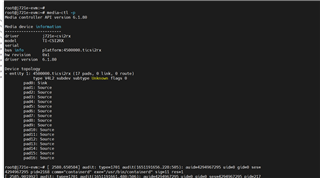
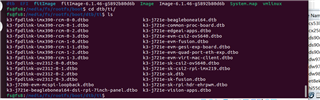
    在步骤3  中、我的 boot/ti 目录中没有 k3-j721s2-evm-fusion.dtbo、因此我使用 k3-j721e-evm-fusion.dtbo 和 k3-fpdlink-imx390-rcm-0-0.dtbo

    root@j721e-evm:~# media-ctl -p
    Media controller API version 6.1.80
    
    Media device information
    ------------------------
    driver          j721e-csi2rx
    model           TI-CSI2RX
    serial
    bus info        platform:4500000.ticsi2rx
    hw revision     0x1
    driver version  6.1.80
    
    Device topology
    - entity 1: 4500000.ticsi2rx (17 pads, 0 link, 0 route)
                type V4L2 subdev subtype Unknown flags 0
            pad0: Sink
            pad1: Source
            pad2: Source
            pad3: Source
            pad4: Source
            pad5: Source
            pad6: Source
            pad7: Source
            pad8: Source
            pad9: Source
            pad10: Source
            pad11: Source
            pad12: Source
            pad13: Source
            pad14: Source
            pad15: Source
            pad16: Source
    
    e2e.ti.com/.../_5B00_com-COM8_5D00_--_2800_2024_2D00_05_2D00_11_5F00_112139_2900_--COM8--_2800_USB-Serial-Port-_2800_COM8_29002900_.log

    对于 日志中所示的步骤5、

  • 请注意,本文内容源自机器翻译,可能存在语法或其它翻译错误,仅供参考。如需获取准确内容,请参阅链接中的英语原文或自行翻译。

    您好!

    如 u-boot 中的日志所示、  

    工作 FDT 设置为88000000
    加载"/boot/dtb/ti/ti/k3-j721e-evm-fusion.dtbo "失败
    加载"/boot/dtb/ti/ti/k3-fpdlink-imx390-rcm-0-0.dtbo "失败
    ##平展设备树 Blob、88000000
    在0x88000000使用 FDT Blob 引导

    您能否在 uEnv.txt 中设置指向叠加层的正确路径?

    此致、

    尼基尔

  • 请注意,本文内容源自机器翻译,可能存在语法或其它翻译错误,仅供参考。如需获取准确内容,请参阅链接中的英语原文或自行翻译。

    您好

    我已在  uEnv.txt 中设置了正确的路径,  如 loge2e.ti.com/.../_5B00_com-COM8_5D00_--_2800_2024_2D00_05_2D00_13_5F00_172542_2900_--COM8--_2800_USB-Serial-Port-_2800_COM8_29002900_.log 中所示

  • 请注意,本文内容源自机器翻译,可能存在语法或其它翻译错误,仅供参考。如需获取准确内容,请参阅链接中的英语原文或自行翻译。

    您是否可以立即检查 media-ctl 并查看是否可以看到解串器和传感器?

    我没有看到 media-ctl 的最新日志

    此致、

    尼基尔

  • 请注意,本文内容源自机器翻译,可能存在语法或其它翻译错误,仅供参考。如需获取准确内容,请参阅链接中的英语原文或自行翻译。

    root@j721e-evm:~# medial-ctl -p
    媒体控制器 API 版本6.1.80

    媒体设备信息
    ----------------
    驱动程序 j721e-csi2rx
    型号 TI-CSI2RX
    串行
    总线信息平台:45000.ticsi2rx
    硬件版本0x1
    驱动程序版本6.1.80

    器件拓扑
    -实体1: 4500000.ticsi2rx (17 pads, 0 link , 0 route)
    类型 V4L2 subdev 子类型未知标志0
    pad0:灌电流
    pad1:来源
    pad2:来源
    pad3:来源
    pad4:来源
    pad5:来源
    pad6:来源
    pad7:来源
    pad8:来源
    pad9:来源
    pad10:来源
    pad11:来源
    pad12:来源
    pad13:来源
    pad14:来源
    pad15:来源
    pad16:来源

  • 请注意,本文内容源自机器翻译,可能存在语法或其它翻译错误,仅供参考。如需获取准确内容,请参阅链接中的英语原文或自行翻译。

     e2e.ti.com/.../3730._5B00_com-COM8_5D00_--_2800_2024_2D00_05_2D00_13_5F00_172542_2900_--COM8--_2800_USB-Serial-Port-_2800_COM8_29002900_.log