This thread has been locked.

If you have a related question, please click the "Ask a related question" button in the top right corner. The newly created question will be automatically linked to this question.

[参考译文] TDA4VH-Q1:评估 TDA4VH-EVM 上 CPSW-9G 的8个 ETH 端口

Guru**** 2568565 points
Other Parts Discussed in Thread: J721EXENETXPANEVM

请注意,本文内容源自机器翻译,可能存在语法或其它翻译错误,仅供参考。如需获取准确内容,请参阅链接中的英语原文或自行翻译。

https://e2e.ti.com/support/processors-group/processors/f/processors-forum/1359379/tda4vh-q1-evaluate-8-eth-ports-of-cpsw-9g-on-tda4vh-evm

器件型号:TDA4VH-Q1
主题中讨论的其他器件:TDA4VH

如何 在 TDA4VH EVM 上评估 CPSW-9G 的8个以太网端口? 现在可以使用1个  J721EXENETXPANEVM 评估4个端口

#1. 我们可以   一起使用两个 J721EXENETXPANEVM 来评估8个端口吗?  

从 https://www.ti.com/lit/pdf/spruj74 用户指南中、仅支持一个 QP-ENET 板。  

但在后续页面中、已安装两个 QP_ENET。 并具有不同的 EEPROM 地址。

我们是否可以将 PHY 地址更改为两个 ENET 板的差值以同时支持2个?

#2. 我看到另一个 k3-j784s4-evm-usxgmii-exp1-exp2.dtso、应该是为另一个扩展板创建的。 但没有有关这方面的更多信息。

  • 请注意,本文内容源自机器翻译,可能存在语法或其它翻译错误,仅供参考。如需获取准确内容,请参阅链接中的英语原文或自行翻译。

    您好!

    如何 在 TDA4VH EVM 上评估 CPSW-9G 的8个以太网端口? 现在可以使用1个  J721EXENETXPANEVM 评估4个端口

    #1. 我们可以   一起使用两个 J721EXENETXPANEVM 来评估8个端口吗?  

    [/报价]

    默认仅在  J721EXENETXPANEVM 需要更改以将 PHY 位于不同地址时启用4个端口。
    可以通过将2个扩展连接器连接到 EVM 来启用8个端口、还需要确保两者中使用的 PHY 地址应该不同。

    qi yu1 说:

    因为它是 ENT 扩展卡用户指南、所以介绍了单个连接器。

    但在后续页面中、已安装两个 QP_ENET。 并具有不同的 EEPROM 地址。

    [/报价]

    由于我们有来自 TDA4VH 的8个端口支持、因此连接了2个扩展连接器、并在用户指南中显示了相同的内容。

    我们是否可以将 PHY 地址更改为两个 ENET 板的差值以同时支持2个?
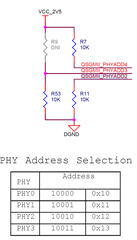
    [/报价]

    可以。 确保两个 ENET 板具有不同的 PHY。 您可以同时连接和使用这两者。

    qi yu1 说:
    #2. 我看到另一个 k3-j784s4-evm-usxgmii-exp1-exp2.dtso、应该是为另一个扩展板创建的。 但没有更多信息。[/引号]

    它用于参考如何配置 USXGMII。  

    TI 在 MAC 到 MAC 连接中进行了内部验证、方法是使用桥接连接器(TI 内部使用)背对背连接两个 EVM。 TI 不支持用于 USXGMII 的 H/W 连接器。

    此致、
    苏德黑尔

    [/quote]
    [/quote][/quote]
    [/quote][/quote]
    [/quote][/quote][/quote]
  • 请注意,本文内容源自机器翻译,可能存在语法或其它翻译错误,仅供参考。如需获取准确内容,请参阅链接中的英语原文或自行翻译。

    尊敬的 Sudheer:

    谢谢。

    以便支持8端口的2个 ENET 板。

    #1. 因此需要更改 ENET PHY 地址信号的上拉/下拉电阻?

    #2. 添加另一个覆盖 Dtso 文件来配置 REST LVDS 通道、是否有经验证的 Dtso 可用于第二个 ENET 板配置?

  • 请注意,本文内容源自机器翻译,可能存在语法或其它翻译错误,仅供参考。如需获取准确内容,请参阅链接中的英语原文或自行翻译。

    您好!

    #1. 因此需要更改 ENET PHY 地址信号的上拉/下拉电阻?

    可以。

    #2. 添加另一个重叠 Dtso 文件来配置 REST LVDS 通道、是否有已验证的 Dtso 可用于第二个 ENET 板配置?

    无需另一个覆盖层、在同一覆盖层中添加其他 CPSW 端口。
    此外、在 MDIO 节点中添加了 PHY 地址。

    除以上内容外、您还需要如下所示更新 ENET 的电源和复位信号。

    对于 PHY 复位、在 MDIO 节点下面添加 复位- GPIO。

    reset-gpios = <&exp2 17 GPIO_ACTIVE_LOW> , <&exp2 20 GPIO_ACTIVE_LOW>;


    对于 PHY 上电、在 exp2节点中添加以下内容:

    /* Power-up ENET2 EXPANDER PHY. */
    qsgmii1-line-hog {
        gpio-hog;
        gpios = <9 GPIO_ACTIVE_HIGH>;
        output-low;
    };

    此外、需要为其他 ENET 添加串行器/解串器通道。
    根据 TI EVM、Lane2上的端口7/Port-1可用于 ENET1、因此其中任何一个都应为主端口。
    Lane3上的端口8/端口2可用于 ENET2、因此 其中任何一个都应该是主端口。

    在端口1、2、3、4中、一个应为主端口、其余为子端口。
    同样、在端口5、6、7、8中、一个应为主端口、其余为子端口。

    请使用以下内容进行主端口定义

    &phy_gmii_sel_cpsw0 {
    ti,qsgmii-main-ports = <1>, <4>; //for Port1 & Port-8 Mater ports
    //ti,qsgmii-main-ports = <2>, <3>; //for Port2 & Port-7 Mater ports
    };


    请使用以下串行器/解串器通道控制 、根据主端口进行 IP 选择。
    &serdes_ln_ctrl {
    idle-states = <J784S4_SERDES0_LANE0_PCIE1_LANE0>, <J784S4_SERDES0_LANE1_PCIE1_LANE1>,
    <J784S4_SERDES0_LANE2_IP3_UNUSED>, <J784S4_SERDES0_LANE3_USB>,
    <J784S4_SERDES1_LANE0_PCIE0_LANE0>, <J784S4_SERDES1_LANE1_PCIE0_LANE1>,
    <J784S4_SERDES1_LANE2_PCIE0_LANE2>, <J784S4_SERDES1_LANE3_PCIE0_LANE3>,
    <J784S4_SERDES2_LANE0_QSGMII_LANE5>, <J784S4_SERDES2_LANE1_QSGMII_LANE6>,
    - <J784S4_SERDES2_LANE2_QSGMII_LANE7>, <J784S4_SERDES2_LANE3_QSGMII_LANE8>;
    + <J784S4_SERDES2_LANE2_QSGMII_LANE1>,<J784S4_SERDES2_LANE3_QSGMII_LANE8>; //for Port-1 Master and Port-8 Master
    //+ <J784S4_SERDES2_LANE2_QSGMII_LANE7>,<J784S4_SERDES2_LANE3_QSGMII_LANE2>; //for Port-2 Master and Port-7 Master
    };


    第二个 ENET 板配置是否有经验证的 dtso?

    否。

    此致、
    苏德黑尔

  • 请注意,本文内容源自机器翻译,可能存在语法或其它翻译错误,仅供参考。如需获取准确内容,请参阅链接中的英语原文或自行翻译。

    您好

     电路板:TDA4VH

     SDK:09.02.00.05 (Linux 内核6.18)

      如上所述、我修改了 k3-j784s4-evm-quad-port-eth-exp1.dtso 文件。 它被编译并放置在指定的位置、并通过 uEnv.txt 启动。

     "name_overlages=k3-j784s4-evm-virt-mac-client.dtbo k3-j784s4-vision-apps.dtbo k3-j784s4-evm-quad-port-eth-exp1.dtbo"   

     但是,在启动过程中报告了一个错误,并且无法访问内核。

    Load Remote Processor 10 with data@addr=0x82000000 14942480 bytes: Success!
    14942480 bytes read in 185 ms (77 MiB/s)
    Load Remote Processor 11 with data@addr=0x82000000 14942480 bytes: Success!
    19376640 bytes read in 227 ms (81.4 MiB/s)
    113787 bytes read in 30 ms (3.6 MiB/s)
    Working FDT set to 88000000
    3943 bytes read in 28 ms (136.7 KiB/s)
    14601 bytes read in 28 ms (508.8 KiB/s)
    4551 bytes read in 29 ms (152.3 KiB/s)
    failed on fdt_overlay_apply(): FDT_ERR_NOTFOUND
    ERROR: Did not find a cmdline Flattened Device Tree
    Could not find a valid device tree
    switch to partitions #0, OK
    mmc0(part 0) is current device
    ** No partition table - mmc 0 **
    Couldn't find partition mmc 0:1
    switch to partitions #0, OK
    mmc1 is current device
    Scanning mmc 1:1...
    No EFI system partition
    No EFI system partition
    Failed to persist EFI variables
    BootOrder not defined
    EFI boot manager: Cannot load any image
    starting USB...
    No working controllers found
    USB is stopped. Please issue 'usb start' first.
    starting USB...
    No working controllers found
    k3-navss-ringacc ringacc@2b800000: Ring Accelerator probed rings:286, gp-rings[96,20] sci-dev-id:328
    k3-navss-ringacc ringacc@2b800000: dma-ring-reset-quirk: disabled
    am65_cpsw_nuss_port ethernet@46000000port@1: K3 CPSW: rflow_id_base: 2
    link up on port 1, speed 1000, full duplex
    BOOTP broadcast 1
    BOOTP broadcast 2
    BOOTP broadcast 3
    BOOTP broadcast 4
    BOOTP broadcast 5
    BOOTP broadcast 6
    BOOTP broadcast 7
    BOOTP broadcast 8

      修改后的 dtso:

    #include <dt-bindings/gpio/gpio.h>
    #include <dt-bindings/mux/ti-serdes.h>
    #include <dt-bindings/phy/phy-cadence.h>
    #include <dt-bindings/phy/phy.h>
    
    #include "k3-pinctrl.h"
    
    &{/} {
    	aliases {
    		ethernet1 = "/bus@100000/ethernet@c000000/ethernet-ports/port@5";
    		ethernet2 = "/bus@100000/ethernet@c000000/ethernet-ports/port@6";
    		ethernet3 = "/bus@100000/ethernet@c000000/ethernet-ports/port@7";
    		ethernet4 = "/bus@100000/ethernet@c000000/ethernet-ports/port@8";
    	};
    };
    
    &main_cpsw0 {
    	status = "okay";
    };
    
    &main_cpsw0_port5 {
    	status = "okay";
    	phy-handle = <&cpsw9g_phy1>;
    	phy-mode = "qsgmii";
    	mac-address = [00 00 00 00 00 00];
    	phys = <&cpsw0_phy_gmii_sel 5>, <&serdes2_qsgmii_link>;
    	phy-names = "mac", "serdes";
    };
    
    &main_cpsw0_port6 {
    	status = "okay";
    	phy-handle = <&cpsw9g_phy2>;
    	phy-mode = "qsgmii";
    	mac-address = [00 00 00 00 00 00];
    	phys = <&cpsw0_phy_gmii_sel 6>, <&serdes2_qsgmii_link>;
    	phy-names = "mac", "serdes";
    };
    
    &main_cpsw0_port7 {
    	status = "okay";
    	phy-handle = <&cpsw9g_phy0>;
    	phy-mode = "qsgmii";
    	mac-address = [00 00 00 00 00 00];
    	phys = <&cpsw0_phy_gmii_sel 7>, <&serdes2_qsgmii_link>;
    	phy-names = "mac", "serdes";
    };
    
    &main_cpsw0_port8 {
    	status = "okay";
    	phy-handle = <&cpsw9g_phy3>;
    	phy-mode = "qsgmii";
    	mac-address = [00 00 00 00 00 00];
    	phys = <&cpsw0_phy_gmii_sel 8>, <&serdes2_qsgmii_link>;
    	phy-names = "mac", "serdes";
    };
    
    &main_cpsw0_mdio {
    	status = "okay";
    	pinctrl-names = "default";
    	pinctrl-0 = <&mdio0_pins_default>;
    	bus_freq = <1000000>;
    	reset-gpios = <&exp2 17 GPIO_ACTIVE_LOW>,<&exp2 20 GPIO_ACTIVE_LOW>;
    	reset-post-delay-us = <120000>;
    	#address-cells = <1>;
    	#size-cells = <0>;
    
    	cpsw9g_phy0: ethernet-phy@16 {
    		reg = <16>;
    	};
    	cpsw9g_phy1: ethernet-phy@17 {
    		reg = <17>;
    	};
    	cpsw9g_phy2: ethernet-phy@18 {
    		reg = <18>;
    	};
    	cpsw9g_phy3: ethernet-phy@19 {
    		reg = <19>;
    	};
    };
    
    &exp2 {
    	/* Power-up ENET1 EXPANDER PHY. */
    	qsgmii-line-hog {
    		gpio-hog;
    		gpios = <16 GPIO_ACTIVE_HIGH>;
    		output-low;
    	};
    	/* Power-up ENET2 EXPANDER PHY. */
    	qsgmii1-line-hog {
    		gpio-hog;
    		gpios = <9 GPIO_ACTIVE_HIGH>;
    		output-low;
    	};
    	/* Toggle MUX2 for MDIO lines */
    	mux-sel-hog {
    		gpio-hog;
    		gpios = <13 GPIO_ACTIVE_HIGH>, <14 GPIO_ACTIVE_HIGH>, <15 GPIO_ACTIVE_HIGH>;
    		output-high;
    	};
    };
    
    &phy_gmii_sel_cpsw0 {
    	ti,qsgmii-main-ports = <1>, <4>; //for Port1 & Port-8 Mater ports
    	//ti,qsgmii-main-ports = <2>, <3>; //for Port2 & Port-7 Mater ports
    };
    
    &main_pmx0 {
    	mdio0_pins_default: mdio0-pins-default {
    		pinctrl-single,pins = <
    			J784S4_IOPAD(0x05c, PIN_INPUT, 4) /* (AC36) MCASP2_AXR0.MDIO1_MDIO */
    			J784S4_IOPAD(0x058, PIN_INPUT, 4) /* (AE37) MCASP2_AFSX.MDIO1_MDC */
    		>;
    	};
    };
    
    &serdes_ln_ctrl {
    	idle-states = <J784S4_SERDES0_LANE0_PCIE1_LANE0>, <J784S4_SERDES0_LANE1_PCIE1_LANE1>,
    	<J784S4_SERDES0_LANE2_IP3_UNUSED>, <J784S4_SERDES0_LANE3_USB>,
    	<J784S4_SERDES1_LANE0_PCIE0_LANE0>, <J784S4_SERDES1_LANE1_PCIE0_LANE1>,
    	<J784S4_SERDES1_LANE2_PCIE0_LANE2>, <J784S4_SERDES1_LANE3_PCIE0_LANE3>,
    	<J784S4_SERDES2_LANE0_QSGMII_LANE5>, <J784S4_SERDES2_LANE1_QSGMII_LANE6>,
    	<J784S4_SERDES2_LANE2_QSGMII_LANE1>,<J784S4_SERDES2_LANE3_QSGMII_LANE8>; //for Port-1 Master and Port-8 Master
    };
    
    &serdes_wiz2 {
    	status = "okay";
    };
    
    &serdes2 {
    	status = "okay";
    	#address-cells = <1>;
    	#size-cells = <0>;
    
    	serdes2_qsgmii_link: phy@0 {
    		reg = <2>;
    		cdns,num-lanes = <1>;
    		#phy-cells = <0>;
    		cdns,phy-type = <PHY_TYPE_QSGMII>;
    		resets = <&serdes_wiz2 3>;
    	};
    };

     我想问一下、这种修改是否有问题? 您能否直接提供支持八个网络端口的 dtso 或 dtbo?

    谢谢。


  • 请注意,本文内容源自机器翻译,可能存在语法或其它翻译错误,仅供参考。如需获取准确内容,请参阅链接中的英语原文或自行翻译。

    您好!

    很抱歉响应延迟。
    我来检查器件树文件并尽快答复您。

    此致、
    苏德黑尔

  • 请注意,本文内容源自机器翻译,可能存在语法或其它翻译错误,仅供参考。如需获取准确内容,请参阅链接中的英语原文或自行翻译。

    您好!

    在修改后的器件树文件中、您仅使用4个端口。 对于4个端口来说、这很好。
    您需要对所有8个端口进行更新。

    其中端口1、2、3、4来自 ENET-1扩展、端口1将是 主端口、其余是子端口。
    同样、端口8、5、6、7来自 ENET-2扩展、端口8将是主端口、其余是子端口。

    "name_overallages=k3-j784s4-evm-virt-mac-client.dtbo k3-j784s4-vision-apps.dtbo k3-j784s4-evm-quad-port-eth-exp1.dtbo"  [/报价]

    在 overlay 中,删除 virt-mac-client ,因为您正计划使用带有 Quad eth 扩展 dtbo 的原生 Linux 驱动程序。

    此外、当您使用视觉应用时、请从 MCU2_0禁用 ETHFW、然后重新编译视觉应用并使用。

    此致、
    苏德黑尔

  • 请注意,本文内容源自机器翻译,可能存在语法或其它翻译错误,仅供参考。如需获取准确内容,请参阅链接中的英语原文或自行翻译。

    您好

      现在、我可以通过 ifconfig 看到端口1-port8。  四个新添加的端口没有信号。 您能否检查设备结构树中是否有任何问题。

    // SPDX-License-Identifier: GPL-2.0
    /**
     * DT Overlay for CPSW9G in QSGMII mode using J7 Quad Port ETH EXP Add-On Ethernet Card with
     * J7AHP board. The Add-On Ethernet Card has to be connected to ENET Expansion 1 slot on the
     * board.
     *
     * Product Datasheet: www.ti.com/.../spruj74.pdf
     * Product Link: www.ti.com/.../J721EXENETXPANEVM
     *
     * Copyright (C) 2023 Texas Instruments Incorporated - https://www.ti.com/
     */
    
    /dts-v1/;
    /plugin/;
    
    #include <dt-bindings/gpio/gpio.h>
    #include <dt-bindings/mux/ti-serdes.h>
    #include <dt-bindings/phy/phy-cadence.h>
    #include <dt-bindings/phy/phy.h>
    
    #include "k3-pinctrl.h"
    
    &{/} {
    	aliases {
    		ethernet1 = "/bus@100000/ethernet@c000000/ethernet-ports/port@5";
    		ethernet2 = "/bus@100000/ethernet@c000000/ethernet-ports/port@6";
    		ethernet3 = "/bus@100000/ethernet@c000000/ethernet-ports/port@7";
    		ethernet4 = "/bus@100000/ethernet@c000000/ethernet-ports/port@8";
    		ethernet5 = "/bus@100000/ethernet@c000000/ethernet-ports/port@1";
    		ethernet6 = "/bus@100000/ethernet@c000000/ethernet-ports/port@2";
    		ethernet7 = "/bus@100000/ethernet@c000000/ethernet-ports/port@3";
    		ethernet8 = "/bus@100000/ethernet@c000000/ethernet-ports/port@4";	
    	};
    };
    
    &main_cpsw0 {
    	status = "okay";
    };
    
    &main_cpsw0_port1 {
    	status = "okay";
    	phy-handle = <&cpsw9g_phy5>;
    	phy-mode = "qsgmii";
    	mac-address = [00 00 00 00 00 00];
    	phys = <&cpsw0_phy_gmii_sel 1>, <&serdes2_qsgmii_link>;
    	phy-names = "mac", "serdes";
    };
    
    &main_cpsw0_port2 {
    	status = "okay";
    	phy-handle = <&cpsw9g_phy6>;
    	phy-mode = "qsgmii";
    	mac-address = [00 00 00 00 00 00];
    	phys = <&cpsw0_phy_gmii_sel 2>, <&serdes2_qsgmii_link>;
    	phy-names = "mac", "serdes";
    };
    
    &main_cpsw0_port3 {
    	status = "okay";
    	phy-handle = <&cpsw9g_phy4>;
    	phy-mode = "qsgmii";
    	mac-address = [00 00 00 00 00 00];
    	phys = <&cpsw0_phy_gmii_sel 3>, <&serdes2_qsgmii_link>;
    	phy-names = "mac", "serdes";
    };
    
    &main_cpsw0_port4 {
    	status = "okay";
    	phy-handle = <&cpsw9g_phy7>;
    	phy-mode = "qsgmii";
    	mac-address = [00 00 00 00 00 00];
    	phys = <&cpsw0_phy_gmii_sel 4>, <&serdes2_qsgmii_link>;
    	phy-names = "mac", "serdes";
    };
    
    &main_cpsw0_port5 {
    	status = "okay";
    	phy-handle = <&cpsw9g_phy1>;
    	phy-mode = "qsgmii";
    	mac-address = [00 00 00 00 00 00];
    	phys = <&cpsw0_phy_gmii_sel 5>, <&serdes2_qsgmii_link>;
    	phy-names = "mac", "serdes";
    };
    
    &main_cpsw0_port6 {
    	status = "okay";
    	phy-handle = <&cpsw9g_phy2>;
    	phy-mode = "qsgmii";
    	mac-address = [00 00 00 00 00 00];
    	phys = <&cpsw0_phy_gmii_sel 6>, <&serdes2_qsgmii_link>;
    	phy-names = "mac", "serdes";
    };
    
    &main_cpsw0_port7 {
    	status = "okay";
    	phy-handle = <&cpsw9g_phy0>;
    	phy-mode = "qsgmii";
    	mac-address = [00 00 00 00 00 00];
    	phys = <&cpsw0_phy_gmii_sel 7>, <&serdes2_qsgmii_link>;
    	phy-names = "mac", "serdes";
    };
    
    &main_cpsw0_port8 {
    	status = "okay";
    	phy-handle = <&cpsw9g_phy3>;
    	phy-mode = "qsgmii";
    	mac-address = [00 00 00 00 00 00];
    	phys = <&cpsw0_phy_gmii_sel 8>, <&serdes2_qsgmii_link>;
    	phy-names = "mac", "serdes";
    };
    
    
    &cpsw0_phy_gmii_sel {
    	ti,qsgmii-main-ports = <1>, <4>; //for Port1 & Port-8 Mater ports
    };
    
    &main_cpsw0_mdio {
    	status = "okay";
    	pinctrl-names = "default";
    	pinctrl-0 = <&mdio0_pins_default>;
    	bus_freq = <1000000>;
    	reset-gpios = <&exp2 17 GPIO_ACTIVE_LOW>,<&exp2 20 GPIO_ACTIVE_LOW>;
    	reset-post-delay-us = <120000>;
    	#address-cells = <1>;
    	#size-cells = <0>;
    
    	cpsw9g_phy0: ethernet-phy@16 {
    		reg = <16>;
    	};
    	cpsw9g_phy1: ethernet-phy@17 {
    		reg = <17>;
    	};
    	cpsw9g_phy2: ethernet-phy@18 {
    		reg = <18>;
    	};
    	cpsw9g_phy3: ethernet-phy@19 {
    		reg = <19>;
    	};
    	cpsw9g_phy4: ethernet-phy@20 {
    		reg = <20>;
    	};
    	cpsw9g_phy5: ethernet-phy@21 {
    		reg = <21>;
    	};
    	cpsw9g_phy6: ethernet-phy@22 {
    		reg = <22>;
    	};
    	cpsw9g_phy7: ethernet-phy@23 {
    		reg = <23>;
    	};
    };
    
    &exp2 {
    	/* Power-up ENET1 EXPANDER PHY. */
    	qsgmii-line-hog {
    		gpio-hog;
    		gpios = <16 GPIO_ACTIVE_HIGH>;
    		output-low;
    	};
    	/* Power-up ENET2 EXPANDER PHY. */
    	qsgmii1-line-hog {
    		gpio-hog;
    		gpios = <9 GPIO_ACTIVE_HIGH>;
    		output-low;
    	};
    	/* Toggle MUX2 for MDIO lines */
    	mux-sel-hog {
    		gpio-hog;
    		gpios = <13 GPIO_ACTIVE_HIGH>, <14 GPIO_ACTIVE_HIGH>, <15 GPIO_ACTIVE_HIGH>;
    		output-high;
    	};
    };
    
    &main_pmx0 {
    	mdio0_pins_default: mdio0-pins-default {
    		pinctrl-single,pins = <
    			J784S4_IOPAD(0x05c, PIN_INPUT, 4) /* (AC36) MCASP2_AXR0.MDIO1_MDIO */
    			J784S4_IOPAD(0x058, PIN_INPUT, 4) /* (AE37) MCASP2_AFSX.MDIO1_MDC */
    		>;
    	};
    };
    
    &serdes_ln_ctrl {
    	idle-states = <J784S4_SERDES0_LANE0_PCIE1_LANE0>, <J784S4_SERDES0_LANE1_PCIE1_LANE1>,
    	<J784S4_SERDES0_LANE2_IP3_UNUSED>, <J784S4_SERDES0_LANE3_USB>,
    	<J784S4_SERDES1_LANE0_PCIE0_LANE0>, <J784S4_SERDES1_LANE1_PCIE0_LANE1>,
    	<J784S4_SERDES1_LANE2_PCIE0_LANE2>, <J784S4_SERDES1_LANE3_PCIE0_LANE3>,
    	<J784S4_SERDES2_LANE0_QSGMII_LANE5>, <J784S4_SERDES2_LANE1_QSGMII_LANE6>,
    	<J784S4_SERDES2_LANE2_QSGMII_LANE1>,<J784S4_SERDES2_LANE3_QSGMII_LANE8>; //for Port-1 Master and Port-8 Master
    };
    
    &serdes_wiz2 {
    	status = "okay";
    };
    
    &serdes2 {
    	status = "okay";
    	#address-cells = <1>;
    	#size-cells = <0>;
    
    	serdes2_qsgmii_link: phy@0 {
    		reg = <2>;
    		cdns,num-lanes = <1>;
    		#phy-cells = <0>;
    		cdns,phy-type = <PHY_TYPE_QSGMII>;
    		resets = <&serdes_wiz2 3>;
    	};
    };
    

    如果希望我单独配置另外四个网络端口,我可以询问使用哪个引脚来配置&SerDes_ln_Ctrl 和&main_pmx0节点?

  • 请注意,本文内容源自机器翻译,可能存在语法或其它翻译错误,仅供参考。如需获取准确内容,请参阅链接中的英语原文或自行翻译。

    您好

    "无信号"是什么意思?EXP-1连接器上是否没有 LED 指示灯?

    我可能看到您只启用了一个 SerDes 线路、即 SerDes2的线路2、它将端口1作为主端口、2、3、4作为子端口。
    您需要配置 SerDes 来启用线路2 (端口1)、线路3 (端口8)、其结果应如下所示。

    &serdes2 {
    	status = "okay";
    	#address-cells = <1>;
    	#size-cells = <0>;
    
    	serdes2_qsgmii_link: phy@0 {
    		reg = <2>;
    		cdns,num-lanes = <2>;
    		#phy-cells = <0>;
    		cdns,phy-type = <PHY_TYPE_QSGMII>;
    		resets = <&serdes_wiz2 3>, <&serdes_wiz2 4>;
    	};
    };

    &SerDes_ln_ctrl

    在这里、我们已经为串行器/解串器2 Line2、Line3配置了以太网功能。

    &main_pmx0 nodes?

    无需为串行器/解串器引脚配置主引脚多路复用。


    此致、
    苏德黑尔

  • 请注意,本文内容源自机器翻译,可能存在语法或其它翻译错误,仅供参考。如需获取准确内容,请参阅链接中的英语原文或自行翻译。

    您好!

      我们根据您的说明修改了&SerDes_ln_ctrl 节点。 我们还发现 cpsw9g_phy4-cpsw9g_phy7的物理地址不正确,因此我们也更改了它。 完成这些更改后、电路板可以加载 eth1-eth8。 但 设置 ip (eth1-eth8)后无法 ping 通计算机。

      原始设备树可以使前四个网络端口正常工作。 修改后的设备树可以加载八个网络端口,但所有端口都不能正常使用。

    器件树:

    // SPDX-License-Identifier: GPL-2.0
    /**
     * DT Overlay for CPSW9G in QSGMII mode using J7 Quad Port ETH EXP Add-On Ethernet Card with
     * J7AHP board. The Add-On Ethernet Card has to be connected to ENET Expansion 1 slot on the
     * board.
     *
     * Product Datasheet: www.ti.com/.../spruj74.pdf
     * Product Link: www.ti.com/.../J721EXENETXPANEVM
     *
     * Copyright (C) 2023 Texas Instruments Incorporated - https://www.ti.com/
     */
    
    /dts-v1/;
    /plugin/;
    
    #include <dt-bindings/gpio/gpio.h>
    #include <dt-bindings/mux/ti-serdes.h>
    #include <dt-bindings/phy/phy-cadence.h>
    #include <dt-bindings/phy/phy.h>
    
    #include "k3-pinctrl.h"
    
    &{/} {
    	aliases {
    		ethernet1 = "/bus@100000/ethernet@c000000/ethernet-ports/port@5";
    		ethernet2 = "/bus@100000/ethernet@c000000/ethernet-ports/port@6";
    		ethernet3 = "/bus@100000/ethernet@c000000/ethernet-ports/port@7";
    		ethernet4 = "/bus@100000/ethernet@c000000/ethernet-ports/port@8";
    		ethernet5 = "/bus@100000/ethernet@c000000/ethernet-ports/port@1";
    		ethernet6 = "/bus@100000/ethernet@c000000/ethernet-ports/port@2";
    		ethernet7 = "/bus@100000/ethernet@c000000/ethernet-ports/port@3";
    		ethernet8 = "/bus@100000/ethernet@c000000/ethernet-ports/port@4";	
    	};
    };
    
    &main_cpsw0 {
    	status = "okay";
    };
    
    &main_cpsw0_port1 {
    	status = "okay";
    	phy-handle = <&cpsw9g_phy5>;
    	phy-mode = "qsgmii";
    	mac-address = [00 00 00 00 00 00];
    	phys = <&cpsw0_phy_gmii_sel 1>, <&serdes2_qsgmii_link>;
    	phy-names = "mac", "serdes";
    };
    
    &main_cpsw0_port2 {
    	status = "okay";
    	phy-handle = <&cpsw9g_phy6>;
    	phy-mode = "qsgmii";
    	mac-address = [00 00 00 00 00 00];
    	phys = <&cpsw0_phy_gmii_sel 2>, <&serdes2_qsgmii_link>;
    	phy-names = "mac", "serdes";
    };
    
    &main_cpsw0_port3 {
    	status = "okay";
    	phy-handle = <&cpsw9g_phy4>;
    	phy-mode = "qsgmii";
    	mac-address = [00 00 00 00 00 00];
    	phys = <&cpsw0_phy_gmii_sel 3>, <&serdes2_qsgmii_link>;
    	phy-names = "mac", "serdes";
    };
    
    &main_cpsw0_port4 {
    	status = "okay";
    	phy-handle = <&cpsw9g_phy7>;
    	phy-mode = "qsgmii";
    	mac-address = [00 00 00 00 00 00];
    	phys = <&cpsw0_phy_gmii_sel 4>, <&serdes2_qsgmii_link>;
    	phy-names = "mac", "serdes";
    };
    
    &main_cpsw0_port5 {
    	status = "okay";
    	phy-handle = <&cpsw9g_phy1>;
    	phy-mode = "qsgmii";
    	mac-address = [00 00 00 00 00 00];
    	phys = <&cpsw0_phy_gmii_sel 5>, <&serdes2_qsgmii_link>;
    	phy-names = "mac", "serdes";
    };
    
    &main_cpsw0_port6 {
    	status = "okay";
    	phy-handle = <&cpsw9g_phy2>;
    	phy-mode = "qsgmii";
    	mac-address = [00 00 00 00 00 00];
    	phys = <&cpsw0_phy_gmii_sel 6>, <&serdes2_qsgmii_link>;
    	phy-names = "mac", "serdes";
    };
    
    &main_cpsw0_port7 {
    	status = "okay";
    	phy-handle = <&cpsw9g_phy0>;
    	phy-mode = "qsgmii";
    	mac-address = [00 00 00 00 00 00];
    	phys = <&cpsw0_phy_gmii_sel 7>, <&serdes2_qsgmii_link>;
    	phy-names = "mac", "serdes";
    };
    
    &main_cpsw0_port8 {
    	status = "okay";
    	phy-handle = <&cpsw9g_phy3>;
    	phy-mode = "qsgmii";
    	mac-address = [00 00 00 00 00 00];
    	phys = <&cpsw0_phy_gmii_sel 8>, <&serdes2_qsgmii_link>;
    	phy-names = "mac", "serdes";
    };
    
    
    &cpsw0_phy_gmii_sel {
    	ti,qsgmii-main-ports = <1>, <4>; //for Port1 & Port-8 Mater ports
    };
    
    &main_cpsw0_mdio {
    	status = "okay";
    	pinctrl-names = "default";
    	pinctrl-0 = <&mdio0_pins_default>;
    	bus_freq = <1000000>;
    	reset-gpios = <&exp2 20 GPIO_ACTIVE_LOW>, <&exp2 17 GPIO_ACTIVE_LOW>;
    	reset-post-delay-us = <120000>;
    	#address-cells = <1>;
    	#size-cells = <0>;
    
    	cpsw9g_phy0: ethernet-phy@16 {
    		reg = <16>;
    	};
    	cpsw9g_phy1: ethernet-phy@17 {
    		reg = <17>;
    	};
    	cpsw9g_phy2: ethernet-phy@18 {
    		reg = <18>;
    	};
    	cpsw9g_phy3: ethernet-phy@19 {
    		reg = <19>;
    	};
    	cpsw9g_phy4: ethernet-phy@24 {
    		reg = <24>;
    	};
    	cpsw9g_phy5: ethernet-phy@25 {
    		reg = <25>;
    	};
    	cpsw9g_phy6: ethernet-phy@26 {
    		reg = <26>;
    	};
    	cpsw9g_phy7: ethernet-phy@27 {
    		reg = <27>;
    	};
    };
    
    &exp2 {
    	/* Power-up ENET1 EXPANDER PHY. */
    	qsgmii1-line-hog {
    		gpio-hog;
    		gpios = <9 GPIO_ACTIVE_HIGH>;
    		output-low;
    	};
    	/* Power-up ENET1 EXPANDER PHY. */
    	qsgmii-line-hog {
    		gpio-hog;
    		gpios = <16 GPIO_ACTIVE_HIGH>;
    		output-low;
    	};
    	/* Toggle MUX2 for MDIO lines */
    	mux-sel-hog {
    		gpio-hog;
    		gpios = <13 GPIO_ACTIVE_HIGH>, <14 GPIO_ACTIVE_HIGH>, <15 GPIO_ACTIVE_HIGH>;
    		output-high;
    	};
    };
    
    &main_pmx0 {
    	mdio0_pins_default: mdio0-pins-default {
    		pinctrl-single,pins = <
    			J784S4_IOPAD(0x05c, PIN_INPUT, 4) /* (AC36) MCASP2_AXR0.MDIO1_MDIO */
    			J784S4_IOPAD(0x058, PIN_INPUT, 4) /* (AE37) MCASP2_AFSX.MDIO1_MDC */
    		>;
    	};
    };
    
    &serdes_ln_ctrl {
    	idle-states = <J784S4_SERDES0_LANE0_PCIE1_LANE0>, <J784S4_SERDES0_LANE1_PCIE1_LANE1>,
    	<J784S4_SERDES0_LANE2_IP3_UNUSED>, <J784S4_SERDES0_LANE3_USB>,
    	<J784S4_SERDES1_LANE0_PCIE0_LANE0>, <J784S4_SERDES1_LANE1_PCIE0_LANE1>,
    	<J784S4_SERDES1_LANE2_PCIE0_LANE2>, <J784S4_SERDES1_LANE3_PCIE0_LANE3>,
    	<J784S4_SERDES2_LANE0_QSGMII_LANE5>, <J784S4_SERDES2_LANE1_QSGMII_LANE6>,
    	<J784S4_SERDES2_LANE2_QSGMII_LANE1>,<J784S4_SERDES2_LANE3_QSGMII_LANE8>; //for Port-1 Master and Port-8 Master
    };
    
    &serdes_wiz2 {
    	status = "okay";
    };
    
    &serdes2 {
    	status = "okay";
    	#address-cells = <1>;
    	#size-cells = <0>;
    
    	serdes2_qsgmii_link: phy@0 {
    		reg = <2>;
    		cdns,num-lanes = <2>;
    		#phy-cells = <0>;
    		cdns,phy-type = <PHY_TYPE_QSGMII>;
    		resets = <&serdes_wiz2 3>, <&serdes_wiz2 4>;
    	};
    };
    

    &main_cpsw0_port1{
       状态="可以";
       PHY-Handle =<&cpsw9g_phy5>;
       Phy-mode ="qsgmii";
       MAC-ADDRESS =[00 00 00 00 00];
       phys =<&cpsw0_phy_gmii_sel 1>、<&serdes2_qsgmii_link>;
       PHY-names ="Mac"、"SerDes";
    };  

    &cpsw0_phy_gmii_sel
       ti、qsgmi-main-ports =<1>、<4>;//对于端口1和端口8更多端口端口端口端口
    };

    SERDES_ln_ctrl{(&S)}
    空闲状态= , ,
      , ,
      , ,
      , ,
      , ,
      , ;//用于端口1主端口和端口8主端口
    };

     这些黄色斑点是否配置不正确? 在上面的回复中、&phy_gmii_sel_cpsw0节点是否意味着&cpsw0_phy_gmii_sel 节点? (我添加了&phy_gmii_sel_cpsw0节点、电路板崩溃)

    谢谢。

  • 请注意,本文内容源自机器翻译,可能存在语法或其它翻译错误,仅供参考。如需获取准确内容,请参阅链接中的英语原文或自行翻译。

    您好!

    这些黄色斑点配置是否错误? 在上面的回复中、&phy_gmii_sel_cpsw0节点是否意味着&cpsw0_phy_gmii_sel 节点? (我添加了&phy_gmii_sel_cpsw0节点、电路板崩溃了)

    是的、  上面的 phy_gmii_sel_cpsw0是"cpsw0_phy_gmii_sel"。 之前的 SDK 版本共享的示例。

    此外、确保扩展连接器连接到 EVM 的 ENET-1和 ENET-2、如下所示。

    ENET-1至四路扩展、无硬件更改。
    具有已更新的 PHY 地址的 ENET-2。

    此致、
    苏德黑尔

  • 请注意,本文内容源自机器翻译,可能存在语法或其它翻译错误,仅供参考。如需获取准确内容,请参阅链接中的英语原文或自行翻译。

    您好!

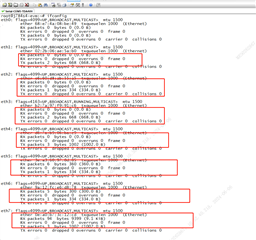
      硬件连接正确。  已加载八个网络端口、但插入网络电缆后、Tx 有数据、Rx 没有数据。

      硬件地址配置:

       Enet-1:0x10 0x11 0x12 0x13

      Enet-2:0x18 0x19 0x1a 0x1b

      软件 &MAIN_CPSW0_MDIO 配置:


    &main_cpsw0_mdio {
    	status = "okay";
    	pinctrl-names = "default";
    	pinctrl-0 = <&mdio0_pins_default>;
    	bus_freq = <1000000>;
    	reset-gpios = <&exp2 20 GPIO_ACTIVE_LOW>, <&exp2 17 GPIO_ACTIVE_LOW>;
    	reset-post-delay-us = <120000>;
    	#address-cells = <1>;
    	#size-cells = <0>;
    
    	cpsw9g_phy0: ethernet-phy@16 {
    		reg = <16>;
    	};
    	cpsw9g_phy1: ethernet-phy@17 {
    		reg = <17>;
    	};
    	cpsw9g_phy2: ethernet-phy@18 {
    		reg = <18>;
    	};
    	cpsw9g_phy3: ethernet-phy@19 {
    		reg = <19>;
    	};
    	cpsw9g_phy4: ethernet-phy@24 {
    		reg = <24>;
    	};
    	cpsw9g_phy5: ethernet-phy@25 {
    		reg = <25>;
    	};
    	cpsw9g_phy6: ethernet-phy@26 {
    		reg = <26>;
    	};
    	cpsw9g_phy7: ethernet-phy@27 {
    		reg = <27>;
    	};
    };

      我修改了&MAIN_cpsw0_PORT*和&cpsw9g_phy*之间的绑定关系,发现可以正常使用 ENET-1的四个端口。 那么 ENET-2的四个端口仍然只有 Tx 数据。

    &main_cpsw0_port1 {
    	status = "okay";
    	phy-handle = <&cpsw9g_phy0>;
    	phy-mode = "qsgmii";
    	mac-address = [00 00 00 00 00 00];
    	phys = <&cpsw0_phy_gmii_sel 1>, <&serdes2_qsgmii_link>;
    	phy-names = "mac", "serdes";
    };
    
    &main_cpsw0_port2 {
    	status = "okay";
    	phy-handle = <&cpsw9g_phy1>;
    	phy-mode = "qsgmii";
    	mac-address = [00 00 00 00 00 00];
    	phys = <&cpsw0_phy_gmii_sel 2>, <&serdes2_qsgmii_link>;
    	phy-names = "mac", "serdes";
    };
    
    &main_cpsw0_port3 {
    	status = "okay";
    	phy-handle = <&cpsw9g_phy2>;
    	phy-mode = "qsgmii";
    	mac-address = [00 00 00 00 00 00];
    	phys = <&cpsw0_phy_gmii_sel 3>, <&serdes2_qsgmii_link>;
    	phy-names = "mac", "serdes";
    };
    
    &main_cpsw0_port4 {
    	status = "okay";
    	phy-handle = <&cpsw9g_phy4>;
    	phy-mode = "qsgmii";
    	mac-address = [00 00 00 00 00 00];
    	phys = <&cpsw0_phy_gmii_sel 4>, <&serdes2_qsgmii_link>;
    	phy-names = "mac", "serdes";
    };
    
    &main_cpsw0_port5 {
    	status = "okay";
    	phy-handle = <&cpsw9g_phy3>;
    	phy-mode = "qsgmii";
    	mac-address = [00 00 00 00 00 00];
    	phys = <&cpsw0_phy_gmii_sel 5>, <&serdes2_qsgmii_link>;
    	phy-names = "mac", "serdes";
    };
    
    &main_cpsw0_port6 {
    	status = "okay";
    	phy-handle = <&cpsw9g_phy5>;
    	phy-mode = "qsgmii";
    	mac-address = [00 00 00 00 00 00];
    	phys = <&cpsw0_phy_gmii_sel 6>, <&serdes2_qsgmii_link>;
    	phy-names = "mac", "serdes";
    };
    
    &main_cpsw0_port7 {
    	status = "okay";
    	phy-handle = <&cpsw9g_phy6>;
    	phy-mode = "qsgmii";
    	mac-address = [00 00 00 00 00 00];
    	phys = <&cpsw0_phy_gmii_sel 7>, <&serdes2_qsgmii_link>;
    	phy-names = "mac", "serdes";
    };
    
    &main_cpsw0_port8 {
    	status = "okay";
    	phy-handle = <&cpsw9g_phy7>;
    	phy-mode = "qsgmii";
    	mac-address = [00 00 00 00 00 00];
    	phys = <&cpsw0_phy_gmii_sel 8>, <&serdes2_qsgmii_link>;
    	phy-names = "mac", "serdes";
    };

     我想知道此&cpsw0_phy_gmii_sel 节点的作用、以及此配置是否与上述两个节点之间的绑定关系相关。 我不知道源代码是如何解析的、因此我在这里感到困惑。 Qsgmi-main-ports 设置为1和4。 &main_cpsw0_port*和&cpsw9g_phy*之间的对应关系是什么? 我猜映射错误。 (__LW_AT__我尝试了各种其他组、ENET-2不能正常工作,&cpsw9g_phy3节点不能放在&main_cpsw0_Port4节点上。 否则、可以正确使用其中一个 ENET-1端口。)

    &cpsw0_phy_gmii_sel{
      ti、qsgmi-main-ports =<1>、<4>;//对于端口1和端口8更多端口端口端口端口
    };

    谢谢。  


  • 请注意,本文内容源自机器翻译,可能存在语法或其它翻译错误,仅供参考。如需获取准确内容,请参阅链接中的英语原文或自行翻译。

    您好!

      可以回答昨天的问题吗?

    谢谢。

  • 请注意,本文内容源自机器翻译,可能存在语法或其它翻译错误,仅供参考。如需获取准确内容,请参阅链接中的英语原文或自行翻译。

    您好!  

    将是 ooo 今天,将检查在明天的某个时间.  

    此致、  

    苏德黑尔

  • 请注意,本文内容源自机器翻译,可能存在语法或其它翻译错误,仅供参考。如需获取准确内容,请参阅链接中的英语原文或自行翻译。

    您好!

      尝试单独调试 ENET-2。 发生与之前相同的现象、Tx 有数据、Rx 没有数据。 如果我要单独使用 ENET-2的四个网络端口、如何修改 k3-j784s4-evm-quad-port-eth-exp1.dtso。 在哪里可以找到 cpsw9g 的详细文档?

    谢谢。

  • 请注意,本文内容源自机器翻译,可能存在语法或其它翻译错误,仅供参考。如需获取准确内容,请参阅链接中的英语原文或自行翻译。

    您好!

      硬件连接正确。  已加载八个网络端口、但插入网络电缆后、Tx 有数据、Rx 没有数据。


      phys =<&cpsw0_phy_gmii_sel 7>中的值7 意味着什么? 这与 ti、qsgmii-main-ports 属性有何关系?

    谢谢。  


  • 请注意,本文内容源自机器翻译,可能存在语法或其它翻译错误,仅供参考。如需获取准确内容,请参阅链接中的英语原文或自行翻译。
    PHY 中的值7是什么=<&cpsw0_phy_gmii_sel 7> 意思是? 这与 ti,qsgmii-main-ports 属性有何关系?

    cpsw0_phy_gmii_sel 将端口号7作为 qsgmii 传递。
    ti、qsgmi-main-ports ->将定义所有 QSGMII 端口中的主端口。

    我们已将端口1和端口8启用为主端口。

    从捕获来看、您似乎没有在 eth1、eth2、eth3、eth4上接收数据、也没有在 eth5、eth6、eth7和 eth8上接收数据?

    您可以使用以下主要端口配置进行一次检查吗?
    &cpsw0_phy_gmii_sel{
      ti、qsgmi-main-ports =<1>、<8>;//对于端口1和端口8更多端口端口端口端口
    };

    此致、
    苏德黑尔

  • 请注意,本文内容源自机器翻译,可能存在语法或其它翻译错误,仅供参考。如需获取准确内容,请参阅链接中的英语原文或自行翻译。

    您好  

      可以、使用主端口<1、8>时、八个网络端口已正常工作。 我们的硬件工程师询问了&main_cpsw0_mdio 节点中的重新设置-gpio 是否用于? 如何?17k Ω 和20k Ω 的值

     指定 main 端口(1、8)后、我发现其他三个 cpsw0_phy_gmii_sel xx 与实际物理端口也具有一对一的关系。 什么决定了这种关系?  

    谢谢。

  • 请注意,本文内容源自机器翻译,可能存在语法或其它翻译错误,仅供参考。如需获取准确内容,请参阅链接中的英语原文或自行翻译。

    您好!

    如何确定17和20的值?

    这来自原理图、我们具有用于扩展连接器复位的 GPIO 波形。

    指定 main port (1、8 )后、我发现另外三个 cpsw0_phy_gmii_sel xx 也与实际物理端口存在一对一关系。 决定此关系的因素

    此处、端口1将充当主器件、并从启动端口复位3、即端口2、端口3和端口4是主端口1的子端口。

    同样、端口8是主端口、而其余端口则复位了3、即端口5、端口6、端口7是主端口8的子端口。

    以上是将子端口分组到主端口的 H/W 行为。


    我知道 在配置主端口<1><8>后、您的问题已得到解决。

    此致。
    苏德黑尔