主题中讨论的其他器件: AWR6843AOP
您好!
因此、我需要通过 AWR6843AOPEVM 电路板为我的项目使用 ROS、我稍微深入文档、主要是 TI 毫米波 ROS 驱动程序用户指南。
我将演示刷入了雷达、完成了与驱动程序和所有组件的每一步。 一旦我开始启动6843AOP_MULTI_2D_0.LAUNCH 文件(用于测试)、我没有收到错误。 但是、当我查看我的主题时、终端中没有收到任何内容。 为什么会这样。
在本例中是否有其他 ROS 引线需要研究。
谢谢。此致。
This thread has been locked.
If you have a related question, please click the "Ask a related question" button in the top right corner. The newly created question will be automatically linked to this question.
您好!
因此、我需要通过 AWR6843AOPEVM 电路板为我的项目使用 ROS、我稍微深入文档、主要是 TI 毫米波 ROS 驱动程序用户指南。
我将演示刷入了雷达、完成了与驱动程序和所有组件的每一步。 一旦我开始启动6843AOP_MULTI_2D_0.LAUNCH 文件(用于测试)、我没有收到错误。 但是、当我查看我的主题时、终端中没有收到任何内容。 为什么会这样。
在本例中是否有其他 ROS 引线需要研究。
谢谢。此致。

大家好、Jackson:
很抱歉答案被延迟了。
我看了使用另一个终端的命令$ rostopic echo /topic_name 的主题。 顺便说一句,当我做一个简单的 rostopic 列表时,主题是存在的,然而没有公布。
我正在使用 CCS (也可通过此 链接找到)中 ressource Explorer 中提供的雷达工具箱1.00.01.07。 以及其中建议的 Git 封装。
如果有什么不合适的,请给我启迪。
Lilia.
尊敬的 Pedrhom:
也感谢您的回答。
我尝试了闪存开箱即用演示选项、即毫米波 SDK 3.06演示文件中的.bin 以及我使用 CCS 构建的演示。
我通过在毫米波可视化工具中看到数据来确认它是否正常工作。 然后、当启动 ROS 节点时、我停止可视化工具、然后检查 Topics (主题)值(如我对 Jackson 的回答中所述)。
关于自述文件、这里是文件包含的内容、安装部分提供了指向工具箱4.12.0中 ROS 驱动程序的链接、以及如何使用人员计数二进制文件。 我将对此进行测试、并确认问题是否仍然存在。
-------------------------------------------------------------------------------------------------------------------------------------------------- v1.0 ROS Driver + Tracking added Detection layer for ti_mmwave_tracker_rospkg will now be based off of Capon algorithm and processing chain with tracking, as opposed to the Bartlett algorithm which is also used in Out of Box Demo and no tracking. Capon algorithm allows for better point cloud density and accuracy, as well as tracking information. Tested with Industrial Toolbox for mmWave Sensors 4.12.0 -------------------------------------------------------------------------------------------------------------------------------------------------- Setup: 1. Follow the ROS Driver user guide up until the step that requires you to use "roslaunch" dev.ti.com/.../node **NOTE** For anywhere the guide mentions Out of Box demo make sure you are using the People Counting binary file. 2. Use the console command "roslaunch ti_mmwave_tracker_rospkg AOP_3d_Tracking.launch" to start the sensor which will start the sensor and Rviz to show the point cloud. The tracking information is not visualized but number of tracks detected is currently being printed to console via a "ROS_INFO" command within DataHandlerClass.cpp. If you want to avoid having Rviz start at the same time as the sensor, delete the entire line near the bottom of AOP_3d_Tracking.launch that says "rviz" in it -------------------------------------------------------------------------------------------------------------------------------------------------- Developer's Guide: All tracker information is handled within the "DataHandlerClass.cpp" file in the src folder. Each track has 112 bytes of information. Track List 3D 112 Bytes * Number of Tracks 'tid', {'uint32', 4}, ... % Track ID 'posX', {'float', 4}, ... % Track position in X dimension, m 'posY', {'float', 4}, ... % Track position in Y dimension, m 'posZ', {'float', 4}, ... % Track position in Z dimension, m 'velX', {'float', 4}, ... % Track velocity in X dimension, m/s 'velY', {'float', 4}, ... % Track velocity in Y dimension, m/s 'velZ', {'float', 4}, ... % Track velocity in Z dimension, m/s 'accX', {'float', 4}, ... % Track acceleration in X dimension, m/s2 'accY', {'float', 4}, ... % Track acceleration in Y dimension, m/s 'accZ', {'float', 4}, ... % Track acceleration in Z dimension, m/s -------------------------------------------------------------------------------------------------------------------------------------------------- Every point is given a track index value, assigning that point to a track ID it falls into. If a point does not fall into a track for whatever reason, a special value is given for why. Track Index 1 Byte * Number of Points 'targetID', {'uint8', 1}); % Track ID Special Values: 253 - Point not associated, SNR too weak 254 - Point not associated, located outside boundary of interest 255 - Point not associated, considered as noise -------------------------------------------------------------------------------------------------------------------------------------------------- 3D Spherical Compressed Point Cloud: 20 bytes + (7 bytes * Number of Points) For data compression, the 20 bytes worth of unit values are sent first and only once. These unit values need to be multiplied by every point's 7 bytes of values to get the point's real values. ‘elevationUnit', {'float', 4}, ... % unit resolution of elevation report, in rad 'azimuthUnit', {'float', 4}, ... % unit resolution of azimuth report, in rad 'dopplerUint', {'float', 4}, ... % unit resolution of Doppler report, in m/s 'rangeUint', {'float', 4}, ... % unit resolution of Range report, in m 'snrUint', {'float', 4}); % unit resolution of SNR report, ratio Each point has the following: pointStruct = struct(... ‘elevation', {'int8', 1}, ... % Elevation report, in number of elevationUnit 'azimuth', {'int8', 1}, ... % Azimuth report, in number of azimuthUnit 'doppler', {'int16', 1}, ... % Doppler, in number of dopplerUint 'range', {‘uint16', 2}, ... % Range, in number of rangeUint 'snr', {‘uint16', 2}); % SNR, in number of snrUint --------------------------------------------------------------------------------------------------------------------------------------------------
PS:但是对于我的项目,我需要实施一个与演示类似的检测案例,在雷达中添加一个 ROS 节点,这就是我使用演示示示例的原因,这是否仍然可行?
谢谢。此致。
Lilia.
你好,Lilia,
我说的是 bin 文件夹中的 readme.txt、它有以下内容:
------------------
要为 ROS 驱动程序刷写的正确二进制文件:
xWRL6432:
xwrl6432_mmw_demo.appimage
xWR6843AOP/ISK +跟踪(电容链):
3D 人员计数二进制
xWR6843ISK +占位/区域检测:
小型障碍物检测二进制
xWR6843AOP:
开箱即用演示二进制文件(使用64xxAOP)
xWR1443:
开箱即用演示二进制文件
xWR1642:
开箱即用演示二进制文件
xWR1843:
开箱即用演示二进制文件
------------------
所需的所有二进制文件也位于该文件夹中。 如果您尝试使用错误的二进制文件运行错误的 ROS 驱动程序、则可能会出现 CLI 错误、指出命令无法识别、以及传感器启动后无法输出。
此致、
佩德霍姆
您好 Pedrhom、
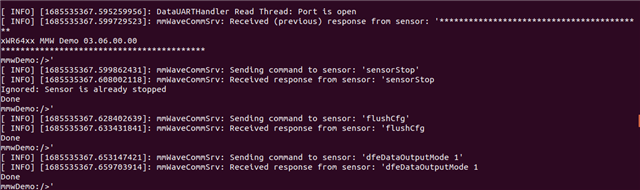
对不起,我没有注意,我找到了正确的自述并刷写了正确的开箱即用演示,没有给出的错误,如你可以在以下屏幕看到(修改的端口在.launch 文件到相应的)。


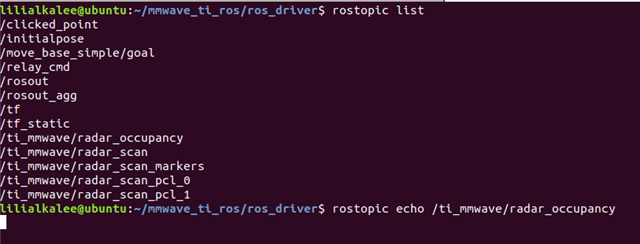
完成后、我可以查看所有可用的主题列表。 当我尝试打印他们的值时,我有三个结果:
1-我有一个挂起的终端,如这里所示:

2-收到 SCAN_PCL 主题的警告:

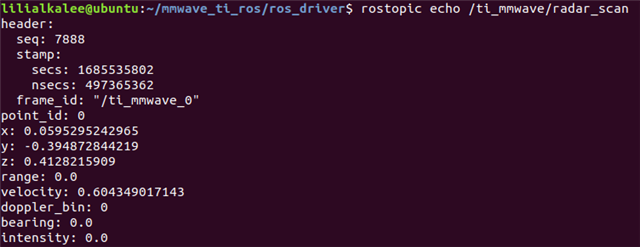
3- 打印实时值的唯一主题是 radar_scan ,我甚至可以通过手移到雷达旁边看到变化,当没有检测到任何情况时,打印会停止:

PS:在启动终端中,打印主题时,我没有任何错误。
因此、我猜示例可以正常工作、但我仍然不明白为什么其他主题没有正确打印。 但是、对于我的应用、我需要实现一个 ROS 发布者节点、为雷达数据提供输出、如演示示例中所示。 我计划将 ROS 示例与 xwr68xx_mmw 演示合并、以获得 预期结果。
然而、由于 ROS 可以在我的电路板上与另一个 演示一起使用、我能否使用64xxAOP 开箱即用演示并在 CCS (根据我的需求+ ROS 节点)上对其进行调整以便为 AWR6843AOP 目标构建? 这是可能的吗?
再次感谢您的帮助。
Lilia.
您好!
您可以忽略其他主题、存在其他主题的目的纯粹是调试。 只要您从其中一个主题中获取点云、就会得到基于配置文件的线性调频脉冲设计的完整点云。
您在 ROS 驱动程序的 bin 文件夹中找到的二进制文件都是在雷达工具箱中找到的默认二进制文件、我已将它们放在一个位置方便用户使用。 其工作方式是、刷写到传感器中的二进制文件将输出配置为发出 TLV、并在该输出中读取毫米波+串行 ROS 包。 可以在此处找到输出/可以输出的所有 TLV 的列表
如果您需要任何其他类型的数据、上面的每个 TLV 都可以有一个 ROS 主题。 目前、ROS 驱动程序中实现的是检测点 TLV。 我会特别关注 ROS 驱动程序源代码中的 DataHandlerClass.cpp 文件、因为大多数 ROS 输出解析都发生在该文件中。
此致、
Pedrhom Nafisi