请注意,本文内容源自机器翻译,可能存在语法或其它翻译错误,仅供参考。如需获取准确内容,请参阅链接中的英语原文或自行翻译。
Thread 中讨论的其他器件:MMWAVEICBOOST、 AWR6843AOP、 SYSBIOS、MMWAVE-SDK 工具与软件:
您好、TI 专家:
下午好~问题为标题。我的 IDE 设置如下所示:
IDE 版本:CCS 20.0.1.
XDCtools:3.50.8.24_CORE
SYS/BIOS:6.73.0.01.
mmWave SDK : 3.6.0.00-LTS
项目: out_of_box_6843_AOP
电路板:MMWAVEICBOOST + AWR6843AOP
操作模式:调试
我已将 "#define DebugP_LOG_ENABLED 1"放置在 main.c 的顶部
mmw.cfg 如下:
/*
 *  Copyright 2018 by Texas Instruments Incorporated.
 *
 *  All rights reserved. Property of Texas Instruments Incorporated.
 *  Restricted rights to use, duplicate or disclose this code are
 *  granted through contract.
 *
 */
environment['xdc.cfg.check.fatal'] = 'false';

/********************************************************************
 ************************** BIOS Modules ****************************
 ********************************************************************/
var Memory    = xdc.useModule('xdc.runtime.Memory');
var BIOS      = xdc.useModule('ti.sysbios.BIOS');
var HeapMem   = xdc.useModule('ti.sysbios.heaps.HeapMem');
var HeapBuf   = xdc.useModule('ti.sysbios.heaps.HeapBuf');
var Task      = xdc.useModule('ti.sysbios.knl.Task');
var Idle      = xdc.useModule('ti.sysbios.knl.Idle');
var SEM       = xdc.useModule('ti.sysbios.knl.Semaphore');
var Event     = xdc.useModule('ti.sysbios.knl.Event');
var Hwi       = xdc.useModule('ti.sysbios.family.arm.v7r.vim.Hwi');
var System    = xdc.useModule('xdc.runtime.System');
var SysStd    = xdc.useModule('xdc.runtime.SysStd');
var clock     = xdc.useModule('ti.sysbios.knl.Clock');
var Pmu       = xdc.useModule('ti.sysbios.family.arm.v7a.Pmu');
var Load      = xdc.useModule('ti.sysbios.utils.Load');

/* make this if (0) if you don't want any messages on CCS console say because of
   slow printing. They can be viewed in CCS ROV viewer in SysMin module */
if (1)
    System.SupportProxy = SysStd;
else
{
    var SysMin = xdc.useModule('xdc.runtime.SysMin');
    SysMin.bufSize = 4096;
    System.SupportProxy = SysMin;
}

/* FIQ Stack Usage: */
Hwi.fiqStackSize                = 2048;
Hwi.fiqStackSection            = ".myFiqStack"
Program.sectMap[".myFiqStack"] = "DATA_RAM";

/* Default Heap Creation: Local L2 memory */
var heapMemParams           = new HeapMem.Params();
heapMemParams.size          = 64*1024;
heapMemParams.sectionName   = "systemHeap";
Program.global.heap0        = HeapMem.create(heapMemParams);
Memory.defaultHeapInstance  = Program.global.heap0;

/* Enable BIOS Task Scheduler */
BIOS.taskEnabled	= true;

/* Reduce the size of BIOS */
BIOS.swiEnabled        = false; /* We don't use SWIs */
BIOS.libType           = BIOS.LibType_Custom;
Program.stack          = 1200; /* for isr context */
Task.idleTaskStackSize = 800;
var Text               = xdc.useModule('xdc.runtime.Text');
Text.isLoaded          = false;

/* do not call update for load - Application will call it at inter-frame boundary */
Load.updateInIdle = false;

/* Install idle function to sleep the R4F (using WFI instruction). Note above
   Load.updateInIdle is false which allows to sleep the R4F in idle.
   Also, no other book-keeping etc functions should be installed in the idle thread */
Idle.addFunc('&MmwDemo_sleep');

Program.sectMap[".vecs"]	= "VECTORS";

/* Make sure libraries are built with 32-bit enum types to be compatible with DSP enum types*/
BIOS.includeXdcRuntime  = true;
BIOS.libType            = BIOS.LibType_Custom;
BIOS.customCCOpts      += " --enum_type=int ";

/********************************************************************
 * Enabling DebugP Log Support
 ********************************************************************/
var Log         = xdc.useModule('xdc.runtime.Log');
var Main        = xdc.useModule('xdc.runtime.Main');
var Diags       = xdc.useModule('xdc.runtime.Diags');
var LoggerBuf   = xdc.useModule('xdc.runtime.LoggerBuf');

/* Configure the Logger Buffer: */
var loggerBufParams             = new LoggerBuf.Params();
loggerBufParams.bufType         = LoggerBuf.BufType_CIRCULAR;
loggerBufParams.exitFlush       = false;
loggerBufParams.instance.name   = "_logInfo";
loggerBufParams.numEntries      = 200;

/* Create the Logger and attach this to the application */
MyAppLogger                     = LoggerBuf.create(loggerBufParams);
Main.common$.logger             = MyAppLogger;
Main.common$.diags_USER1        = Diags.RUNTIME_ON;
Task.common$.diags_USER1        = Diags.RUNTIME_ON;
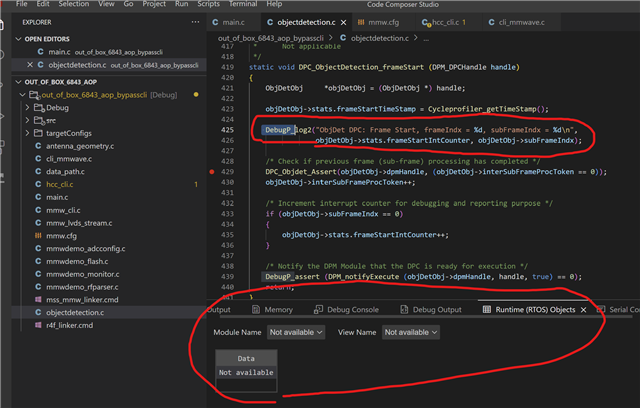
我在 objectdetection.c 中的 DebugP_log2下面设置了一个断点、并打开控制台中的"RTOS Objects"
但未看到任何内容(我预期看到 "ObjDet DPC:Frame Start、frameIndx =%d、subFrameIndx =%d\n"、 objDetObj->stats.frameStartIntCounter、objDetObj->subFrameIndx)
是否还有其他要看 DebugP_log2内容的需要注意的事项?