工具/软件:
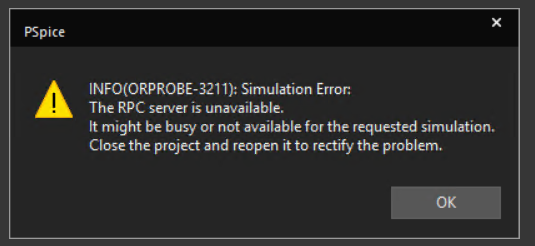
启动仿真时弹出以下错误消息

已尝试 以下解决方法、如其中一个线程中所述

This thread has been locked.
If you have a related question, please click the "Ask a related question" button in the top right corner. The newly created question will be automatically linked to this question.
工具/软件:
启动仿真时弹出以下错误消息

已尝试 以下解决方法、如其中一个线程中所述

尊敬的 Vishnu:
是在 Windows 启动后还是在运行一段时间后?
我将尝试重新启动 Windows 作为初始检查。 如果没有运气、请尝试以下操作:
从注册表编辑器中删除以下注册表:
HKEY_CURRENT_USER\Software\Orcad\CaptureTIP Spice_Install \17.4.0
如果您运行的是最新版本、请删除以下内容:
HKEY_CURRENT_USER\Software\OrCAD\CaptureTIP Spice_Install \23.1.0
如果不起作用:
将 capture.ini 重命名为 capture_ini.txt、网址为%cds_home%\cdssetup\Orcad_CAPTURETIP Spice_Install \17.4.0
将 pspice.ini 重命名为 pspice_ini.txt、网址为%cds_home%\cdssetup\Orcad_PSpiceTIp Spice_Install \17.4.0
此致、
Jc.