
This thread has been locked.

If you have a related question, please click the "Ask a related question" button in the top right corner. The newly created question will be automatically linked to this question.

[参考译文] WEBENCH®︎工具:Internet Explorer 加载问题

Guru**** 2556110 points


请注意,本文内容源自机器翻译,可能存在语法或其它翻译错误,仅供参考。如需获取准确内容,请参阅链接中的英语原文或自行翻译。

https://e2e.ti.com/support/tools/simulation-hardware-system-design-tools-group/sim-hw-system-design/f/simulation-hardware-system-design-tools-forum/709767/webench-tools-internet-explorer-loading-issue

工具/软件:WEBENCHRegistered设计工具

我们最近推出了全新的完全重新设计的 HTML5应用程序、适用于 WEBENCH Power Designer (Beta)

Google Chrome、IE 11及更高版本、Firefox 60及更高版本最支持此 HTML5应用程序。

如果在 IE11中加载工具时遇到问题、请按照以下说明更新文档模式:

  1. 在浏览器中,右键单击页面上的任意位置,然后选择“Inspect Element”(检查元素)
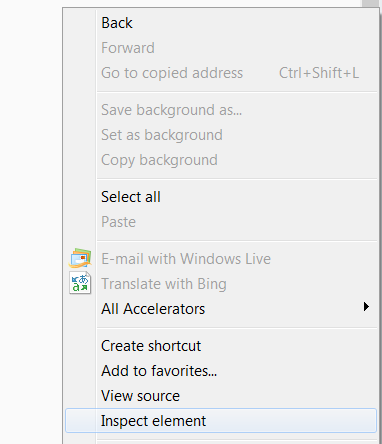

  2. 单击“Emulation (仿真)”选项卡


  3. 将“文档模式”更改为“边缘(默认)”

