
This thread has been locked.

If you have a related question, please click the "Ask a related question" button in the top right corner. The newly created question will be automatically linked to this question.

[参考译文] TIDA-080004:DLPC120-Q1:DLPC120控制程序连接错误

Guru**** 2539500 points


请注意,本文内容源自机器翻译,可能存在语法或其它翻译错误,仅供参考。如需获取准确内容,请参阅链接中的英语原文或自行翻译。

https://e2e.ti.com/support/tools/simulation-hardware-system-design-tools-group/sim-hw-system-design/f/simulation-hardware-system-design-tools-forum/1198199/tida-080004-dlpc120-q1-dlpc120-control-program-connect-error

器件型号:TIDA-080004

尊敬的团队

每当我操作 DLPC120时、它都会不断弹出错误消息。 如何检查并修复此问题?
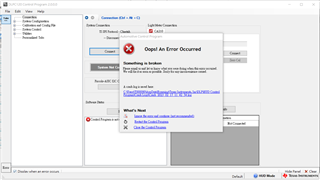
=========================== .log ===================================

汽车控制程序2.0.0.0的崩溃文件
当前时间:2/17/2023上午11:42:54


消息:

外部异常:
===========================
-信息:
===========================
沒有可以顯示列的空間。  (没有显示列的空间。)


- stacktrace:
===========================
於 System.Windows.Forms.DataGridView.set_FirstDisplayedScrollingRowIndex(Int32值)
於 Automotive_Control_Program.ErrorControl.DisplayError (字符串消息)
於 Automotive_Control_Program.MainForm.DisplayError (字符串消息)
於 Automotive_Control_Program.ConnectionWrapper.Connect (ConnectionAdapter 适配器)
於 Automotive_Control_Program.SystemConnection.ConnectToSystem (连接适配器、ICommnProtocol 协议)
於 Automotive_Control_Program.Connection.btnConnect_Click (对象发送器、EventArgs e)
於 System.Windows.Forms.Control.OnClick(EventArgs e)
於 System.Windows.Forms.button.OnClick(EventArgs e)
於 System.Windows.Forms.button.OnMouseUp (MouseEventArgs 存储)
於 System.Windows.Forms.Control.WMMOUUp (Message & m、MouseButtons 按钮、Int32次点击)
於 System.Windows.Forms.Control.WndProc (消息和 m)
於 System.Windows.Forms.ButtonBase.WndProc (消息和 m)
於 System.Windows.Forms.button.WndProc (消息和 m)
於 System.Windows.Forms.Control.ControlNativeWindow.OnMessage (Message& m)
於 System.Windows.Forms.Control.ControlNativeWindow.WndProc (消息和 m)
於 System.Windows.Forms.NativeWindow.Callback (IntPtr HWND、Int32 msg、IntPtr wparam、IntPtr lparam)

即使在使用较新版本2.1.2.0时也会出现类似的情况。

感谢你的帮助。

  • 请注意,本文内容源自机器翻译,可能存在语法或其它翻译错误,仅供参考。如需获取准确内容,请参阅链接中的英语原文或自行翻译。

    您好!

    请在执行任何操作之前展开底部错误窗口。 您应该能够看到消息显示在灰色区域中。

    谢谢、

    陈亚历克斯

  • 请注意,本文内容源自机器翻译,可能存在语法或其它翻译错误,仅供参考。如需获取准确内容,请参阅链接中的英语原文或自行翻译。

    你好 Alex   

    感谢您的回复。

    显示如下、您有任何线索吗?  

    無法將類型'CommonUtilities.GenericKeyClass`2[System.String、SDK.SPI_Flash_Program.SPIFlash+FlashDevice]'的物件轉換為類型'Common.GenericKeyClass`2[System.String、SDK.SPI_Flash_Program.SPIFlash+FlashDevice]'。

    命令:软件状态(读取:103、0、0、0、0、0、 0、0、0、0、0、 0、0、0、0、0、 0、0、0、0、0、 0、0、0、0、0、 0、0、0、0、0、 0、0、0、0、0、 0、0、0、0、0、 0、0、0、0、0、 0、0、0、0、0、 0、0、0、0、0、 0、0、0、0、0、 0、0、0、0、0、 0、0、0、0、0、 0、0、0、0、0、 0、0、0、0、0、 0、0、0、0、0、 0、0、0、0、0、 0、0、0、0、0、 0、0、0、0、0、 0、0、0、0、0、 0、0、0、0、0、 0、0、0、0、0、 0、0、0、0、0、 0、0、0、0、0、 0、0、0、0、0、 0、0、0、0、0、 0、0、0、0、0、 0、0、0、0、0、 0、0、0、0、0、 0、0、0、0、0、 0、0、0、0、0、 0、0、0、0、0、 0、0、0、0、0、 0、0、0、0、0、 0、0、0、0、0、 0、0、0、0、0、 0、0、0、0、0、 0、0、0、0、0、 0、0、0、0、0、 0、0、0、0、0、 0、0、0、0、0、 0、0、0、0、0、 0、0、0、0、0、 0、0、0、0、0、 0、0、0、0、0、 0、0、0、0、0、 0、0、0、0、0、 0、0、0、0、0、 0、0、0、0、0、 0、0、0、0、0、 0、0、0、0、0)
    错误:等待响应超时

    沒有可以顯示列的空間。μ A

  • 请注意,本文内容源自机器翻译,可能存在语法或其它翻译错误,仅供参考。如需获取准确内容,请参阅链接中的英语原文或自行翻译。

    用户好!

    感谢您提供此信息。

    请给我们时间查看您的电子邮件。 我们可能需要一两周时间才能解决您的问题。

    此致、

    奥斯汀

  • 请注意,本文内容源自机器翻译,可能存在语法或其它翻译错误,仅供参考。如需获取准确内容,请参阅链接中的英语原文或自行翻译。

    您好 Johns、

    您能否检查您是否已在正确的位置安装 Total Phase Cheetah 驱动程序?  

    1.您可以从 https://www.totalphase.com/products/usb-drivers/下载并安装 Cheetah 的 USB 驱动程序。  

    2.从 https://www.totalphase.com/products/flash-center/下载闪存中心软件

    3.从下载的文件夹中,复制 cheetah.dll 并将其粘贴到 DLPC120汽车控制程序安装目录中。  

    4.关闭并重新打开  DLPC120汽车控制程序

    请告诉我们这是否能解决您的问题。  

    此致、

    Lori  

  • 请注意,本文内容源自机器翻译,可能存在语法或其它翻译错误,仅供参考。如需获取准确内容,请参阅链接中的英语原文或自行翻译。

    你(们)好、Lori

    复制 cheetah.dll 解决了我的问题。

    感谢你的帮助。

    此致、

    Johns