


Other Parts Discussed in Thread: CC3351MOD, AM62L
器件型号: AM62L
Thread 中讨论的其他器件: CC3351MOD、
你好
我们有一个基于 AM62L 的定制电路板、并已将 CC3351MOD 连接到用于 WiFi 的 SDIO2 接口和用于蓝牙的 UART6 接口。
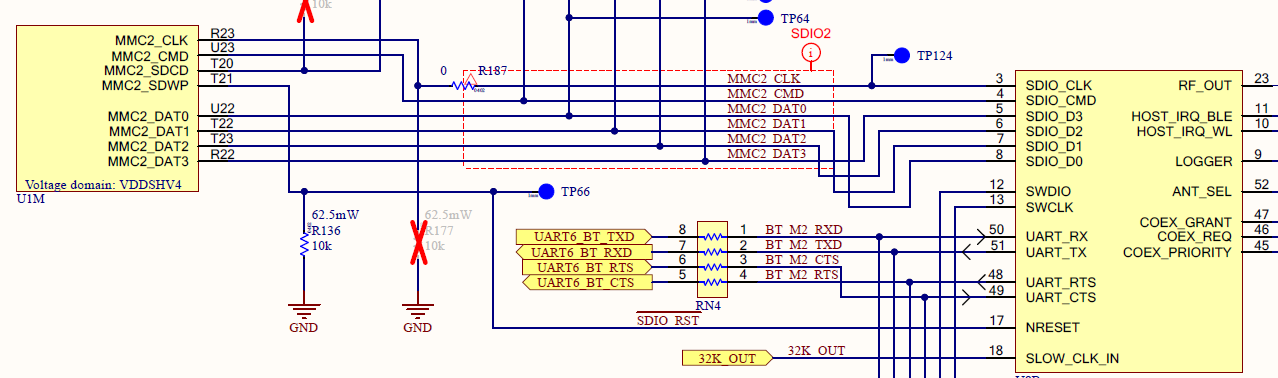
我们将使用 TI Linux 内核版本 11.02.11 https://github.com/TexasInstruments/ti-linux-kernel/archive/refs/tags/11.02.11.tar.gz
结合 cc33xx 最新版本 https://dr-download.ti.com/software-development/driver-or-library/MD-UoRUAALCjn/1.0.2.10/cc33xx_linux_package_1_0_2_10.run
已配置内核以添加
CONFIG_MAC80211_DEBUGFS=y
CONFIG_BT_DEBUGFS=y
CONFIG_BT_TI=n
CONFIG_BT_TI_SDIO=n
CONFIG_BT_TI_UART=m
通过内核源进行检查看起来像是所有补丁更改、如 https://github.com/TexasInstruments-Sandbox/cc33xx-linux-mpu-ports/blob/main/ti-linux-6.12.y/0001-drivers-cc33xx-update-to-1.0.2.10.patch#L271 中所建议
已经应用于 ti 11.02.11 内核。
已将设备树配置为启用 wifi:
&sdhci2 {
	bootph-all;
	vmmc-supply = <&wlan_en>;
	pinctrl-names = "default";
	pinctrl-0 = <&main_mmc2_pins_default>;
	bus-width = <4>;
	non-removable;
	cap-power-off-card;
	keep-power-in-suspend;

	#address-cells = <1>;
	#size-cells = <0>;
	status = "okay";

	wlcore: wlcore@0 {
		compatible = "ti,cc3300";
		reg = <2>;
	};
};
此外、还配置了蓝牙 UART
	aliases {
		serial3 = &main_uart6;
	};

&main_uart6 {
	pinctrl-names = "default";
	pinctrl-0 = <&main_uart6_pins_default>;
	status = "okay";
	bootph-all;
	//uart-has-rtscts;

	bluetooth {
		compatible = "ti,cc33xx-bt";
		cc33xx-supply = <&wlan_en>;
		max-speed = <115200>;
	};
};
已尝试使用和不使用 UART 流控制。
系统将启动、WiFi 正在运行、CAN 扫描并连接到网络。
蓝牙子系统似乎正在初始化:
[   96.610484] Bluetooth: Core ver 2.22
[   96.614871] NET: Registered PF_BLUETOOTH protocol family
[   96.621222] Bluetooth: HCI device and connection manager initialized
[   96.628114] Bluetooth: HCI socket layer initialized
[   96.634026] Bluetooth: L2CAP socket layer initialized
[   96.639453] Bluetooth: SCO socket layer initialized
[   96.653274] btti serial0-0: Host wakeup NOT enabled
[   96.658601] btti serial0-0: SM: Got EVENT_PROBE_DONE, moving from STATE_PROBING to STATE_HW_OFF
[   96.658871] btti serial0-0: SM: Got EVENT_REGULATOR_ENABLE, moving from STATE_HW_OFF to STATE_HW_ON
我还会执行建议的步骤、在通过 debugfs 启用蓝牙之前、先将 WiFi 联机:
ifconfig wlan0 up
echo 1 > /sys/kernel/debug/ieee80211/phy0/cc33xx/ble_enable
使用 hciconfig 检查 HCI 设备时不会产生输出/未找到设备。
你能告诉任何其他地方,看看为什么蓝牙没有初始化?
谢谢你
Marc

