This thread has been locked.

If you have a related question, please click the "Ask a related question" button in the top right corner. The newly created question will be automatically linked to this question.

TIDM-1000提供的例程在CCS7.4.0中无法下载编译

Other Parts Discussed in Thread: TIDM-1000, CONTROLSUITE, TMDSCNCD28379D, TMS320F28377D

买了tidm-1000的开发套件,控制板买的ti提供的配套28379D的controlcard。现在的问题是countrolsuite里面提供的例程是28377D的。在ccs7.4.0里面把targetconfigs和variant修改成28379D。编译没报错。debug的时候总是提示:c28xx-CPU1:GEL:Error  while  executing  Ontargetconnect():identifier  not  found:ST1。报了好几个错误,都是说gel.

这个问题卡了几天了,有木有大神遇到过这个问题的

  • 补充下:电脑不能联网。所以装的离线版本的ccs。在自己电脑上装ccs的时候发现安装过程中,软件会自动从官网下载些东西还提示打Windows补丁。由于调试程序的电脑不能联网,这个会不会也有影响?有没有可能导致以上报错信息?
  • 您用的哪个版本的ccs?
    您试下烧掉工程中的仿真器配置文件.ccxml.通过view-target configuration重新建一个配置文件。
  • 试过。我用的7.4版本的。配置文件更新为560V2和28379D了。但是问题依然存在。controlsuite版本是3.4.7。
  • 该contolcard板载仿真器是XDS100V2,所以target configuration配置为xds100v2,您只需要使用一根usb连到电脑端就可以仿真了。
  • 哦哦,明天试下
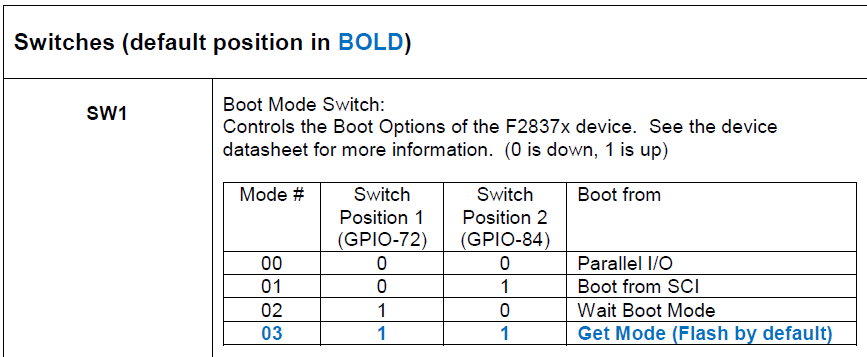
  • 你好,在28379D的controlcared上把SW1开关打为01(第一个为序号1的开关),用XDS100V2链接,在test connection上测试,报DR和IR都错误。请问这是哪的问题?我用的8.0版本的ccs

  • sw1都要置1,具体需要查看controlcard手册:

    :\ti\controlSUITE\development_kits\~controlCARDs\TMDSCNCD28379D_v1_0

  • Test 2 Word 4: scanned out 0x00000000 and scanned in 0xFFFFFFFF.

    Test 2 Word 5: scanned out 0x00000000 and scanned in 0xFFFFFFFF.

    Test 2 Word 6: scanned out 0x00000000 and scanned in 0xFFFFFFFF.

    Test 2 Word 7: scanned out 0x00000000 and scanned in 0xFFFFFFFF.

    The details of the first 8 errors have been provided.

    The utility will now report only the count of failed tests.

    Scan tests: 2, skipped: 0, failed: 1

    Do a test using 0xFE03E0E2.

    Scan tests: 3, skipped: 0, failed: 2

    Do a test using 0x01FC1F1D.

    Scan tests: 4, skipped: 0, failed: 3

    Do a test using 0x5533CCAA.

    Scan tests: 5, skipped: 0, failed: 4

    Do a test using 0xAACC3355.

    Scan tests: 6, skipped: 0, failed: 5

    Some of the values were corrupted - 83.3 percent.

    The JTAG IR Integrity scan-test has failed.

    -----[Perform the Integrity scan-test on the JTAG DR]------------------------

    This test will use blocks of 64 32-bit words.

    This test will be applied just once.

    Do a test using 0xFFFFFFFF.

    Scan tests: 1, skipped: 0, failed: 0

    Do a test using 0x00000000.

    Test 2 Word 0: scanned out 0x00000000 and scanned in 0xFFFFFFFF.

    Test 2 Word 1: scanned out 0x00000000 and scanned in 0xFFFFFFFF.

    Test 2 Word 2: scanned out 0x00000000 and scanned in 0xFFFFFFFF.

    Test 2 Word 3: scanned out 0x00000000 and scanned in 0xFFFFFFFF.

    Test 2 Word 4: scanned out 0x00000000 and scanned in 0xFFFFFFFF.

    Test 2 Word 5: scanned out 0x00000000 and scanned in 0xFFFFFFFF.

    Test 2 Word 6: scanned out 0x00000000 and scanned in 0xFFFFFFFF.

    Test 2 Word 7: scanned out 0x00000000 and scanned in 0xFFFFFFFF.

    The details of the first 8 errors have been provided.

    The utility will now report only the count of failed tests.

    Scan tests: 2, skipped: 0, failed: 1

    Do a test using 0xFE03E0E2.

    Scan tests: 3, skipped: 0, failed: 2

    Do a test using 0x01FC1F1D.

    Scan tests: 4, skipped: 0, failed: 3

    Do a test using 0x5533CCAA.

    Scan tests: 5, skipped: 0, failed: 4

    Do a test using 0xAACC3355.

    Scan tests: 6, skipped: 0, failed: 5

    Some of the values were corrupted - 83.3 percent.

    The JTAG DR Integrity scan-test has failed.

    [End: Texas Instruments XDS100v2 USB Debug Probe_0]

    开关SW1都置一了,开发环境是CCS8.0,套件是28379D的controlcard。设定XDS100V2测试连接报的错。感觉像XDS100V2的驱动没装一样。

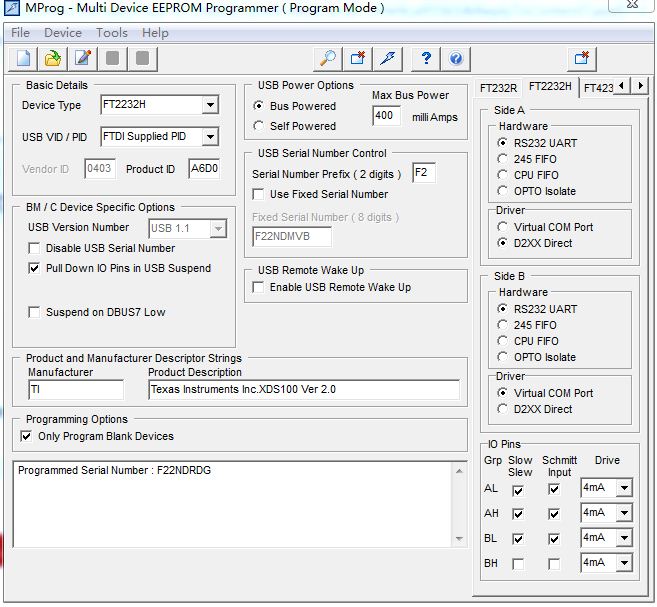
    用MProg工具看了下FT2232的配置,如下图:

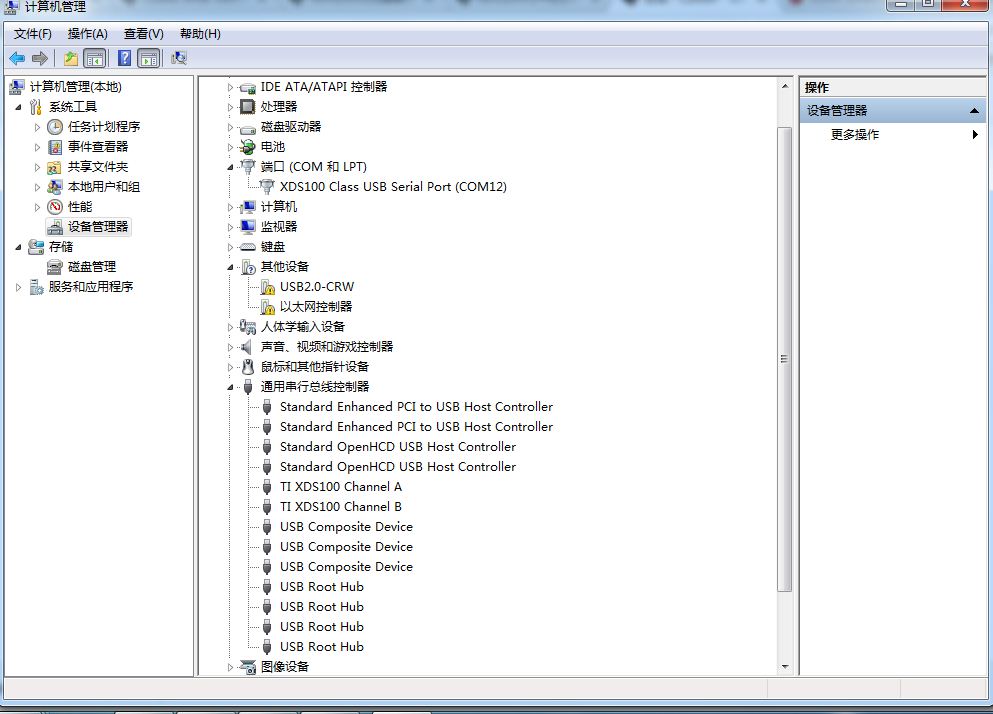
    设备管理器显示的驱动情况如下:

  • 请问您现在可以连上仿真器了么?
  • 没有使用过MProg烧录,我以上说的是通过ccs烧录,看您的MProg好像是串口烧写,您是否有尝试用直接ccs烧写。
  • XDS100V2还是链接不上
  • Mprog不是烧录的,是可以配置FT2232芯片。请问用XDS100V2,测试链接报上述IR和DR错误,可能是哪里的问题?
  • Mprog不是烧录的,是可以配置FT2232芯片。请问用XDS100V2,测试链接报上述IR和DR错误,可能是哪里的问题?
  • 不太能确定您具体的操作,建议您参考下controlsuit中的doc。或者您将操作的图片发上来帮您看下。
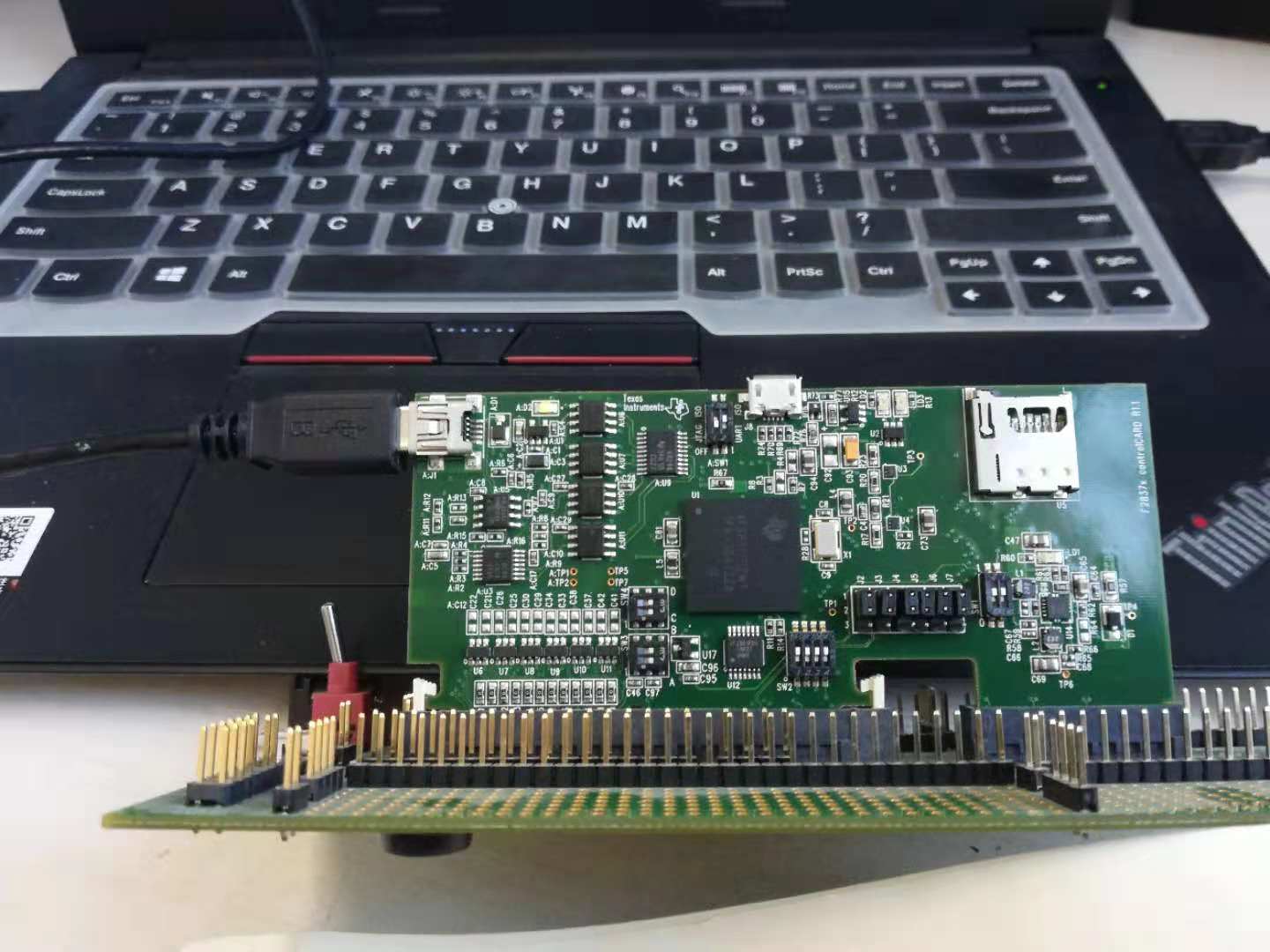
  • 您好,我在使用TMS320F28377D板卡时出现一些问题,电脑是win10 系统 CCS7.2  开发板与电脑通过一根USB转串口线连接,连接方式如下图所示:

    打开CCS建立target configuration 文件,  仿真器选择XDS100V2  MCU选择28377D  然后save  并且test conection   这个时候出现错误了,连接失败,之后我检查了电脑设备管理器通用串行总线控制器,并没有显示XDS100等内容 ,具体情况如下图:

    无非就是多了一个USB composite device 

    起初我以为需要用MProg小程序闪一下,但试过之后还是这样子,通用串行总线没变化,后来查看了28377d控制卡的用户向导,和这个A:SW1的拨码开关有关系,试了之后还是不行 ,测试连接失败,您能告诉我问题出现在哪里?非常感谢  下面是在test conection 时出现的错误信息

    [Start: Texas Instruments XDS100v2 USB Debug Probe_0]

    Execute the command:

    %ccs_base%/common/uscif/dbgjtag -f %boarddatafile% -rv -o -F inform,logfile=yes -S pathlength -S integrity

    [Result]


    -----[Print the board config pathname(s)]------------------------------------

    C:\Users\zp\AppData\Local\TEXASI~1\CCS\ti\
    0\0\BrdDat\testBoard.dat

    -----[Print the reset-command software log-file]-----------------------------

    This utility has selected a 100- or 510-class product.
    This utility will load the adapter 'jioserdesusb.dll'.
    The library build date was 'May 23 2017'.
    The library build time was '19:37:36'.
    The library package version is '6.0.628.3'.
    The library component version is '35.35.0.0'.
    The controller does not use a programmable FPGA.
    The controller has a version number of '4' (0x00000004).
    The controller has an insertion length of '0' (0x00000000).
    This utility will attempt to reset the controller.
    This utility has successfully reset the controller.

    -----[Print the reset-command hardware log-file]-----------------------------

    The scan-path will be reset by toggling the JTAG TRST signal.
    The controller is the FTDI FT2232 with USB interface.
    The link from controller to target is direct (without cable).
    The software is configured for FTDI FT2232 features.
    The controller cannot monitor the value on the EMU[0] pin.
    The controller cannot monitor the value on the EMU[1] pin.
    The controller cannot control the timing on output pins.
    The controller cannot control the timing on input pins.
    The scan-path link-delay has been set to exactly '0' (0x0000).

    -----[The log-file for the JTAG TCLK output generated from the PLL]----------

    There is no hardware for programming the JTAG TCLK frequency.

    -----[Measure the source and frequency of the final JTAG TCLKR input]--------

    There is no hardware for measuring the JTAG TCLK frequency.

    -----[Perform the standard path-length test on the JTAG IR and DR]-----------

    This path-length test uses blocks of 64 32-bit words.

    The test for the JTAG IR instruction path-length failed.
    The JTAG IR instruction scan-path is stuck-at-ones.

    The test for the JTAG DR bypass path-length failed.
    The JTAG DR bypass scan-path is stuck-at-ones.

    -----[Perform the Integrity scan-test on the JTAG IR]------------------------

    This test will use blocks of 64 32-bit words.
    This test will be applied just once.

    Do a test using 0xFFFFFFFF.
    Scan tests: 1, skipped: 0, failed: 0
    Do a test using 0x00000000.
    Test 2 Word 0: scanned out 0x00000000 and scanned in 0xFFFFFFFF.
    Test 2 Word 1: scanned out 0x00000000 and scanned in 0xFFFFFFFF.
    Test 2 Word 2: scanned out 0x00000000 and scanned in 0xFFFFFFFF.
    Test 2 Word 3: scanned out 0x00000000 and scanned in 0xFFFFFFFF.
    Test 2 Word 4: scanned out 0x00000000 and scanned in 0xFFFFFFFF.
    Test 2 Word 5: scanned out 0x00000000 and scanned in 0xFFFFFFFF.
    Test 2 Word 6: scanned out 0x00000000 and scanned in 0xFFFFFFFF.
    Test 2 Word 7: scanned out 0x00000000 and scanned in 0xFFFFFFFF.
    The details of the first 8 errors have been provided.
    The utility will now report only the count of failed tests.
    Scan tests: 2, skipped: 0, failed: 1
    Do a test using 0xFE03E0E2.
    Scan tests: 3, skipped: 0, failed: 2
    Do a test using 0x01FC1F1D.
    Scan tests: 4, skipped: 0, failed: 3
    Do a test using 0x5533CCAA.
    Scan tests: 5, skipped: 0, failed: 4
    Do a test using 0xAACC3355.
    Scan tests: 6, skipped: 0, failed: 5
    Some of the values were corrupted - 83.3 percent.

    The JTAG IR Integrity scan-test has failed.

    -----[Perform the Integrity scan-test on the JTAG DR]------------------------

    This test will use blocks of 64 32-bit words.
    This test will be applied just once.

    Do a test using 0xFFFFFFFF.
    Scan tests: 1, skipped: 0, failed: 0
    Do a test using 0x00000000.
    Test 2 Word 0: scanned out 0x00000000 and scanned in 0xFFFFFFFF.
    Test 2 Word 1: scanned out 0x00000000 and scanned in 0xFFFFFFFF.
    Test 2 Word 2: scanned out 0x00000000 and scanned in 0xFFFFFFFF.
    Test 2 Word 3: scanned out 0x00000000 and scanned in 0xFFFFFFFF.
    Test 2 Word 4: scanned out 0x00000000 and scanned in 0xFFFFFFFF.
    Test 2 Word 5: scanned out 0x00000000 and scanned in 0xFFFFFFFF.
    Test 2 Word 6: scanned out 0x00000000 and scanned in 0xFFFFFFFF.
    Test 2 Word 7: scanned out 0x00000000 and scanned in 0xFFFFFFFF.
    The details of the first 8 errors have been provided.
    The utility will now report only the count of failed tests.
    Scan tests: 2, skipped: 0, failed: 1
    Do a test using 0xFE03E0E2.
    Scan tests: 3, skipped: 0, failed: 2
    Do a test using 0x01FC1F1D.
    Scan tests: 4, skipped: 0, failed: 3
    Do a test using 0x5533CCAA.
    Scan tests: 5, skipped: 0, failed: 4
    Do a test using 0xAACC3355.
    Scan tests: 6, skipped: 0, failed: 5
    Some of the values were corrupted - 83.3 percent.

    The JTAG DR Integrity scan-test has failed.

    [End: Texas Instruments XDS100v2 USB Debug Probe_0]

    谢谢!