This thread has been locked.

If you have a related question, please click the "Ask a related question" button in the top right corner. The newly created question will be automatically linked to this question.

F28335外部RAM仿真,下载出错


F28335内部RAM较小,程序过大,想通过使用外部ram进行仿真,仿真出现错误

在网上查资料后进行外部RAM仿真,外部RAM仿真配置如下:

  1. 配置芯片GPIO84~87引脚, 使其的引导模式为Jump to XINTF x16;
  2. 修改CMD文件,将.text段放到XINTF zone6的区间,将BEGIN设为0x10 0000;
  3. 配置GEL, GEL文件的XINTF_ENABLE去掉注释,debug生成.out文件;
  4. 检查Target Configuration文件.ccxml里面是否有包含这个gel.

最初刚配置完,在外部ram,能够正常运行,几天之后,突然程序下载出错,错误如下:

C28xx: GEL Output:

NOTES:

To configure the XINTF automatically on reset:

  uncomment the XINTF_Enable call in the OnReset function of the GEL file.C28xx: GEL Output:

NOTES:

Gel will enable XINTFx16 during Debug only.

Enable XINTF in code prior to use.C28xx: File Loader: Verification failed: Values at address 0x100000@Program do not match Please verify target memory and memory map.

C28xx: GEL: File: F:\workfile\CPU0517_ram.out: a data verification error occurred, file load failed.

采用CCS6.1.3进行程序仿真

通过在网上查询资料找到可能的故障

1、程序修改问题,打开最初保存的可以下载的程序,重新下载,出现上述错误,排除程序修改问题;

2、外部RAM损坏,对外部RAM进行读写程序操作,发现RAM可以正常读写;

3、CCS版本问题,下载最新版本,ccs9.0进行程序下载仿真,仍然是下载程序出错;

4、.ccxml配置问题,反复确认配置,没有错误;

5、software-dl.ti.com/.../troubleshooting-data_verification_errors.html 中可以解决的办法,都尝试过,下载程序还是出错;

6、芯片GPIO84~87引脚在电路设计时使用默认配置,即内置上拉电阻高电平,早期可以使用时也是使用这种默认配置,之后出现错误后,尝试将GPIO85 /86加下拉电阻下拉为低电平,配置为XINTFx16进行boot,下载程序仍然有误。

7、屏蔽一部分程序,配置到内部RAM仿真没问题。

不知道还有什么问题能导致这种错误了,希望对这方面比较了解的朋友帮忙解答一下,非常感谢!!

  • 您可以参考下帖子

    e2e.ti.com/.../191498

    Lori Heustess讲解的非常详细

    另外关于GEL文件您可以看一下

    processors.wiki.ti.com/.../GEL
  • 突然出错 不行就重新建工程等方法试试
  • 我使用的是F28335,匹配的GEL文件,使用的GEL文件为F28335.gel,

    OnReset(int nErrorCode)
    {
        if (GEL_IsInRealtimeMode())   /* If in real-time-mode */
        {
        }
        else    /* Put device in C28x mode */
        {
             C28x_Mode();
        }
        Unlock_CSM();
        ADC_Cal();
        XINTF_Enable();               /* Uncomment to enable XINTF on Reset */    
    }

    在GEL文件中,只是去掉 XINTF_Enable() 函数的评注。

    手动加载 .out文件,connect target之后

    C28xx: GEL Output:

    NOTES:

    To configure the XINTF automatically on reset:

      uncomment the XINTF_Enable call in the OnReset function of the GEL file.C28xx: GEL Output:

    NOTES:

    Gel will enable XINTFx16 during Debug only.

    Enable XINTF in code prior to use. 

    根据您提供的连接,仔细阅读了一下,参考之前的回答:

     After executing the function the write should work properly,

    验证XINTF是否打开的方法是

    One way is to open a memory window and attempt to write a value to a memory location.  This is probably the easiest.

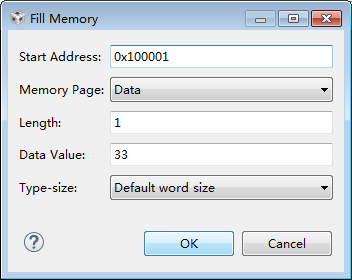
    并验证XINTF是否打开,在memory brower 中的Fill memory 在固定地址写入数据

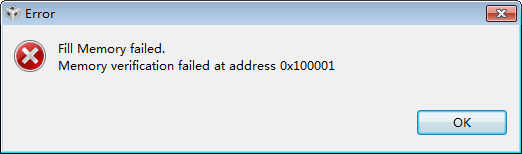
    数据无法写入,我这里无法验证。


    程序在外部RAM仿真,我一直怀疑是CMD文件和GEL文件不匹配问题,外部RAM 连接 ZONE6 ,我的CMD文件主要修改如下:

    MEMORY

    {

    PAGE 0 :

       /* BEGIN is used for the "boot to SARAM" bootloader mode      */

       //BEGIN      : origin = 0x000000, length = 0x000002     /* Boot to M0 will go here                      */

       BEGIN      : origin = 0x100000, length = 0x000002

       RAMM0      : origin = 0x000050, length = 0x0003B0

       RAML0      : origin = 0x008000, length = 0x001000

       RAML1      : origin = 0x009000, length = 0x003000

        ZONE6      : origin = 0x100002, length = 0x03FFFD    /* XINTF zone 6 - program space */

    }

    SECTIONS

    {

       /* Setup for "boot to SARAM" mode:

          The codestart section (found in DSP28_CodeStartBranch.asm)

          re-directs execution to the start of user code.  */

          ram_start                : > BEGIN,           PAGE = 0

         .text            : > ZONE6,     PAGE = 0  

    }

    debug之后没有错误,load文件时出错

    出现这种问题可能的原因是什么?官方有没有外部RAM程序仿真的指导文件?

  • 感觉有可能是出现了勘误表( www.ti.com.cn/.../sprz272l.pdf )中描述的问题

    Memory: Possible Incorrect Operation of XINTF Module After Power Up

    或者是

    XINTF Rogue Write for Back-to-Back Accesses to x16/x32 Zones

    建议您在使用XINTF之前加入下面的代码

    If ((SysCtrlRegs.WDCR & 0x80) != 0x80)

    {

    EALLOW;

    SysCtrlRegs.WDCR = 0x0028; // Enable WD

    SysCtrlRegs.WDCR = 0x0000; // Issue WD Reset.

    EDIS;

    }