This thread has been locked.
If you have a related question, please click the "Ask a related question" button in the top right corner. The newly created question will be automatically linked to this question.
Original question:
关于ccxml配置文件
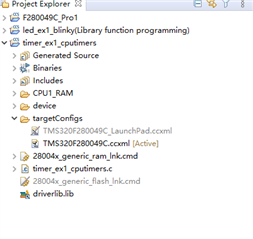
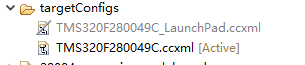
这两个文件对应ram和flash编译。
有两者方法,一个是例程中的预定义可以切换。可以通过点击编译摁键(小锤子)旁边的倒三角打开下拉菜单,选择对应的编译模式就会切换对应的.ccxml文件进行编译。(例程的话推荐用这种方法)
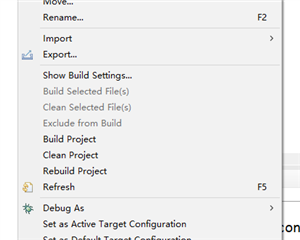
二是右键对应的.ccxml文件,选择exclude from build或者include from build就可以更改参与编译的文件了。
谢谢~
我试了 右键对应的.ccxml文件,选择exclude from build或者include from build 但是对应的菜单项显示 灰色,您知道是什么原因么?
如果已经是灰色的文件,那么只能选择include form build。
这个功能是用来设置文件在编译时是否参与编译的。因为同一个工程同时只能有一个.ccxml文件,所以两个.ccxml要分别exclude from build(编译时不包含)和include from build(编译时包含),确保只有一个.ccxml文件参与编译,否则编译会报错。