Part Number: TMS320F28379D
CAN通信中,只有默认邮箱1在进行通信,其余邮箱无法正常工作。更令人奇怪的是,即使注释掉通信代码后,邮箱1也仍然通信(一个神奇的bug)
在调试CAN通信时,参考C2000example的例程,对1~5号邮箱进行了初始化
以下为初始化代码
void CAN_init()//初始化CAN通信引脚
{
       GPIO_setPinConfig(GPIO_18_CANRXA);
       GPIO_setPinConfig(GPIO_19_CANTXA);
       CAN_initModule(CANA_BASE);

       // Set up the CAN bus bit rate to 500kHz for each module
       // Refer to the Driver Library User Guide for information on how to set
       // tighter timing control. Additionally, consult the device data sheet
       // for more information about the CAN module clocking.
       //
       CAN_setBitRate(CANA_BASE, DEVICE_SYSCLK_FREQ, 5000000, 16);//500Khz
    // Initialize the transmit message object used for sending CAN messages.
    // Message Object Parameters:
    //      CAN Module: A
    //      Message Object ID Number: 1
    //      Message Identifier: 0x01   数字越小  优先级越高
    //      Message Frame: Standard
    //      Message Type: Transmit
    //      Message ID Mask: 0x0
    //      Message Object Flags: None
    //      Message Data Length: 8 Bytes
       //发送邮箱 4个16位的数据
       CAN_setupMessageObject(CANA_BASE, 1, 0x01,
                              CAN_MSG_FRAME_STD, CAN_MSG_OBJ_TYPE_TX, 0,
                              CAN_MSG_OBJ_NO_FLAGS, MSG_DATA_LENGTH);
       CAN_setupMessageObject(CANA_BASE, 2, 0x02,
                              CAN_MSG_FRAME_STD, CAN_MSG_OBJ_TYPE_TX, 0,
                              CAN_MSG_OBJ_NO_FLAGS, MSG_DATA_LENGTH);
       CAN_setupMessageObject(CANA_BASE, 3, 0x03,
                              CAN_MSG_FRAME_STD, CAN_MSG_OBJ_TYPE_TX, 0,
                              CAN_MSG_OBJ_NO_FLAGS, MSG_DATA_LENGTH);
       CAN_setupMessageObject(CANA_BASE, 4, 0x04,
                              CAN_MSG_FRAME_STD, CAN_MSG_OBJ_TYPE_TX, 0,
                              CAN_MSG_OBJ_NO_FLAGS, MSG_DATA_LENGTH);
       CAN_setupMessageObject(CANA_BASE, 5, 0x05,
                              CAN_MSG_FRAME_STD, CAN_MSG_OBJ_TYPE_TX, 0,
                              CAN_MSG_OBJ_NO_FLAGS, MSG_DATA_LENGTH);


     //接收邮箱
       CAN_setupMessageObject(CANA_BASE, 7, 0x07,
                              CAN_MSG_FRAME_STD, CAN_MSG_OBJ_TYPE_RX, 0,
                              CAN_MSG_OBJ_NO_FLAGS, MSG_DATA_LENGTH);
    CAN_startModule(CANA_BASE);
}
随后是通信代码
void communication(void)
{
    // 8字节数组可以放4个16位信号,需要移位进行组合
    CanFrame1[0] = ((uint16_t)(Udc * 10) >> 8) & 0xFF;
    CanFrame1[1] = (uint16_t)(Udc * 10) & 0xFF;
    CanFrame1[2] = ((uint16_t)((Ua + 300) * 10) >> 8) & 0xFF;
    CanFrame1[3] = (uint16_t)((Ua + 300) * 10) & 0xFF;
    CanFrame1[4] = ((uint16_t)((Ub + 300) * 10) >> 8) & 0xFF;
    CanFrame1[5] = (uint16_t)((Ub + 300) * 10) & 0xFF;
    CanFrame1[6] = ((uint16_t)((Uc + 300) * 10) >> 8) & 0xFF;
    CanFrame1[7] = (uint16_t)((Uc + 300) * 10) & 0xFF;
    CAN_sendMessage(CANA_BASE, 1, MSG_DATA_LENGTH, CanFrame1);

    // 2号邮箱发送 Ia, Ib, Ic, Ipa
    CanFrame2[0] = ((uint16_t)((Ia + 40) * 10) >> 8) & 0xFF;
    CanFrame2[1] = (uint16_t)((Ia + 40) * 10) & 0xFF;
    CanFrame2[2] = ((uint16_t)((Ib + 40) * 10) >> 8) & 0xFF;
    CanFrame2[3] = (uint16_t)((Ib + 40) * 10) & 0xFF;
    CanFrame2[4] = ((uint16_t)((Ic + 40) * 10) >> 8) & 0xFF;
    CanFrame2[5] = (uint16_t)((Ic + 40) * 10) & 0xFF;
    CanFrame2[6] = ((uint16_t)((Ipa + 40) * 10) >> 8) & 0xFF;
    CanFrame2[7] = (uint16_t)((Ipa + 40) * 10) & 0xFF;
    CAN_sendMessage(CANA_BASE, 2, MSG_DATA_LENGTH, CanFrame2);
  //  while(!(HWREGH(CANA_BASE + CAN_O_ES) & CAN_ES_TXOK));

    // 3号邮箱发送 Ina, Ipb, Inb, Ipc
    CanFrame3[0] = ((uint16_t)((Ina + 40) * 10) >> 8) & 0xFF;
    CanFrame3[1] = (uint16_t)((Ina + 40) * 10) & 0xFF;
    CanFrame3[2] = ((uint16_t)((Ipb + 40) * 10) >> 8) & 0xFF;
    CanFrame3[3] = (uint16_t)((Ipb + 40) * 10) & 0xFF;
    CanFrame3[4] = ((uint16_t)((Inb + 40) * 10) >> 8) & 0xFF;
    CanFrame3[5] = (uint16_t)((Inb + 40) * 10) & 0xFF;
    CanFrame3[6] = ((uint16_t)((Ipc + 40) * 10) >> 8) & 0xFF;
    CanFrame3[7] = (uint16_t)((Ipc + 40) * 10) & 0xFF;
    CAN_sendMessage(CANA_BASE, 3, MSG_DATA_LENGTH, CanFrame3);

    // 4号邮箱发送 Inc, average_Aarm, average_Barm, average_Carm
    CanFrame4[0] = ((uint16_t)((Inc + 40) * 10) >> 8) & 0xFF;
    CanFrame4[1] = (uint16_t)((Inc + 40) * 10) & 0xFF;
    CanFrame4[2] = ((uint16_t)((average_Aarm + 40) * 10) >> 8) & 0xFF;
    CanFrame4[3] = (uint16_t)((average_Aarm + 40) * 10) & 0xFF;
    CanFrame4[4] = ((uint16_t)((average_Barm + 40) * 10) >> 8) & 0xFF;
    CanFrame4[5] = (uint16_t)((average_Barm + 40) * 10) & 0xFF;
    CanFrame4[6] = ((uint16_t)((average_Carm + 40) * 10) >> 8) & 0xFF;
    CanFrame4[7] = (uint16_t)((average_Carm + 40) * 10) & 0xFF;
    CAN_sendMessage(CANA_BASE, 4, MSG_DATA_LENGTH, CanFrame4);

    // 5号邮箱发送 ABC 调制波信号
    CanFrame5[0] = (A_modu_12000 >> 8) & 0xFF;
    CanFrame5[1] = A_modu_12000 & 0xFF;
    CanFrame5[2] = (B_modu_12000 >> 8) & 0xFF;
    CanFrame5[3] = B_modu_12000 & 0xFF;
    CanFrame5[4] = (C_modu_12000 >> 8) & 0xFF;
    CanFrame5[5] = C_modu_12000 & 0xFF;
    CanFrame5[6] = ((uint16_t)((Theta + 100) * 10) >> 8) & 0xFF;
    CanFrame5[7] = ((uint16_t)((Theta + 100) * 10)) & 0xFF;
    CAN_sendMessage(CANA_BASE, 5, MSG_DATA_LENGTH, CanFrame5);

    // 7号邮箱接收
    if(HWREGH(CANA_BASE + CAN_O_ES) & CAN_ES_RXOK)
    {
        CAN_readMessage(CANA_BASE, 7, CanRecFrame);
        disable = ((uint16_t)CanRecFrame[0] << 8) | CanRecFrame[1];
        status = ((uint16_t)CanRecFrame[2] << 8) | CanRecFrame[3];
        Uac_ref = ((uint16_t)CanRecFrame[4] << 8) | CanRecFrame[5];
        pre_flag = ((uint16_t)CanRecFrame[6] << 8) | CanRecFrame[7];
    }
}
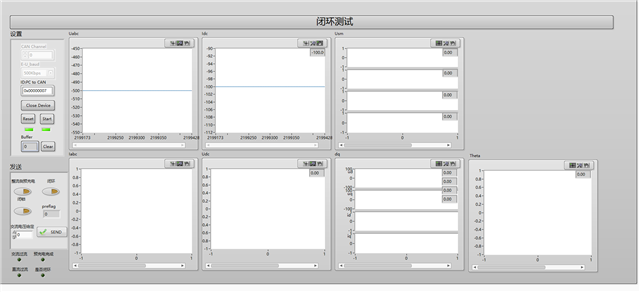
以下是实验现象,其中Uabc与Idc(实际为Idc中)能够正常接收(邮箱1),其余部分无法同步,观察can帧信号后也发现邮箱ID始终为1;
即使注释掉communication函数,邮箱1仍然发送。这个是什么原因导致的呢?