This thread has been locked.

If you have a related question, please click the "Ask a related question" button in the top right corner. The newly created question will be automatically linked to this question.

使用TM4C123GXL程序下载进板子时出现Error connecting to the target

Other Parts Discussed in Thread: EK-TM4C123GXL

单片机 TM4C123GXL,芯片GH6PM

CCS 版本6.0.1

编译过程无错误,但是烧进板子时,出现Error connecting to the target,之前也查询过相关问题,在网上找到过一例教程(blog.163.com/.../),即下载LM Flash Programmer后unlock,按照该方法确实可用,但是仅仅能连接上一次,下次再想改程序时,重新编译运行还要再次重复上述过程,特别麻烦。原来板子是正常下载的,只是最近突然出现这样子的问题,因此想请教下有没有一劳永逸的办法可以杜绝这个连接错误的问题?

下附链接内容:

关于TM4C123LaunchPad锁死问题的解决方法(以下内容来自互联网)
由于本人刚接触到TM4C123Glaunchpad不久,在操作PortF和PortD有误时,有时会有自动锁死的现象。也就是CCS开发环境会提示Error connecting to the target。在网上寻找解锁方法,但是由于TM4C123GXL的资料较少,而且网友提供的方法编译还是有问题。TM4C123是原先是LM4F231这块板子的替代品。LM4F231是Cortex-M4的内核,它的兄弟LM3S是M3的内核,在这里TI提供了一个软件LM Flash Programmer可以用于对它的解锁问题。我于是借鉴它的方法,但是最好是最新的版本,我下载的就是LM Flash Programmer-Build1613。只需两步就可以解锁,首先在Configuration里的Quick Set选项中找到TM4C123G LaunchPad(这就是为什么要下载最新版的原因,低版本的我没有找到它),接下来在Other Utilities选项卡里选择Fury...那一项,点击Unlock。按提示进行操作,要记得重新断电再上电完成整个操作。P.S.如果一次没有成功的话就多试几次。 方法简单易行,谨以此献给那些和我一样刚接触TM4C123G的人
  • 说明你代码使将JTAG锁定了,当然每次下载都需要重新解锁才能用,不然无法保障知识产权。

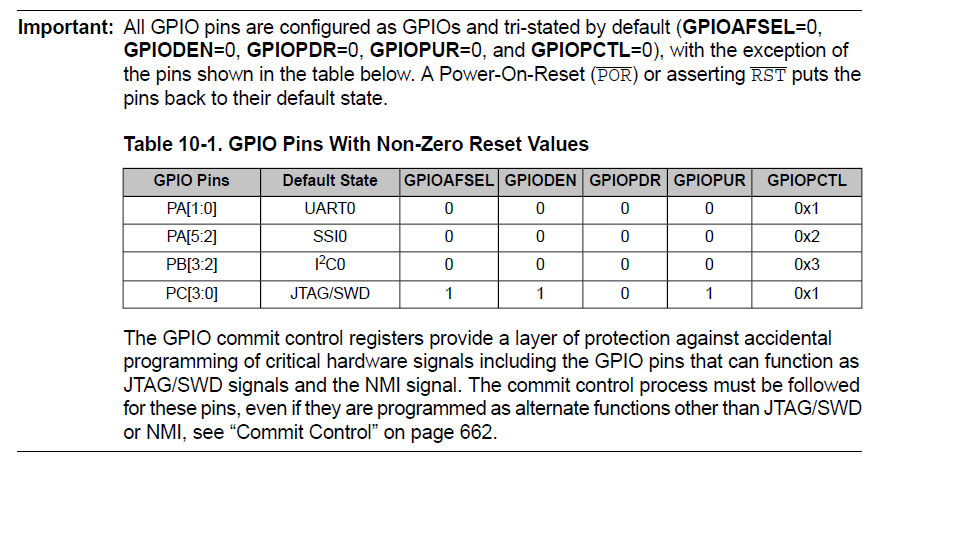
    M4部分IO默认是锁定的,如果你需要使用,需要先解锁才能配置使用,在数据手册的GPIO那章节有详细说明。

    GPIO和JTAG转换参考下面的代码例程:

    //*****************************************************************************
    //
    // gpio_jtag.c - Example to demonstrate recovering the JTAG interface.
    //
    // Copyright (c) 2012-2015 Texas Instruments Incorporated. All rights reserved.
    // Software License Agreement
    //
    // Texas Instruments (TI) is supplying this software for use solely and
    // exclusively on TI's microcontroller products. The software is owned by
    // TI and/or its suppliers, and is protected under applicable copyright
    // laws. You may not combine this software with "viral" open-source
    // software in order to form a larger program.
    //
    // THIS SOFTWARE IS PROVIDED "AS IS" AND WITH ALL FAULTS.
    // NO WARRANTIES, WHETHER EXPRESS, IMPLIED OR STATUTORY, INCLUDING, BUT
    // NOT LIMITED TO, IMPLIED WARRANTIES OF MERCHANTABILITY AND FITNESS FOR
    // A PARTICULAR PURPOSE APPLY TO THIS SOFTWARE. TI SHALL NOT, UNDER ANY
    // CIRCUMSTANCES, BE LIABLE FOR SPECIAL, INCIDENTAL, OR CONSEQUENTIAL
    // DAMAGES, FOR ANY REASON WHATSOEVER.
    //
    // This is part of revision 2.1.1.71 of the EK-TM4C123GXL Firmware Package.
    //
    //*****************************************************************************

    #include <stdint.h>
    #include <stdbool.h>
    #include "inc/hw_gpio.h"
    #include "inc/hw_ints.h"
    #include "inc/hw_memmap.h"
    #include "inc/hw_types.h"
    #include "driverlib/debug.h"
    #include "driverlib/fpu.h"
    #include "driverlib/gpio.h"
    #include "driverlib/interrupt.h"
    #include "driverlib/pin_map.h"
    #include "driverlib/rom.h"
    #include "driverlib/sysctl.h"
    #include "driverlib/systick.h"
    #include "driverlib/uart.h"
    #include "utils/uartstdio.h"
    #include "drivers/buttons.h"

    //*****************************************************************************
    //
    //! \addtogroup example_list
    //! <h1>GPIO JTAG Recovery (gpio_jtag)</h1>
    //!
    //! This example demonstrates changing the JTAG pins into GPIOs, aint32_t with a
    //! mechanism to revert them to JTAG pins. When first run, the pins remain in
    //! JTAG mode. Pressing the left button will toggle the pins between JTAG mode
    //! and GPIO mode. Because there is no debouncing of the push button (either
    //! in hardware or software), a button press will occasionally result in more
    //! than one mode change.
    //!
    //! In this example, four pins (PC0, PC1, PC2, and PC3) are switched.
    //!
    //! UART0, connected to the ICDI virtual COM port and running at 115,200,
    //! 8-N-1, is used to display messages from this application.
    //
    //*****************************************************************************


    //*****************************************************************************
    //
    // The current mode of pins PC0, PC1, PC2, and PC3. When zero, the pins
    // are in JTAG mode; when non-zero, the pins are in GPIO mode.
    //
    //*****************************************************************************
    volatile uint32_t g_ui32Mode;

    //*****************************************************************************
    //
    // The error routine that is called if the driver library encounters an error.
    //
    //*****************************************************************************
    #ifdef DEBUG
    void
    __error__(char *pcFilename, uint32_t ui32Line)
    {
    }
    #endif

    //*****************************************************************************
    //
    // The interrupt handler for the PB4 pin interrupt. When triggered, this will
    // toggle the JTAG pins between JTAG and GPIO mode.
    //
    //*****************************************************************************
    void
    SysTickIntHandler(void)
    {
    uint8_t ui8Buttons;
    uint8_t ui8ButtonsChanged;

    //
    // Grab the current, debounced state of the buttons.
    //
    ui8Buttons = ButtonsPoll(&ui8ButtonsChanged, 0);

    //
    // If the left button has been pressed, and was previously not pressed,
    // start the process of changing the behavior of the JTAG pins.
    //
    if(BUTTON_PRESSED(LEFT_BUTTON, ui8Buttons, ui8ButtonsChanged))
    {
    //
    // Toggle the pin mode.
    //
    g_ui32Mode ^= 1;

    //
    // See if the pins should be in JTAG or GPIO mode.
    //
    if(g_ui32Mode == 0)
    {
    //
    // Change PC0-3 into hardware (i.e. JTAG) pins.
    //
    HWREG(GPIO_PORTC_BASE + GPIO_O_LOCK) = GPIO_LOCK_KEY;
    HWREG(GPIO_PORTC_BASE + GPIO_O_CR) = 0x01;
    HWREG(GPIO_PORTC_BASE + GPIO_O_AFSEL) |= 0x01;
    HWREG(GPIO_PORTC_BASE + GPIO_O_LOCK) = GPIO_LOCK_KEY;
    HWREG(GPIO_PORTC_BASE + GPIO_O_CR) = 0x02;
    HWREG(GPIO_PORTC_BASE + GPIO_O_AFSEL) |= 0x02;
    HWREG(GPIO_PORTC_BASE + GPIO_O_LOCK) = GPIO_LOCK_KEY;
    HWREG(GPIO_PORTC_BASE + GPIO_O_CR) = 0x04;
    HWREG(GPIO_PORTC_BASE + GPIO_O_AFSEL) |= 0x04;
    HWREG(GPIO_PORTC_BASE + GPIO_O_LOCK) = GPIO_LOCK_KEY;
    HWREG(GPIO_PORTC_BASE + GPIO_O_CR) = 0x08;
    HWREG(GPIO_PORTC_BASE + GPIO_O_AFSEL) |= 0x08;
    HWREG(GPIO_PORTC_BASE + GPIO_O_LOCK) = GPIO_LOCK_KEY;
    HWREG(GPIO_PORTC_BASE + GPIO_O_CR) = 0x00;
    HWREG(GPIO_PORTC_BASE + GPIO_O_LOCK) = 0;

    //
    // Turn on the LED to indicate that the pins are in JTAG mode.
    //
    ROM_GPIOPinWrite(GPIO_PORTF_BASE, GPIO_PIN_3 | GPIO_PIN_1,
    GPIO_PIN_3);
    }
    else
    {
    //
    // Change PC0-3 into GPIO inputs.
    //
    HWREG(GPIO_PORTC_BASE + GPIO_O_LOCK) = GPIO_LOCK_KEY;
    HWREG(GPIO_PORTC_BASE + GPIO_O_CR) = 0x01;
    HWREG(GPIO_PORTC_BASE + GPIO_O_AFSEL) &= 0xfe;
    HWREG(GPIO_PORTC_BASE + GPIO_O_LOCK) = GPIO_LOCK_KEY;
    HWREG(GPIO_PORTC_BASE + GPIO_O_CR) = 0x02;
    HWREG(GPIO_PORTC_BASE + GPIO_O_AFSEL) &= 0xfd;
    HWREG(GPIO_PORTC_BASE + GPIO_O_LOCK) = GPIO_LOCK_KEY;
    HWREG(GPIO_PORTC_BASE + GPIO_O_CR) = 0x04;
    HWREG(GPIO_PORTC_BASE + GPIO_O_AFSEL) &= 0xfb;
    HWREG(GPIO_PORTC_BASE + GPIO_O_LOCK) = GPIO_LOCK_KEY;
    HWREG(GPIO_PORTC_BASE + GPIO_O_CR) = 0x08;
    HWREG(GPIO_PORTC_BASE + GPIO_O_AFSEL) &= 0xf7;
    HWREG(GPIO_PORTC_BASE + GPIO_O_LOCK) = GPIO_LOCK_KEY;
    HWREG(GPIO_PORTC_BASE + GPIO_O_CR) = 0x00;
    HWREG(GPIO_PORTC_BASE + GPIO_O_LOCK) = 0;
    ROM_GPIOPinTypeGPIOInput(GPIO_PORTC_BASE, (GPIO_PIN_0 | GPIO_PIN_1 |
    GPIO_PIN_2 | GPIO_PIN_3));

    //
    // Turn off the LED to indicate that the pins are in GPIO mode.
    //
    ROM_GPIOPinWrite(GPIO_PORTF_BASE, GPIO_PIN_3 | GPIO_PIN_1,
    GPIO_PIN_1);
    }
    }
    }

    //*****************************************************************************
    //
    // Configure the UART and its pins. This must be called before UARTprintf().
    //
    //*****************************************************************************
    void
    ConfigureUART(void)
    {
    //
    // Enable the GPIO Peripheral used by the UART.
    //
    ROM_SysCtlPeripheralEnable(SYSCTL_PERIPH_GPIOA);

    //
    // Enable UART0
    //
    ROM_SysCtlPeripheralEnable(SYSCTL_PERIPH_UART0);

    //
    // Configure GPIO Pins for UART mode.
    //
    ROM_GPIOPinConfigure(GPIO_PA0_U0RX);
    ROM_GPIOPinConfigure(GPIO_PA1_U0TX);
    ROM_GPIOPinTypeUART(GPIO_PORTA_BASE, GPIO_PIN_0 | GPIO_PIN_1);

    //
    // Use the internal 16MHz oscillator as the UART clock source.
    //
    UARTClockSourceSet(UART0_BASE, UART_CLOCK_PIOSC);

    //
    // Initialize the UART for console I/O.
    //
    UARTStdioConfig(0, 115200, 16000000);
    }

    //*****************************************************************************
    //
    // Toggle the JTAG pins between JTAG and GPIO mode with a push button selecting
    // between the two.
    //
    //*****************************************************************************
    int
    main(void)
    {
    uint32_t ui32Mode;

    //
    // Enable lazy stacking for interrupt handlers. This allows floating-point
    // instructions to be used within interrupt handlers, but at the expense of
    // extra stack usage.
    //
    ROM_FPULazyStackingEnable();

    //
    // Set the clocking to run directly from the crystal.
    //
    ROM_SysCtlClockSet(SYSCTL_SYSDIV_4 | SYSCTL_USE_PLL | SYSCTL_XTAL_16MHZ |
    SYSCTL_OSC_MAIN);

    //
    // Enable the peripherals used by this application.
    //
    ROM_SysCtlPeripheralEnable(SYSCTL_PERIPH_GPIOA);
    ROM_SysCtlPeripheralEnable(SYSCTL_PERIPH_GPIOC);

    //
    // Initialize the button driver.
    //
    ButtonsInit();

    //
    // Set up a SysTick Interrupt to handle polling and debouncing for our
    // buttons.
    //
    SysTickPeriodSet(SysCtlClockGet() / 100);
    SysTickIntEnable();
    SysTickEnable();

    IntMasterEnable();

    //
    // Configure the LED as an output and turn it on.
    //
    ROM_GPIOPinTypeGPIOOutput(GPIO_PORTF_BASE, GPIO_PIN_3 | GPIO_PIN_1);
    ROM_GPIOPinWrite(GPIO_PORTF_BASE, GPIO_PIN_3 | GPIO_PIN_1, GPIO_PIN_3);

    //
    // Set the global and local indicator of pin mode to zero, meaning JTAG.
    //
    g_ui32Mode = 0;
    ui32Mode = 0;

    //
    // Initialize the UART.
    //
    ConfigureUART();

    UARTprintf("\033[2JGPIO <-> JTAG\n");

    //
    // Indicate that the pins start out as JTAG.
    //
    UARTprintf("Pins are JTAG\n");

    //
    // Loop forever. This loop simply exists to display on the UART the
    // current state of PC0-3; the handling of changing the JTAG pins to and
    // from GPIO mode is done in GPIO Interrupt Handler.
    //
    while(1)
    {
    //
    // Wait until the pin mode changes.
    //
    while(g_ui32Mode == ui32Mode)
    {
    }

    //
    // Save the new mode locally so that a subsequent pin mode change can
    // be detected.
    //
    ui32Mode = g_ui32Mode;

    //
    // See what the new pin mode was changed to.
    //
    if(ui32Mode == 0)
    {
    //
    // Indicate that PC0-3 are currently JTAG pins.
    //
    UARTprintf("Pins are JTAG\n");
    }
    else
    {
    //
    // Indicate that PC0-3 are currently GPIO pins.
    //
    UARTprintf("Pins are GPIO\n");
    }
    }
    }

  • Maka:

    您好,

    谢谢您的回复。

    我查询data sheet 时也注意到了这个锁定问题,但是并没有很理解。

    令我疑惑的是我只是在一个小程序里利用了PWM使用PB4、PB5、PB6、PB7输出,之前有好多次修改debug是没有问题的,但是同样的程序在某一次就突然锁定了,接下来每次就要去解锁。

    还有请问我需要怎么做才能避免每次锁定的问题?

    谢谢!

  • JTAG和PC口才是复用的,PB口与其无关,你的代码中是否有对PC口进行操作?如果没有PC配置,那么你这种情况就不确定是什么原因导致的。

    烧一个我们简单的例程进去,看看是不是会锁定?

    GPIO默认说明在数据手册中有详细说明。

  • Maka:

    谢谢您的耐心解答。

    解锁后烧进简单的程序不再锁定,但是我的程序(附件内)里确实没有对PC口操作的,这到底是为什么呢?

    谢谢

  • Maka:

    您好!

    谢谢您的耐心的解答。

    烧进简单程序没有再被锁定,但我的程序(下附)里确实没有对PC口操作的,这是为什么呢?

    谢谢

    /*利用PWMO,PWM1产生200HZ和400Hz 50%占空比的方波*/
    #include <stdint.h>
    #include <stdbool.h>
    #include "inc/hw_memmap.h"
    #include "inc/hw_types.h"
    #include "driverlib/sysctl.h"
    #include "driverlib/rom.h"
    #include "driverlib/gpio.h"
    #include "driverlib/pwm.h"
    #include "driverlib/fpu.h"
    #include "driverlib/pin_map.h"

    int main (void)
    {
    //使能FPU
    FPUEnable();
    FPULazyStackingEnable();
    //设置系统时钟为16MHz
    SysCtlClockSet(SYSCTL_SYSDIV_64|SYSCTL_USE_OSC|SYSCTL_OSC_MAIN |SYSCTL_XTAL_16MHZ);
    //使能PWM0模块,使能PWM0和PWM1输出所在GPIO
    SysCtlPeripheralEnable(SYSCTL_PERIPH_PWM0);
    SysCtlPeripheralEnable(SYSCTL_PERIPH_GPIOB);
    GPIOPinTypePWM(GPIO_PORTB_BASE, GPIO_PIN_4|GPIO_PIN_5|GPIO_PIN_6|GPIO_PIN_7);
    GPIOPinConfigure(GPIO_PB6_M0PWM0);
    GPIOPinConfigure(GPIO_PB7_M0PWM1);
    GPIOPinConfigure(GPIO_PB4_M0PWM2);
    GPIOPinConfigure(GPIO_PB5_M0PWM3);

    //驱动电流8MA,推挽输出
    GPIOPadConfigSet(GPIO_PORTB_BASE,GPIO_PIN_4|GPIO_PIN_5|GPIO_PIN_6|GPIO_PIN_7,
    GPIO_STRENGTH_8MA,GPIO_PIN_TYPE_STD);

    // PWM时钟配置
    SysCtlPWMClockSet(SYSCTL_PWMDIV_1);
    // SysCtlPWMClockSet(SYSCTL_PWMDIV_32);
    //配置PWM发生器0:加减计数,不同步
    PWMGenConfigure(PWM0_BASE,PWM_GEN_0,PWM_GEN_MODE_UP_DOWN| PWM_GEN_MODE_NO_SYNC);
    PWMGenConfigure(PWM0_BASE,PWM_GEN_1,PWM_GEN_MODE_UP_DOWN| PWM_GEN_MODE_NO_SYNC);
    //设置PWM发生器0的频率,时钟频率/PWM分频数/n,16M/64/1250=200HZ
    PWMGenPeriodSet(PWM0_BASE, PWM_GEN_0, 1250);
    //设置PWM发生器1的频率,时钟频率/PWM分频数/n,16M/16/625=400HZ
    PWMGenPeriodSet(PWM0_BASE, PWM_GEN_1, 625);
    //设置PWM0/PWM1输出的脉冲宽度
    PWMPulseWidthSet(PWM0_BASE, PWM_OUT_0,1250/2);
    PWMPulseWidthSet(PWM0_BASE, PWM_OUT_1,1250/2);
    PWMPulseWidthSet(PWM0_BASE, PWM_OUT_2,625/2);
    PWMPulseWidthSet(PWM0_BASE, PWM_OUT_3,625/2);

    //使能PWM0和PWM1的输出
    PWMOutputState(PWM0_BASE, (PWM_OUT_0_BIT |PWM_OUT_1_BIT| PWM_OUT_2_BIT| PWM_OUT_3_BIT), true);
    //使能PWM发生器
    PWMGenEnable(PWM0_BASE, PWM_GEN_0);
    PWMGenEnable(PWM0_BASE, PWM_GEN_1);

    while(1)
    {

    }

    }

  • 从程序代码来看,没有什么问题。

    仿真过程中是否有同样的问题?

  • 有的,也是这样

  • 那PWM工作正常?

    这有点奇怪,建议换个硬件看看。

  • 测试一下这个例程,看看JTAG是否正常。

  • 模块时钟使能后需要加至少6时钟周期的延时

    能否换个硬件看看是否存在同样的问题?

  • 忘记哪个手册上说的来着,有很小的概率会被锁死的,因为操作说明不当的原因。总之没事了就好啦。