AM6422: AM64 pru eth communication issue

Part Number: AM6422


我们在AM64的pru网口上遇到了两个问题:

1. command timeout的问题,在应用层的表现是网口的link up、link down都正常,但是网口ping不通。

内核缓冲区记录了pru异常的日志,见附件log.txtlog.txt ,此问题在重启后可以恢复正常。

2.pru网口始终ping不通,但是网口的link up、link down都正常,内核缓冲区日志见附件log2.txtlog2.txt 。

在问题2的板子上我们添加了如下图所示的patch,并且进行了多次重启,但是问题依旧存在。

Image preview

TI SDK的版本为09.00.00.006

  • 您好

    已经收到了您的案例,调查需要些时间,感谢您的耐心等待

  • 请问是自己制作的板子还是官方开发板,

    如果是官方开发板,请告知具体型号。

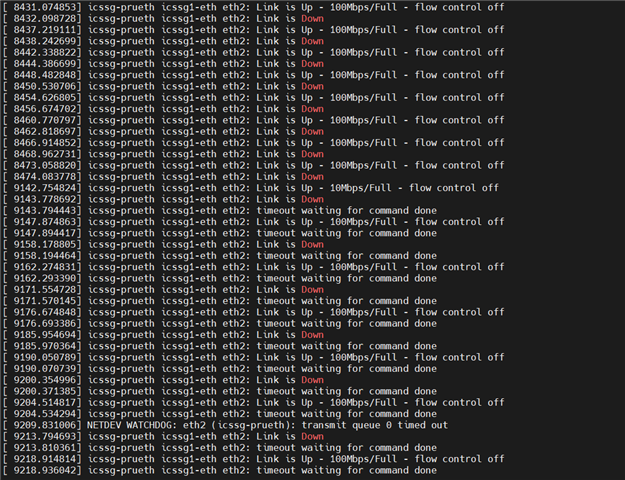
  • 是自己制作的板子,昨天我们搭了自动化的eth2 link up/link down的测试,再次复现了该问题,log如下:

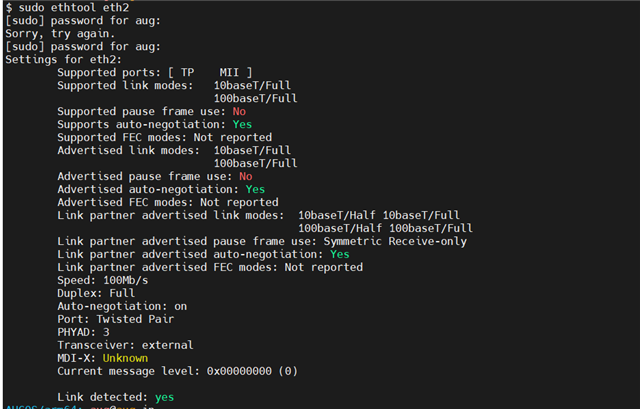
  • 补充一下,网口的状态见下图:

  • 问题很可能与PRU驱动、固件、内核网络协议栈的配置相关,PRU子系统(固件、驱动、数据路径等)未能成功建立网络数据通道。

    这个可能不大好排查,建议参考一下官方的开发板和例程,这样可能更直观,更容易找到问题:

    https://www.ti.com/product/AM6422#hardware-development

  • 我们使用TI SDK 11.02.08.02验证,发现问题仍然存在,具体参考下面的测试用例和结果。

    这些用例在我们当前使用的SDK 09.00.00.006都会报timeout 问题。

    另外用例10是最基本使用场景,请优先处理。

    用例10的log见附件

    [  448.041454] icssg-prueth icssg1-eth eth2: Link is Up - 100Mbps/Full - flow control off
    [  449.059133] icssg-prueth icssg1-eth eth2: Link is Down
    [  453.161595] icssg-prueth icssg1-eth eth2: Link is Up - 100Mbps/Full - flow control off
    [  455.208297] icssg-prueth icssg1-eth eth2: Link is Down
    [  459.303633] icssg-prueth icssg1-eth eth2: Link is Up - 100Mbps/Full - flow control off
    [  461.347138] icssg-prueth icssg1-eth eth2: Link is Down
    [  465.445036] icssg-prueth icssg1-eth eth2: Link is Up - 100Mbps/Full - flow control off
    [  467.491123] icssg-prueth icssg1-eth eth2: Link is Down
    [  471.594173] icssg-prueth icssg1-eth eth2: Link is Up - 100Mbps/Full - flow control off
    [  473.635067] icssg-prueth icssg1-eth eth2: Link is Down
    [  477.737663] icssg-prueth icssg1-eth eth2: Link is Up - 100Mbps/Full - flow control off
    [  478.760448] icssg-prueth icssg1-eth eth2: Link is Down
    [  483.880291] icssg-prueth icssg1-eth eth2: Link is Up - 100Mbps/Full - flow control off
    [  484.899956] icssg-prueth icssg1-eth eth2: Link is Down
    [  490.026155] icssg-prueth icssg1-eth eth2: Link is Up - 100Mbps/Full - flow control off
    [  491.043141] icssg-prueth icssg1-eth eth2: Link is Down
    [  496.169596] icssg-prueth icssg1-eth eth2: Link is Up - 100Mbps/Full - flow control off
    [  497.187132] icssg-prueth icssg1-eth eth2: Link is Down
    [  501.289503] icssg-prueth icssg1-eth eth2: Link is Up - 100Mbps/Full - flow control off
    [  503.331133] icssg-prueth icssg1-eth eth2: Link is Down
    [  507.429912] icssg-prueth icssg1-eth eth2: Link is Up - 100Mbps/Full - flow control off
    [  509.475019] icssg-prueth icssg1-eth eth2: Link is Down
    [  516.644376] icssg-prueth icssg1-eth eth2: Link is Up - 100Mbps/Full - flow control off
    [  524.835131] icssg-prueth icssg1-eth eth2: Link is Down
    [  553.513638] icssg-prueth icssg1-eth eth2: Link is Up - 100Mbps/Full - flow control off
    [ 1663.523142] icssg-prueth icssg1-eth eth2: Link is Down
    [ 1669.674187] icssg-prueth icssg1-eth eth2: Link is Up - 10Mbps/Full - flow control off
    [ 1670.691124] icssg-prueth icssg1-eth eth2: Link is Down
    [ 1670.713715] icssg-prueth icssg1-eth eth2: timeout waiting for command done
    [ 1672.810186] icssg-prueth icssg1-eth eth2: Link is Up - 100Mbps/Full - flow control off
    [ 1672.830872] icssg-prueth icssg1-eth eth2: timeout waiting for command done
    [ 1674.915130] icssg-prueth icssg1-eth eth2: Link is Down
    [ 1674.937843] icssg-prueth icssg1-eth eth2: timeout waiting for command done
    [ 1678.051991] icssg-prueth icssg1-eth eth2: Link is Up - 100Mbps/Full - flow control off
    [ 1678.078776] icssg-prueth icssg1-eth eth2: timeout waiting for command done
    [ 1683.235137] icssg-prueth icssg1-eth eth2: Link is Down
    [ 1683.257787] icssg-prueth icssg1-eth eth2: timeout waiting for command done
    [ 1686.375629] icssg-prueth icssg1-eth eth2: Link is Up - 100Mbps/Full - flow control off
    [ 1686.397755] icssg-prueth icssg1-eth eth2: timeout waiting for command done
    [19729.315019] icssg-prueth icssg1-eth eth2: Link is Down
    [19729.337759] icssg-prueth icssg1-eth eth2: timeout waiting for command done
    [19741.673812] icssg-prueth icssg1-eth eth2: Link is Up - 100Mbps/Full - flow control off
    [19741.695801] icssg-prueth icssg1-eth eth2: timeout waiting for command done
    [19763.170604] icssg-prueth icssg1-eth eth2: NETDEV WATCHDOG: CPU: 1: transmit queue 0 timed out 5120 ms
    [19768.802607] icssg-prueth icssg1-eth eth2: NETDEV WATCHDOG: CPU: 1: transmit queue 0 timed out 10752 ms
    [19773.922631] icssg-prueth icssg1-eth eth2: NETDEV WATCHDOG: CPU: 0: transmit queue 0 timed out 15872 ms
    [19779.042638] icssg-prueth icssg1-eth eth2: NETDEV WATCHDOG: CPU: 1: transmit queue 0 timed out 20992 ms
    [19785.186606] icssg-prueth icssg1-eth eth2: NETDEV WATCHDOG: CPU: 1: transmit queue 0 timed out 27136 ms
    [19790.818623] icssg-prueth icssg1-eth eth2: NETDEV WATCHDOG: CPU: 0: transmit queue 0 timed out 32768 ms
    [19795.938631] icssg-prueth icssg1-eth eth2: NETDEV WATCHDOG: CPU: 1: transmit queue 0 timed out 37888 ms
    [19801.058648] icssg-prueth icssg1-eth eth2: NETDEV WATCHDOG: CPU: 1: transmit queue 0 timed out 43008 ms
    [19807.202597] icssg-prueth icssg1-eth eth2: NETDEV WATCHDOG: CPU: 0: transmit queue 0 timed out 49152 ms
    [19812.834632] icssg-prueth icssg1-eth eth2: NETDEV WATCHDOG: CPU: 1: transmit queue 0 timed out 54784 ms
    [19817.954632] icssg-prueth icssg1-eth eth2: NETDEV WATCHDOG: CPU: 0: transmit queue 0 timed out 59904 ms
    [19823.074594] icssg-prueth icssg1-eth eth2: NETDEV WATCHDOG: CPU: 0: transmit queue 0 timed out 65024 ms
    [19829.218608] icssg-prueth icssg1-eth eth2: NETDEV WATCHDOG: CPU: 1: transmit queue 0 timed out 71168 ms
    [19834.850616] icssg-prueth icssg1-eth eth2: NETDEV WATCHDOG: CPU: 0: transmit queue 0 timed out 76800 ms
    [19839.970633] icssg-prueth icssg1-eth eth2: NETDEV WATCHDOG: CPU: 1: transmit queue 0 timed out 81920 ms
    [19846.114628] icssg-prueth icssg1-eth eth2: NETDEV WATCHDOG: CPU: 1: transmit queue 0 timed out 88064 ms
    [19851.746603] icssg-prueth icssg1-eth eth2: NETDEV WATCHDOG: CPU: 0: transmit queue 0 timed out 93696 ms
    [19856.866638] icssg-prueth icssg1-eth eth2: NETDEV WATCHDOG: CPU: 1: transmit queue 0 timed out 98816 ms
    [19861.986632] icssg-prueth icssg1-eth eth2: NETDEV WATCHDOG: CPU: 1: transmit queue 0 timed out 103936 ms
    [19868.130599] icssg-prueth icssg1-eth eth2: NETDEV WATCHDOG: CPU: 0: transmit queue 0 timed out 110080 ms
    

    测试用例和结果:

    序列 PRU EHT 电脑网卡 测试步骤 验证结果 备注
    1 自协商 自协商 电脑通过脚本控制网卡反复通断,模拟插拔测试,3s循环一次 OK 累计插拔30小时
    2 自协商 强制成100m 全双工 电脑通过脚本控制网卡反复通断,模拟插拔测试,3s循环一次 OK 累计插拔20小时
    3 自协商 强制成100m 半双工 电脑通过脚本控制网卡反复通断,模拟插拔测试,3s循环一次 NOK pru eth无法up
    4 自协商 强制成10m 全双工 电脑通过脚本控制网卡反复通断,模拟插拔测试,3s循环一次 NOK pru eth无法up或者timeout
    5 自协商 强制成10m 半双工 电脑通过脚本控制网卡反复通断,模拟插拔测试,3s循环一次 NOK pru eth无法up或者timeout
    6 强制成100m 全双工 自协商 电脑通过脚本控制网卡反复通断,模拟插拔测试,3s循环一次 OK 累计插拔20小时
    7 强制成100m 半双工 自协商 电脑通过脚本控制网卡反复通断,模拟插拔测试,3s循环一次 NOK pru eth 报timeout
    8 强制成10m 全双工 自协商 电脑通过脚本控制网卡反复通断,模拟插拔测试,3s循环一次 OK 累计插拔20小时
    9 强制成10m 半双工 自协商 电脑通过脚本控制网卡反复通断,模拟插拔测试,3s循环一次 NOK pru eth 报timeout
    10 自协商 自协商 手动插拔 NOK 出现协商成10M,pru eth 报timeout
    后续脚本重新插拔协商恢复成100M
  • 由于板子不是官方的,我们很难进行验证。

    建议参考官方的开发板和例程,从硬件开始做一个系统的排查。