This thread has been locked.

If you have a related question, please click the "Ask a related question" button in the top right corner. The newly created question will be automatically linked to this question.

pdk安装路径下面Image Processing Demo 运行问题

Other Parts Discussed in Thread: SYSBIOS

软件:CCS5.2

硬件:6678EVM

我的问题如附件详细说明。

  • 在你提到的wiki网页上有如何操作的步骤说明。其实编译master,slave时候,需要不同工程下编译。但是下载到板子的核上,只需要加载程序到核上即可,不需要打开多个工程。步骤如下,运行是没有问题的。

    IPC-Based

    Run Instructions for IPC based demo application

    The pre-compiled libraries are provided as a part of MCSDK release.

    Please follow the procedures below to load images using CCS and run the demo.

    Please refer the hardware setup guide for further the setup details. 

    • Connect the board to a Ethernet hub or PC using Ethernet cable.
    • The demo runs in Static IP mode if User Switch 1 (SW9, position 2) is OFF else if it is ON then it runs in DHCP mode. See the Hardware Setup section for the location of User Switch 1.  
    • If it is configured in static IP mode, the board will come up with IP address 192.168.2.100, GW IP address 192.168.2.101 and subnet mask 255.255.254.0
    • If it is configures in DHCP mode, it would send out DHCP request to get the IP address from a DHCP server in the network.
    • There are two images to be loaded to master (core 0) and other cores. The core 0 to be loaded with <MCSDK INSTALL DIR>\demos\image_processing\ipc\evmc66##l\master\Debug\image_processing_evmc66##l_master.out image and other cores (referred as slave cores) to be loaded with <MCSDK INSTALL DIR>\demos\image_processing\ipc\evmc66##l\slave\Debug\image_processing_evmc66##l_slave.out image.
    • Connect the debugger and power on the board.
    • In CCS window, launch the target configuration file for the board.
    • It should open debug perspective and open debug window with all the cores.
    • Connect to all the cores and load image_processing_evmc66##l_master.out to core 0 and image_processing_evmc66##l_slave.out to all other cores.
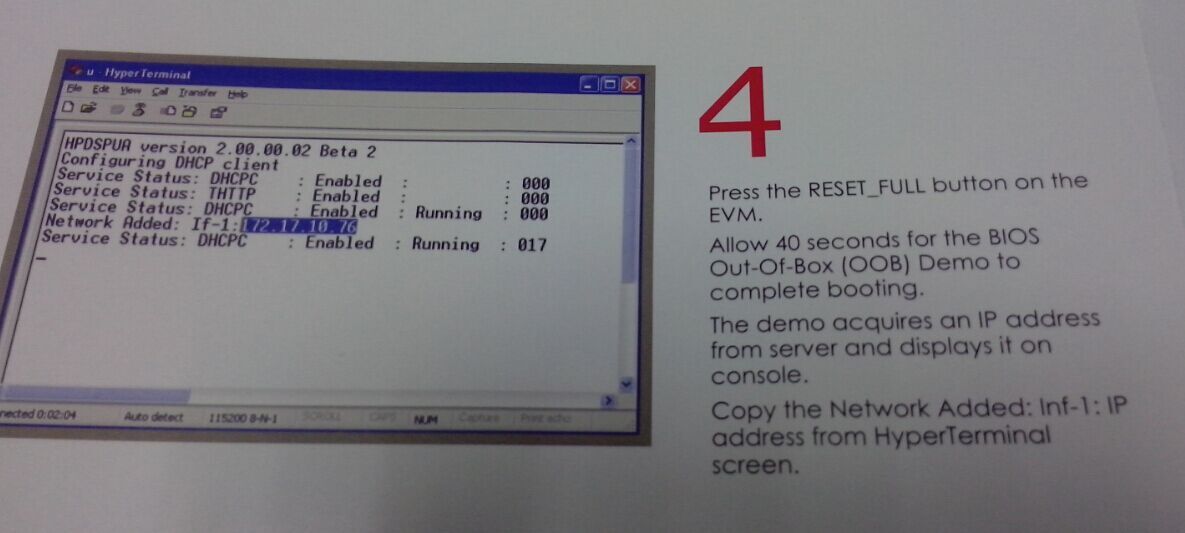
    • Run all the cores, in the CIO console window, the board should print IP address information (for eg: Network Added: If-1:192.168.2.100)
    • Open a web browser in the PC connected to the HUB or the board.
    • Enter the IP address of the board, it should open up the image processing demo web page.
    • Please follow the instructions in the web page to run the demo.
    • Note that, sample BMP images are provided in <MCSDK INSTALL DIR>\demos\image_processing\images 

    NoteNote: If you want to run the demo in static IP address mode, make sure the host PC is in same subnet or can

  • 是这样的,我试过了,成功了一次之后,再烧程序就出现如下问题,希望帮助解答:

    [C66xx_0]
    [C66xx_0]
    [C66xx_0] MCSDK IMAGE PROCESSING DEMONSTRATION
    [C66xx_0]
    [C66xx_0] QMSS successfully initialized
    [C66xx_0] CPPI successfully initialized
    [C66xx_0] PA successfully initialized
    [C66xx_0] EVM in StaticIP mode at 192.168.2.100
    [C66xx_0] Set IP address of PC to 192.168.2.101
    [C66xx_0] PASS successfully initialized
    [C66xx_0] Ethernet subsystem successfully initialized
    [C66xx_0] Ethernet eventId : 48 and vectId (Interrupt) : 7
    [C66xx_0] Timeout waiting for reply from PA to Pa_addMac command                  ////从这开始不正常了
    [C66xx_0] ti.sysbios.heaps.HeapMem: line 354: assertion failure: A_invalidFree: Invalid free
    [C66xx_0] xdc.runtime.Error.raise: terminating execution

    在TI英文论坛中找到一个同样的问题,但是貌似没有得出解决办法。http://e2e.ti.com/support/embedded/bios/f/355/p/239367/875770.aspx#875770

  • 还有就是,这个用DHCP貌似没有成功,但是板子自带的OOB使用DHCP成功了。

  • 我建议你先将板子调节到:'Emulation Boot' ,另外指定gel file到Core 0,试试看。

  • 您说的”Emulation Boot“是No boot 模式吗?gel file 我也下载了,很莫名奇妙。。

  • 是的,选择最后的No boot模式,然后如果是静态IP地址,要把SW9的2,置为OFF。

    一般情况下,在

    [C66xx_0] Ethernet eventId : 48 and vectId (Interrupt) : 7 
    [C66xx_0] Timeout waiting for reply from PA to Pa_addMac command                  ////从这开始不正常了

    这里应该显示的是:Registration of the emac successful,waiting for link up...

    我调试了一下,是没有问题的。

  • 你试试这个版本的mcsdk,

    http://software-dl.ti.com/sdoemb/sdoemb_public_sw/bios_mcsdk/latest/index_FDS.html

    注意把这个链接上的补丁也下载安装了,我试过,没有问题的。

  • 好的!我试试。

    请问另外一个问题,

    MCSDK-VIDEO 02_01_00_08是不是不支持TMDSEVM6678L这个开发板?

    1.  要用msdk-video,这个链接是安装的下载页面。在support platform中只看到TMDXEVM6678LXE,但是没有看到TMDSEVM6678L这个平台,代表不支持吗?谢 谢。http://software-dl.ti.com/sdoemb/sdoemb_public_sw/mcsdk_video/latest/index_FDS.html

    2.  安装完mcsdk-video之后,按照这个链接(http://processors.wiki.ti.com/index.php/MCSDK_VIDEO_2.1_PKT_Demo_Guide)做实验,但是在preparing the EVM的Initial Boot loder flash(如下图标记的红圈,路径中没有IBL_flash文件夹),不知这是何种缘故。

  • TMDXEVM6678LXE和TMDSEVM6678L都是一样的平台,只不过前者多了一个仿真器,支持的,不用担心。

    IBL_FLASH这里描述的应该有错误,在MCSDK/tools/boot_loader/ibl中,你查看一下。

  • 能帮我解答这个问题吗,谢谢!

    http://www.deyisupport.com/question_answer/f/53/t/19000.aspx

  • 您好,请问“网络例程成功一次之后,再烧写就会出现Timeout waiting for reply from PA to Pa_addMac command”的问题是怎么解决的呢?

    谢谢。

  • 我也遇到以上问题,求解!  按照说明文档一步步都验证ok, 只是在跑DHCP 功能时出现以下信息:正常情况会出自己直接分到地址!


    [C66xx_0] QMSS successfully initialized

    [C66xx_0] CPPI successfully initialized

     [C66xx_0] PA successfully initialized

    [C66xx_0] [C66xx_0] TCP/IP Stack 'Hello World!' Application

     [C66xx_0] [C66xx_0] [C66xx_0] TCP/IP Stack 'Hello World!' Application

     [C66xx_0] [C66xx_0] PASS successfully initialized

    [C66xx_0] Ethernet subsystem successfully initialized

     [C66xx_0] Ethernet eventId : 48 and vectId (Interrupt) : 7

    [C66xx_0] Timeout waiting for reply from PA to Pa_addMac command

     [C66xx_0] ti.sysbios.heaps.HeapMem: line 354: assertion failure: A_invalidFree: Invalid free

     [C66xx_0] xdc.runtime.Error.raise: terminating execution

  • lei wang2

    我也遇到了同样问题,我有两块dsp开发板,一个TMDSEVM6678L Rev.3B,一个TMDSEVM6678LXE Rev2.0 ,前者,没有一次连接成功,后者,就能连接一次成功,之后reset,都不能成功,但断电,上电重启,则就又能连上。错误错误信息跟你前面的一样,如下:

    QMSS successfully initialized

    CPPI successfully initialized

    PA successfully initialized

    TCP/IP Stack 'Hello World!' Application

    TCP/IP Stack 'Hello World!' Application

    PASS successfully initialized

    Ethernet subsystem successfully initialized

    Ethernet eventId : 48 and vectId (Interrupt) : 7

    Timeout waiting for reply from PA to Pa_addMac command

    ti.sysbios.heaps.HeapMem: line 370: assertion failure: A_invalidFree: Invalid free

    xdc.runtime.Error.raise: terminating execution

    开始我怀疑板子问题,以为板子之前烧个一个芯片,修好了,可能板子还存在未知问题。但看到你也遇到了此问题。不知道您最后是怎么解决的??能指导下吗,万分感谢!