This thread has been locked.
If you have a related question, please click the "Ask a related question" button in the top right corner. The newly created question will be automatically linked to this question.
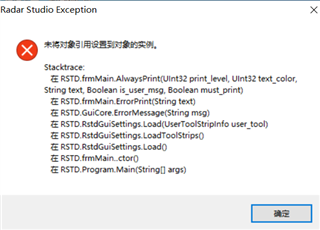
启动mmWave Studio 03.00.00.14时弹出下面的对话框,程序无法启动
有关软件安装教程已经装了,不知道是不是这个软件安装过程有问题,在控制面板-》卸载程序界面找不到卸载入口,无法重装,
直接重装覆盖也无效。
如果操作系统是win10的话,第一次启动软件请先插入板卡,已识别硬件后,再打开软件。
如果要删除重装的话,按照下面步骤操作。