


按User guide中的6. Formatting the SSD (required for the first-time)的操作格式化SSD时,
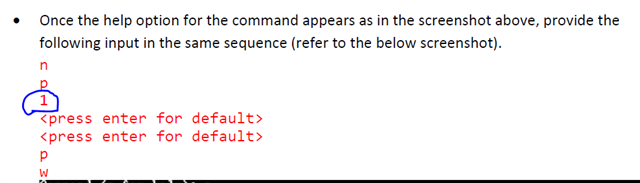
在输入命令1以后提示Partition 1 is already defined, delete it before re-adding,可以直接输入命令d删除吗?还是说明我的SSD不需要格式化操作了?
由于没有看到user guide中有要删除的操作,不敢轻易操作,还请帮忙确认下该问题,
如下是串口打印数据
[11:37:53.526] root
[11:37:53.526] 7[r[999;999H[6nroot@dra7xx-evm:~# ifconfig
[11:38:31.833] eth0 Link encap:Ethernet HWaddr 80:F5:B5:4F:CA:D8
[11:38:31.842] inet addr:192.168.33.180 Bcast:0.0.0.0 Mask:255.255.255.0
[11:38:31.862] inet6 addr: fe80::82f5:b5ff:fe4f:cad8/64 Scope:Link
[11:38:31.862] UP BROADCAST RUNNING MULTICAST MTU:1500 Metric:1
[11:38:31.862] RX packets:5571 errors:0 dropped:0 overruns:0 frame:0
[11:38:31.872] TX packets:6043 errors:0 dropped:0 overruns:0 carrier:0
[11:38:31.872] collisions:0 txqueuelen:1000
[11:38:31.872] RX bytes:402760 (393.3 KiB) TX bytes:391132 (381.9 KiB)
[11:38:31.892] Interrupt:251
[11:38:31.892]
[11:38:31.892] lo Link encap:Local Loopback
[11:38:31.892] inet addr:127.0.0.1 Mask:255.0.0.0
[11:38:31.892] inet6 addr: ::1/128 Scope:Host
[11:38:31.912] UP LOOPBACK RUNNING MTU:65536 Metric:1
[11:38:31.912] RX packets:1440 errors:0 dropped:0 overruns:0 frame:0
[11:38:31.912] TX packets:1440 errors:0 dropped:0 overruns:0 carrier:0
[11:38:31.922] collisions:0 txqueuelen:1
[11:38:31.922] RX bytes:127348 (124.3 KiB) TX bytes:127348 (124.3 KiB)
[11:38:31.922]
[11:38:31.922] root@dra7xx-evm:~# ls /dev/nvme*
[11:38:43.379] [1;35m/dev/nvme0[m [1;35m/dev/nvme0n1[m [1;35m/dev/nvme0n1p1[m
[11:38:43.399] root@dra7xx-evm:~# fdisk /dev/nvme0n1
[11:38:53.682]
[11:38:53.703] The number of cylinders for this disk is set to 488386.
[11:38:53.713] There is nothing wrong with that, but this is larger than 1024,
[11:38:53.713] and could in certain setups cause problems with:
[11:38:53.713] 1) software that runs at boot time (e.g., old versions of LILO)
[11:38:53.733] 2) booting and partitioning software from other OSs
[11:38:53.733] (e.g., DOS FDISK, OS/2 FDISK)
[11:38:53.733]
[11:38:53.733] Command (m for help): m
[11:38:56.982] Command Action
[11:38:56.982] a toggle a bootable flag
[11:38:56.982] b edit bsd disklabel
[11:38:56.982] c toggle the dos compatibility flag
[11:38:56.982] d delete a partition
[11:38:56.992] l list known partition types
[11:38:56.992] n add a new partition
[11:38:56.992] o create a new empty DOS partition table
[11:38:56.992] p print the partition table
[11:38:56.992] q quit without saving changes
[11:38:56.992] s create a new empty Sun disklabel
[11:38:57.012] t change a partition's system id
[11:38:57.012] u change display/entry units
[11:38:57.012] v verify the partition table
[11:38:57.012] w write table to disk and exit
[11:38:57.012] x extra functionality (experts only)
[11:38:57.012]
[11:38:57.012] Command (m for help): n
[11:39:12.400] Partition type
[11:39:12.400] p primary partition (1-4)
[11:39:12.400] e extended
[11:39:12.421] p
[11:39:15.398] Partition number (1-4): 1
[11:39:19.061] Partition 1 is already defined, delete it before re-adding
[11:39:19.061]
[11:39:19.061] Command (m for help):

